Umbraco.Community.Umbrella
17.0.0-alpha.8
dotnet add package Umbraco.Community.Umbrella --version 17.0.0-alpha.8
NuGet\Install-Package Umbraco.Community.Umbrella -Version 17.0.0-alpha.8
<PackageReference Include="Umbraco.Community.Umbrella" Version="17.0.0-alpha.8" />
<PackageVersion Include="Umbraco.Community.Umbrella" Version="17.0.0-alpha.8" />
<PackageReference Include="Umbraco.Community.Umbrella" />
paket add Umbraco.Community.Umbrella --version 17.0.0-alpha.8
#r "nuget: Umbraco.Community.Umbrella, 17.0.0-alpha.8"
#:package Umbraco.Community.Umbrella@17.0.0-alpha.8
#addin nuget:?package=Umbraco.Community.Umbrella&version=17.0.0-alpha.8&prerelease
#tool nuget:?package=Umbraco.Community.Umbrella&version=17.0.0-alpha.8&prerelease
☂️ Umbrella
Let your AI tool work with your Umbraco 17 site: content, forms, automations and personalisation, through one MCP server.
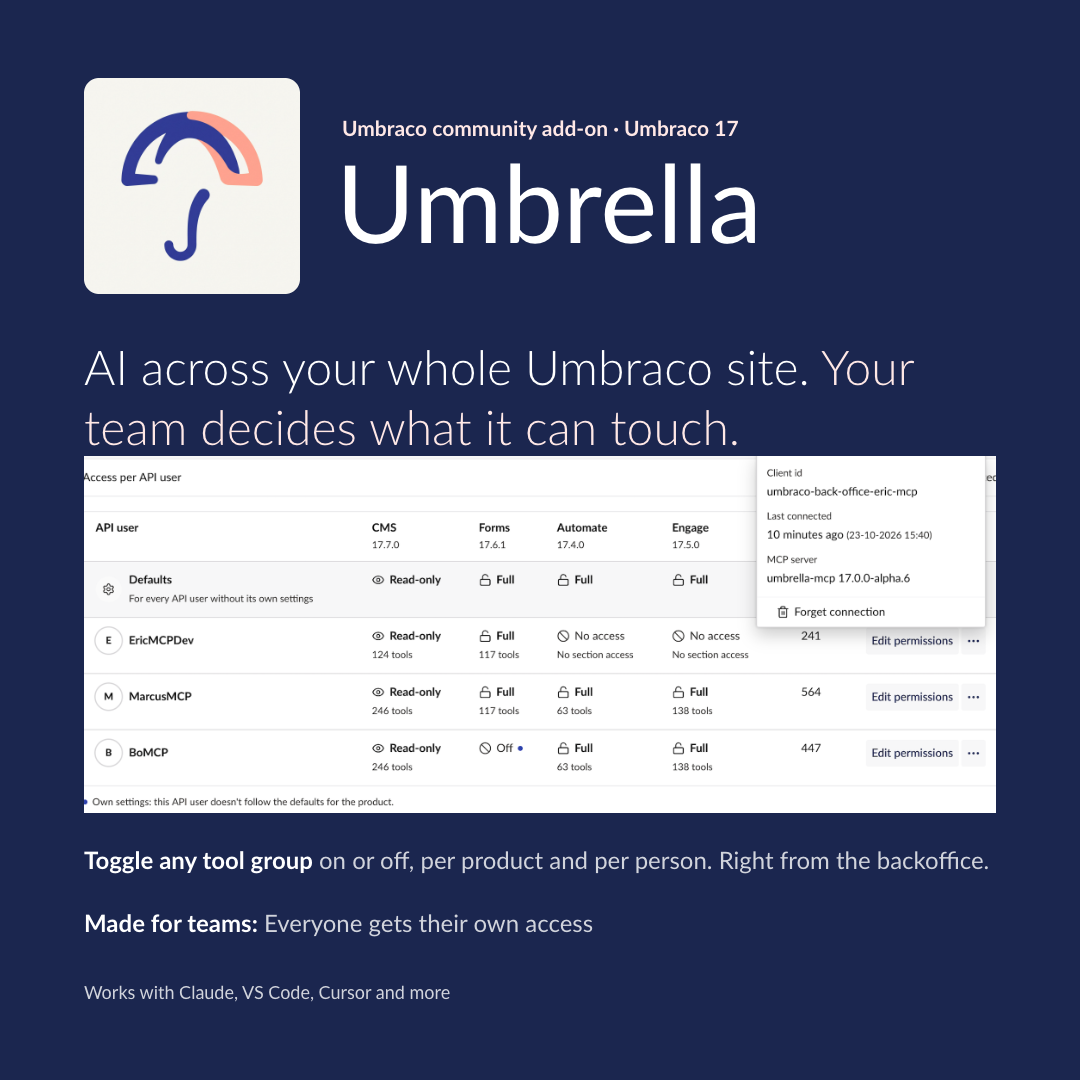
Install this package in your site, then connect Claude Code, VS Code, Cursor or Claude Desktop with the config the backoffice gives you: each person connects their own AI tool. It gets tools for exactly the Umbraco products your site has. No product installed, no tools for it, so the AI isn't buried in tools it can't use.
"Create a contact form with name, email and message fields." "Add a news article under the News page and save it as a draft." "Which personas do we have in Engage?"
✨ What you get
- One server for every product. Umbraco CMS tools always, plus Umbraco Forms, Automate and Engage tools when the site has them installed.
- Config to copy, per person. Settings → Umbrella → Overview has the config for Claude Code, Claude Desktop, VS Code, Cursor and other clients, filled in with the site's address and the client id of the API user you pick. No secret in it, so you can send it to an editor who has no access to the code.
- You stay in control. The Umbrella dashboard (Settings section) has an Overview tab (what needs attention, config to copy for your AI tool, the API users MCP servers connected as) and a Tool Permissions tab that sets each product's access, for every API user or for one: Off (the MCP server doesn't load the product at all), Read-only, No deletes (leaves out the tools the products flag
destructiveHint: mostly deletes, emptying recycle bins and terminating runs; unpublishing, moving to the recycle bin, and CMS and Forms version rollback stay available) or Full, and switches single tool groups off. - Easy to check. Backoffice health checks show which products were found and which API user the AI signed in as. In the AI tool,
get-mcp-healthexplains what loaded and why.
🚀 Get started in 5 steps
You need Umbraco 17, and Node.js 22 or later on the machine running your AI tool.
1. Install the package and restart the site:
dotnet add package Umbraco.Community.Umbrella
2. Create an API user in the backoffice (Users → Create → API user). Add client credentials with:
- a client id, for example
umbraco-back-office-mcp - a secret of your choice. Copy it now: Umbraco only keeps a hash.
Give the user's groups the sections the AI should work in (Content, Media, Settings, Forms, …). Each person who uses an AI tool gets an API user of their own.
3. Copy the config. In Settings → Umbrella → Overview ("Connect an AI tool", click Show steps if it is closed), pick the API user and your AI tool: Claude Code, Claude Desktop, VS Code, Cursor or another client. The plain version looks like this, with your site's address and the client id filled in:
{
  "mcpServers": {
    "umbraco": {
      "command": "npx",
      "args": ["-y", "umbrella-mcp@17.0.0-alpha.8"],
      "env": {
        "UMBRACO_BASE_URL": "https://your-site",
        "UMBRACO_CLIENT_ID": "umbraco-back-office-mcp",
        "UMBRACO_CLIENT_SECRET": "<your client secret>"
      }
    }
  }
}
4. Add the secret. Replace the placeholder with the client secret. VS Code asks for it when the server starts, and the Claude Code .mcp.json and Cursor configs read it from an environment variable:
# macOS / Linux
export UMBRELLA_CLIENT_SECRET="<the client secret>"
# Windows (PowerShell)
setx UMBRELLA_CLIENT_SECRET "<the client secret>"
Then restart your AI tool and approve the umbraco server when asked. A config with the secret in it stays out of source control. The address must be https://.
5. Say hello. Ask the AI to "call get-mcp-health". It lists each product and how many tools it loaded.
🧩 How it fits together
| Part | Where it runs | Job |
|---|---|---|
Umbraco.Community.Umbrella (this package) |
In your site | Detects the installed products and adds the dashboard and health checks |
umbrella-mcp |
On your machine | The MCP server. Your AI tool starts it with npx, so there is nothing to install |
Both are released together with the same version number. The package doesn't depend on any product package: it detects them by name.
📋 Requirements
| Umbraco | 17 |
| Products | Umbraco CMS, Forms, Automate, Engage |
| AI tool machine | Node.js 22+ |
📚 More
Configuration, turning tool groups off, troubleshooting and known limitations: full documentation on GitHub.
Bugs, ideas and questions: Umbrella issue tracker. Report security vulnerabilities privately, as described in its security policy.
Umbrella is a community project, not an official Umbraco HQ package. MIT licensed.
| Product | Versions Compatible and additional computed target framework versions. |
|---|---|
| .NET | net10.0 is compatible. net10.0-android was computed. net10.0-browser was computed. net10.0-ios was computed. net10.0-maccatalyst was computed. net10.0-macos was computed. net10.0-tvos was computed. net10.0-windows was computed. |
-
net10.0
- Umbraco.Cms.Api.Management (>= 17.0.0)
NuGet packages
This package is not used by any NuGet packages.
GitHub repositories
This package is not used by any popular GitHub repositories.
| Version | Downloads | Last Updated |
|---|---|---|
| 17.0.0-alpha.8 | 56 | 10/23/2026 |
| 17.0.0-alpha.7 | 63 | 10/23/2026 |
| 17.0.0-alpha.6 | 59 | 10/13/2026 |
| 17.0.0-alpha.5 | 52 | 10/13/2026 |
| 17.0.0-alpha.4 | 58 | 10/12/2026 |
| 17.0.0-alpha.3 | 45 | 10/12/2026 |
| 17.0.0-alpha.2 | 56 | 10/12/2026 |
| 17.0.0-alpha.1 | 54 | 10/12/2026 |