VL.Automata
0.1.0
dotnet add package VL.Automata --version 0.1.0
NuGet\Install-Package VL.Automata -Version 0.1.0
<PackageReference Include="VL.Automata" Version="0.1.0" />
<PackageVersion Include="VL.Automata" Version="0.1.0" />
<PackageReference Include="VL.Automata" />
paket add VL.Automata --version 0.1.0
#r "nuget: VL.Automata, 0.1.0"
#:package VL.Automata@0.1.0
#addin nuget:?package=VL.Automata&version=0.1.0
#tool nuget:?package=VL.Automata&version=0.1.0
VL.Automata — vvvv gamma port of the cables Automata op
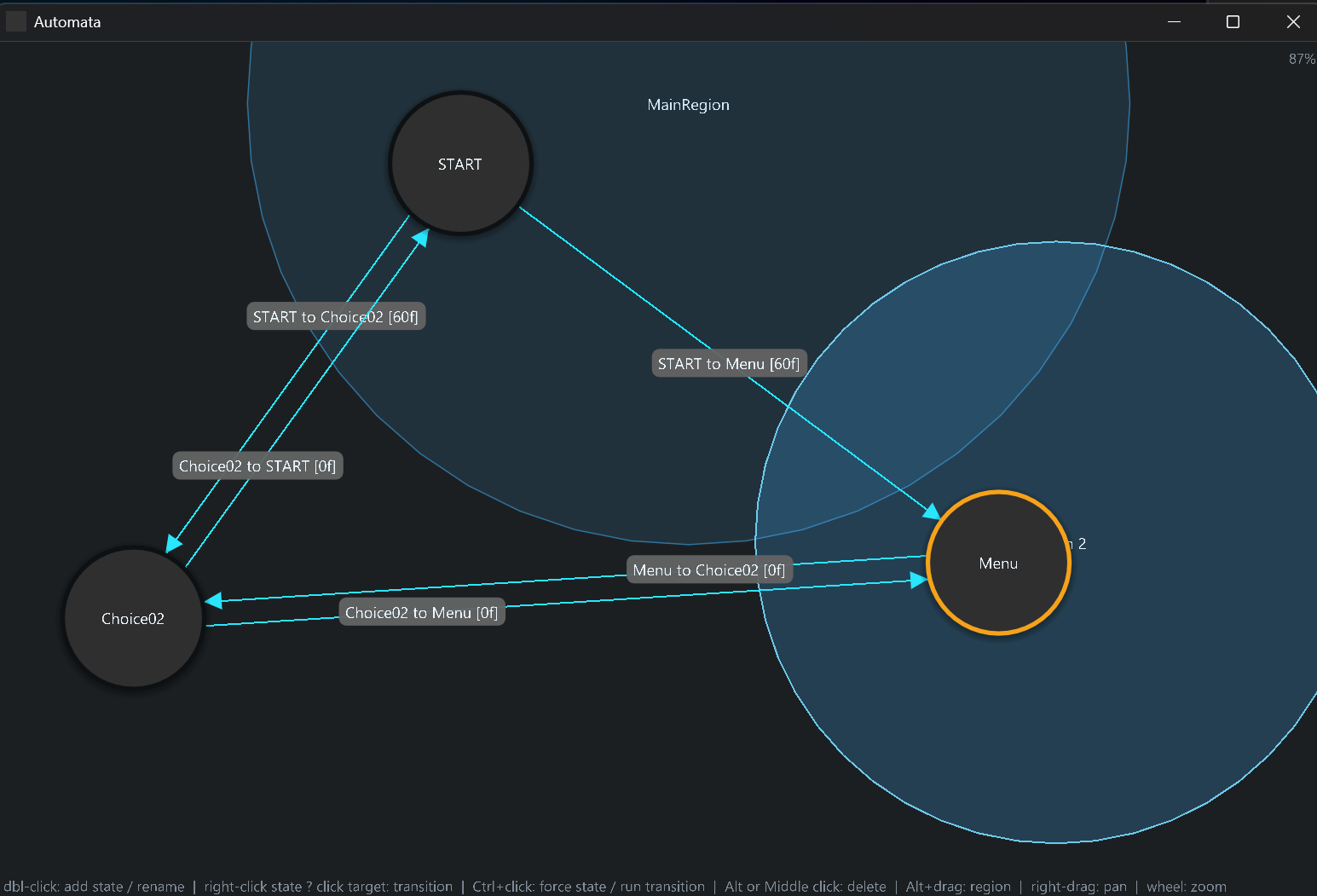
A finite-state-machine node for vvvv gamma, ported from the cables op
Ops.Local.Automata. The state machine is authored in an ImGui editor window
(not a docked tab); the running node reports the active state, frame counters and
region activity, and fires transitions.
Using the node? See the User Manual for a task-oriented guide (concepts, editor interactions, running the machine, full pin reference). This README and DEVNOTES.md focus on the build and the design rationale.
Layout
VL.Automata/
  VL.Automata.csproj        net8.0, refs VL.Core + VL.ImGui (ImGui.NET transitively)
  Properties/AssemblyInfo.cs [assembly: ImportAsIs]  (so vvvv imports the node)
  Engine/AutomataData.cs    JSON data model (states/transitions/regions)
  Engine/AutomataEngine.cs  pure state-machine core (port of the cables engine)
  Nodes/AutomataNode.cs     the [ProcessNode] exposed in gamma
  Editor/AutomataEditorWidget.cs  ImGui DrawList editor (VL.ImGui.Widget)
reference/Packs/            VL.ImGui + VL.ImGui.Skia packs (read-only, API lookup)
reference/demonodeproject/  the [ProcessNode] template that established the pattern
Demo.automata              sample machine JSON (paste into the Data pin to load)
Node model
Implemented as a [ProcessNode] (category Automata). Fire is a dynamic pin
group: the node keeps one bang pin per transition in sync with the machine —
no packaging or node factory required (see DEVNOTES for how). Regions
are still exposed as aligned spreads.
The machine is stored in the patch, not in an external file — see Persistence below.
Automata pins:
| direction | pin | type | meaning |
|---|---|---|---|
| in | Data |
string | the machine as JSON (same format as the cables op), stored in the patch — leave unconnected; the node reads and writes it (see below) |
| in | Reset Target |
string | state label to reset to (empty = START) |
| in | Reset |
bool | rising edge resets |
| in | No UI Mode |
bool | when true, skip the ImGui frame + ToSkiaLayer update and output a null Editor — engine, outputs and Fire pins keep working. Flip on for a headless/running patch to reclaim the per-frame editor cost. Default false = UI on |
| in | No Background |
bool | inspector-only (PinVisibility.Optional — hidden on the node, shown in the Inspektor). When true the editor canvas is transparent (both the fill and ImGui's window background are dropped), so the renderer shows through. Default false = opaque |
| in | Fire |
pin group of bool (bang) | one pin per transition, named by its "A to B" title; rising edge fires that transition |
| out | Active State |
string | current state label |
| out | Next State |
string | target of a pending (multi-frame) transition |
| out | State Frames |
int | frames spent in the current state |
| out | Transition Countdown |
float | pending transition progress, 1 → 0 |
| out | States |
Spread<string> | reset-target labels |
| out | Transition Titles |
Spread<string> | "A to B" labels (match the Fire pin names) |
| out | Region Active |
Spread<float> | 1/0 per region, aligned with Region Names |
| out | Region Names |
Spread<string> | region names (the title you give a region; falls back to its id) |
| out | Automata |
AutomataInfo | one-cable bundle of all the outputs above (active state, next state, state frames, transition countdown, and the four spreads) as a single immutable object — pass the whole automata downstream on one wire and split out only what you need |
| out | Editor |
ILayer (Skia) | the editor as a Skia layer — wire straight into a renderer |
Firing a transition: the Fire pin group holds one bang pin per transition,
named by its title (e.g. Idle to Run). Bang the pin for the transition you
want; on its rising edge that transition fires — only when it's valid from the
current state with nothing pending. The pins appear/disappear automatically as you
add, remove, or rename transitions in the editor.
Splitters
Nodes that unpack the Automata (AutomataInfo) output onto separate cables:
| node | in | out |
|---|---|---|
GetActiveState |
Automata (AutomataInfo) |
Active State (string), State Frames (int) |
GetActiveTransition |
Automata (AutomataInfo) |
Transition Title (string, "A to B"), Next State (string), Transition Countdown (float) |
GetActiveRegion |
Automata (AutomataInfo) |
Active Regions (Spread<string>) — names of the regions the current state is inside (regions can overlap) |
Persistence (Data pin)
The machine lives on the Data input pin as JSON and is saved inside the .vl
patch — no external .automata file. Leave Data unconnected: the node reads it
to load the machine and writes the serialized document back into it on every edit, via
the vvvv solution API (ISolution.SetPinValue, confirmed without recompiling or adding
to undo — see DEVNOTES). A freshly dropped node initialises itself to a
START-only machine and stores that.
Because it's a real pin you can still copy the JSON out of one node or paste a machine in to load it. (This is the gamma equivalent of beta's "save to a hidden pin"; VL.Audio.VST persists a VST plugin's state chunk the same way.)
Editor window
Editor is already a Skia ILayer — the node wraps the ImGui widget with
VL.ImGui.ToSkiaLayer internally, so you don't need a ToSkiaLayer node. Wire it
straight into a renderer:
Automata.Editor → Skia renderer / RenderWindow
No renderer setting needed. The node forces the layer into DIPTopLeft space
internally (VL.Skia's SetSpaceUpstream2), so both rendering and mouse input work
1:1 from the top-left even with the renderer's default Normalized Space.
(Previously you had to set the renderer's Space to DIPTopLeft by hand, otherwise the
editor showed only in the bottom-right quarter at half scale — that is now handled by
the node.)
Editing the graph mutates the document live: the engine reloads (keeping the
active state valid) and the .automata file is saved. Interactions:
- double-click empty canvas → add a state
- drag a state → move it
- double-click a state → rename it (inline)
- right-click a state, then left-click another → create a transition
- double-click a transition → edit its frame delay
- Ctrl + click a state → force the machine into that state
- Ctrl + click a transition → run it now (jumps to its
from, then starts it) - Alt/Middle + click a state / transition / region → delete it
- Alt + drag empty canvas → create a region (drag out the radius)
- double-click a region → rename it (inline)
- drag a region body → move it; drag its edge → resize it
- right-drag → pan the canvas; mouse wheel → zoom (around the cursor)
A START state always exists (created for an empty machine) and can't be deleted.
Transitions are labelled A to B [Nf]. The active state (cyan ring) and any
in-progress transition (amber) are highlighted live from the running engine.
Dev loop (local gamma)
dotnet build -c Release→bin/Release/net8.0/VL.Automata.dll.- In gamma, add a dependency on the built
VL.Automata.dll(or reference the.csproj). - Drop the Automata node (category
Automata). It initialises to aSTART-only machine and stores it on theDatapin — no file to set up. - Wire the
Editorlayer straight into a renderer / RenderWindow to open the editor window (no renderer Space change needed — the layer handles it). Author the machine in the editor; it's saved with the patch. (To seed from an existing.automata, paste its JSON into theDatapin.) - The machine runs on its own (one frame per patch frame). Bang a transition's pin
under
Fireto change state; watchActive State/State Frames/Transition Countdown/Region Active.
Note: [ProcessNode] classes hot-reload on rebuild, which is why this port uses
ProcessNode. The per-transition Fire pins and the Data autosave are both driven by
the vvvv solution API (ISolution.ModifyPinGroup / SetPinValue) at edit time — no
packaging or factory needed.
Status
- Engine: ported and unit-tested (27 parity checks against the cables logic).
[ProcessNode]+ editor: confirmed working in gamma (referenced project); the editor renders via ILayer into a renderer. It forces its own DIPTopLeft space (VL.Skia'sSetSpaceUpstream2) so a default (Normalized) renderer shows it and takes mouse input correctly — confirmed in gamma, no renderer Space change needed.- Full editor interactions (states, transitions, regions, rename, frames, delete) implemented — pending on-screen verification against the cables editor.
| Product | Versions Compatible and additional computed target framework versions. |
|---|---|
| .NET | net8.0-windows7.0 is compatible. net9.0-windows was computed. net10.0-windows was computed. |
-
net8.0-windows7.0
- VL.ImGui (>= 2025.7.4)
- VL.ImGui.Skia (>= 2025.7.4)
NuGet packages
This package is not used by any NuGet packages.
GitHub repositories
This package is not used by any popular GitHub repositories.
| Version | Downloads | Last Updated |
|---|---|---|
| 0.1.0 | 68 | 10/15/2026 |