WpfDataGrid.Enhancements
0.9.3
dotnet add package WpfDataGrid.Enhancements --version 0.9.3
NuGet\Install-Package WpfDataGrid.Enhancements -Version 0.9.3
<PackageReference Include="WpfDataGrid.Enhancements" Version="0.9.3" />
<PackageVersion Include="WpfDataGrid.Enhancements" Version="0.9.3" />
<PackageReference Include="WpfDataGrid.Enhancements" />
paket add WpfDataGrid.Enhancements --version 0.9.3
#r "nuget: WpfDataGrid.Enhancements, 0.9.3"
#:package WpfDataGrid.Enhancements@0.9.3
#addin nuget:?package=WpfDataGrid.Enhancements&version=0.9.3
#tool nuget:?package=WpfDataGrid.Enhancements&version=0.9.3
WPF DataGrid 增强包(WpfDataGrid.Enhancements)
轻量级 WPF DataGrid 增强库:多列组合过滤、主题切换、数据导出(CSV / xlsx / PDF)与大数据虚拟化。
开源版 MIT 协议;Pro 版(xlsx / PDF 导出、正则过滤、大数据虚拟化)采用 RSA 签名授权。详见 docs/README.md 与设计文档 WPF_DataGrid_增强包_设计文档.md。
项目简介
本库以 Behavior + 附加属性 的方式增强原生 DataGrid,无需继承子类即可获得:
- 多列组合过滤:表头弹出过滤面板,支持文本包含 / 数值范围 / 日期区间 / 枚举多选,列间可配置 And / Or 组合;
- 主题切换:内置 Light / Dark 两套可替换主题资源,支持跟随系统;
- 一键导出:CSV(开源)、xlsx / PDF(Pro),xlsx 自带表头样式、自动列宽、单元格对齐与冻结表头;
- 大数据虚拟化:
AsyncVirtualizingCollection<T>按页异步加载,支撑十万级行数据流畅浏览。
功能特性(开源版 vs Pro 版)
| 功能 | 开源版 WpfDataGrid.Enhancements |
Pro 版 WpfDataGrid.Enhancements.Pro |
|---|---|---|
| 多列组合过滤(FilterModel / ColumnFilter / 过滤面板) | ✅ | ✅(含 RegexPredicate 正则过滤) |
| 主题切换(Light / Dark / System) | ✅ | ✅ |
| CSV 导出(UTF-8 BOM + 转义) | ✅ | ✅ |
| xlsx 导出(表头样式 / 自动列宽 / 对齐 / 冻结表头,流式写入) | — | ✅ |
| PDF 导出(分页 / 标题 / 横纵向) | — | ✅ |
| 大数据虚拟化(AsyncVirtualizingCollection) | — | ✅ |
| 授权体系(RSA-2048 签名授权,试用模式) | — | ✅ |
| 协议 | MIT | 商业授权(内置 30 天试用) |
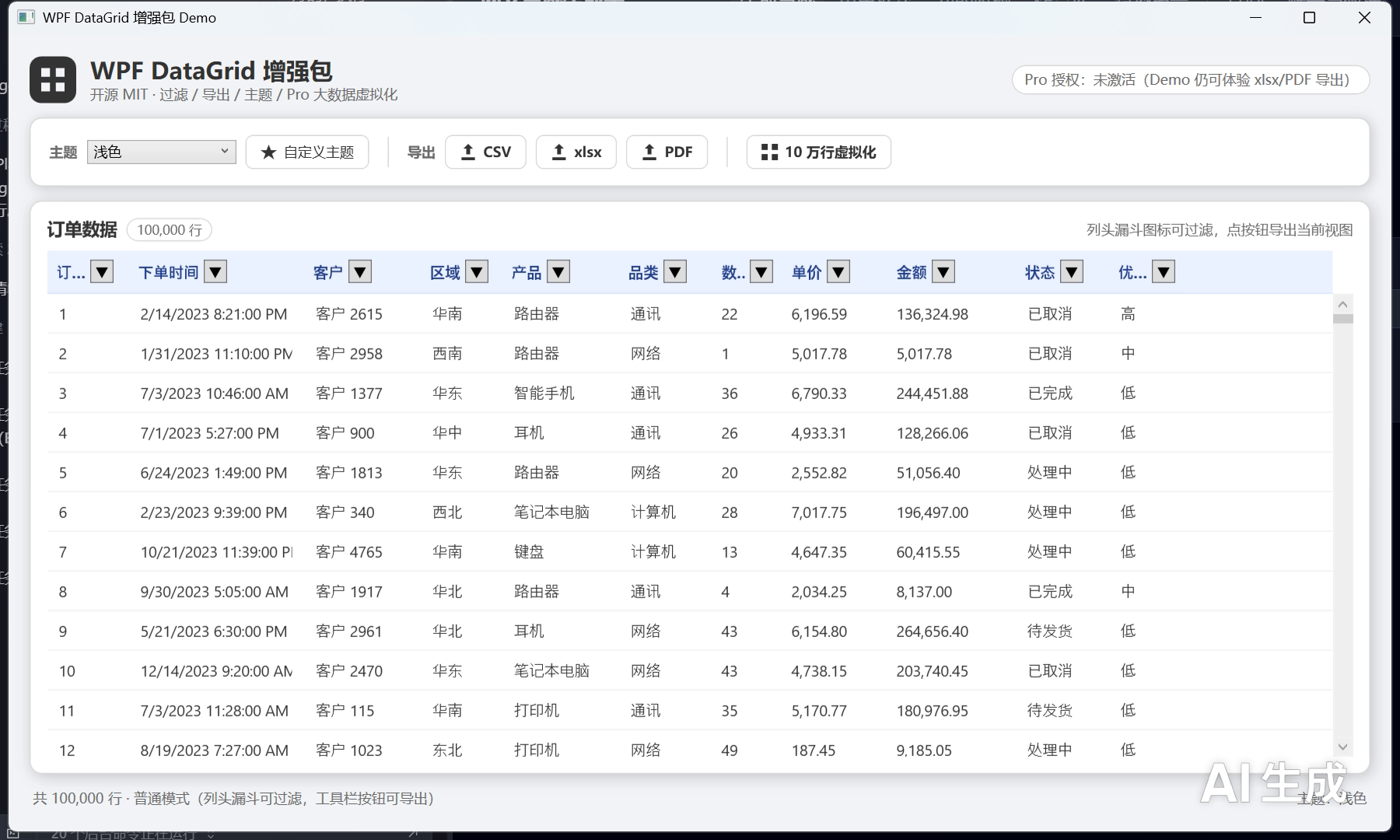
界面预览
Demo 实测截图(浅色 / 深色,均来自真实渲染的 Demo 主窗口):
| 浅色主题 | 深色主题 |
|---|---|
 |
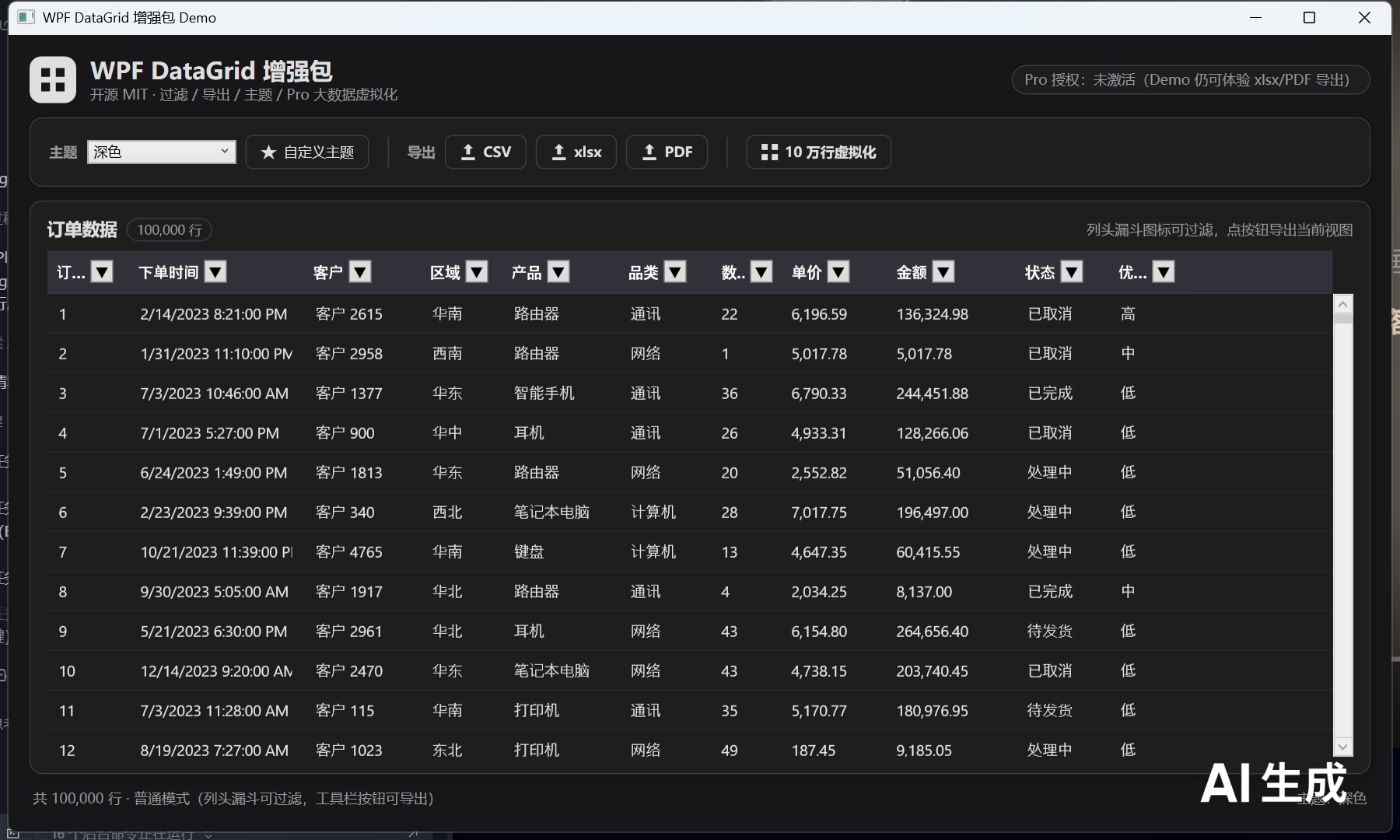 |
截图由 Demo 主窗口真实渲染生成,来源
demo/WpfDataGrid.Enhancements.Demo,可在本仓库assets/screenshots/目录查看原图。
安装
NuGet 包发布后可通过以下命令安装(占位,发布前替换为实际包版本):
# 开源版
dotnet add package WpfDataGrid.Enhancements

# Pro 版(需授权文件激活)
dotnet add package WpfDataGrid.Enhancements.Pro
目标框架:
net8.0-windows+net462(双 TFM)。依赖(MIT 系):Microsoft.Xaml.Behaviors.Wpf、Sylvan.Data.Excel(xlsx)、PdfSharp(PDF)。集成方式:Behavior 为主 + 附加属性为辅,不推荐子类。
快速开始
完整教程见 docs/guide/quick-start.md。
1. 挂载过滤(XAML 附加属性方式)
<Window x:Class="Demo.MainWindow"
        xmlns="http://schemas.microsoft.com/winfx/2006/xaml/presentation"
        xmlns:x="http://schemas.microsoft.com/winfx/2006/xaml"
        xmlns:enh="clr-namespace:WpfDataGrid.Enhancements;assembly=WpfDataGrid.Enhancements">
    <Grid>
        <DataGrid x:Name="Grid"
                  ItemsSource="{Binding Orders}"
                  enh:DataGridExtensions.EnableFiltering="True"
                  enh:DataGridExtensions.EnableExporting="True" />
    </Grid>
</Window>
2. CsvExportProvider 一行导出
using WpfDataGrid.Enhancements.Exporting;

var table = new TableData(
    new[] { "订单号", "客户", "金额" },
    new object?[][] { new object?[] { 1001, "张三", 199.5m } });

using var stream = File.Create("orders.csv");
new CsvExportProvider().Export(table, stream); // 一行导出
3. 主题切换
using WpfDataGrid.Enhancements.Theming;

DataGridThemeManager.ApplyTheme(ThemeMode.Dark);   // 深色
DataGridThemeManager.ApplyTheme(ThemeMode.Light);  // 浅色
DataGridThemeManager.ApplyTheme(ThemeMode.System); // 跟随系统
解决方案结构
WpfDataGrid.Enhancements.sln
├── src/
│   ├── WpfDataGrid.Enhancements/        开源核心库(过滤、主题、CSV 导出、集成基座)
│   ├── WpfDataGrid.Enhancements.Pro/    Pro 扩展库(xlsx/PDF 导出、正则过滤、大数据虚拟化、授权)
│   └── WpfDataGrid.Enhancements.LicenseTool/  授权签发工具(独立控制台)
├── demo/
│   └── WpfDataGrid.Enhancements.Demo/   Demo 示例(WPF 应用)
├── docs/                                项目文档(guide / api / licensing)
└── tests/
    └── WpfDataGrid.Enhancements.Tests/  xUnit 测试
关键 API
| 层 | 类型 | 说明 |
|---|---|---|
| 开源 | DataGridExtensions |
附加属性入口(EnableFiltering / EnableExporting / ThemeMode) |
| 开源 | DataGridFilterBehavior / FilterModel / ColumnFilter / IFilterPredicate |
多列组合过滤 |
| 开源 | FilterPredicates |
内置谓词:文本包含 / 数值范围 / 日期区间 / 枚举多选 |
| 开源 | DataGridExportBehavior / IExportProvider / CsvExportProvider |
导出框架与 CSV 导出 |
| 开源 | DataGridThemeManager |
主题资源管理(Light / Dark) |
| Pro | XlsxExportProvider / PdfExportProvider |
xlsx / PDF 导出 |
| Pro | RegexPredicate |
高级过滤(正则) |
| Pro | AsyncVirtualizingCollection<T> |
大数据虚拟化 |
| Pro | LicenseManager |
授权校验 |
API 参考索引见 docs/api/README.md。
授权与激活
Pro 版(WpfDataGrid.Enhancements.Pro)采用 RSA-2048 / RSA-SHA256 签名授权:许可证为自包含 JSON 文件(扩展名 wpfdatagrid.enhancements.license),库内仅内嵌公钥验证签名,支持 Personal / Team / Enterprise 三种授权类型与功能掩码开关,未激活时自动进入试用模式(默认 30 天 / 5000 行)。
- 授权类型、激活步骤、试用限制、密钥管理、签发工具用法与 FAQ:见 docs/licensing/README.md
- 授权校验入口:
LicenseManager.ValidateLicense()/LicenseManager.EnsureLicensed(ProFeature.XXX) - 签发工具:
WpfDataGrid.Enhancements.LicenseTool(独立控制台,不随 NuGet 分发)
路线图
| 里程碑 | 内容 | 状态 |
|---|---|---|
| M1 | 脚手架:解决方案结构、双 TFM(net8.0-windows;net462)、开源/Pro/Demo/Tests 四项目 | ✅ 已完成 |
| M2 | 核心功能:多列过滤、CSV 导出、主题切换、大数据虚拟化、Pro 导出(xlsx / PDF) | ✅ 已完成 |
| M3 | 授权体系:RSA-2048 签名授权、LicenseTool 签发工具、试用模式 | ✅ 已完成 |
| M4 | 导出美化与文档体系:xlsx 表头样式 / 自动列宽 / 对齐 / 冻结表头、完整中文文档 | 🔄 进行中 |
参与贡献 / 反馈
- 欢迎提交 Issue 报告缺陷或建议新功能(占位,发布前替换为仓库地址)。
- 本仓库暂不接受未经讨论的外部 Pull Request,重大改动请先开 Issue 说明方案。
- 商业授权 / Pro 版咨询:见 docs/licensing/README.md。
构建
dotnet restore
dotnet build WpfDataGrid.Enhancements.sln   # 双 TFM 0 警告 0 错误
dotnet test tests/WpfDataGrid.Enhancements.Tests   # 全部测试通过
| Product | Versions Compatible and additional computed target framework versions. |
|---|---|
| .NET | net8.0-windows7.0 is compatible. net9.0-windows was computed. net10.0-windows was computed. |
| .NET Framework | net462 is compatible. net463 was computed. net47 was computed. net471 was computed. net472 was computed. net48 was computed. net481 was computed. |
-
.NETFramework 4.6.2
- Microsoft.Xaml.Behaviors.Wpf (>= 1.1.135)
-
net8.0-windows7.0
- Microsoft.Xaml.Behaviors.Wpf (>= 1.1.135)
NuGet packages
This package is not used by any NuGet packages.
GitHub repositories
This package is not used by any popular GitHub repositories.