Adr.MySockets
1.0.1
dotnet add package Adr.MySockets --version 1.0.1
NuGet\Install-Package Adr.MySockets -Version 1.0.1
This command is intended to be used within the Package Manager Console in Visual Studio, as it uses the NuGet module's version of Install-Package.
<PackageReference Include="Adr.MySockets" Version="1.0.1" />
For projects that support PackageReference, copy this XML node into the project file to reference the package.
<PackageVersion Include="Adr.MySockets" Version="1.0.1" />
<PackageReference Include="Adr.MySockets" />
For projects that support Central Package Management (CPM), copy this XML node into the solution Directory.Packages.props file to version the package.
paket add Adr.MySockets --version 1.0.1
The NuGet Team does not provide support for this client. Please contact its maintainers for support.
#r "nuget: Adr.MySockets, 1.0.1"
#r directive can be used in F# Interactive and Polyglot Notebooks. Copy this into the interactive tool or source code of the script to reference the package.
#:package Adr.MySockets@1.0.1
#:package directive can be used in C# file-based apps starting in .NET 10 preview 4. Copy this into a .cs file before any lines of code to reference the package.
#addin nuget:?package=Adr.MySockets&version=1.0.1
#tool nuget:?package=Adr.MySockets&version=1.0.1
The NuGet Team does not provide support for this client. Please contact its maintainers for support.
Adr.MySockets
Adr.MySockets is a package with classes used to facilitate the websocket communication in C#.
Installation
.NET CLI
dotnet add package Adr.MySockets --version 1.0.1
Nuget package manager
PM> Install-Package Adr.MySockets -Version 1.0.1
packageReference
<PackageReference Include="Adr.MySockets" Version="1.0.1" />
Sample of basic events only
Create a simple server:
        public static void Main(string[] args) {

            SocketS server = new SocketS(IPEndPoint.Parse("127.0.0.1:1236"));

            server.OnClientAccepted += S_OnClientAccepted;
            server.OnMessageReceived += S_OnMessageReceived;
            server.OnClientDisconnect += S_OnClientDisconnect;
            server.OnServerUp += S_OnServerUp;

            server.Connect();

            Console.ReadKey();

        }

        private static void S_OnServerUp(SocketS obj) => Console.WriteLine($"Server online");
        private static void S_OnClientDisconnect(SocketC obj) => Console.WriteLine("Client disconnected: " + obj.UserName);
        private static void S_OnMessageReceived(Message arg1, SocketC arg2) => Console.WriteLine("Message: " + arg1);
        private static void S_OnClientAccepted(SocketC obj) => Console.WriteLine($"Client connected: " + obj.UserName);
Create a simple client:
        public static void Main(string[] args) {

            Console.WriteLine("Username:");
            SocketC cli = new SocketC(Console.ReadLine());

            cli.OnConnected += Cli_OnConnected;
            cli.OnConnectionFail += Cli_OnConnectionFail;
            cli.OnMessageReceived += Cli_OnMessageReceived;
            cli.Connect("127.0.0.1", 1236);

            while (true)
            {
                cli.SendMessage(Console.ReadLine());
            }

        }

        private static void Cli_OnMessageReceived(Message arg1, SocketC arg2) => Console.WriteLine($"{arg1.From}: {arg1.Body}");
        private static void Cli_OnConnectionFail(Exception obj) => Console.WriteLine($"Error on connection: {obj.Message}");
        private static void Cli_OnConnected(SocketC obj) => Console.WriteLine("Connected!");
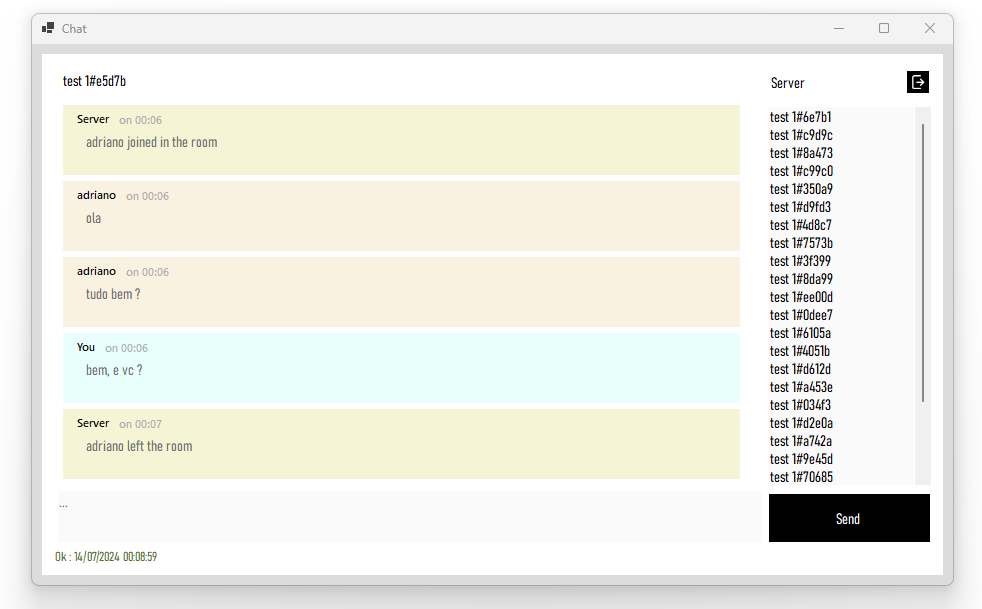
Check the complete chat app project
GitHub link : https://github.com/adrianomarino1992/Socket
Contributing
Pull requests are welcome. For major changes, please open an issue first to discuss what you would like to change.
Git
| Product | Versions Compatible and additional computed target framework versions. |
|---|---|
| .NET | net6.0 is compatible. net6.0-android was computed. net6.0-ios was computed. net6.0-maccatalyst was computed. net6.0-macos was computed. net6.0-tvos was computed. net6.0-windows was computed. net7.0 was computed. net7.0-android was computed. net7.0-ios was computed. net7.0-maccatalyst was computed. net7.0-macos was computed. net7.0-tvos was computed. net7.0-windows was computed. net8.0 was computed. net8.0-android was computed. net8.0-browser was computed. net8.0-ios was computed. net8.0-maccatalyst was computed. net8.0-macos was computed. net8.0-tvos was computed. net8.0-windows was computed. net9.0 was computed. net9.0-android was computed. net9.0-browser was computed. net9.0-ios was computed. net9.0-maccatalyst was computed. net9.0-macos was computed. net9.0-tvos was computed. net9.0-windows was computed. net10.0 was computed. net10.0-android was computed. net10.0-browser was computed. net10.0-ios was computed. net10.0-maccatalyst was computed. net10.0-macos was computed. net10.0-tvos was computed. net10.0-windows was computed. |
Compatible target framework(s)
Included target framework(s) (in package)
Learn more about Target Frameworks and .NET Standard.
This package has no dependencies.
NuGet packages
This package is not used by any NuGet packages.
GitHub repositories
This package is not used by any popular GitHub repositories.
Add EventEmiter funcions