AwesomeProperties 1.0.9
.NET 5.0
This package targets .NET 5.0. The package is compatible with this framework or higher.
.NET Framework 4.7.1
This package targets .NET Framework 4.7.1. The package is compatible with this framework or higher.
dotnet add package AwesomeProperties --version 1.0.9
NuGet\Install-Package AwesomeProperties -Version 1.0.9
This command is intended to be used within the Package Manager Console in Visual Studio, as it uses the NuGet module's version of Install-Package.
<PackageReference Include="AwesomeProperties" Version="1.0.9" />
For projects that support PackageReference, copy this XML node into the project file to reference the package.
<PackageVersion Include="AwesomeProperties" Version="1.0.9" />
<PackageReference Include="AwesomeProperties" />
For projects that support Central Package Management (CPM), copy this XML node into the solution Directory.Packages.props file to version the package.
paket add AwesomeProperties --version 1.0.9
The NuGet Team does not provide support for this client. Please contact its maintainers for support.
#r "nuget: AwesomeProperties, 1.0.9"
#r directive can be used in F# Interactive and Polyglot Notebooks. Copy this into the interactive tool or source code of the script to reference the package.
#:package AwesomeProperties@1.0.9
#:package directive can be used in C# file-based apps starting in .NET 10 preview 4. Copy this into a .cs file before any lines of code to reference the package.
#addin nuget:?package=AwesomeProperties&version=1.0.9
#tool nuget:?package=AwesomeProperties&version=1.0.9
The NuGet Team does not provide support for this client. Please contact its maintainers for support.
AwesomeProperties
Setup
Install on nuget market place or at this link: https://www.nuget.org/packages/AwesomeProperties/
Sample
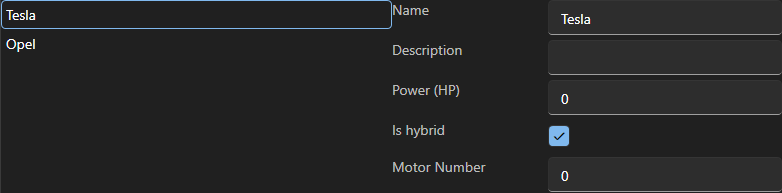
Example with a listview bind with a custom class ElectricCar and ThermalCar inherit from a class Car


Awesome properties also support graphics library like WPF-UI:
Basic Usage
To show on the properties window you should mark with PropertyField attribute
Some property type are available:²
    public enum PropertyType
    {
        None,
        Text,
        Int,
        CheckBox,
        Dropdown
    }
Basic class declaration:
    public class Example
    {
        [PropertyField(PropertyType.Text, "Name")]
        public string Name { get; set; }

        [PropertyField(PropertyType.Text, "Model")]
        public string Model { get; set; }

        public Example()
        {

        }
    }
Create new instance of your custom class
    public class MainWindow
    {
        public Example MyCustomClass{ get; set;}

        public Example()
        {
            MyCustomClass = new Example();
        }
    }
To show the properties panel:
    public void ShowProperties(){
        //Put your data to bind in the constructor of PropertiesPanel
        PropertiesPanel panel = new PropertiesPanel(MyCustomClass);

        //Add the property panel to a container
        MyGrid.Children.Clear();
        MyGrid.Children.Add(panel);
    }
Advance Usage
    public class Example
    {
        [PropertyField(PropertyType.Text, "Name")]
        public string Name { get; set; }

        [PropertyField(PropertyType.Text, "Model")]
        public string Model { get; set; }

        public Example()
        {

        }
    }
| Product | Versions Compatible and additional computed target framework versions. |
|---|---|
| .NET | net5.0-windows7.0 is compatible. net6.0-windows was computed. net6.0-windows7.0 is compatible. net7.0-windows was computed. net8.0-windows was computed. net9.0-windows was computed. net10.0-windows was computed. |
| .NET Framework | net471 is compatible. net472 is compatible. net48 is compatible. net481 was computed. |
Compatible target framework(s)
Included target framework(s) (in package)
Learn more about Target Frameworks and .NET Standard.
-
.NETFramework 4.7.1
- Extended.Wpf.Toolkit (>= 4.5.0)
- Ookii.Dialogs.Wpf (>= 5.0.1)
- WPF-UI (>= 2.0.3)
-
.NETFramework 4.7.2
- Extended.Wpf.Toolkit (>= 4.5.0)
- Ookii.Dialogs.Wpf (>= 5.0.1)
- WPF-UI (>= 2.0.3)
-
.NETFramework 4.8
- Extended.Wpf.Toolkit (>= 4.5.0)
- Ookii.Dialogs.Wpf (>= 5.0.1)
- WPF-UI (>= 2.0.3)
-
net5.0-windows7.0
- Extended.Wpf.Toolkit (>= 4.5.0)
- Ookii.Dialogs.Wpf (>= 5.0.1)
- WPF-UI (>= 2.0.3)
-
net6.0-windows7.0
- Extended.Wpf.Toolkit (>= 4.5.0)
- Ookii.Dialogs.Wpf (>= 5.0.1)
- WPF-UI (>= 2.0.3)
NuGet packages
This package is not used by any NuGet packages.
GitHub repositories
This package is not used by any popular GitHub repositories.
First release