C1.WPF.Docking.Cn
10.0.20252.1322
dotnet add package C1.WPF.Docking.Cn --version 10.0.20252.1322
NuGet\Install-Package C1.WPF.Docking.Cn -Version 10.0.20252.1322
This command is intended to be used within the Package Manager Console in Visual Studio, as it uses the NuGet module's version of Install-Package.
<PackageReference Include="C1.WPF.Docking.Cn" Version="10.0.20252.1322" />
For projects that support PackageReference, copy this XML node into the project file to reference the package.
<PackageVersion Include="C1.WPF.Docking.Cn" Version="10.0.20252.1322" />
<PackageReference Include="C1.WPF.Docking.Cn" />
For projects that support Central Package Management (CPM), copy this XML node into the solution Directory.Packages.props file to version the package.
paket add C1.WPF.Docking.Cn --version 10.0.20252.1322
The NuGet Team does not provide support for this client. Please contact its maintainers for support.
#r "nuget: C1.WPF.Docking.Cn, 10.0.20252.1322"
#r directive can be used in F# Interactive and Polyglot Notebooks. Copy this into the interactive tool or source code of the script to reference the package.
#:package C1.WPF.Docking.Cn@10.0.20252.1322
#:package directive can be used in C# file-based apps starting in .NET 10 preview 4. Copy this into a .cs file before any lines of code to reference the package.
#addin nuget:?package=C1.WPF.Docking.Cn&version=10.0.20252.1322
#tool nuget:?package=C1.WPF.Docking.Cn&version=10.0.20252.1322
The NuGet Team does not provide support for this client. Please contact its maintainers for support.
About
The ComponentOne WPF Docking library provides a multi-tabbed, docking interface inspired by Microsoft Visual Studio. Deliver customizable workspaces to your users complete with resizing, floating, and auto-hiding capabilities.
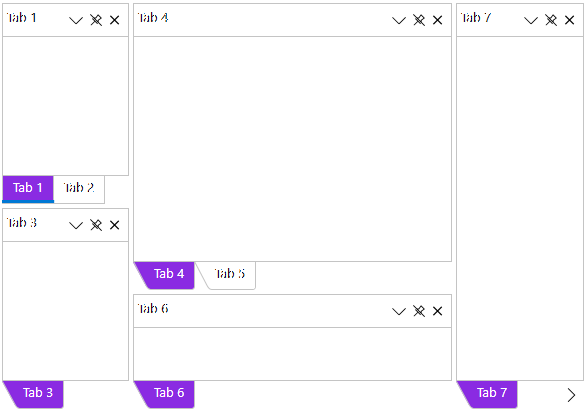
Key Features:
- Float and drag tabs outside your desktop application
- Dock tabs using a diamond UI paradigm just like Visual Studio
- Tabs can slide open and closed just like the pin (auto-hide) behavior seen in Visual Studio
- The C1DockTabControl will hide the tab header when only one tab exists
- In code you can persist layouts and restrict docking of certain tabs
Learn more at developer.mescius.com/componentone/wpf-ui-controls/custom-workspace-dockcontrol-wpf.
Resources
| Product | Versions Compatible and additional computed target framework versions. |
|---|---|
| .NET | net6.0-windows7.0 is compatible. net7.0-windows was computed. net8.0-windows was computed. net9.0-windows was computed. net10.0-windows was computed. |
Compatible target framework(s)
Included target framework(s) (in package)
Learn more about Target Frameworks and .NET Standard.
-
net6.0-windows7.0
- C1.WPF.Core.Cn (= 10.0.20252.1322)
- C1.WPF.Input.Cn (= 10.0.20252.1322)
- C1.WPF.Menu.Cn (= 10.0.20252.1322)
- C1.WPF.TabControl.Cn (= 10.0.20252.1322)
NuGet packages (3)
Showing the top 3 NuGet packages that depend on C1.WPF.Docking.Cn:
| Package | Downloads |
|---|---|
|
C1.WPF.GanttView.Cn
C1GanttView控件为项目管理提供类似Microsoft Project®的用户体验。 |
|
|
C1.WPF.Schedule.Cn
Scheduler是一个功能齐全的计划,允许用户添加,编辑和管理他们的约会。 |
|
|
C1.WPF.Pivot.Cn
WPF平台的ComponentOne FlexPivot。 |
GitHub repositories
This package is not used by any popular GitHub repositories.
| Version | Downloads | Last Updated |
|---|---|---|
| 10.0.20252.1322 | 124 | 4/3/2026 |
| 10.0.20252.1313 | 123 | 3/25/2026 |
| 10.0.20252.1222 | 533 | 12/1/2025 |
| 9.0.20251.1139 | 345 | 9/18/2025 |
| 9.0.20251.1104 | 201 | 7/11/2025 |
| 9.0.20251.1070 | 284 | 5/16/2025 |
| 8.0.20242.1053 | 272 | 3/3/2025 |
| 8.0.20242.1007 | 176 | 1/9/2025 |
| 8.0.20242.978 | 184 | 11/25/2024 |
| 8.0.20241.923 | 231 | 9/3/2024 |
| 8.0.20241.856 | 212 | 7/8/2024 |
| 8.0.20241.797 | 190 | 5/29/2024 |
| 8.0.20233.733 | 232 | 4/1/2024 |