C1.WPF.Pivot
10.0.20261.38
dotnet add package C1.WPF.Pivot --version 10.0.20261.38
NuGet\Install-Package C1.WPF.Pivot -Version 10.0.20261.38
This command is intended to be used within the Package Manager Console in Visual Studio, as it uses the NuGet module's version of Install-Package.
<PackageReference Include="C1.WPF.Pivot" Version="10.0.20261.38" />
For projects that support PackageReference, copy this XML node into the project file to reference the package.
<PackageVersion Include="C1.WPF.Pivot" Version="10.0.20261.38" />
<PackageReference Include="C1.WPF.Pivot" />
For projects that support Central Package Management (CPM), copy this XML node into the solution Directory.Packages.props file to version the package.
paket add C1.WPF.Pivot --version 10.0.20261.38
The NuGet Team does not provide support for this client. Please contact its maintainers for support.
#r "nuget: C1.WPF.Pivot, 10.0.20261.38"
#r directive can be used in F# Interactive and Polyglot Notebooks. Copy this into the interactive tool or source code of the script to reference the package.
#:package C1.WPF.Pivot@10.0.20261.38
#:package directive can be used in C# file-based apps starting in .NET 10 preview 4. Copy this into a .cs file before any lines of code to reference the package.
#addin nuget:?package=C1.WPF.Pivot&version=10.0.20261.38
#tool nuget:?package=C1.WPF.Pivot&version=10.0.20261.38
The NuGet Team does not provide support for this client. Please contact its maintainers for support.
About
The ComponentOne WPF FlexPivot control uses pivot grids and charts to deliver in-depth business intelligence (BI) functionality. Aggregate millions of rows of data in your WPF apps to create dynamic pivot tables like Microsoft Excel.
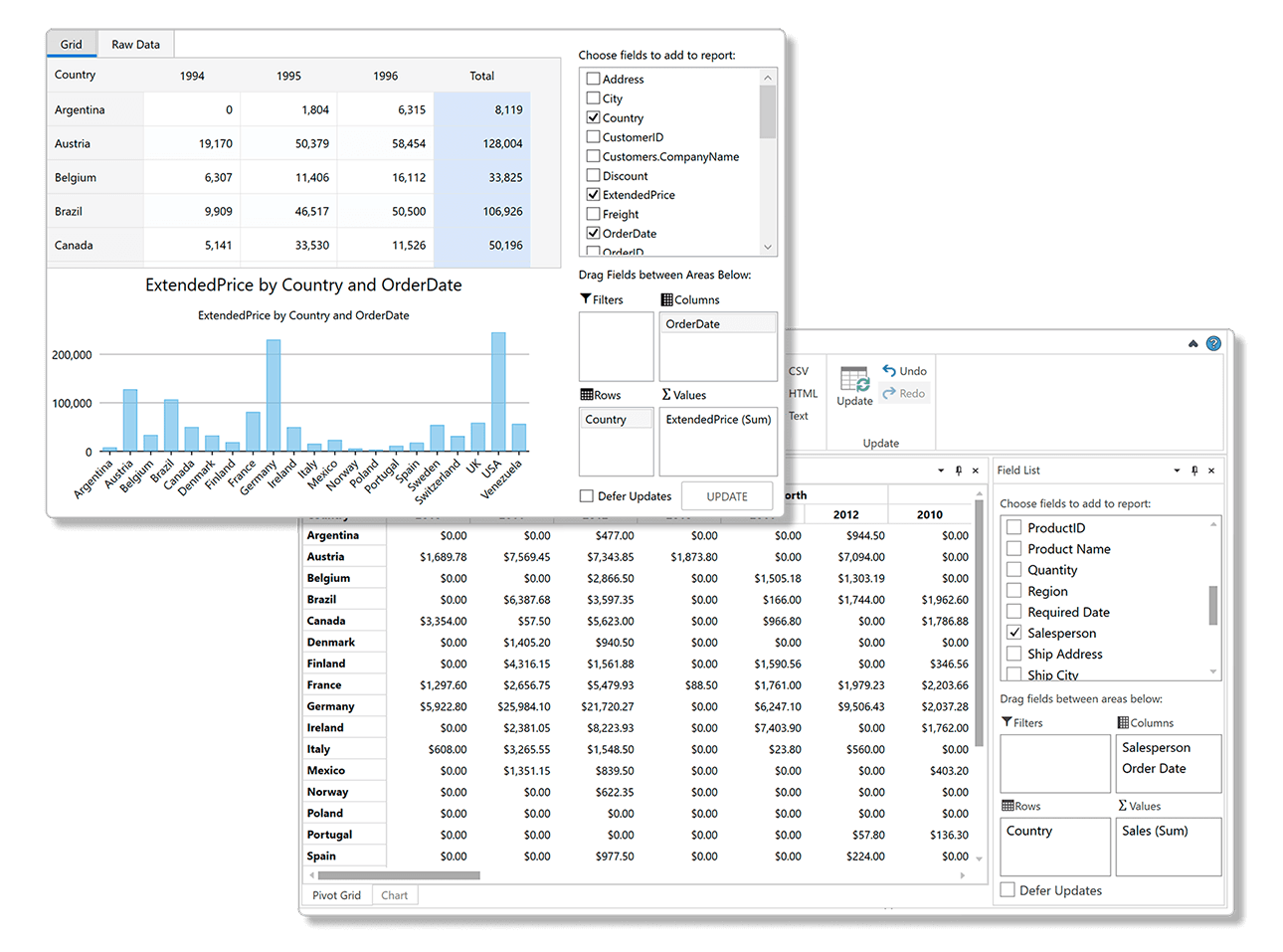
Key Features:
- Includes pivot tables, charts and a pivot panel UI that allows users to create dynamic views
- Dynamically create summarized views by dragging fields into the row, column, and value lists
- Pull multiple data sources into a single, multi-dimensional pivot table from online or local OLAP cubes
- Built on a super-charged data engine, FlexPivot can process millions of records in milliseconds
- The WPF pivotgrid automatically calculates subtotals grand totals for each slice of your data
- End-users can create conditional formatting rules to highlight values
- End-users can filter, slice and aggregate the data set dynamically with no coding required
- Convey the pivot table view in a chart to discover new insights and trends
- View the underlying (raw) data for any aggregated cell in the pivot table by double-clicking
- The pivot table information can be exported to CSV, HTML, text or directly printed from the toolbar
- Get the same pivot UI across multiple desktop and web platforms: WinForms, WPF, ASP.NET MVC and JavaScript
Learn more at developer.mescius.com/componentone/wpf-ui-controls/flexpivot-pivot-grid-olap-wpf.
Resources
| Product | Versions Compatible and additional computed target framework versions. |
|---|---|
| .NET | net6.0-windows7.0 is compatible. net7.0-windows was computed. net8.0-windows was computed. net9.0-windows was computed. net10.0-windows was computed. |
Compatible target framework(s)
Included target framework(s) (in package)
Learn more about Target Frameworks and .NET Standard.
-
net6.0-windows7.0
- C1.DataEngine (>= 10.0.20261.378)
- C1.DataEngine.Api (>= 10.0.20261.378)
- C1.PivotEngine (>= 10.0.20261.378)
- C1.WPF.Chart (= 10.0.20261.38)
- C1.WPF.ColorPicker (= 10.0.20261.38)
- C1.WPF.Core (= 10.0.20261.38)
- C1.WPF.Docking (= 10.0.20261.38)
- C1.WPF.DX (= 10.0.20261.38)
- C1.WPF.Grid (= 10.0.20261.38)
- C1.WPF.Input (= 10.0.20261.38)
- C1.WPF.Menu (= 10.0.20261.38)
- C1.WPF.Ribbon (= 10.0.20261.38)
- C1.WPF.TabControl (= 10.0.20261.38)
- C1.WPF.TreeView (= 10.0.20261.38)
NuGet packages
This package is not used by any NuGet packages.
GitHub repositories
This package is not used by any popular GitHub repositories.
| Version | Downloads | Last Updated |
|---|---|---|
| 10.0.20261.38 | 99 | 5/29/2026 |
| 10.0.20252.1321 | 146 | 3/20/2026 |
| 10.0.20252.1308 | 152 | 2/12/2026 |
| 10.0.20252.1221 | 1,028 | 12/1/2025 |
| 9.0.20251.1133 | 411 | 9/18/2025 |
| 9.0.20251.1102 | 273 | 7/11/2025 |
| 9.0.20251.1069 | 390 | 5/16/2025 |
| 8.0.20242.1051 | 377 | 3/3/2025 |
| 8.0.20242.1032 | 292 | 2/26/2025 |
| 8.0.20242.1005 | 294 | 12/27/2024 |
| 8.0.20242.966 | 318 | 11/12/2024 |
| 8.0.20241.921 | 317 | 9/3/2024 |
| 8.0.20241.854 | 328 | 7/8/2024 |
| 8.0.20241.795 | 319 | 5/29/2024 |
| 8.0.20233.731 | 358 | 3/12/2024 |
| 8.0.20233.702 | 326 | 1/19/2024 |
| 8.0.20233.681 | 300 | 11/29/2023 |
| 8.0.20233.668 | 258 | 11/8/2023 |
| 7.0.20233.662 | 277 | 11/10/2023 |
| 6.0.20232.624 | 290 | 9/11/2023 |
Loading failed