Chuckie.ConsoleProgressBar
1.0.4
dotnet add package Chuckie.ConsoleProgressBar --version 1.0.4
NuGet\Install-Package Chuckie.ConsoleProgressBar -Version 1.0.4
<PackageReference Include="Chuckie.ConsoleProgressBar" Version="1.0.4" />
<PackageVersion Include="Chuckie.ConsoleProgressBar" Version="1.0.4" />
<PackageReference Include="Chuckie.ConsoleProgressBar" />
paket add Chuckie.ConsoleProgressBar --version 1.0.4
#r "nuget: Chuckie.ConsoleProgressBar, 1.0.4"
#:package Chuckie.ConsoleProgressBar@1.0.4
#addin nuget:?package=Chuckie.ConsoleProgressBar&version=1.0.4
#tool nuget:?package=Chuckie.ConsoleProgressBar&version=1.0.4
ConsoleProgressBar

一款为 .NET 控制台应用程序设计的强大、高度可定制且线程安全的进度条库。它支持单任务以及多任务并行的进度追踪,并内置了丰富的字符样式和动态信息展示。
特性
- 底部悬浮渲染 (Floating Rendering):进度条会始终像悬浮窗一样吸附在控制台最底部。当你使用内置的
WriteLine方法安全地输出日志时,历史日志会向上滚动,而进度条永远保持在最下方,完全不会破坏 UI。 - 多任务并行支持:通过
MultiProgressBar,轻松同时跟踪多个异步任务的进度。 - 丰富的视觉样式:内置多种现代感十足的样式(例如:盲文风格、Ascii、方块渐变等)。
- Unicode自动降级:如果目标控制台不支持 Unicode,会自动回退到安全的 Ascii 样式。
- 详尽的数据指标:内置计算已用时间、ETA(预计剩余时间)以及处理速度。
- 高度定制化:可自定义颜色、宽度以及用来渲染进度条的具体字符。
视觉效果展示
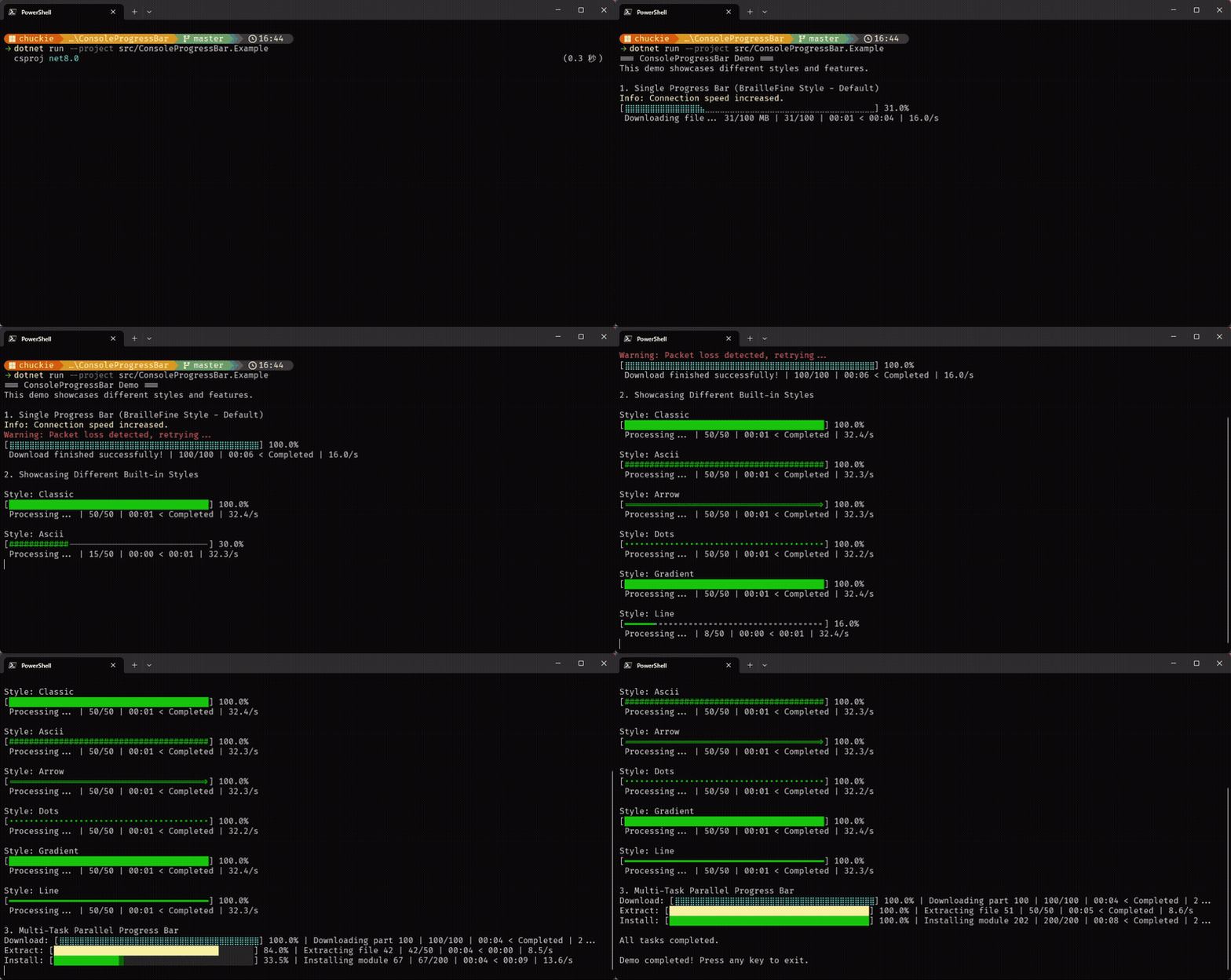
内置样式
| 样式名称 | 示例输出 |
|---|---|
| BrailleFine (默认) | [⣿⣿⣿⣿⣿⣿⣀⣀⣀] 50.0% |
| Classic | [█████░░░░░] 50.0% |
| Ascii (安全回退) | [#####-----] 50.0% |
| Arrow | [====>-----] 50.0% |
| Gradient | [█▓▒░░░░░░░] 30.0% |
进度详情
进度条会自动在下方显示详尽的数据指标:
1,024/2,048 | 00:05 < 00:05 | 204.8/s
安装
你可以通过 NuGet 命令行或者包管理器安装 ConsoleProgressBar:
dotnet add package Chuckie.ConsoleProgressBar
快速入门
1. 单个进度条
using Chuckie.ConsoleProgressBar;

// 可选:启用 Unicode 支持以获得最佳视觉体验
ProgressBarChars.EnableUnicodeSupport();

int total = 100;
using (var progressBar = new ConsoleProgressBar(
    total,
    "正在处理文件...",
    50,
    ProgressBarStyle.BrailleFine,
    ConsoleColor.Cyan))
{
    for (int i = 0; i <= total; i++)
    {
        progressBar.Update(i, $"已处理 {i}.txt");

        // 安全地输出日志:日志会在进度条上方滚动,而进度条始终吸附在最底部
        if (i == 50)
        {
            progressBar.WriteLine("进度已经过半!", ConsoleColor.Yellow);
        }

        Thread.Sleep(50);
    }

    progressBar.Complete("处理成功结束!");
}
2. 多任务并发进度条
using Chuckie.ConsoleProgressBar;

using (var multiBar = new MultiProgressBar(40))
{
    // 添加多个并行任务
    int task1 = multiBar.AddProgressBar("下载", 100, ConsoleColor.Cyan, ProgressBarStyle.BrailleFine);
    int task2 = multiBar.AddProgressBar("解压", 50, ConsoleColor.Yellow, ProgressBarStyle.Classic);

    // 并发更新它们的状态
    multiBar.Update(task1, 25, "正在下载分块 1");
    multiBar.Update(task2, 10, "正在解压文件 A");
}
创建自定义样式
如果内置样式不符合你的需求,你可以轻松定义自己的字符:
var customChars = new ProgressBarChars
{
    FilledChar = '+',
    EmptyChar = '-'
};

var pb = new ConsoleProgressBar(100, "自定义", 50, customChars);
开源协议
本项目基于 MIT 协议开源。
English Version
A powerful, customizable, and thread-safe progress bar library for .NET Console Applications. It supports both single task and multi-task parallel progress tracking with rich built-in styles and dynamic information display.
Features
- Floating Bottom Rendering: The progress bar acts like a floating widget at the bottom of your console. When you use the built-in
WriteLinemethod to output logs, historical logs will scroll upwards while the progress bar safely remains at the bottom, ensuring the UI is never broken. - Multi-Task Support: Easily track multiple asynchronous tasks with parallel progress bars (
MultiProgressBar). - Rich Visual Styles: Includes several modern built-in styles (e.g., Braille, Docker-style, Ascii, Blocks, Gradients).
- Auto-Unicode Detection: Automatically falls back to Ascii if the target console doesn't support Unicode.
- Detailed Metrics: Built-in calculation for elapsed time, ETA (Estimated Time of Arrival), and processing speed.
- Customizable: Change colors, characters, and widths to fit your exact needs.
Visual Showcases
Built-in Styles
| Style Name | Example Output |
|---|---|
| BrailleFine (Default) | [⣿⣿⣿⣿⣿⣿⣀⣀⣀] 50.0% |
| Classic | [█████░░░░░] 50.0% |
| Ascii (Safe fallback) | [#####-----] 50.0% |
| Arrow | [====>-----] 50.0% |
| Gradient | [█▓▒░░░░░░░] 30.0% |
Progress Details
The progress bar automatically displays detailed metrics below the bar:
1,024/2,048 | 00:05 < 00:05 | 204.8/s
Installation
You can install ConsoleProgressBar via the NuGet CLI or Package Manager:
dotnet add package Chuckie.ConsoleProgressBar
Quick Start
1. Single Progress Bar
using Chuckie.ConsoleProgressBar;

// Optional: Enable Unicode support for best visual quality
ProgressBarChars.EnableUnicodeSupport();

int total = 100;
using (var progressBar = new ConsoleProgressBar(
    total,
    "Processing files...",
    50,
    ProgressBarStyle.BrailleFine,
    ConsoleColor.Cyan))
{
    for (int i = 0; i <= total; i++)
    {
        progressBar.Update(i, $"Processed file {i}.txt");

        // Output logs safely: logs will scroll above while the progress bar stays at the bottom
        if (i == 50)
        {
            progressBar.WriteLine("Halfway there!", ConsoleColor.Yellow);
        }

        Thread.Sleep(50);
    }

    progressBar.Complete("Finished successfully!");
}
2. Multi-Task Progress Bar
using Chuckie.ConsoleProgressBar;

using (var multiBar = new MultiProgressBar(40))
{
    // Add multiple parallel tasks
    int task1 = multiBar.AddProgressBar("Download", 100, ConsoleColor.Cyan, ProgressBarStyle.BrailleFine);
    int task2 = multiBar.AddProgressBar("Extract", 50, ConsoleColor.Yellow, ProgressBarStyle.Classic);

    // Update them concurrently
    multiBar.Update(task1, 25, "Downloading part 1");
    multiBar.Update(task2, 10, "Extracting file A");
}
Creating Custom Styles
You can easily define your own characters if none of the built-in styles match your needs:
var customChars = new ProgressBarChars
{
    FilledChar = '+',
    EmptyChar = '-'
};

var pb = new ConsoleProgressBar(100, "Custom", 50, customChars);
License
This project is open-sourced under the MIT License.
| Product | Versions Compatible and additional computed target framework versions. |
|---|---|
| .NET | net5.0 was computed. net5.0-windows was computed. net6.0 was computed. net6.0-android was computed. net6.0-ios was computed. net6.0-maccatalyst was computed. net6.0-macos was computed. net6.0-tvos was computed. net6.0-windows was computed. net7.0 was computed. net7.0-android was computed. net7.0-ios was computed. net7.0-maccatalyst was computed. net7.0-macos was computed. net7.0-tvos was computed. net7.0-windows was computed. net8.0 is compatible. net8.0-android was computed. net8.0-browser was computed. net8.0-ios was computed. net8.0-maccatalyst was computed. net8.0-macos was computed. net8.0-tvos was computed. net8.0-windows was computed. net9.0 was computed. net9.0-android was computed. net9.0-browser was computed. net9.0-ios was computed. net9.0-maccatalyst was computed. net9.0-macos was computed. net9.0-tvos was computed. net9.0-windows was computed. net10.0 was computed. net10.0-android was computed. net10.0-browser was computed. net10.0-ios was computed. net10.0-maccatalyst was computed. net10.0-macos was computed. net10.0-tvos was computed. net10.0-windows was computed. |
| .NET Core | netcoreapp2.0 was computed. netcoreapp2.1 was computed. netcoreapp2.2 was computed. netcoreapp3.0 was computed. netcoreapp3.1 was computed. |
| .NET Standard | netstandard2.0 is compatible. netstandard2.1 was computed. |
| .NET Framework | net45 is compatible. net451 was computed. net452 was computed. net46 was computed. net461 was computed. net462 was computed. net463 was computed. net47 was computed. net471 was computed. net472 was computed. net48 was computed. net481 was computed. |
| MonoAndroid | monoandroid was computed. |
| MonoMac | monomac was computed. |
| MonoTouch | monotouch was computed. |
| Tizen | tizen40 was computed. tizen60 was computed. |
| Xamarin.iOS | xamarinios was computed. |
| Xamarin.Mac | xamarinmac was computed. |
| Xamarin.TVOS | xamarintvos was computed. |
| Xamarin.WatchOS | xamarinwatchos was computed. |
-
.NETFramework 4.5
- No dependencies.
-
.NETStandard 2.0
- No dependencies.
-
net8.0
- No dependencies.
NuGet packages
This package is not used by any NuGet packages.
GitHub repositories
This package is not used by any popular GitHub repositories.