ConfigCreator.Framework
1.0.0
dotnet add package ConfigCreator.Framework --version 1.0.0
NuGet\Install-Package ConfigCreator.Framework -Version 1.0.0
<PackageReference Include="ConfigCreator.Framework" Version="1.0.0" />
<PackageVersion Include="ConfigCreator.Framework" Version="1.0.0" />
<PackageReference Include="ConfigCreator.Framework" />
paket add ConfigCreator.Framework --version 1.0.0
#r "nuget: ConfigCreator.Framework, 1.0.0"
#:package ConfigCreator.Framework@1.0.0
#addin nuget:?package=ConfigCreator.Framework&version=1.0.0
#tool nuget:?package=ConfigCreator.Framework&version=1.0.0
Config-Creator
A simple library for creating config files
There are two versions of this library:
- ConfigCreator (>NET 6.0)
- ConfigCreator.Framework (>NET.Framework 4.7.2)
Installing
NuGet\Install-Package ConfigCreator -Version 1.0.0
or
NuGet\Install-Package ConfigCreator.Framework -Version 1.0.0
Documentation | RU Language
Documentation Content:
- Config.CreateConfigFile(string configFileName, string configPath)
- Config.Add(string configItem, string itemValue, string configItemComment
- Config.Initialize(string configFileName, string configPath)
- Config.GetItem(string configItem)
- Config.getConfigPath()
- Program Example
Config.CreateConfigFile(string configFileName, string configPath)
This method creates a file with the items you added. Use only after the Config.Add method
configFileName - Config name
configPath - The path to the folder where the config will be located. Leave null if you want it to be saved in the same folder as the exe file
Example:
using ConfigCreator;

Config.Add("ApiKey", null, null); // Adding an item to the config
Config.Add("File", "default", null);
Config.Add("Language", "RU", "Languages: EN, RU, UA");
Config.CreateConfigFile("appsettings", null); // Creating a config file
Config.Add(string configItem, string itemValue, string configItemComment)
This method allows you to add an item to your config file, give it a comment and a default value
configItem - The name of the item in the config, example: [ConfigItem]
itemValue - The standard value for the item in the config file
configItemComment - Comment on the item in the config file
Example:
using ConfigCreator;

Config.Add("ApiKey", null, null); // Adding an item to the config
Config.Add("File", "default", null);
Config.Add("Language", "RU", "Languages: EN, RU, UA");
Config.CreateConfigFile("appsettings", null); // Creating a config file
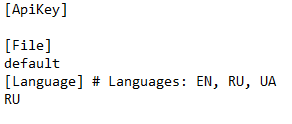
The contents of this config file:
Config.Initialize(string configFileName, string configPath)
This method initializes the configuration to memory. It is recommended to run it every time you start the program so that your application does not throw an exception
configFileName - Config name
configPath - The path to the folder where the configuration is located. The path to the folder where the configuration is located. If the configuration file is in the same folder as the exe file of your program, then leave null
using ConfigCreator;

Config.Initialize("appsettings", null); // initializing config into memory
Console.WriteLine($"ApiKey: {Config.GetItem("ApiKey")}"); // display config value
Config.GetItem(string configItem)
This method will help you get the value from the config file. returns null if no value was found
configItem - Item in the config
Example:
using ConfigCreator;

Config.Initialize("appsettings", null); // initializing config into memory
Console.WriteLine($"ApiKey: {Config.GetItem("ApiKey")}"); // display config value
Config.getConfigPath()
Returns the path to the config after its initialization
Program example
using ConfigCreator;

Config.Add("ApiKey", null, null); // Adding items into config file
Config.Add("File", "default", null);
Config.Add("Language", "RU", "Languages: EN, RU, UA");
Config.CreateConfigFile("appsettings", null); // Creating config file
Config.Initialize("appsettings", null); // initializing config file into memory
Console.WriteLine($"Config path detected: {Config.getConfigPath()}");
if (Config.GetItem("ApiKey") == null)
{
    Console.WriteLine("ApiKey not found. Check if you have filled it out in the config");
    Console.ReadKey();
    return;
}
Console.WriteLine($"ApiKey: {Config.GetItem("ApiKey")}"); // displaying information
Console.WriteLine($"File: {Config.GetItem("File")}");
Console.WriteLine($"Language: {Config.GetItem("Language")}");
Console.ReadLine();
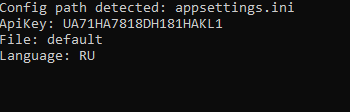
Output:
| Product | Versions Compatible and additional computed target framework versions. |
|---|---|
| .NET Framework | net48 is compatible. net481 was computed. |
-
.NETFramework 4.8
- No dependencies.
NuGet packages
This package is not used by any NuGet packages.
GitHub repositories
This package is not used by any popular GitHub repositories.
| Version | Downloads | Last Updated |
|---|---|---|
| 1.0.0 | 343 | 12/10/2022 |