FlatlinerDOA.Controls
1.1.9
dotnet add package FlatlinerDOA.Controls --version 1.1.9
NuGet\Install-Package FlatlinerDOA.Controls -Version 1.1.9
This command is intended to be used within the Package Manager Console in Visual Studio, as it uses the NuGet module's version of Install-Package.
<PackageReference Include="FlatlinerDOA.Controls" Version="1.1.9" />
For projects that support PackageReference, copy this XML node into the project file to reference the package.
<PackageVersion Include="FlatlinerDOA.Controls" Version="1.1.9" />
<PackageReference Include="FlatlinerDOA.Controls" />
For projects that support Central Package Management (CPM), copy this XML node into the solution Directory.Packages.props file to version the package.
paket add FlatlinerDOA.Controls --version 1.1.9
The NuGet Team does not provide support for this client. Please contact its maintainers for support.
#r "nuget: FlatlinerDOA.Controls, 1.1.9"
#r directive can be used in F# Interactive and Polyglot Notebooks. Copy this into the interactive tool or source code of the script to reference the package.
#:package FlatlinerDOA.Controls@1.1.9
#:package directive can be used in C# file-based apps starting in .NET 10 preview 4. Copy this into a .cs file before any lines of code to reference the package.
#addin nuget:?package=FlatlinerDOA.Controls&version=1.1.9
#tool nuget:?package=FlatlinerDOA.Controls&version=1.1.9
The NuGet Team does not provide support for this client. Please contact its maintainers for support.
FlatlinerDOA.Controls
Requirements
- .NET 8.0
- Avalonia 11.0.10 or later
SelectingCanvas
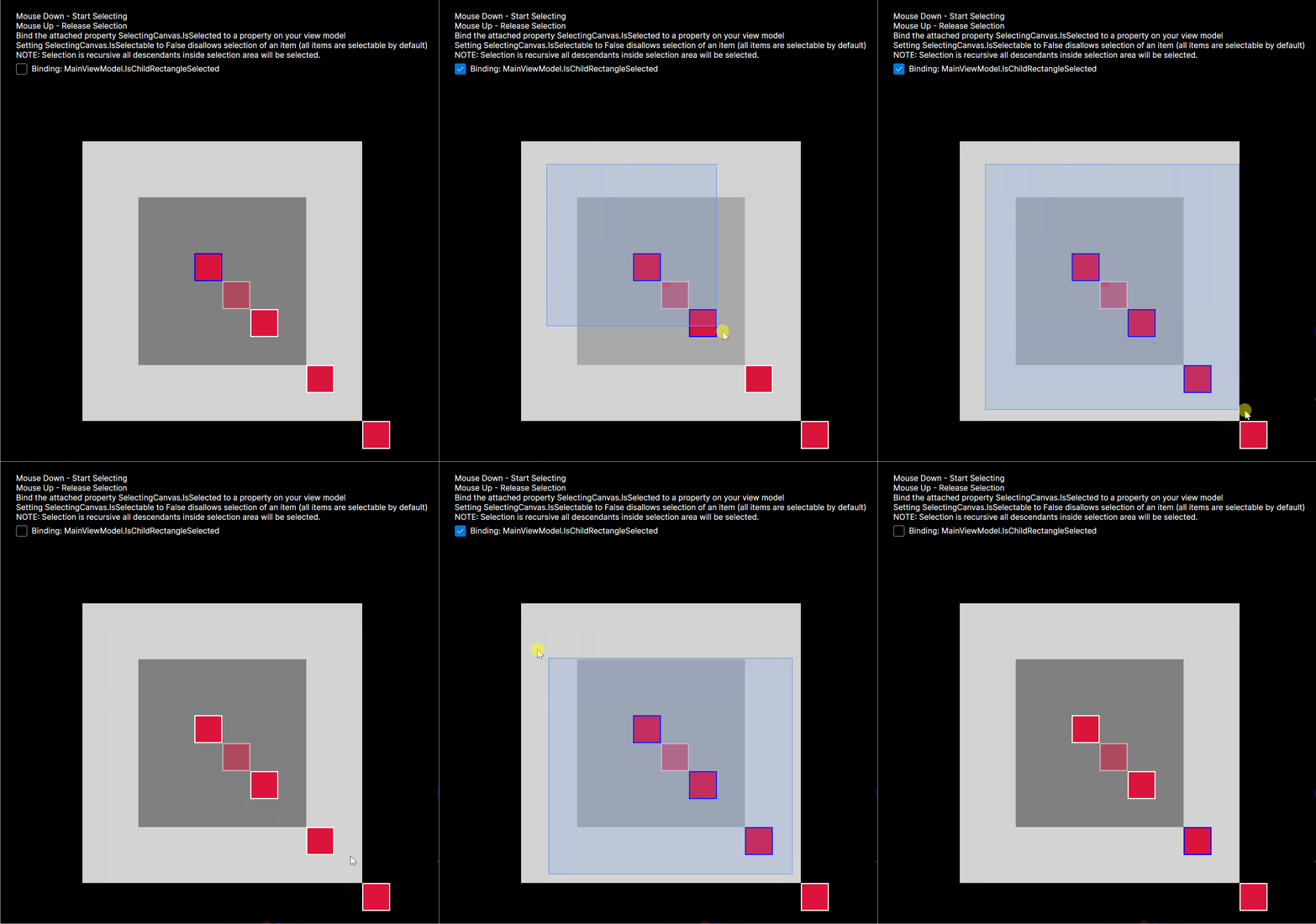
A control for visually selecting descendant controls via a mouse drag selection box.
- Add
xmlns:fd="https://github.com/FlatlinerDOA"to your Xaml file - Define a
<fd:SelectingCanvas>control - Add any selectable children to your control, or use the
<fd:SelectingCanvas>in an<ItemsPanelTemplate>if you intend to data-bind your selectable items - To visually show what is and isn't selected use a style selector for your elements such as the following:
  <Style Selector="Rectangle[(fd|SelectingCanvas.IsSelectable)=False]">
      <Setter Property="Opacity" Value="0.5" />
    </Style>
    <Style Selector="Rectangle[(fd|SelectingCanvas.IsSelected)=True]">
      <Setter Property="Stroke" Value="Blue" />
    </Style>
Example
SelectingCanvasDemo.axaml
<UserControl xmlns="https://github.com/avaloniaui"
             xmlns:x="http://schemas.microsoft.com/winfx/2006/xaml"
             xmlns:d="http://schemas.microsoft.com/expression/blend/2008"
             xmlns:mc="http://schemas.openxmlformats.org/markup-compatibility/2006"
             mc:Ignorable="d" d:DesignWidth="800" d:DesignHeight="1024"
             xmlns:fd="https://github.com/FlatlinerDOA"
             xmlns:vm="using:FlatlinerDOA.Controls.Demo"
             x:DataType="vm:MainViewModel"
             x:Class="FlatlinerDOA.Controls.Demo.SelectingCanvasDemo">
  <UserControl.Styles>
    <Style Selector="Canvas">
      <Setter Property="Background" Value="Gray" />
    </Style>
    <Style Selector="Canvas[(fd|SelectingCanvas.IsSelected)=True]">
      <Setter Property="Background" Value="DarkGray" />
    </Style>
    <Style Selector="Rectangle">
      <Setter Property="Fill" Value="Crimson" />
      <Setter Property="Stroke" Value="White" />
      <Setter Property="StrokeThickness" Value="2" />
    </Style>
    <Style Selector="Rectangle[(fd|SelectingCanvas.IsSelectable)=False]">
      <Setter Property="Opacity" Value="0.5" />
    </Style>
    <Style Selector="Rectangle[(fd|SelectingCanvas.IsSelected)=True]">
      <Setter Property="Stroke" Value="Blue" />
    </Style>
  </UserControl.Styles>
  <Grid RowDefinitions="Auto,*">
    <StackPanel Orientation="Vertical"
                Margin="40"
                HorizontalAlignment="Center" Grid.Row="0" Grid.Column="1">
      <TextBlock Text="Mouse Down - Start Selecting"/>
      <TextBlock Text="Mouse Up - Release Selection"/>
      <TextBlock Text="Bind the attached property SelectingCanvas.IsSelected to a property on your view model" />
      <TextBlock Text="Setting SelectingCanvas.IsSelectable to False disallows selection of an item (all items are selectable by default)" TextWrapping="Wrap"/>
      <TextBlock Text="NOTE: Selection is recursive all descendants inside selection area will be selected." TextWrapping="Wrap"/>
      <CheckBox IsChecked="{Binding IsChildRectangleSelected}">Binding: MainViewModel.IsChildRectangleSelected</CheckBox>
    </StackPanel>
    <fd:SelectingCanvas
      Grid.Row="1"
      Background="LightGray"
      Width="500" Height="500"
      SelectionFill="#336495ed"
      SelectionStroke="CornflowerBlue"
      SelectionStrokeThickness="1">

      <Canvas Canvas.Left="100" Canvas.Top="100" Width="300" Height="300">

        <Rectangle fd:SelectingCanvas.IsSelected="True" Canvas.Left="100" Canvas.Top="100" Width="50" Height="50" />

        <Rectangle fd:SelectingCanvas.IsSelectable="False" Canvas.Left="150" Canvas.Top="150" Width="50" Height="50" />

        <Rectangle fd:SelectingCanvas.IsSelected="{Binding IsChildRectangleSelected}" Canvas.Left="200" Canvas.Top="200" Width="50" Height="50" />
        <Rectangle Canvas.Left="300" Canvas.Top="300" Width="50" Height="50" />

        <Rectangle Canvas.Left="400" Canvas.Top="400" Width="50" Height="50" />
      </Canvas>
    </fd:SelectingCanvas>
  </Grid>
</UserControl>
InkCanvas
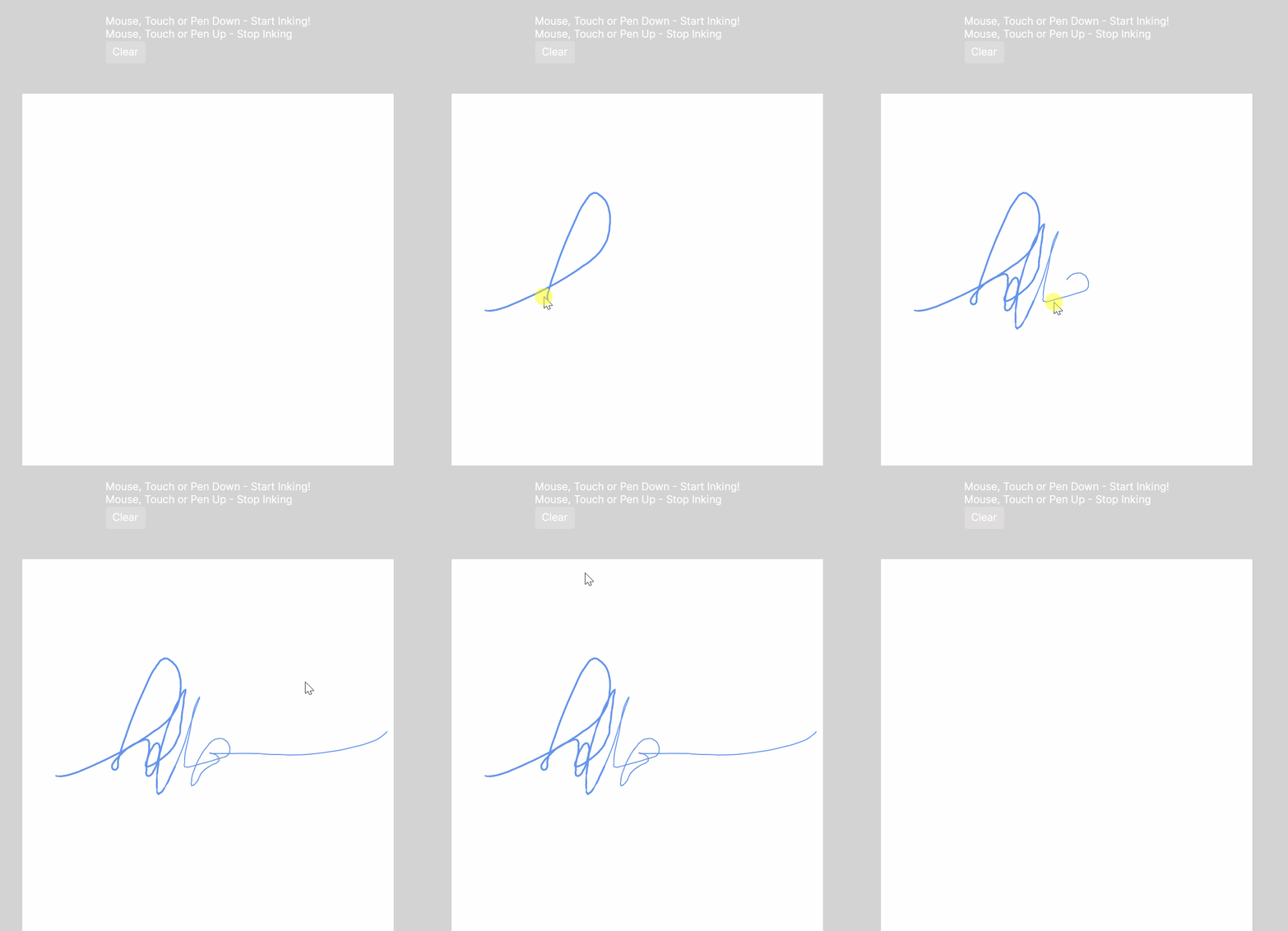
A natural feeling pen experience, useful for collecting signatures or as a nice drawing tool.
- Add
xmlns:fd="https://github.com/FlatlinerDOA"to your Xaml file - Define a
<fd:InkCanvas>control - To clear currently you must currently call the
Children.Clear(), I hope to improve this in future. - Not supported yet, exporting of path data or the canvas as an image (PR's welcome).
VirtualizingWrapPanel
A virtualizing layout control for laying out a series of tiles of uniform width horizontally or uniform height vertically.
This is a work in progress.
License
SelectingCanvas is licensed under the MIT license.
| Product | Versions Compatible and additional computed target framework versions. |
|---|---|
| .NET | net8.0 is compatible. net8.0-android was computed. net8.0-browser was computed. net8.0-ios was computed. net8.0-maccatalyst was computed. net8.0-macos was computed. net8.0-tvos was computed. net8.0-windows was computed. net9.0 was computed. net9.0-android was computed. net9.0-browser was computed. net9.0-ios was computed. net9.0-maccatalyst was computed. net9.0-macos was computed. net9.0-tvos was computed. net9.0-windows was computed. net10.0 was computed. net10.0-android was computed. net10.0-browser was computed. net10.0-ios was computed. net10.0-maccatalyst was computed. net10.0-macos was computed. net10.0-tvos was computed. net10.0-windows was computed. |
Compatible target framework(s)
Included target framework(s) (in package)
Learn more about Target Frameworks and .NET Standard.
-
net8.0
- Avalonia (>= 11.0.10)
- Avalonia.Controls.ItemsRepeater (>= 11.0.10)
NuGet packages
This package is not used by any NuGet packages.
GitHub repositories
This package is not used by any popular GitHub repositories.