Our.Umbraco.GitHubIssues
1.0.0
dotnet add package Our.Umbraco.GitHubIssues --version 1.0.0
NuGet\Install-Package Our.Umbraco.GitHubIssues -Version 1.0.0
<PackageReference Include="Our.Umbraco.GitHubIssues" Version="1.0.0" />
<PackageVersion Include="Our.Umbraco.GitHubIssues" Version="1.0.0" />
<PackageReference Include="Our.Umbraco.GitHubIssues" />
paket add Our.Umbraco.GitHubIssues --version 1.0.0
#r "nuget: Our.Umbraco.GitHubIssues, 1.0.0"
#:package Our.Umbraco.GitHubIssues@1.0.0
#addin nuget:?package=Our.Umbraco.GitHubIssues&version=1.0.0
#tool nuget:?package=Our.Umbraco.GitHubIssues&version=1.0.0
Our.Umbraco.GitHubIssues


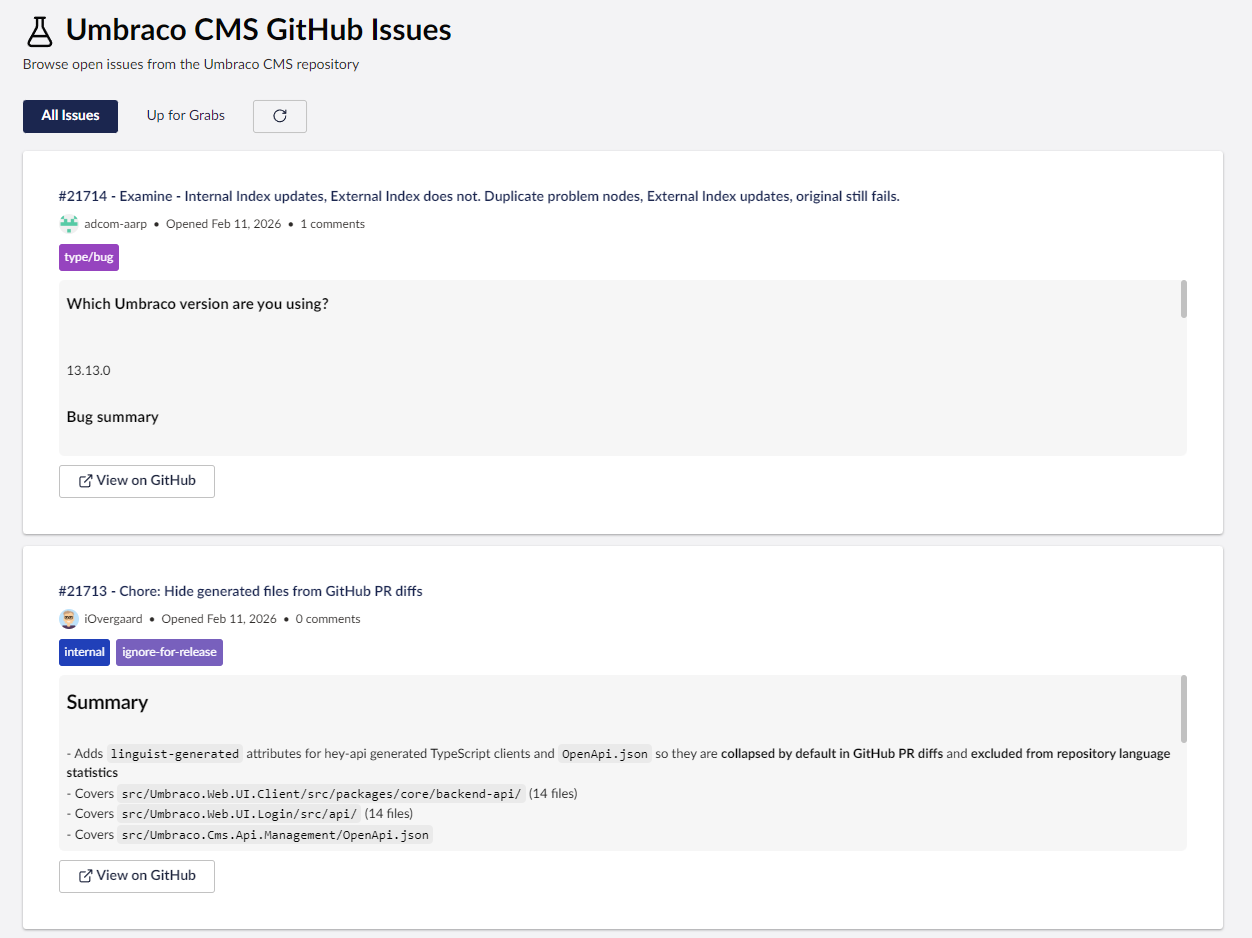
Our.Umbraco.GitHubIssues is a small Umbraco package that brings open GitHub issues from the Umbraco project right into your backoffice.
It might not change your life, and you probably don’t need it… but hey, it’s kind of nice to have everything in one place, right?
Features
- Displays open Umbraco GitHub issues in your backoffice.
- Click on an issue to open it directly on GitHub.
- Keeps you up-to-date without leaving Umbraco.
- All accessible under Settings → GitHub Issues.
- No complicated setup, just install and go.
Installation
You can install via NuGet:
Install-Package Our.Umbraco.GitHubIssues
Or grab it from the NuGet Gallery.
After installation, a GitHub Issues dashboard will appear in the Settings section of your Umbraco backoffice.
Screenshot
Here’s a quick look at how it appears in the Umbraco backoffice:
Usage
- Navigate to Settings → GitHub Issues in your Umbraco backoffice.
- View the list of open issues from the Umbraco GitHub repository.
- Click any issue to jump directly to GitHub for more details.
It’s simple, it’s handy, and it’s there when you want it.
Configuration
No configuration needed. The package fetches issues directly from GitHub automatically and refreshes itself.
Community Love ❤️
This package exists because the Umbraco community rocks! 🌟
If you enjoy using Our.Umbraco.GitHubIssues:
- Give it a ⭐ on GitHub
- Share it with fellow Umbraco developers
- Send feedback or open issues if you have ideas for improvements
Let’s keep building and supporting each other — one dashboard at a time!
License
This project is licensed under the MIT License.
So yeah, it’s not essential… but sometimes it’s nice to keep everything in one Umbraco installation. Just saying.
| Product | Versions Compatible and additional computed target framework versions. |
|---|---|
| .NET | net10.0 is compatible. net10.0-android was computed. net10.0-browser was computed. net10.0-ios was computed. net10.0-maccatalyst was computed. net10.0-macos was computed. net10.0-tvos was computed. net10.0-windows was computed. |
-
net10.0
- Umbraco.Cms.Api.Common (>= 17.1.0)
- Umbraco.Cms.Api.Management (>= 17.1.0)
- Umbraco.Cms.Web.Common (>= 17.1.0)
- Umbraco.Cms.Web.Website (>= 17.1.0)
NuGet packages
This package is not used by any NuGet packages.
GitHub repositories
This package is not used by any popular GitHub repositories.
| Version | Downloads | Last Updated |
|---|---|---|
| 1.0.0 | 108 | 2/12/2026 |