Parlot.Explorer
2.2.1
dotnet tool install --global Parlot.Explorer --version 2.2.1
dotnet new tool-manifest
dotnet tool install --local Parlot.Explorer --version 2.2.1
#tool dotnet:?package=Parlot.Explorer&version=2.2.1
nuke :add-package Parlot.Explorer --version 2.2.1
Parlot Explorer
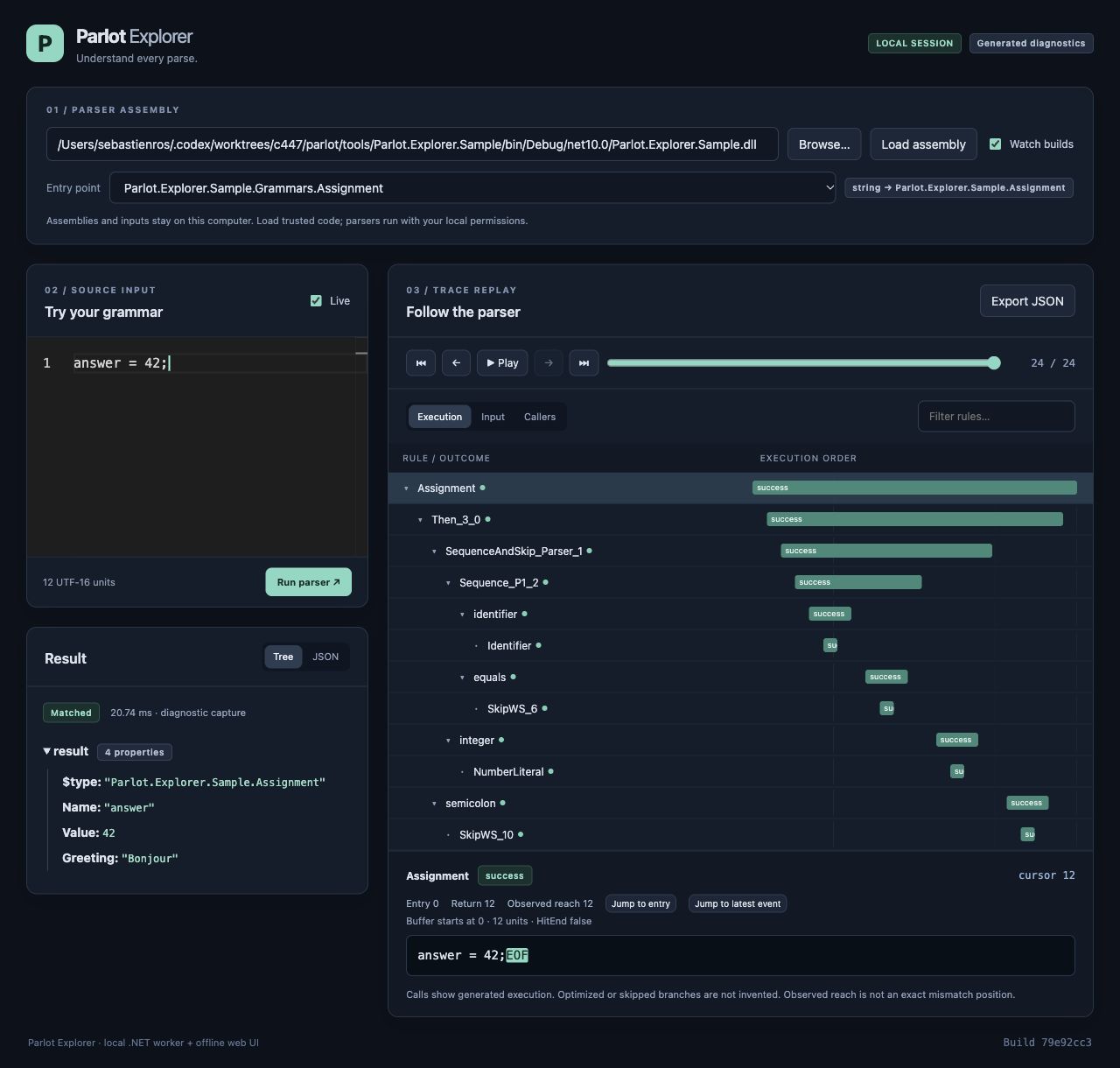
Parlot Explorer is a local .NET tool for understanding how a source-generated Parlot parser processes its input. Edit text in Monaco, replay the parse one event at a time, and follow named rules through nested calls, failures, and backtracking. Inspect the buffer at each step and view the returned object as a tree or JSON. Assemblies and input stay on your computer; the UI works offline.
Install and run
The tool requires the .NET 10 and ASP.NET Core 10 runtimes. The .NET 10 SDK includes both. For a published package, install it as a global tool:
dotnet tool install --global Parlot.Explorer --prerelease
parlot-explorer /path/to/Your.Parsers.dll
You can also start parlot-explorer without a path and browse for an assembly in the UI.
Keep its dependencies beside the assembly, including culture and native-runtime subdirectories.
Private diagnostic entry points are discovered too. Enable Watch builds to reload the assembly
when you rebuild it.
The command opens a standalone desktop window on Windows, macOS, and Linux. Closing it stops the server and active parser workers; Ctrl+C also closes the window. Native shells are included for Windows x64, macOS Intel/Apple Silicon, and Linux x64. Windows needs WebView2 Evergreen; Linux needs WebKitGTK 4.1 and a graphical desktop. macOS uses the system WebKit framework.
Use --browser explicitly to open your browser, or --no-browser to run only the local server and
print its URL. In these modes, keep the terminal running and press Ctrl+C to end the session.
A missing or unsupported native shell reports an error instead of silently changing launch mode.
For a development build that has not been published, see the build and local-package instructions. Node.js, Rust, and the platform's native build prerequisites are needed to build from source, not to run an installed package. The shared Tauri shell uses the existing offline UI and local .NET backend.
Enable diagnostics in your parser
Use a version of Parlot.SourceGenerator that supports the Diagnostics option. Add it to the factory
attribute in your build-only .parlot.cs file, then rebuild the assembly:
using Parlot.Fluent;
using Parlot.SourceGenerator;
using static Parlot.Fluent.Parsers;

public static partial class NumberParser
{
    [GenerateParser(nameof(TryParse), Diagnostics = true)]
    private static Parser<long> Build() => Terms.Integer().Named("integer").Eof();
}
Declare the matching entry point in an ordinary .cs file:
public static partial class NumberParser
{
    public static partial bool TryParse(string text, out long value);
}
The consuming application needs no reference to the explorer. Diagnostics are opt-in: generated
parsers without the option contain no tracing calls. Use conditional compilation if only debug builds
should include diagnostics. Both string and TextReader entry points are supported; application
configuration parameters can be supplied through the UI's configuration JSON field.
Explore a parse
- Edit and run: select an entry point and change the input. Live mode captures a new parse after edits; disable it to run manually.
- Replay: use first, previous, play/pause, next, last, or the event slider. Replay uses recorded events and does not rerun parser callbacks.
- Navigate: Execution shows nested calls in event order, Input shows observed input reach, and
Callers follows the selected call back toward the root.
Named()gives generated helpers readable labels. - Inspect: select a call to see its outcome, entry/return positions, observed reach, cursor resets, and buffer window. Inspect the returned object as a tree or JSON, or export the capture as JSON.
- Hide noise: use Include names or enter comma-separated Exclude patterns such as
SkipWS*, Then_*, Sequence_*. Plain text matches part of a name;*matches any text and?matches one character in a whole-name pattern. Matching ignores case. Hidden parents' children remain visible, and filtering preserves all replay events. Clear filters restores the unfiltered view.
The trace statistics show Parse duration in milliseconds for the recorded invocation, including diagnostic instrumentation and JIT compilation. It excludes worker startup and result inspection; the diagnostic capture duration shown with the result also includes result inspection. Filtering and replaying leave these timings unchanged. This is not a benchmark of an uninstrumented parser.
Scope and limits
The explorer traces source-generated parsers, not runtime Parser<T> graphs. It displays the actual
generated calls: optimized or skipped grammar branches are not invented. Observed reach is the furthest
cursor offset seen at instrumented boundaries, not an exact mismatch location. Offsets use UTF-16 units.
Inputs are limited to 128,000 UTF-16 units. Recording retains up to 20,000 events and 2,000,000 units of buffer text. Parsing continues after recording stops, and open calls are marked incomplete. The call tree virtualizes rows so every retained call is reachable. Results are bounded snapshots, and workers have a ten-second deadline. See the full guide for dependency loading, snapshot limits, examples, and stress-test measurements.
Load only trusted assemblies: parser code runs locally with your user permissions. Worker processes provide cleanup and a deadline, not a security sandbox.
| Product | Versions Compatible and additional computed target framework versions. |
|---|---|
| .NET | net10.0 is compatible. net10.0-android was computed. net10.0-browser was computed. net10.0-ios was computed. net10.0-maccatalyst was computed. net10.0-macos was computed. net10.0-tvos was computed. net10.0-windows was computed. |
This package has no dependencies.