Seq.App.TelegramAlerts
1.0.2
dotnet add package Seq.App.TelegramAlerts --version 1.0.2
NuGet\Install-Package Seq.App.TelegramAlerts -Version 1.0.2
<PackageReference Include="Seq.App.TelegramAlerts" Version="1.0.2" />
<PackageVersion Include="Seq.App.TelegramAlerts" Version="1.0.2" />
<PackageReference Include="Seq.App.TelegramAlerts" />
paket add Seq.App.TelegramAlerts --version 1.0.2
#r "nuget: Seq.App.TelegramAlerts, 1.0.2"
#:package Seq.App.TelegramAlerts@1.0.2
#addin nuget:?package=Seq.App.TelegramAlerts&version=1.0.2
#tool nuget:?package=Seq.App.TelegramAlerts&version=1.0.2
Seq.App.TelegramAlerts


A Seq app for sending alerts to Telegram via the Telegram Bot API. This app allows you to forward log events or notifications from Seq directly to a Telegram chat or group, making it easy to receive real-time alerts on your devices.
This project is inspired by and references code from Seq.App.Telegram. Initially, I used that project, but it did not support Seq's standard template syntax and could only access event data from a manually mapped dictionary. Therefore, I created this project, which uses the official Seq.Syntax logic for template processing.
Features
- Send log events from Seq to Telegram chats or groups
- Template syntax support
- Customizable message formatting
- Socks5 proxy support
- Throttling support to prevent alert spam
- Easy configuration via the Seq UI
Template Syntax Support
This app supports most of the basic template syntax for formatting messages sent to Telegram.
Access Seq event properties directly in your message template.
Standard properties:
Level,RenderedMessage,@Timestamp,Properties, etc.
Short forms:
@l,@x,@t,@i,@p,@mt, etc.
Custom properties:
- Example:
{Application},{SourceContext},{User}, etc.
These properties such as
{Application},{SourceContext},{MachineName}, etc. must be enriched in your logger configuration to be available in the event data.- Example:
Scalar functions:
- Functions like
Substring()are supported (others not fully tested).
- Functions like
For more details, see: https://datalust.co/docs/template-syntax
Getting Started
Prerequisites
Seq instance
A Telegram bot token (create via @BotFather)
The chat ID of your target Telegram chat or group.
Add your bot to your group. Send a message. Then invite @ShowJsonBot or @RawDataBot into your chat and it will send you a message. Copy id value from chat section including leading minus. chat section example:
  "chat": {
  "title": "Your telegram Group Name",
  	"type": "group",
  	"all_members_are_administrators": true,
  	"id": -123456789	// Use this ID to target the group or topic
  }
Installation
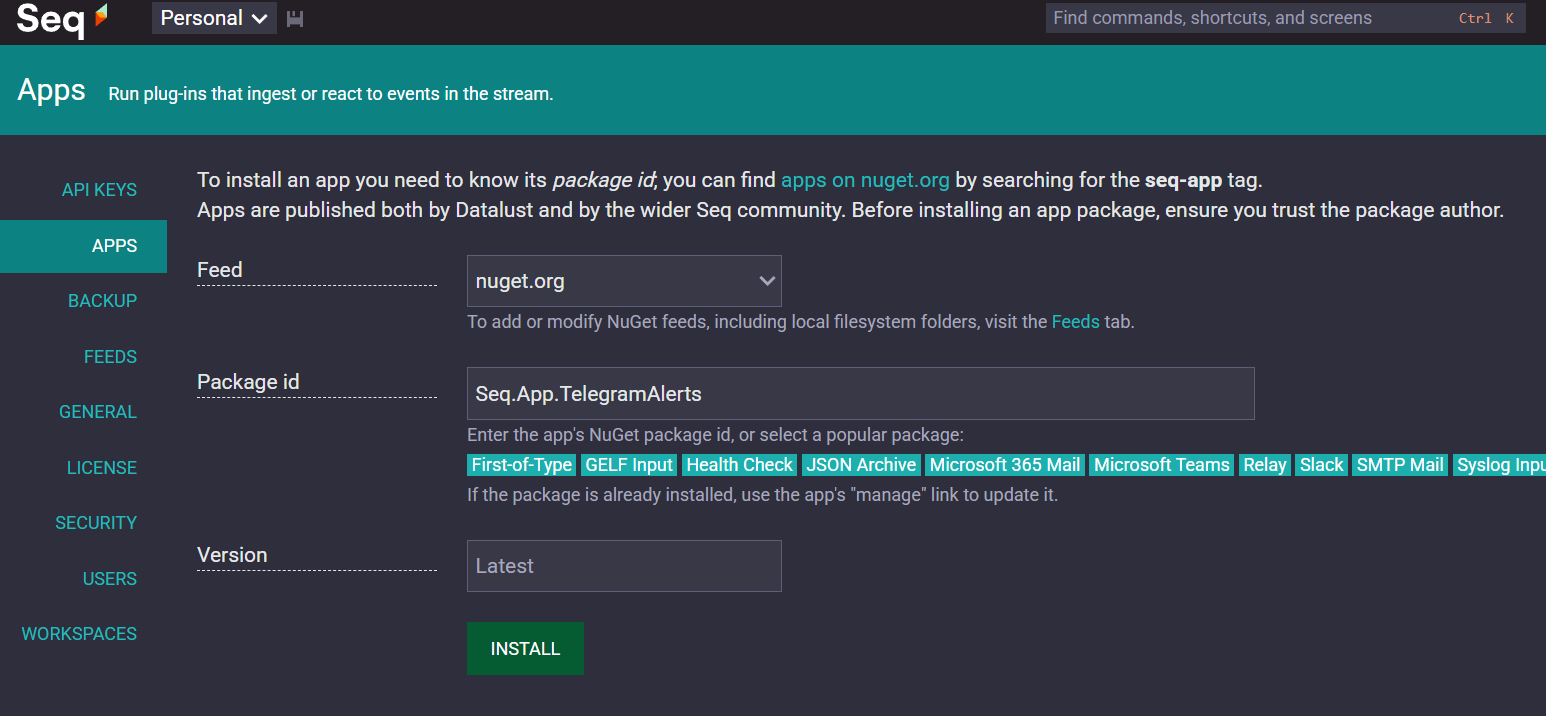
- In Seq, go to Settings > Apps > Install from NuGet and search for
Seq.App.TelegramAlerts. - Or build the project and use the generated
.nupkgfile inbin/Release.
Configuration
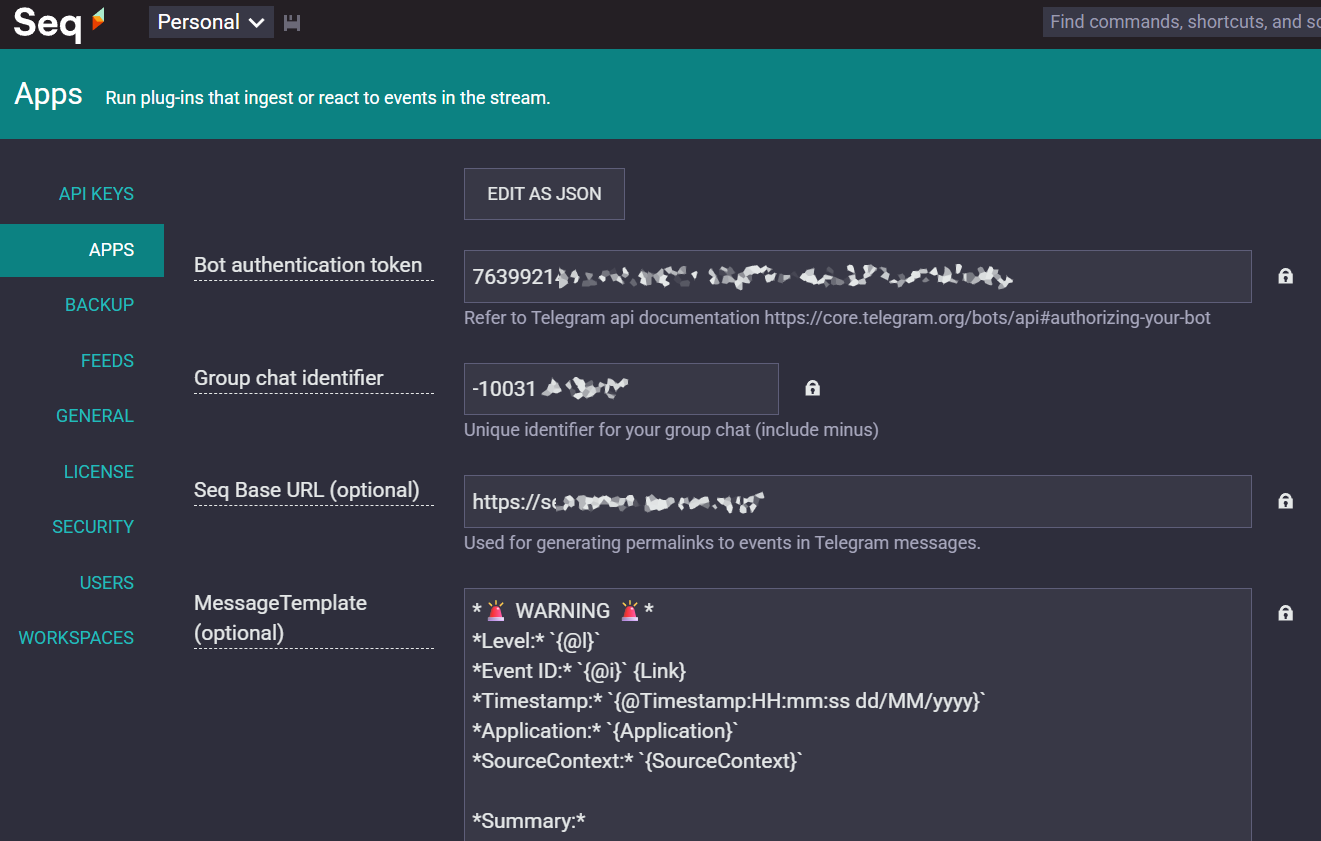
- Bot Token: The token provided by @BotFather.
- Chat ID: The ID of the chat or group to receive alerts.
- Message Template: (Optional) Customize the message format.
- Throttling: (Optional) Configure to limit alert frequency.
How to Use
After installing the app into Seq, follow these steps:
- Add a new instance: In Seq
(settings/apps), click the Add instance button to create a new instance of the Telegram Alerts app. - Fill in the parameters: Enter the required information as guided (Bot Token, Chat ID, etc.) and save the instance. Make sure your bot has been added to your group.
Example Message Template for Error Notifications
You can use the following message template as a reference for error notifications:
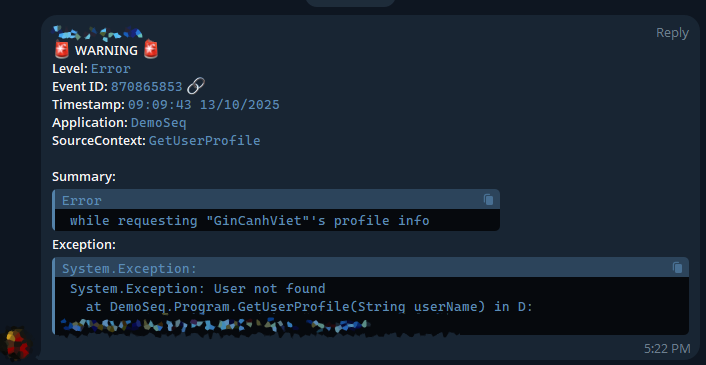
*🚨 WARNING 🚨*
*Level:* `{@l}`
*Event ID:* `{@i}` {Link}
*Timestamp:* `{@Timestamp:HH:mm:ss dd/MM/yyyy}`
*Application:* `{Application}`
*SourceContext:* `{SourceContext}`

*Summary:*
```{RenderedMessage}```
*Exception:*
```{Substring(@x, 0, 150)}...```
Note: The
{Link}property is a custom property provided by this app. It generates a direct link to the event in Seq and is displayed in Telegram as a 🔗 icon.You can also create your own custom properties by downloading the source code and modifying the
GetDynamicPropertiesmethod in theMessageFormatterclass.
License
MIT
Author
GinCanhViet
| Product | Versions Compatible and additional computed target framework versions. |
|---|---|
| .NET | net8.0 is compatible. net8.0-android was computed. net8.0-browser was computed. net8.0-ios was computed. net8.0-maccatalyst was computed. net8.0-macos was computed. net8.0-tvos was computed. net8.0-windows was computed. net9.0 was computed. net9.0-android was computed. net9.0-browser was computed. net9.0-ios was computed. net9.0-maccatalyst was computed. net9.0-macos was computed. net9.0-tvos was computed. net9.0-windows was computed. net10.0 was computed. net10.0-android was computed. net10.0-browser was computed. net10.0-ios was computed. net10.0-maccatalyst was computed. net10.0-macos was computed. net10.0-tvos was computed. net10.0-windows was computed. |
-
net8.0
- HttpToSocks5Proxy (>= 1.4.0)
- Seq.Apps (>= 2023.4.0)
- Seq.Syntax (>= 1.1.0)
- Serilog.Formatting.Compact (>= 1.1.0)
- Telegram.Bot (>= 22.7.2)
NuGet packages
This package is not used by any NuGet packages.
GitHub repositories
This package is not used by any popular GitHub repositories.