SujanSolutionDeployer 1.0.12
dotnet add package SujanSolutionDeployer --version 1.0.12
NuGet\Install-Package SujanSolutionDeployer -Version 1.0.12
<PackageReference Include="SujanSolutionDeployer" Version="1.0.12" />
<PackageVersion Include="SujanSolutionDeployer" Version="1.0.12" />
<PackageReference Include="SujanSolutionDeployer" />
paket add SujanSolutionDeployer --version 1.0.12
#r "nuget: SujanSolutionDeployer, 1.0.12"
#:package SujanSolutionDeployer@1.0.12
#addin nuget:?package=SujanSolutionDeployer&version=1.0.12
#tool nuget:?package=SujanSolutionDeployer&version=1.0.12
Sujan Solution Deployer
Power Platform Solution Deployment Tool


A comprehensive solution deployment and management tool for Microsoft Power Platform that streamlines the process of deploying solutions across multiple environments with advanced features like version control, automated backups, and rollback capabilities.
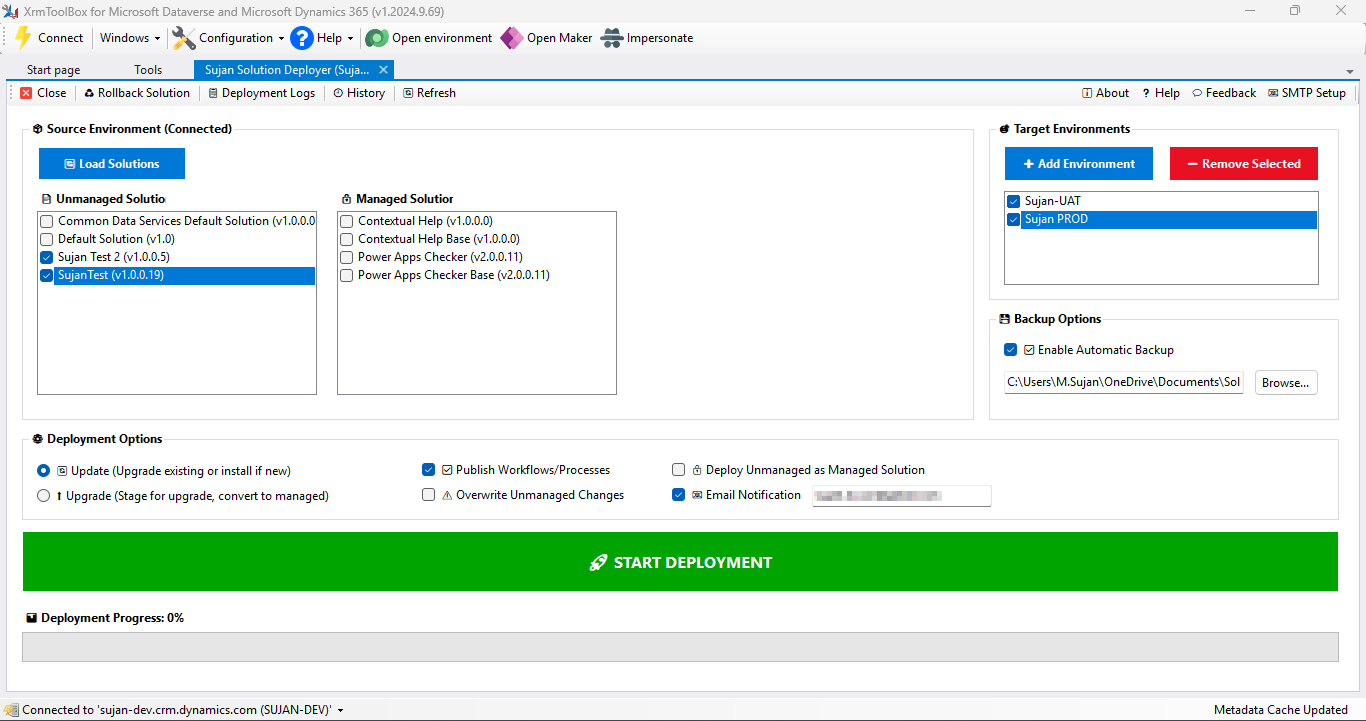
🚀 Features
Core Functionality
- Multi-Environment Solution Loading: Load both managed and unmanaged solutions from connected Power Platform environments
- Batch Deployment: Deploy single or multiple solutions to one or more target environments simultaneously
- Target Environment Management: Easily add, remove, and manage multiple target environments
Version Control
- Intelligent Version Increment: Support for both manual and automatic version incrementation
- Source Synchronization: Update solution versions in the source environment automatically
- Version History Tracking: Maintain complete version history for audit and compliance
Deployment Management
- Real-Time Monitoring: View live deployment logs and progress indicators
- Deployment History: Access complete deployment history with CSV export capability
- Configurable Options: Customize deployment settings per environment
Backup & Recovery
- Automatic Solution Backup: Create backups before each deployment
- Rollback/Downgrade: Safely revert to previous solution versions when needed
- Point-in-Time Recovery: Restore solutions to any previous state
Notifications
- Email Notifications: Automated deployment status notifications
- SMTP Configuration: Built-in SMTP setup with diagnostic tools
- Custom Alerts: Configure notification triggers and recipients
📋 Prerequisites
- .NET 4.6 or higher
- Microsoft Power Platform environment access
- Valid Power Platform credentials with appropriate permissions
- SMTP server details (optional, for email notifications)
🔧 Installation
Via NuGet Package Manager
Install-Package SujanSolutionDeployer --version 1.0.12
Via .NET CLI
dotnet add package SujanSolutionDeployer --version 1.0.12
Via Package Manager Console
PM> NuGet\Install-Package SujanSolutionDeployer -Version 1.0.12
🎯 Quick Start
1. Connect to Your Environment
var connectionString = "AuthType=OAuth;Url=https://yourorg.crm.dynamics.com;...";
var solutionManager = new SolutionDeploymentTool(connectionString);
2. Load Solutions
// Load all solutions from the connected environment
var solutions = await solutionManager.LoadSolutionsAsync();

// Filter managed or unmanaged solutions
var managedSolutions = solutions.Where(s => s.IsManaged).ToList();
3. Configure Target Environments
// Add target environment
solutionManager.AddTargetEnvironment(new TargetEnvironment
{
    Name = "Production",
    Url = "https://prod.crm.dynamics.com",
    Credentials = credentials
});
4. Deploy Solutions
var deploymentOptions = new DeploymentOptions
{
    EnableEmailNotification = true,
    AutoBackup = true,
    VersionIncrement = VersionIncrementType.Patch
};

await solutionManager.DeployAsync(solutions, targetEnvironments, deploymentOptions);
📖 Detailed Usage
Version Management
Automatic Version Increment
var options = new DeploymentOptions
{
    VersionIncrement = VersionIncrementType.Automatic,
    VersionIncrementRule = IncrementRule.Patch // Major, Minor, Patch, Build
};
Manual Version Increment
await solutionManager.UpdateSolutionVersionAsync(
    solutionName: "MySolution",
    newVersion: "1.2.3.4"
);
Backup Configuration
var backupOptions = new BackupOptions
{
    AutoBackup = true,
    BackupLocation = @"C:\Backups\Solutions",
    RetentionDays = 30
};

solutionManager.ConfigureBackup(backupOptions);
Email Notifications
var smtpConfig = new SmtpConfiguration
{
    Host = "smtp.gmail.com",
    Port = 587,
    EnableSsl = true,
    Username = "your-email@domain.com",
    Password = "your-password",
    FromAddress = "noreply@domain.com"
};

solutionManager.ConfigureSmtp(smtpConfig);

// Test SMTP configuration
var diagnosticResult = await solutionManager.TestSmtpAsync();
Rollback Solutions
// List available backups
var backups = await solutionManager.GetBackupsAsync("MySolution");

// Rollback to specific version
await solutionManager.RollbackAsync(
    solutionName: "MySolution",
    targetVersion: "1.2.0.0",
    targetEnvironment: productionEnv
);
Deployment History
// Get deployment history
var history = await solutionManager.GetDeploymentHistoryAsync(
    startDate: DateTime.Now.AddMonths(-1),
    endDate: DateTime.Now
);

// Export to CSV
await solutionManager.ExportHistoryToCsvAsync(
    history,
    outputPath: @"C:\Reports\deployment_history.csv"
);
🔍 Monitoring & Logging
The tool provides real-time deployment monitoring:
solutionManager.OnDeploymentProgress += (sender, args) =>
{
    Console.WriteLine($"Progress: {args.PercentComplete}%");
    Console.WriteLine($"Current Step: {args.CurrentStep}");
    Console.WriteLine($"Status: {args.Status}");
};

solutionManager.OnDeploymentLog += (sender, args) =>
{
    Console.WriteLine($"[{args.Timestamp}] {args.Level}: {args.Message}");
};
⚙️ Configuration
appsettings.json Example
{
  "PowerPlatform": {
    "SourceEnvironment": {
      "Url": "https://dev.crm.dynamics.com",
      "AuthType": "OAuth"
    },
    "DefaultDeploymentOptions": {
      "AutoBackup": true,
      "EmailNotification": true,
      "VersionIncrement": "Patch"
    }
  },
  "Smtp": {
    "Host": "smtp.gmail.com",
    "Port": 587,
    "EnableSsl": true
  },
  "Backup": {
    "Location": "./Backups",
    "RetentionDays": 30
  }
}
🤝 Contributing
Contributions are welcome! Please feel free to submit a Pull Request. For major changes, please open an issue first to discuss what you would like to change.
- Fork the repository
- Create your feature branch (
git checkout -b feature/AmazingFeature) - Commit your changes (
git commit -m 'Add some AmazingFeature') - Push to the branch (
git push origin feature/AmazingFeature) - Open a Pull Request
📝 License
This project is licensed under the GPL-3.0 License - see the LICENSE file for details.
🐛 Known Issues
- Large solution deployments (>100MB) may require increased timeout settings
- Email notifications require proper SMTP server configuration
📞 Support
- Issues: GitHub Issues
- Discussions: GitHub Discussions
- Email: murugeshsujan22@gmail.com
🙏 Acknowledgments
- Microsoft Power Platform team for the excellent SDK
📊 Roadmap
- Support for Power Platform Pipelines integration
- Advanced solution dependency analysis
- Multi-tenant deployment support
- Integration with Azure DevOps
- Enhanced reporting and analytics dashboard
Made with ❤️ for the Power Platform Community
| Product | Versions Compatible and additional computed target framework versions. |
|---|---|
| .NET Framework | net48 is compatible. net481 was computed. |
-
.NETFramework 4.8
- XrmToolBox (>= 1.2025.7.71)
NuGet packages
This package is not used by any NuGet packages.
GitHub repositories
This package is not used by any popular GitHub repositories.
| Version | Downloads | Last Updated |
|---|---|---|
| 1.0.12 | 1,142 | 12/1/2025 |
| 1.0.11 | 535 | 12/1/2025 |
| 1.0.10 | 523 | 12/1/2025 |
| 1.0.9 | 526 | 12/1/2025 |
| 1.0.8 | 534 | 12/1/2025 |
| 1.0.7 | 455 | 12/1/2025 |
| 1.0.6 | 225 | 11/27/2025 |
| 1.0.5 | 219 | 11/27/2025 |
| 1.0.4 | 221 | 11/27/2025 |
| 1.0.3 | 212 | 11/27/2025 |
| 1.0.2 | 220 | 11/27/2025 |
| 1.0.1 | 216 | 11/27/2025 |
| 1.0.0 | 218 | 11/27/2025 |
Version 1.0.12 (2025-12-01)
- Fixed missing SQLite dependencies that prevented the tool from loading in XrmToolBox
- Added required System.Data.SQLite.dll and native SQLite.Interop (x86/x64) files into the NuGet package
Version 1.0.11 (2025-12-01)
- Updated NuGet Assembly info for XrmToolBox compatibility
Version 1.0.10 (2025-12-01)
- Updated NuGet Assembly info for XrmToolBox compatibility
Version 1.0.9 (2025-12-01)
- Updated NuGet Assembly info for XrmToolBox compatibility
Version 1.0.8 (2025-12-01)
- Fixed NuGet package structure for XrmToolBox compatibility
- Changed dependency from XrmToolBoxPackage to XrmToolBox
- Updated target framework to net472 for proper plugin loading
Version 1.0.7 (2025-11-28)
- Fixed NuGet package target framework to match dependency group (net48)
Version 1.0.6 (2025-11-28)
- Fixed NuGet package structure for XrmToolBox compatibility (lib\net452\Plugins)
Version 1.0.5 (2025-11-28)
- Assembly info updated for NuGet package compliance
Version 1.0.4 (2025-11-28)
- Added embedded icon for better package visibility
Version 1.0.3 (2025-11-28)
- Added public icon for better package visibility
Version 1.0.2 (2025-11-27)
- Added public icon for better package visibility
Version 1.0.1 (2025-11-27)
- Added embedded icon for better package visibility
- Included README documentation in package
- Improved package metadata and presentation
Version 1.0.0 (2025-11-27)
- Initial release of Sujan Solution Deployer for XrmToolBox
- Deploy Dataverse/Dynamics 365 solutions with a user-friendly interface
- Automated rollback capabilities for failed deployments
- Email notifications for deployment status and results
- Comprehensive deployment history tracking
- Solution version management and comparison
- Support for managed and unmanaged solutions
- Batch deployment support for multiple solutions
- Pre-deployment validation and dependency checking
- Integration with XrmToolBox plugin ecosystem
- Built on .NET Framework 4.8 with latest Microsoft CRM SDK