Swaggregate 0.2.5
dotnet add package Swaggregate --version 0.2.5
NuGet\Install-Package Swaggregate -Version 0.2.5
<PackageReference Include="Swaggregate" Version="0.2.5" />
<PackageVersion Include="Swaggregate" Version="0.2.5" />
<PackageReference Include="Swaggregate" />
paket add Swaggregate --version 0.2.5
#r "nuget: Swaggregate, 0.2.5"
#:package Swaggregate@0.2.5
#addin nuget:?package=Swaggregate&version=0.2.5
#tool nuget:?package=Swaggregate&version=0.2.5
Swaggregate


Swaggregate is a zero-dependency ASP.NET Core middleware library that pulls together multiple Swagger / OpenAPI specification endpoints into a single, searchable documentation portal — served directly from your app with no extra infrastructure required.
Instead of telling developers "go find the right Swagger URL for each service," you give them one URL and they can browse, search, explore, and execute requests against every API across your entire platform from one place.
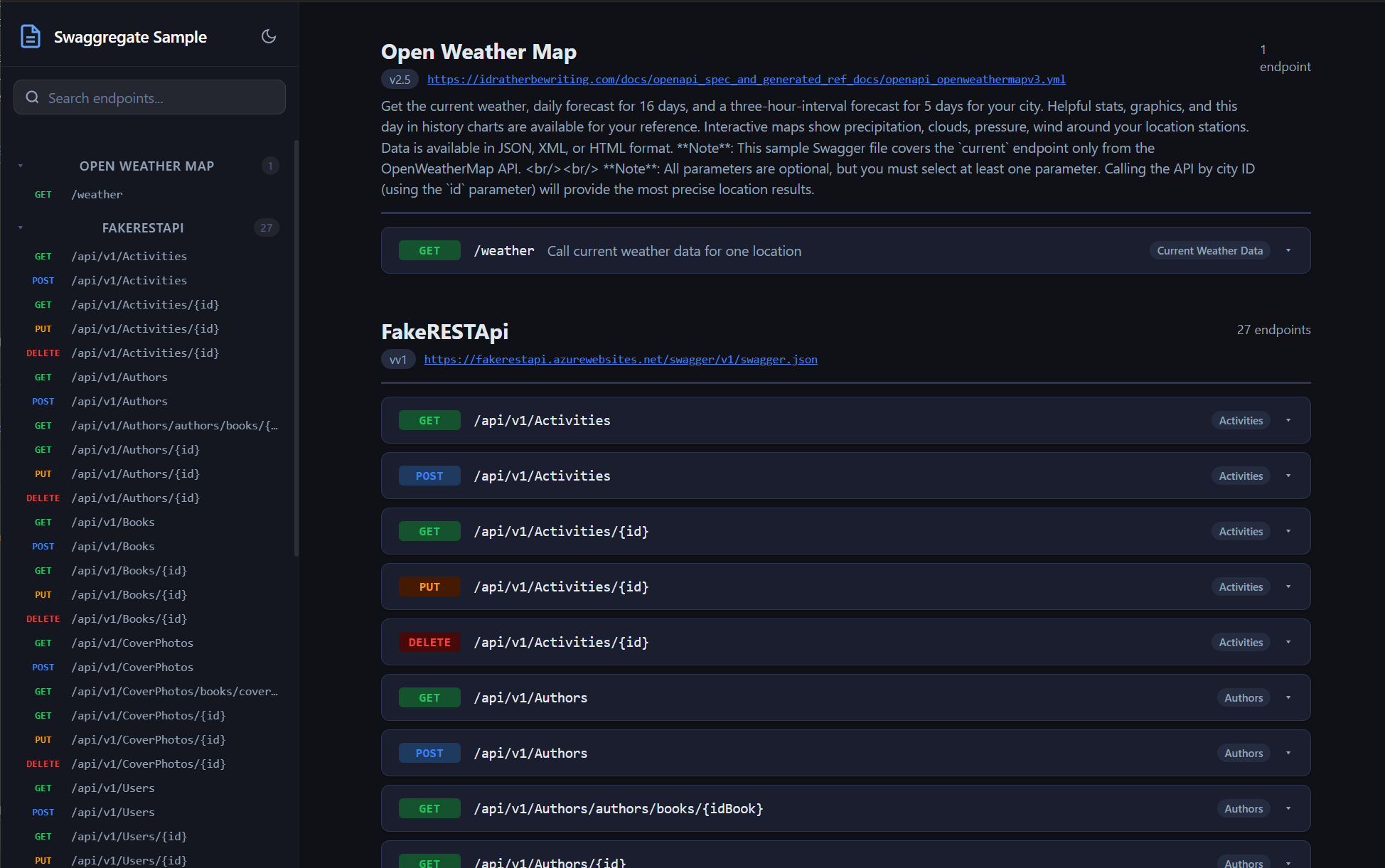
Features
- 📄 Aggregates multiple specs — point it at as many
swagger.jsonendpoints as you need (Swagger 2.0 and OpenAPI 3.x both supported) - 🔍 Full-text search — instantly filter endpoints by path, method, summary, description, or tags
- 🌓 Dark / Light mode — theme preference is persisted per-browser
- 📦 Self-contained — the portal UI (HTML, CSS, JS) is embedded as a resource inside the NuGet package; nothing to deploy separately
- ⚡ In-memory caching — fetched specs are cached to avoid hammering upstream services on every request (TTL is configurable)
- 🧩 Fluent configuration — set up entirely in
Program.cswith a simple options builder - 🏥 Graceful degradation — if a service's spec cannot be fetched, the portal shows a clear error for that service while the rest load normally
- 🛤️ Path prefix support — optionally rewrite paths from each spec so they match the actual gateway-level routes
How It Works
Browser → GET /api-docs/index.html
              ↳ SwaggerAggregatorMiddleware serves embedded index.html

Browser → GET /api-docs/specs
              ↳ SpecAggregator fetches each configured swagger.json in parallel
              ↳ Parses & normalises into a unified JSON model
              ↳ Returns AggregatedSpec as JSON (cached per TTL)

Browser renders the portal UI (app.js / styles.css also served from embedded resources)
Architecture
Swaggregate/
├── Extensions.cs                    # AddSwaggerAggregator() / UseSwaggerAggregator()
├── SwaggerAggregatorOptions.cs      # Configuration: title, route prefix, cache TTL, endpoints
├── SwaggerAggregatorEndpoint.cs     # Per-service: name, swagger.json URL, optional path prefix
├── Middleware/
│   └── SwaggerAggregatorMiddleware  # Routes /api-docs/*, serves embedded UI & /specs endpoint
├── Services/
│   ├── ISpecFetcher                 # Fetches a single swagger.json with caching
│   ├── SpecFetcher                  # Concrete implementation (HttpClient + IMemoryCache)
│   └── SpecAggregator               # Fetches all endpoints in parallel, normalises into model
├── Models/
│   ├── AggregatedSpec               # Root response: title, list of ServiceGroups, fetchedAt
│   ├── ServiceGroup                 # One service: name, version, description, endpoints[]
│   └── EndpointInfo                 # One operation: method, path, summary, parameters, etc.
└── EmbeddedUI/
    ├── index.html                   # Single-page portal shell
    ├── app.js                       # Vanilla JS: fetch /specs, render, search, theme
    └── styles.css                   # Dark/light theme with CSS custom properties
Requirements
- .NET 8.0, 9.0, or 10.0
- ASP.NET Core (included in the .NET SDK — no extra packages needed)
Installation
dotnet add package Swaggregate
Quick Start
1. Register the services in Program.cs:
builder.Services.AddSwaggerAggregator();
2. Add the middleware and configure your endpoints:
app.UseSwaggerAggregator(opt =>
{
    opt.Title = "My API Documentation";

    opt.AddEndpoint("Orders Service",   "https://orders.internal/swagger/v1/swagger.json");
    opt.AddEndpoint("Users Service",    "https://users.internal/swagger/v1/swagger.json");
    opt.AddEndpoint("Payments Service", "https://payments.internal/swagger/v1/swagger.json");
});
3. Navigate to /api-docs in your browser.
That's it. No Razor pages, no additional middleware, no static file hosting required.
Configuration
All options are set via SwaggerAggregatorOptions:
| Property | Type | Default | Description |
|---|---|---|---|
Title |
string |
"API Documentation" |
Heading shown in the portal header |
RoutePrefix |
string |
"api-docs" |
URL prefix where the portal is mounted |
CacheTtlMinutes |
int |
5 |
How long fetched specs are held in memory |
Endpoints |
List<...> |
[] |
Services to aggregate (see below) |
Adding Endpoints
opt.AddEndpoint(name: "My Service",
                url: "https://my-service/swagger/v1/swagger.json",
                pathPrefix: "/my-service");   // optional — prepended to every path
The pathPrefix is useful when your services sit behind an API gateway and the paths in the raw spec don't include the gateway prefix.
Full Example
app.UseSwaggerAggregator(opt =>
{
    opt.Title          = "Acme Platform APIs";
    opt.RoutePrefix    = "api-docs";
    opt.CacheTtlMinutes = 10;

    opt.AddEndpoint("Orders",     "https://orders.acme.internal/swagger/v1/swagger.json",   "/orders");
    opt.AddEndpoint("Inventory",  "https://inventory.acme.internal/swagger/v1/swagger.json", "/inventory");
    opt.AddEndpoint("Auth",       "https://auth.acme.internal/swagger/v1/swagger.json");
});
The /specs Endpoint
The portal UI calls GET /api-docs/specs to load data. You can also hit this endpoint directly if you want to consume the aggregated model in your own tooling:
{
  "title": "My API Documentation",
  "fetchedAt": "2025-04-02T18:00:00Z",
  "services": [
    {
      "name": "Orders Service",
      "version": "1.0",
      "description": "Manages customer orders",
      "sourceUrl": "https://orders.internal/swagger/v1/swagger.json",
      "fetchError": false,
      "endpoints": [
        {
          "method": "GET",
          "path": "/orders/{id}",
          "summary": "Get order by ID",
          "tags": ["Orders"],
          "parameters": [...],
          "responses": [...]
        }
      ]
    }
  ]
}
Sample Project
The Swaggregate.Sample project in this repository is a minimal ASP.NET Core host that demonstrates the library. To run it locally:
cd Swaggregate.Sample
dotnet run
# Open https://localhost:7080/api-docs
Update the endpoint URLs in Program.cs to point at your own services.
Publishing a New Version to NuGet
Releases are automated via GitHub Actions. To publish a new version:
- Update
<Version>inSwaggregate/Swaggregate.csproj - Commit and push to
main - Create and push a tag matching the version:
git tag v1.2.0
git push origin v1.2.0
The Publish workflow will automatically pack and push to NuGet.org.
Prerequisite: Add your NuGet API key as a repository secret named
NUGET_API_KEYunder Settings → Secrets and variables → Actions.
Contributing
Contributions are welcome! Please open an issue to discuss major changes before submitting a pull request.
- Fork the repo
- Create a feature branch (
git checkout -b feature/my-feature) - Commit your changes
- Push and open a pull request against
main
License
| Product | Versions Compatible and additional computed target framework versions. |
|---|---|
| .NET | net8.0 is compatible. net8.0-android was computed. net8.0-browser was computed. net8.0-ios was computed. net8.0-maccatalyst was computed. net8.0-macos was computed. net8.0-tvos was computed. net8.0-windows was computed. net9.0 is compatible. net9.0-android was computed. net9.0-browser was computed. net9.0-ios was computed. net9.0-maccatalyst was computed. net9.0-macos was computed. net9.0-tvos was computed. net9.0-windows was computed. net10.0 is compatible. net10.0-android was computed. net10.0-browser was computed. net10.0-ios was computed. net10.0-maccatalyst was computed. net10.0-macos was computed. net10.0-tvos was computed. net10.0-windows was computed. |
-
net10.0
- YamlDotNet (>= 16.3.0)
-
net8.0
- YamlDotNet (>= 16.3.0)
-
net9.0
- YamlDotNet (>= 16.3.0)
NuGet packages
This package is not used by any NuGet packages.
GitHub repositories
This package is not used by any popular GitHub repositories.