Syncfusion.Blazor.ChartWizard
33.2.10
Prefix Reserved
dotnet add package Syncfusion.Blazor.ChartWizard --version 33.2.10
NuGet\Install-Package Syncfusion.Blazor.ChartWizard -Version 33.2.10
<PackageReference Include="Syncfusion.Blazor.ChartWizard" Version="33.2.10" />
<PackageVersion Include="Syncfusion.Blazor.ChartWizard" Version="33.2.10" />
<PackageReference Include="Syncfusion.Blazor.ChartWizard" />
paket add Syncfusion.Blazor.ChartWizard --version 33.2.10
#r "nuget: Syncfusion.Blazor.ChartWizard, 33.2.10"
#:package Syncfusion.Blazor.ChartWizard@33.2.10
#addin nuget:?package=Syncfusion.Blazor.ChartWizard&version=33.2.10
#tool nuget:?package=Syncfusion.Blazor.ChartWizard&version=33.2.10
Syncfusion® Blazor Chart Wizard
The Syncfusion® Blazor Chart Wizard is an interactive chart creation and customization component for Blazor applications. It helps users map data fields, configure series, control chart appearance, and preview updates in real time.
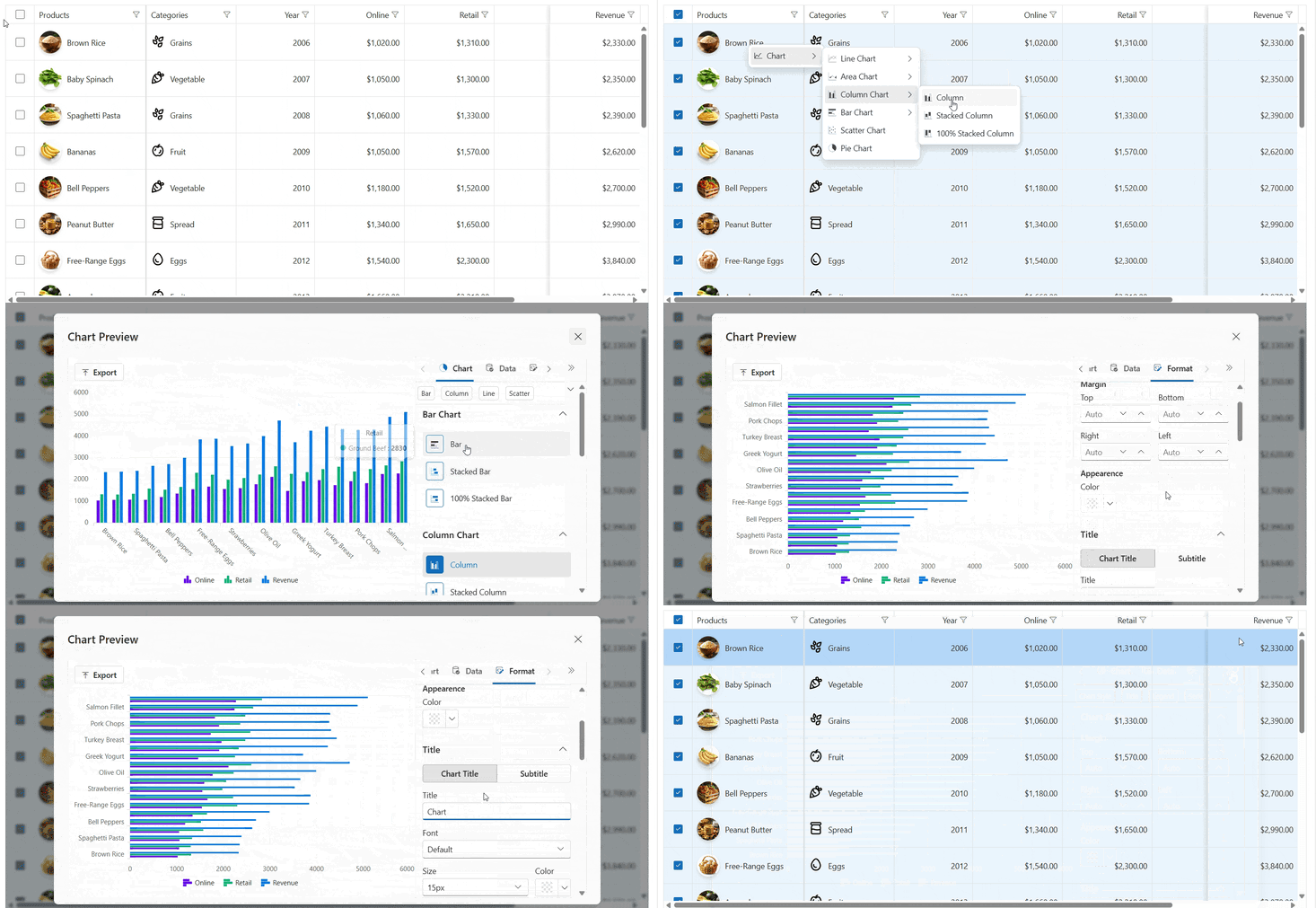
Key features
- Interactive chart building: Configure chart type, category fields, and series fields with immediate visual feedback.
- Data binding support: Bind to
IEnumerable<T>collections, includingList<T>andObservableCollection<T>. - Single and multi-series charts: Render one or more series from the same data source.
- Flexible field mapping: Map one or more category fields and numeric series fields from your data model.
- Multiple chart types: Support for common chart types such as column, bar, line, area, pie, and more.
- Real-time preview: Reflect chart changes as users update settings in the wizard.
- Property panel support: Provide an interactive editor experience for chart configuration.
- Export-ready workflow: Prepare chart output for export scenarios supported by the component.
- Responsive and Blazor-friendly: Built for Web App, Server, and WebAssembly applications.
Add stylesheet and script references
For Blazor Web App / Blazor Server App, add these to Components/App.razor or App.razor file.
For Blazor WebAssembly App, add these to wwwroot/index.html file.
<link href="_content/Syncfusion.Blazor.Themes/bootstrap5.css" rel="stylesheet" />
<script src="_content/Syncfusion.Blazor.Core/scripts/syncfusion-blazor.min.js" type="text/javascript"></script>
Quick start
- Register the Syncfusion® Blazor service in the
Program.csfile.
using Syncfusion.Blazor;

builder.Services.AddSyncfusionBlazor();
- Add Blazor Chart Wizard to your Razor page and bind data fields.
@using Syncfusion.Blazor.ChartWizard

<SfChartWizard Width="800" Height="450" Theme="Syncfusion.Blazor.Theme.Bootstrap5" PropertyPanelExpanded="true">
	<ChartSettings DataSource="@SalesData"
				   CategoryFields="@categories"
				   SeriesFields="@chartSeries"
				   SeriesType="ChartWizardSeriesType.Column">
	</ChartSettings>
</SfChartWizard>

@code {

    private List<string> categories = new() { "Month" };
    private List<string> chartSeries = new() { "Sales" };

	public class SalesInfo
	{
		public string Month { get; set; }
		public double Sales { get; set; }
	}

	private List<SalesInfo> SalesData = new()
	{
		new SalesInfo { Month = "Jan", Sales = 35 },
		new SalesInfo { Month = "Feb", Sales = 28 },
		new SalesInfo { Month = "Mar", Sales = 34 },
		new SalesInfo { Month = "Apr", Sales = 32 },
		new SalesInfo { Month = "May", Sales = 40 }
	};
}
Working with data
The Chart Wizard uses ChartSettings to configure data binding:
DataSourcesupplies the collection of data objects.CategoryFieldsidentifies the field or fields used for category values.SeriesFieldsidentifies the numeric fields used to create chart series.SeriesTypeselects the chart type for rendering.
For multi-series charts, provide multiple values in SeriesFields. For example, a single category with multiple series can be bound using fields such as Gold, Silver, and Bronze.
ObservableCollection<T> is also supported for dynamic data scenarios where the chart should update as items are added, removed, or modified.
Documentation
- Getting Started with Blazor Chart Wizard in Blazor Web App
- Getting Started with Blazor Server App
- Getting Started with Blazor Chart Wizard in Blazor WebAssembly App
- API Reference
- Feature Overview
- Live Demos
Support
License
This is a commercial product and requires a paid license for possession or use. Review the Syncfusion® EULA.
About Syncfusion®
Syncfusion® provides 1800+ UI components and frameworks for web, mobile, and desktop development across multiple platforms:
Web: Blazor | ASP.NET Core | ASP.NET MVC | JavaScript | Angular | React | Vue
Mobile: Flutter | MAUI | Xamarin
Desktop: WinForms | WPF | WinUI
Learn more at www.syncfusion.com.
sales@syncfusion.com | Toll Free: 1-888-9-DOTNET
| Product | Versions Compatible and additional computed target framework versions. |
|---|---|
| .NET | net8.0 is compatible. net8.0-android was computed. net8.0-browser was computed. net8.0-ios was computed. net8.0-maccatalyst was computed. net8.0-macos was computed. net8.0-tvos was computed. net8.0-windows was computed. net9.0 is compatible. net9.0-android was computed. net9.0-browser was computed. net9.0-ios was computed. net9.0-maccatalyst was computed. net9.0-macos was computed. net9.0-tvos was computed. net9.0-windows was computed. net10.0 is compatible. net10.0-android was computed. net10.0-browser was computed. net10.0-ios was computed. net10.0-maccatalyst was computed. net10.0-macos was computed. net10.0-tvos was computed. net10.0-windows was computed. |
-
net10.0
- Syncfusion.Blazor.Buttons (>= 33.2.10)
- Syncfusion.Blazor.Charts (>= 33.2.10)
- Syncfusion.Blazor.Core (>= 33.2.10)
- Syncfusion.Blazor.Data (>= 33.2.10)
- Syncfusion.Blazor.DataVizCommon (>= 33.2.10)
- Syncfusion.Blazor.DropDowns (>= 33.2.10)
- Syncfusion.Blazor.Grid (>= 33.2.10)
- Syncfusion.Blazor.Inputs (>= 33.2.10)
- Syncfusion.Blazor.Navigations (>= 33.2.10)
- Syncfusion.Blazor.SplitButtons (>= 33.2.10)
- Syncfusion.ExcelExport.Net.Core (>= 33.2.10)
- Syncfusion.PdfExport.Net.Core (>= 33.2.10)
-
net8.0
- Syncfusion.Blazor.Buttons (>= 33.2.10)
- Syncfusion.Blazor.Charts (>= 33.2.10)
- Syncfusion.Blazor.Core (>= 33.2.10)
- Syncfusion.Blazor.Data (>= 33.2.10)
- Syncfusion.Blazor.DataVizCommon (>= 33.2.10)
- Syncfusion.Blazor.DropDowns (>= 33.2.10)
- Syncfusion.Blazor.Grid (>= 33.2.10)
- Syncfusion.Blazor.Inputs (>= 33.2.10)
- Syncfusion.Blazor.Navigations (>= 33.2.10)
- Syncfusion.Blazor.SplitButtons (>= 33.2.10)
- Syncfusion.ExcelExport.Net.Core (>= 33.2.10)
- Syncfusion.PdfExport.Net.Core (>= 33.2.10)
-
net9.0
- Syncfusion.Blazor.Buttons (>= 33.2.10)
- Syncfusion.Blazor.Charts (>= 33.2.10)
- Syncfusion.Blazor.Core (>= 33.2.10)
- Syncfusion.Blazor.Data (>= 33.2.10)
- Syncfusion.Blazor.DataVizCommon (>= 33.2.10)
- Syncfusion.Blazor.DropDowns (>= 33.2.10)
- Syncfusion.Blazor.Grid (>= 33.2.10)
- Syncfusion.Blazor.Inputs (>= 33.2.10)
- Syncfusion.Blazor.Navigations (>= 33.2.10)
- Syncfusion.Blazor.SplitButtons (>= 33.2.10)
- Syncfusion.ExcelExport.Net.Core (>= 33.2.10)
- Syncfusion.PdfExport.Net.Core (>= 33.2.10)
NuGet packages
This package is not used by any NuGet packages.
GitHub repositories
This package is not used by any popular GitHub repositories.