uaParser.Net.AspNetCore
2.1.0
dotnet add package uaParser.Net.AspNetCore --version 2.1.0
NuGet\Install-Package uaParser.Net.AspNetCore -Version 2.1.0
<PackageReference Include="uaParser.Net.AspNetCore" Version="2.1.0" />
<PackageVersion Include="uaParser.Net.AspNetCore" Version="2.1.0" />
<PackageReference Include="uaParser.Net.AspNetCore" />
paket add uaParser.Net.AspNetCore --version 2.1.0
#r "nuget: uaParser.Net.AspNetCore, 2.1.0"
#:package uaParser.Net.AspNetCore@2.1.0
#addin nuget:?package=uaParser.Net.AspNetCore&version=2.1.0
#tool nuget:?package=uaParser.Net.AspNetCore&version=2.1.0
<p align="center"> <a href="https://www.nuget.org/packages/uaParser.Net"><img alt="NuGet" src="https://img.shields.io/nuget/v/uaParser.Net.svg?style=flat-square"></a> <a href="https://github.com/Dariuosh/uaParser.Net/actions/workflows/ci.yml"><img alt="CI" src="https://github.com/Dariuosh/uaParser.Net/actions/workflows/ci.yml/badge.svg"></a> </p>
uaParser.Net
Detects the browser, engine, operating system, CPU, device and bot from a User-Agent string, and from User-Agent Client Hints, in .NET.
uaParser.Net maintains its own rules. They started as the rules of ua-parser-js 1.0.41 (MIT) and are extended here: newer devices, the real iOS version from Safari 26 on, about 1,500 bots from crawler-user-agents (MIT), and Client Hints. A tool in this repository turns the rules into C#, and the tests compare every result, field by field, with the rules run in JavaScript on more than 3,500 user agents.
- Browsers and devices, including rare ones, with ua-parser-js 1.x names
- Bots: search engines, AI crawlers, link previews, monitors, scanners, HTTP libraries
- Client Hints: Windows 11, full browser versions, the CPU and the Android model that the frozen User-Agent string hides
- Immutable, thread-safe results; a missing value is
null - About 25-35 µs per user agent, about 40 ns when cached
- ASP.NET Core integration: a per-request
ClientInfo(with the request's client hints),HttpContext.GetClientInfo(), a shared cache - GPU detection from WebGL renderer strings
- .NET 10
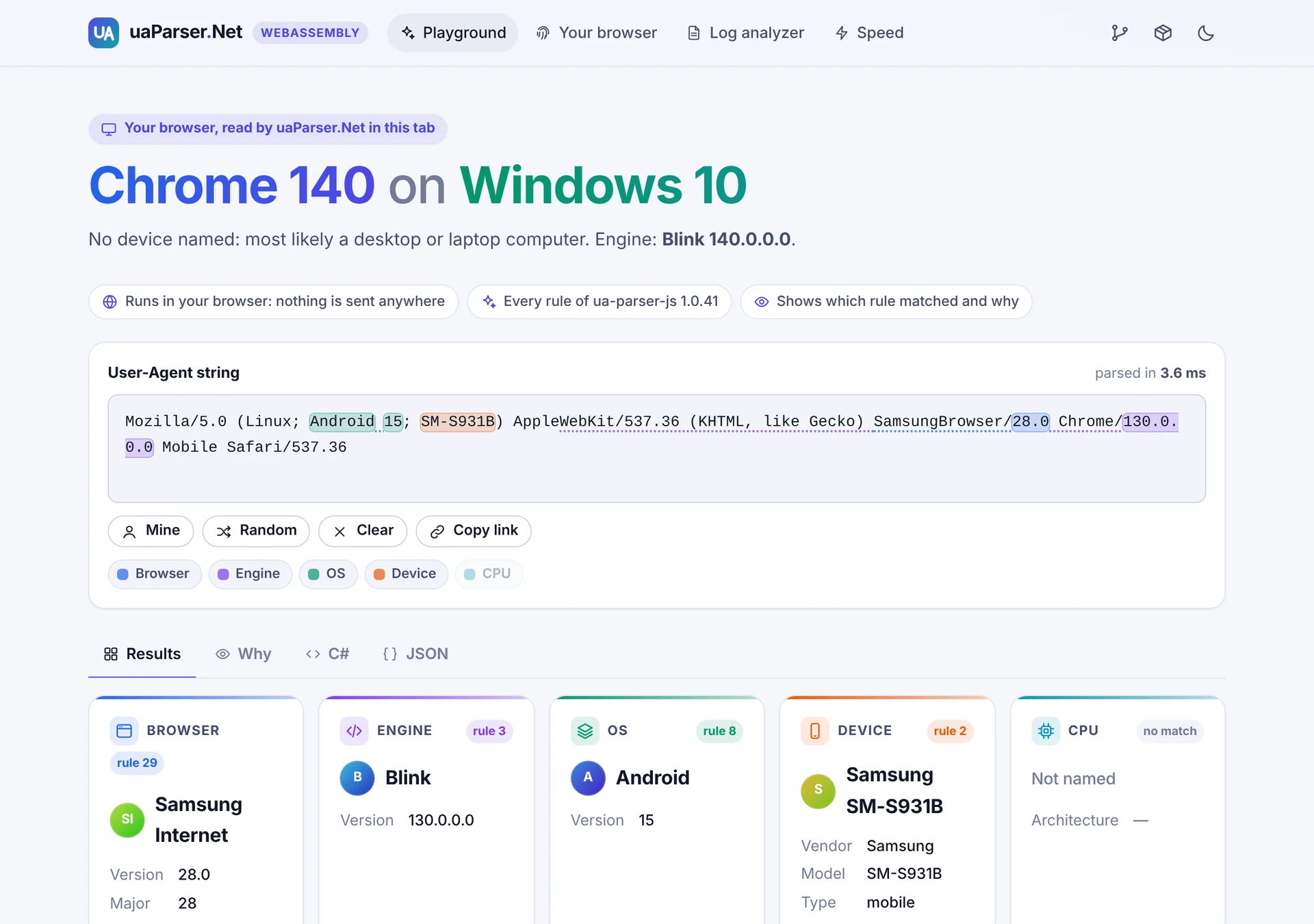 <sub>The playground of the demos: each value is highlighted where it was found, and the Why tab shows the rule that matched.</sub>
Install
dotnet add package uaParser.Net
dotnet add package uaParser.Net.AspNetCore   # for ASP.NET Core
Quick start
using uaParserLibrary;
using uaParserLibrary.Models;

var ua = "Mozilla/5.0 (Linux; Android 15; SM-S931B) AppleWebKit/537.36 (KHTML, like Gecko) " +
         "SamsungBrowser/28.0 Chrome/130.0.0.0 Mobile Safari/537.36";

ClientInfo info = UAParser.GetClientInfo(ua);

Console.WriteLine(info.Browser);                            // Browser: Samsung Internet 28.0
Console.WriteLine(info.Browser.Major);                      // 28
Console.WriteLine(info.Engine);                             // Engine : Blink 130.0.0.0
Console.WriteLine(info.OS);                                 // OS     : Android 15
Console.WriteLine(info.Device);                             // Device : Samsung SM-S931B mobile
Console.WriteLine(info.Device.Type == DeviceTypes.Mobile);  // True
Console.WriteLine(info.CPU.Architecture is null);           // True: not in this user agent
Console.WriteLine(info.Bot.IsBot);                          // False
Each part can also be read on its own: UAParser.GetBrowser, GetEngine, GetOS, GetDevice,
GetCPU, GetBot. UAParser.GetGPU reads a WebGL renderer string, and
GetClientInfo(userAgent, renderer) includes it.
Bots
Bot bot = UAParser.GetBot("Mozilla/5.0 AppleWebKit/537.36 (KHTML, like Gecko; compatible; GPTBot/1.2; +https://openai.com/gptbot)");

Console.WriteLine(bot);                                      // Bot    : GPTBot ai-crawler
Console.WriteLine(bot.Category == BotCategories.AiCrawler);  // True
Console.WriteLine(UAParser.GetClientInfo("curl/8.9.1").Bot.Name);  // curl
ClientInfo.Bot and UAParser.GetBot know about 1,500 bots from the
crawler-user-agents list, each with a
category (BotCategories: search-engine, ai-crawler, seo, monitoring, scanner,
advertising, social-preview, feed-reader, http-library, archiver, academic,
browser-automation) and usually a web page about it (Url). A user agent that names itself
with a word ending in "bot", "crawler", "spider" or "scraper" is also a bot, with no category.
For anything else, Bot is Bot.None and IsBot is false.
A bot can send any user agent, and anyone can send a bot's: this tells what a client says it is, not what it is. Search engines document how to verify their crawlers (with a reverse DNS lookup).
Client Hints
Chromium-based browsers (Chrome, Edge, Opera, Brave, Samsung Internet...) now send a reduced
User-Agent string: Windows 11 shows as Windows 10, the browser version as 140.0.0.0, and
Android phones as Android 10; K. The real values come as User-Agent Client Hints, the
Sec-CH-UA-* request headers (or navigator.userAgentData in JavaScript):
ClientHints? hints = ClientHints.FromHeaders(name => request.Headers[name]);
ClientInfo info = UAParser.GetClientInfo(userAgent, hints);

// With hints from Chrome on Windows 11 (ARM):
Console.WriteLine(info.Browser);   // Browser: Chrome 140.0.7339.128
Console.WriteLine(info.OS);        // OS     : Windows 11
Console.WriteLine(info.CPU);       // CPU    : arm64
The hints give the full browser and engine version, the browser behind a Chrome-like user agent
(Brave), Windows 11, the macOS and Android version, the CPU and the Android device model (whose
vendor the device rules then find). What the User-Agent string tells more precisely, such as an
in-app browser or HarmonyOS, is kept. Browsers send the brands, "mobile" and the platform to every
secure site; the rest only to sites that ask for them with an Accept-CH response header.
In ASP.NET Core this is all done for you (see below). With a cache, use
cache.GetClientInfo(userAgent, hints).
Results
| Type | Properties |
|---|---|
Browser |
Name, Version, Major |
Engine |
Name, Version |
OS |
Name, Version |
Device |
Vendor, Model, Type (one of DeviceTypes: mobile, tablet, smarttv, console, wearable, embedded) |
CPU |
Architecture (for example amd64, arm64, ia32) |
Bot |
Name, Category (one of BotCategories), Url, IsBot |
GPU |
Vendor, Model |
ClientInfo |
UserAgent and all of the above (GPU only when a renderer string was given), and Hints (the client hints used, if any) |
- A value that is not in the user agent is
null. Desktop browsers usually have no device values. - All types are immutable records: compare them with
==, copy them withwith. - Names follow ua-parser-js 1.x, for example
Mobile Safari,Samsung Internet,Mac OS. - Like ua-parser-js, at most the first 500 characters of a user agent are read.
Repeated user agents
A busy server sees the same user agents again and again. ClientInfoCache returns the earlier
result instead of parsing again. It is thread-safe and its memory stays bounded, even when every
request has a different user agent.
var cache = new ClientInfoCache(capacity: 1024);
ClientInfo info = cache.GetClientInfo(userAgent);
ASP.NET Core
using uaParserLibrary.Models;
using uaParserMiddleware;

builder.Services.AddUAParser();               // ClientInfo becomes injectable (scoped)
// builder.Services.AddUAParser(o => o.CacheCapacity = 4096);  // 0 turns the cache off
// builder.Services.AddUAParser(o => o.RequestClientHints = true);  // ask for all client hints

var app = builder.Build();
app.UseUAParser();                            // optional: parse before the rest of the pipeline

app.MapGet("/", (ClientInfo client) => $"Hello, {client.Browser.Name} on {client.OS.Name}!");
app.MapGet("/client", (HttpContext context) => context.GetClientInfo());   // as JSON
Every request gets the result for its own User-Agent header and client hints.
HttpContext.GetClientInfo() works with or without the middleware and parses at most once per
request.
The client hints the browser sends are used automatically (UseClientHints, on by default).
Browsers send the full set (versions, CPU, model) only after a site asks for it:
RequestClientHints = true makes UseUAParser() add the Accept-CH header to responses, and
browsers send the hints from the next request on. It is off by default because these hints tell
more about the user's device; if a response depends on a hint, also add it to the Vary header.
Blazor, interactive server rendering: a circuit has no request of its own, so do not inject
ClientInfo into interactive components (or SignalR hubs): there it depends on the SignalR
transport, and is empty with long polling. Read the User-Agent while the page is prerendered and
keep it for the circuit, as the Blazor Server demo's playground does:
@code {
    [CascadingParameter] private HttpContext? HttpContext { get; set; }

    [PersistentState] public string? UserAgent { get; set; }

    protected override void OnInitialized() =>
        UserAgent ??= HttpContext?.Request.Headers.UserAgent.ToString();
}
This needs the component to be prerendered (per-page interactivity, the default). With global
interactivity, pages reached by in-app navigation are not prerendered: read the header in
App.razor, which is always rendered on the server, and pass it down, for example
<Routes @rendermode="InteractiveServer" UserAgent="@HttpContext?.Request.Headers.UserAgent.ToString()" />.
Blazor WebAssembly: read navigator.userAgent with JS interop and call UAParser in the
browser, as the WebAssembly demo does.
Demos
Two Blazor apps show uaParser.Net at work. Their pages come from uaParserDemoComponents.
uaParserBlazorWebAssemblyDemo |
uaParserBlazorServerDemo |
|
|---|---|---|
| Runs | in the browser (.NET on WebAssembly): nothing is sent anywhere | on the server (ASP.NET Core, Blazor) |
| Start page | your browser, read in the tab (with its Client Hints) | what your request told the server: User-Agent, Client Hints and the injected ClientInfo |
| Playground | type or paste a user agent: every value is highlighted where it was found, with the rule and regex that matched, the C# and the JSON | the same, parsed on the server as you type |
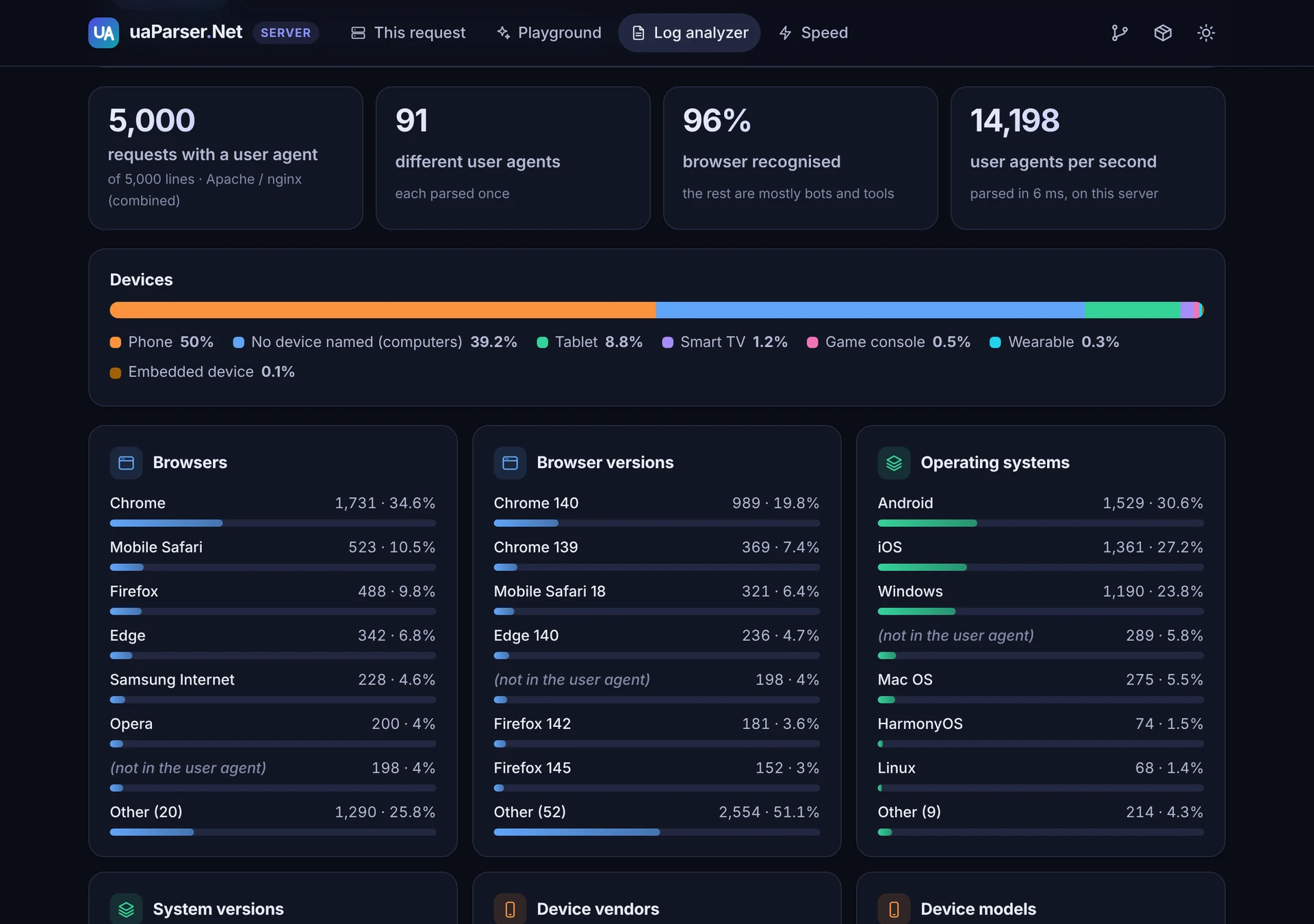
| Log analyzer | the browsers, systems, devices and bots in an Apache, nginx, IIS or JSON access log, read in the browser | the same, on the server |
| Also | what Client Hints add to the User-Agent, the GPU, the iPad check; a speed test in the browser | a JSON API (/api/client, /api/parse?ua=); a speed test on the server |
dotnet run -c Release --project uaParserBlazorWebAssemblyDemo   # http://localhost:5000
dotnet run -c Release --project uaParserBlazorServerDemo        # http://localhost:5002
Performance
Measured on a 4-CPU Linux container (Intel Xeon 2.8 GHz), .NET 10:
| uaParser.Net | ua-parser-js 1.0.41 on Node 22 | |
|---|---|---|
| Per user agent, after warm-up | 26-35 µs (bots included) | 34-40 µs (no bots) |
Repeated user agent, ClientInfoCache |
about 40 ns | |
| Memory per parse | about 2.6 KB | |
| First call in a new process | about 120-135 ms (less with ReadyToRun) | about 8 ms |
| In the browser (Blazor WebAssembly, Chromium) | about 0.4 ms |
Most regexes are skipped by a cheap substring check before they run (about 96 % of them for a
typical user agent); the checks are derived from the regexes and verified never to skip a match.
Nearly all bot patterns are plain text, found with one multi-string search (about 1.5 µs).
Publish with -p:PublishReadyToRun=true if start-up time matters.
Measure it on your own machine with uaParserBenchmark:
dotnet run -c Release -- --quick in uaParserBenchmark, and npm run bench in
tools/RuleGenerator for ua-parser-js. Results are saved as Markdown and JSON in
benchmark-results/.
Known limitations
- Frozen user agents. Without Client Hints, Windows 11 reads as Windows 10, and Chrome on
Android as
Android 10with the modelK. Firefox and Safari send no Client Hints; Safari on an iPad sends the user agent of a Mac. - New devices. The rules are kept up to date here, but a device released after the last update may have no vendor or model yet. Please open an issue with its user agent.
- GPU rules from 2021. Modern WebGL strings such as
ANGLE (NVIDIA, NVIDIA GeForce RTX 3060 Direct3D11 ...)are not recognised.
How the rules are made
The rules live in tools/RuleGenerator/rules: user-agent-rules.js (browsers, engines,
operating systems, CPUs and devices; it began as the rule table of ua-parser-js 1.0.41, and every
change since is marked) and bot-rules.js (with the unchanged crawler-user-agents.json).
tools/RuleGenerator (Node.js) writes them as C#: every regex becomes a [GeneratedRegex] with
JavaScript semantics (RegexOptions.ECMAScript, invariant culture), and every value assignment
one of seven shapes. Anything it does not recognise stops it. It also writes what the rules give,
run in JavaScript, for every test user agent (the tests compare the C# results with it), a report
of which regexes the test user agents reach (318 of 319; the last one can never be reached), and
a report of every result that differs from ua-parser-js 1.0.41, each on purpose. See
tools/RuleGenerator/README.md.
cd tools/RuleGenerator
npm ci --ignore-scripts
npm run all
Upgrading from 1.x
See CHANGELOG.md for every change.
From 2.0 to 2.1 nothing needs to change: ClientInfo gains Bot and Hints, and some results
are more precise (see the changelog).
| 1.x | 2.0 |
|---|---|
Missing values were "Other", "UnKnown", "" or "undefined" |
null |
Mutable classes with an Empty property |
Immutable records |
| The same result object was reused between calls (wrong results under concurrency) | Every call returns new results; thread-safe |
| Hand-ported subset of the rules | All rules of ua-parser-js 1.0.41, generated |
Some names differed from ua-parser-js (for example Samsung Browser, Edge HTML) |
Names of ua-parser-js 1.0.41 (Samsung Internet, EdgeHTML) |
AddUAParser(options => ...) with per-part switches; a singleton ClientInfo filled after the request |
AddUAParser() or AddUAParser(o => o.CacheCapacity = n); a scoped ClientInfo per request |
Separate uaParserResource assembly |
Removed |
| .NET 5 | .NET 10 |
Repository
| Folder | |
|---|---|
uaParserLibrary |
The uaParser.Net package |
uaParserMiddleware |
The uaParser.Net.AspNetCore package |
uaParserTest |
Tests: the expected results, ua-parser-js 1.0.41's own tests, bots, Client Hints, behaviour, cache, middleware |
uaParserBenchmark |
Speed measurements |
tools/RuleGenerator |
The rules, and the tool that turns them into C#, the expected results and the example user agents |
uaParserConsole |
Console sample |
uaParserBlazorWebAssemblyDemo, uaParserBlazorServerDemo |
Demos (see above) |
uaParserDemoComponents |
The demos' pages, shared by both |
Shared |
Example user agents shared by the samples |
dotnet build uaParser.slnx
dotnet test
License
MIT, see LICENSE. The rules are based on ua-parser-js 1.0.41 (MIT License, copyright (c) 2012-2025 Faisal Salman) and the bot list on crawler-user-agents (MIT License, copyright (c) 2017 Martin Monperrus); see THIRD-PARTY-NOTICES.md.
| Product | Versions Compatible and additional computed target framework versions. |
|---|---|
| .NET | net10.0 is compatible. net10.0-android was computed. net10.0-browser was computed. net10.0-ios was computed. net10.0-maccatalyst was computed. net10.0-macos was computed. net10.0-tvos was computed. net10.0-windows was computed. |
-
net10.0
- uaParser.Net (>= 2.1.0)
NuGet packages
This package is not used by any NuGet packages.
GitHub repositories
This package is not used by any popular GitHub repositories.