BetterHexViewer.Uno
1.2.2
dotnet add package BetterHexViewer.Uno --version 1.2.2
NuGet\Install-Package BetterHexViewer.Uno -Version 1.2.2
<PackageReference Include="BetterHexViewer.Uno" Version="1.2.2" />
<PackageVersion Include="BetterHexViewer.Uno" Version="1.2.2" />
<PackageReference Include="BetterHexViewer.Uno" />
paket add BetterHexViewer.Uno --version 1.2.2
#r "nuget: BetterHexViewer.Uno, 1.2.2"
#:package BetterHexViewer.Uno@1.2.2
#addin nuget:?package=BetterHexViewer.Uno&version=1.2.2
#tool nuget:?package=BetterHexViewer.Uno&version=1.2.2
BetterHexViewer.Uno
Current release: 1.2.2, for Uno Platform with the Skia renderer.



BetterHexViewer.Uno is the Uno Platform edition of BetterHexViewer, a feature-rich,
fully customisable hex-viewer control for Uno Platform applications using the Skia renderer.
It ports BetterHexViewer.WinUI3 1.2.1 to SkiaSharp and SKCanvasElement, drawing visible
rows directly instead of creating a XAML element for every byte. Hardware acceleration
depends on the Uno host and its rendering configuration.
Use the NuGet package and XAML namespace BetterHexViewer.Uno. The repository is
named BetterHexView.Uno. For Windows App SDK / WinUI 3 applications using Win2D,
see the separate WinUI 3 edition.
Uno Platform demo
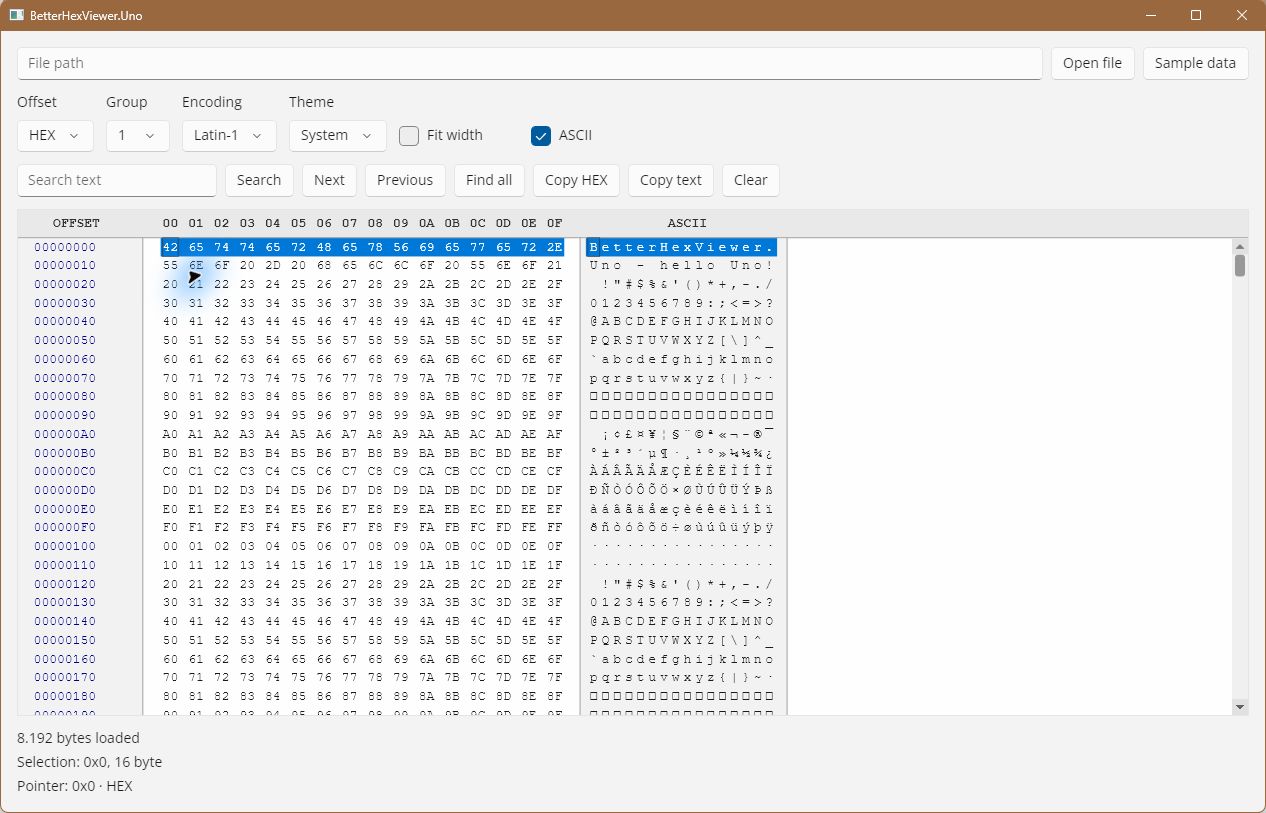
The screenshot shows the actual Uno desktop demo with sample bytes, synchronised HEX and ASCII panels, search controls, grouping, encoding and theme options.
Features
| Feature | Detail |
|---|---|
| Skia rendering | SKCanvasElement with separate data and hover surfaces; only visible rows are drawn |
| Large-file support | Read-only memory mapping where available; FileStream fallback with a 64 KiB cache; integration test covers a 40 GiB sparse file and offsets beyond 2 GiB |
| Mouse selection | Click-drag in hex or ASCII panels; both stay in sync |
| Keyboard navigation | Arrow keys, Home/End, PgUp/PgDn, Shift-extend selection, Ctrl+A |
| Text and byte search | SearchAsync / SearchNextAsync / SearchPreviousAsync / FindAllAsync |
| Programmatic selection | SelectRange(offset, length) and SelectFromTo(start, end) |
| Hover cross-highlight | 1 px border tracks the pointer in both panels simultaneously |
| Context menu | Right-click to copy selection as hex string or ASCII text |
| Offset formats | Hexadecimal · Decimal · Octal |
| Column grouping | 1 · 2 · 4 · 8 · 16 bytes per visual group |
| Full-width auto-fit | FullWidth = true adapts column count to the available width |
| Configurable spacing | BytesSpacing and ExtraLineGap in pixels |
| ASCII encoding | AsciiEncoding — Latin-1 (default), IBM CP437, UTF-8, CP1252, any Encoding |
| ASCII panel | Toggleable via ShowAsciiPanel |
| Font control | FontFamily, FontSize, FontWeight — hot-reloadable at runtime |
| Colour themes | All brushes are bindable — background, foreground, offsets, ruler, selection, dividers |
| Tooltip | 500 ms hover tooltip showing the formatted offset; configurable TooltipOffsetLabel |
| SelectionChanged event | StartOffset, full selection Length, and up to 5 MiB of event Data; see selection limits below |
| ScrollToOffset | Scroll to any byte offset programmatically |
Requirements
| Component | Requirement |
|---|---|
| .NET | .NET 10 (net10.0 library) |
| Uno SDK | 6.7.30, pinned in this repository's global.json |
| Rendering | Uno Platform host using SkiaRenderer |
| Graphics dependencies | Uno.WinUI.Graphics2DSK and SkiaSharp, supplied transitively by Uno.Sdk |
| Demo target | net10.0-desktop |
The supplied demo uses Uno desktop hosts for Windows, Linux (X11/framebuffer) and macOS. Build and runtime verification have been performed on Windows desktop. Linux, macOS, Android, iOS and WebAssembly require validation on the respective host. Mobile and browser apps must be configured for Skia rendering; this library does not provide a native-renderer or Windows App SDK target.
OpenFileAsync needs a filesystem path accessible to the app process. On mobile or
WebAssembly, import the file into the app's sandbox or provide bytes with LoadBytes.
A browser cannot automatically access paths on the user's computer. Clipboard and
font availability also depend on the host; choose a monospaced font installed or
bundled with your app.
See Uno's SKCanvasElement documentation and control library guidance.
Quick start
1 — Install the NuGet package
dotnet add package BetterHexViewer.Uno --version 1.2.2
2 — Add the XAML namespace
xmlns:hex="using:BetterHexViewer.Uno"
3 — Place the control
<hex:BetterHexViewer
    x:Name="HexViewer"
    OffsetFormat="Hexadecimal"
    ColumnGroupSize="One"
    BytesSpacing="10"
    ExtraLineGap="4"
    FullWidth="False"
    ShowAsciiPanel="True"
    SelectionChanged="HexViewer_SelectionChanged"/>
4 — Load content
// From a path accessible to your Uno host (memory mapping or stream fallback)
await HexViewer.OpenFileAsync(filePath);

// From a byte array
HexViewer.LoadBytes(myByteArray);
5 — Search
// Text search (forward)
var result = await HexViewer.SearchAsync("MZ");

// Byte-sequence search
var binaryResult = await HexViewer.SearchAsync(new byte[] { 0x4D, 0x5A });

// Navigate results
await HexViewer.SearchNextAsync();
await HexViewer.SearchPreviousAsync();

// Find all occurrences
IReadOnlyList<long> offsets = await HexViewer.FindAllAsync("MZ");
6 — Programmatic selection
// Select 16 bytes starting at offset 0x100
HexViewer.SelectRange(0x100, 16);

// Select from offset 0x200 to 0x2FF (inclusive)
HexViewer.SelectFromTo(0x200, 0x2FF);
7 — Change ASCII encoding
// Enable extended code pages (call once at app startup)
Encoding.RegisterProvider(CodePagesEncodingProvider.Instance);

HexViewer.AsciiEncoding = Encoding.GetEncoding(437); // IBM CP437
HexViewer.AsciiEncoding = Encoding.UTF8;
Properties
Layout and display
| Property | Type | Default | Description |
|---|---|---|---|
OffsetFormat |
OffsetFormat |
Hexadecimal |
Format of the offset column |
ColumnGroupSize |
ColumnGroupSize |
One |
Bytes per visual group |
BytesSpacing |
double |
10 |
Horizontal gap between hex columns (px) |
ExtraLineGap |
double |
4 |
Extra vertical gap between rows (px) |
FullWidth |
bool |
false |
Auto-fit columns to available width |
ShowAsciiPanel |
bool |
true |
Show or hide the ASCII panel |
AsciiEncoding |
Encoding |
Latin-1 | Encoding used in the ASCII panel |
BytesPerLine (read-only) |
int |
16 | Current number of columns |
FileSize (read-only) |
long |
0 | Size of loaded data in bytes |
Font
| Property | Type | Default | Description |
|---|---|---|---|
FontFamily |
FontFamily |
Courier New |
Monospaced font family |
FontSize |
double |
13 |
Font size in XAML units |
FontWeight |
FontWeight |
Normal |
Font weight |
Colours
| Property | Type | Default | Description |
|---|---|---|---|
Background |
Brush |
Theme | Control background |
Foreground |
Brush |
Theme | Hex and ASCII data text |
OffsetForeground |
Brush |
Dark blue | Offset column text |
OffsetBackground |
Brush |
Theme | Offset column background |
AsciiBackground |
Brush |
Theme | ASCII panel background |
RulerForeground |
Brush? |
auto | Ruler header text |
TooltipOffsetLabel |
string |
"Offset" |
Prefix for the hover offset |
NoDataLoadedText |
string |
"No data loaded." |
Message displayed when empty |
SelectionBackground |
Brush |
Blue | Selection highlight background |
SelectionForeground |
Brush |
White | Selected byte text |
DividerBrush |
Brush |
Gray | Column divider lines |
Methods
| Method | Description |
|---|---|
OpenFileAsync(string path) |
Opens an accessible file using memory mapping or a cached stream fallback |
LoadBytes(byte[] data) |
Loads raw bytes directly |
Clear() |
Clears the viewer |
CopySelectionAsHex() |
Copies selection to clipboard as space-separated hex pairs |
CopySelectionAsAscii() |
Copies selection to clipboard as ASCII text |
ScrollToOffset(long offset) |
Scrolls to the row containing the given byte offset |
SelectRange(long offset, long length) |
Programmatically selects length bytes from offset |
SelectFromTo(long start, long end) |
Selects bytes between two offsets (inclusive, any order) |
SearchAsync(byte[]) |
Searches forward for a byte pattern |
SearchAsync(string, Encoding?, bool ignoreCase) |
Searches forward for a text pattern |
SearchNextAsync() |
Finds the next match |
SearchPreviousAsync() |
Finds the previous match |
FindAllAsync(byte[]) |
Returns match offsets using chunked Boyer–Moore–Horspool scanning; see search behaviour below |
FindAllAsync(string, Encoding?, bool ignoreCase) |
Returns offsets of all text matches |
ClearSearch() |
Cancels the active search and clears the stored pattern and match state |
Dispose() |
Cancels searches and releases file resources |
Events
// Fired when the selection changes
HexViewer.SelectionChanged += (sender, e) =>
{
    long   offset = e.StartOffset; // -1 when no selection
    long   length = e.Length;
    byte[] data   = e.Data;        // at most 5 MiB; Length describes the full selection
};

// Fired after each SearchAsync / SearchNextAsync / SearchPreviousAsync
HexViewer.SearchResultFound += (sender, result) =>
{
    bool found   = result.Found;
    long offset  = result.Offset;  // -1 when not found
    long length  = result.Length;
    bool wrapped = result.Wrapped;
};

// Fired when mouse hover enters/moves/exits a byte cell (HEX or ASCII panel)
HexViewer.HoverOffsetChanged += (sender, e) =>
{
    long offset = e.Offset;          // -1 when pointer is outside data cells
    bool isHex  = e.IsHexColumn;
    bool isAsc  = e.IsAsciiColumn;
};
Enumerations
public enum OffsetFormat    { Hexadecimal, Decimal, Octal }
public enum ColumnGroupSize { One = 1, Two = 2, Four = 4, Eight = 8, Sixteen = 16 }
Uno behaviour and migration from WinUI 3
- Reference
BetterHexViewer.Unoand change the XAML namespace tousing:BetterHexViewer.Uno. The control class remainsBetterHexViewer. - The default template in
Themes/Generic.xamlloads automatically. Custom templates must use UnoHexCanvassurfaces for the main and hover parts instead of Win2DCanvasControl. Win2D and Windows App SDK are not dependencies of this package. - Use control properties and methods on the UI thread. Search scans run on worker
threads;
SearchAsynccompletes after selection and events are updated on the UI thread. SelectionChanged.Datacontains at most 5 MiB, whileLengthdescribes the full selection.Selection.Datareturns a complete copy subject to .NET array and memory limits; lengths beyondInt32throwOverflowException. Read such ranges in chunks from your own data source rather than requesting a full array.- ASCII rendering decodes one byte per cell. Multibyte UTF-8 sequences do not become
a single glyph; control and replacement characters appear as
·. The optionalignoreCasesearch argument folds ASCII letters A–Z/a–z only, not Unicode case. FindAllAsyncscans files in 4 MiB blocks with boundary overlap. Matches are non-overlapping within each scan block; it does not enumerate every overlapping combination. Text searches useAsciiEncodingunless an encoding is supplied.- Starting a new search cancels the previous scan.
ClearSearch, loading new data,Clear,Disposeand removal from the visual tree cancel active scans. Cancellation can produceOperationCanceledExceptionor an empty/not-found result. Loading new data resets previous search, selection and hover state. - Removing the control from the visual tree releases its content and file handles.
Reload content if you reattach it. Theme defaults are reapplied internally when
the theme changes;
ApplyThemeis not a public method in this edition.
Building from source
git clone https://github.com/zipgenius/BetterHexView.Uno.git
cd BetterHexView.Uno
dotnet build BetterHexViewer.Uno.Demo/BetterHexViewer.Uno.Demo.csproj -c Release
Run the Uno desktop demo:
dotnet run --project BetterHexViewer.Uno.Demo -c Release
Run integration checks in a real Uno window:
dotnet run --project BetterHexViewer.Uno.Demo -c Release -- --self-test
The checks exercise the XAML template, dependency properties, keyboard focus, search, clipboard, selection, off-screen Skia rendering, empty files, scan-block boundaries, cancellation and a 40 GiB sparse file. See the demo README for the sample app's controls and file-loading behaviour.
Create a NuGet package:
dotnet pack BetterHexViewer.Uno.csproj -c Release -o artifacts/betterhexviewer
The package embeds this English README.md as its NuGet readme, together with
LICENSE. The demo screenshot uses an absolute GitHub raw URL so it can render on
both GitHub and NuGet.org when the image is publicly accessible. If this repository
is private, NuGet.org cannot load that URL: host the screenshot at a public URL on
an allowed domain and update the image link before publication. The screenshot is
also included in the package under docs/images/uno-demo.png.
Changelog
See the Uno Platform changelog.
The port is based on BetterHexViewer.WinUI3 1.2.1, source commit
e0be0795a4342cb9a59c5a6681af208ed2b986ec. Historical WinUI-only rendering and performance
claims do not describe this Uno implementation.
License
MIT © 2026 zipgenius.it — see LICENSE.
| Product | Versions Compatible and additional computed target framework versions. |
|---|---|
| .NET | net10.0 is compatible. net10.0-android was computed. net10.0-browser was computed. net10.0-ios was computed. net10.0-maccatalyst was computed. net10.0-macos was computed. net10.0-tvos was computed. net10.0-windows was computed. |
-
net10.0
- SkiaSharp.Views.Uno.WinUI (>= 3.119.2)
- Uno.WinUI (>= 6.7.135)
- Uno.WinUI.Graphics2DSK (>= 6.7.135)
- Uno.WinUI.Lottie (>= 6.7.135)
NuGet packages
This package is not used by any NuGet packages.
GitHub repositories
This package is not used by any popular GitHub repositories.
| Version | Downloads | Last Updated |
|---|---|---|
| 1.2.2 | 101 | 10/10/2026 |