BoTech.UI.Forms
1.0.3-alpha
This is a prerelease version of BoTech.UI.Forms.
dotnet add package BoTech.UI.Forms --version 1.0.3-alpha
NuGet\Install-Package BoTech.UI.Forms -Version 1.0.3-alpha
This command is intended to be used within the Package Manager Console in Visual Studio, as it uses the NuGet module's version of Install-Package.
<PackageReference Include="BoTech.UI.Forms" Version="1.0.3-alpha" />
For projects that support PackageReference, copy this XML node into the project file to reference the package.
<PackageVersion Include="BoTech.UI.Forms" Version="1.0.3-alpha" />
<PackageReference Include="BoTech.UI.Forms" />
For projects that support Central Package Management (CPM), copy this XML node into the solution Directory.Packages.props file to version the package.
paket add BoTech.UI.Forms --version 1.0.3-alpha
The NuGet Team does not provide support for this client. Please contact its maintainers for support.
#r "nuget: BoTech.UI.Forms, 1.0.3-alpha"
#r directive can be used in F# Interactive and Polyglot Notebooks. Copy this into the interactive tool or source code of the script to reference the package.
#:package BoTech.UI.Forms@1.0.3-alpha
#:package directive can be used in C# file-based apps starting in .NET 10 preview 4. Copy this into a .cs file before any lines of code to reference the package.
#addin nuget:?package=BoTech.UI.Forms&version=1.0.3-alpha&prerelease
#tool nuget:?package=BoTech.UI.Forms&version=1.0.3-alpha&prerelease
The NuGet Team does not provide support for this client. Please contact its maintainers for support.

BoTech.UI.Forms
Please note: This Project is in EAP (Early Access Mode) or Beta mode ⇒There may be serious errors in the software or functions may be only partially implemented.
What is this?
- This extension makes it easier to create input forms. All you need to do is create a ViewModel, add a few annotations, and tell my library to create a form for that ViewModel.
General structure
- We use a ViewModel to describe the appearance of the form and to store all the data that has been entered.
- The library takes care of validating and styling the view.
Result
https://github.com/user-attachments/assets/5a0da46b-1ecb-45e9-bb9e-1747f6eedbdd
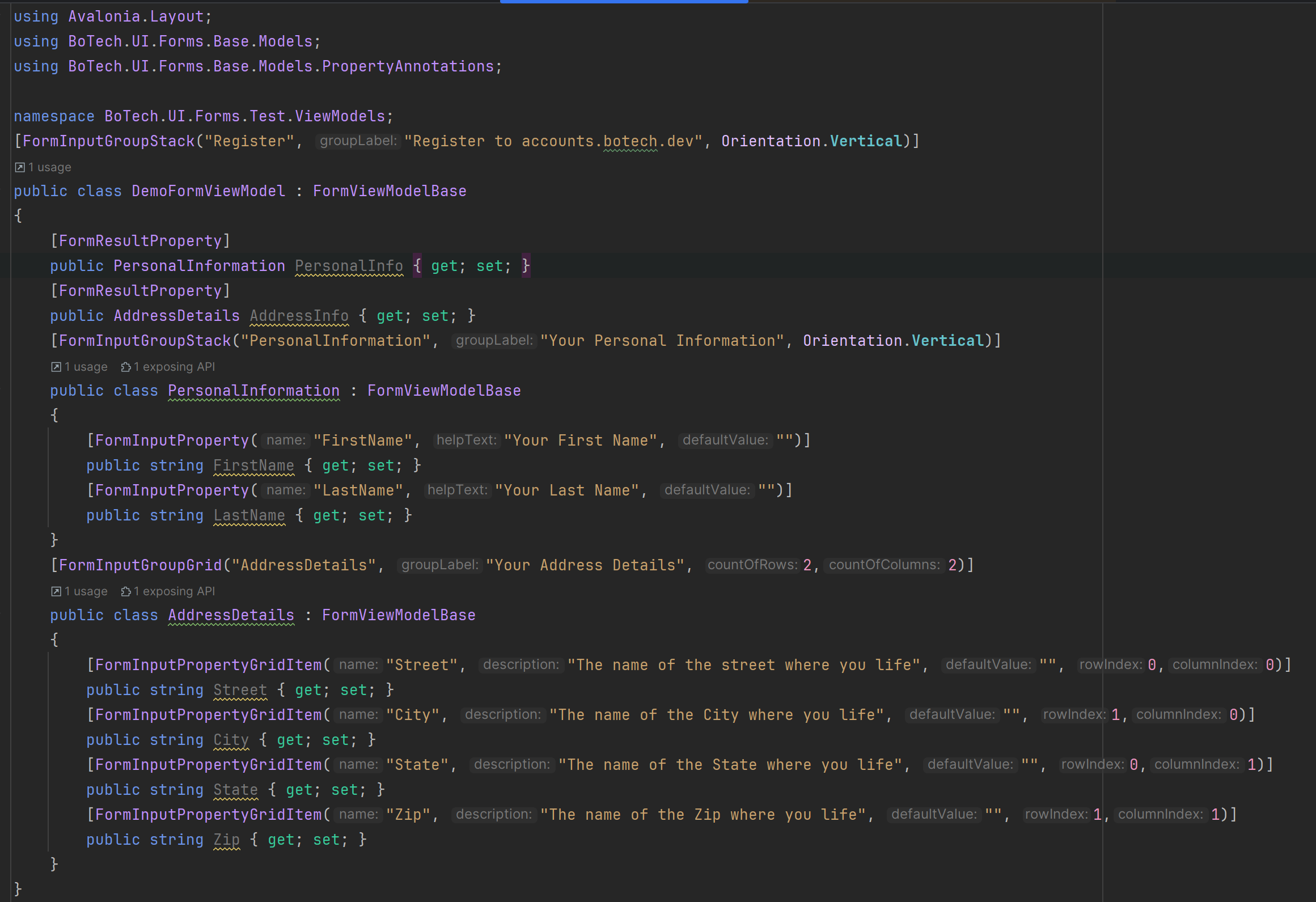
ViewModel
Installation
dotnet add package BoTech.UI.Forms
dotnet add package BoTech.UI
dotnet add package Material.Icons.Avalonia
App.axaml
    <Application.Styles>
        <FluentTheme />
        <avalonia:MaterialIconStyles />
        <botechui:BoTechTheme/>
    </Application.Styles>
MainWindow.axaml
<ContentControl Content="{Binding FormControl}"/>
MainWindowViewModel.cs
public partial class MainWindowViewModel : ViewModelBase
{
    private FormControl _formControl;
    public FormControl FormControl
    {
        get => _formControl;
        set => this.RaiseAndSetIfChanged(ref _formControl, value);

    }
    public MainWindowViewModel()
    {
        FormControl form = new FormBuilder().CreateFormFor(new DemoFormViewModel());
        form.OnFormAccepted += OnFormAccepted;
        form.OnFormCancelled += OnFormCancelled;
        form.OnFormRequiredInputsMissing += OnFormRequiredInputsMissing;
        FormControl = form;
    }

    private void OnFormRequiredInputsMissing(FormViewModelBase currentStatusOrResult, List<FormProperty> missingInputs, FormResultOption result)
    {
        //throw new System.NotImplementedException();
    }

    private void OnFormCancelled(FormViewModelBase currentStatus)
    {
        //throw new System.NotImplementedException();
    }

    private void OnFormAccepted(FormViewModelBase result)
    {
        //throw new System.NotImplementedException();
    }
}
{YourName}FormViewModel.cs
[FormInputGroupStack("Register", "Register to accounts.botech.dev", Orientation.Vertical)]
public class {YourName}ViewModel : FormViewModelBase
{
    [FormResultProperty]
    public PersonalInformation PersonalInfo { get; set; }
    [FormResultProperty]
    public AddressDetails AddressInfo { get; set; }
    [FormInputGroupStack("PersonalInformation", "Your Personal Information", Orientation.Vertical)]
    public class PersonalInformation : FormViewModelBase
    {
        [FormInputProperty("FirstName", "Your First Name", true,"")]
        public string FirstName { get; set; }
        [FormInputProperty("LastName", "Your Last Name",true, "")]
        public string LastName { get; set; }
    }
    [FormInputGroupGrid("AddressDetails", "Your Address Details", 2,2)]
    public class AddressDetails : FormViewModelBase
    {
        [FormInputPropertyGridItem("Street", "The name of the street where you life",false ,"", 0,0)]
        public string Street { get; set; }
        [FormInputPropertyGridItem("City", "The name of the City where you life", false,"", 1,0)]
        public string City { get; set; }
        [FormInputPropertyGridItem("State", "The name of the State where you life", false,"", 0,1)]
        public string State { get; set; }
        [FormInputPropertyGridItem("Zip", "The name of the Zip where you life", false,"", 1,1)]
        public string Zip { get; set; }
    }
}
- Your ViewModel class must inherit from the FormViewModelBase class so that the system knows that this is a ViewModel of a Form.
- The ViewModel must be provided with so-called annotations so that it is clear what the layout of the form should be and to help display text and other information.
- The annotation FormInputGroupStack defines that all properties (FormInputs) of the class should be arranged in a StackPanel.
- The FormInputProperty annotation defines an input field. The input field adapts to the property type (not all types are supported yet). It also specifies the text that should be displayed when the question mark is clicked, as well as the property name.
- By setting the isRequired property to true, you can specify that the user must provide input. If the user doesn't, the OnFormRequiredInputsMissing event is fired when the cancel or accept button is clicked. Otherwise, either the OnFormAccepted event or the OnFormCancelled event is fired.
- If you want to use a grid as a layout, you must provide your group of properties (class) with the FormInputGroupGrid annotation and all properties with the FormInputPropertyGridItem annotation, since additional data such as Row and Column must be specified here.
- A class defines a group of input options.
| Product | Versions Compatible and additional computed target framework versions. |
|---|---|
| .NET | net9.0 is compatible. net9.0-android was computed. net9.0-browser was computed. net9.0-ios was computed. net9.0-maccatalyst was computed. net9.0-macos was computed. net9.0-tvos was computed. net9.0-windows was computed. net10.0 was computed. net10.0-android was computed. net10.0-browser was computed. net10.0-ios was computed. net10.0-maccatalyst was computed. net10.0-macos was computed. net10.0-tvos was computed. net10.0-windows was computed. |
Compatible target framework(s)
Included target framework(s) (in package)
Learn more about Target Frameworks and .NET Standard.
-
net9.0
- Avalonia (>= 11.3.2)
- BoTech.UI (>= 1.0.9-alpha)
- Material.Icons.Avalonia (>= 2.4.1)
NuGet packages
This package is not used by any NuGet packages.
GitHub repositories
This package is not used by any popular GitHub repositories.
| Version | Downloads | Last Updated |
|---|---|---|
| 1.0.3-alpha | 158 | 7/27/2025 |
| 1.0.2-alpha | 426 | 7/25/2025 |
Added support for isRequired property and added more info to the README.md file.