Chizl.ConsoleFonts
6.2.19.1
dotnet add package Chizl.ConsoleFonts --version 6.2.19.1
NuGet\Install-Package Chizl.ConsoleFonts -Version 6.2.19.1
<PackageReference Include="Chizl.ConsoleFonts" Version="6.2.19.1" />
<PackageVersion Include="Chizl.ConsoleFonts" Version="6.2.19.1" />
<PackageReference Include="Chizl.ConsoleFonts" />
paket add Chizl.ConsoleFonts --version 6.2.19.1
#r "nuget: Chizl.ConsoleFonts, 6.2.19.1"
#:package Chizl.ConsoleFonts@6.2.19.1
#addin nuget:?package=Chizl.ConsoleFonts&version=6.2.19.1
#tool nuget:?package=Chizl.ConsoleFonts&version=6.2.19.1
Chizl.ConsoleFonts



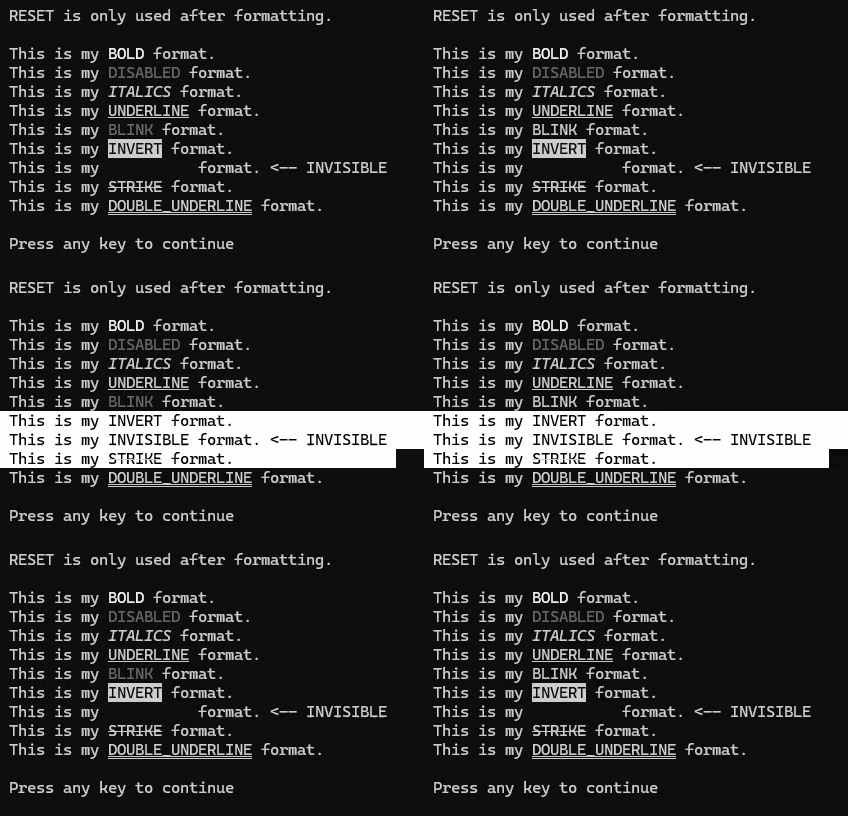
A lightweight, cross-platform .NET library for adding font styles to console applications using ANSI escape sequences.
📦 Installation
NuGet Package Manager
Install-Package Chizl.ConsoleFonts
.NET CLI
dotnet add package Chizl.ConsoleFonts
PackageReference
<PackageReference Include="Chizl.ConsoleFonts" />
Note: Omitting the version attribute automatically uses the latest stable release. To pin a specific version, use
Version="x.x.x".
🎯 Features
- ✅ Simple, fluent API for console text styling
- ✅ Multiple font styles: Bold, Italics, <u>Underline</u>,
Strike, Blink, and more - ✅ Cross-platform support (.NET Standard 2.0/2.1)
- ✅ Zero dependencies
- ✅ Lightweight and performant
- ✅ Works with modern terminals that support ANSI escape sequences
📖 Available Styles
| Style | Description | Usage Example |
|---|---|---|
Bold |
Makes text bold | {FontStyles.Bold}text{FontStyles.Reset} |
Disabled |
Darkens text from existing color | {FontStyles.Disabled}text{FontStyles.Reset} |
Italics |
Makes text italic | {FontStyles.Italics}text{FontStyles.Reset} |
Underline |
Adds single underline | {FontStyles.Underline}text{FontStyles.Reset} |
DOUBLE_UNDERLINE |
Adds double underline | {FontStyles.DOUBLE_UNDERLINE}text{FontStyles.Reset} |
Blink |
Makes text blink | {FontStyles.Blink}text{FontStyles.Reset} |
Invert |
Swaps foreground/background colors | {FontStyles.Invert}text{FontStyles.Reset} |
Invisible |
Hides text (same as background) | {FontStyles.Invisible}text{FontStyles.Reset} |
Strike |
Adds strikethrough | {FontStyles.Strike}text{FontStyles.Reset} |
Reset |
Resets all styles | {FontStyles.Reset} |
💡 Usage Examples
Basic Styling
Console.WriteLine($"This is my {FontStyles.Underline}UNDERLINE{FontStyles.Reset} text.");
Multiple Styles
Console.WriteLine($"This is my {FontStyles.Bold}{FontStyles.Italics}BOLD ITALICS{FontStyles.Reset} text.");
Console.WriteLine($"This is my {FontStyles.Underline}{FontStyles.Blink}UNDERLINE BLINK{FontStyles.Reset} text.");
Hiding Sensitive Information
// Good for logging without displaying sensitive data in console
Console.WriteLine($"Password: {FontStyles.Invisible}secret123{FontStyles.Reset}");
🛠️ Properties
Each FontStyles instance provides the following properties:
Name- Returns the name of the style (e.g., "BOLD", "UNDERLINE")Value- Returns the ANSI escape sequence stringNumberValue- Returns the numeric ANSI escape value
var style = FontStyles.Bold;
Console.WriteLine($"Name: {style.Name}");
// "BOLD"
Console.WriteLine($"Value: {style.Value}");
// "\x1b[1m"
Console.WriteLine($"Number: {style.NumberValue}"); // 1
⚙️ Requirements
- .NET Standard 2.0 or higher
- Terminal/console with ANSI escape sequence support
- Windows Terminal ✅
- PowerShell 7+ ✅
- Linux/macOS terminals ✅
- Legacy Windows Command Prompt (limited support)
⚠️ Important Notes
- Always use
FontStyles.Resetafter applying styles to avoid style bleeding into subsequent text - Bold appearance depends on your terminal's font settings
- Blink support varies by terminal (many modern terminals disable blinking)
- Set
Console.OutputEncoding = Encoding.UTF8;for best compatibility
📄 License
This project is licensed under the MIT License - see the LICENSE.md file for details.
🔗 Links
🤝 Contributing
Contributions, issues, and feature requests are welcome! Feel free to check the issues page.
Made with experience by Chizl
| Product | Versions Compatible and additional computed target framework versions. |
|---|---|
| .NET | net5.0 was computed. net5.0-windows was computed. net6.0 was computed. net6.0-android was computed. net6.0-ios was computed. net6.0-maccatalyst was computed. net6.0-macos was computed. net6.0-tvos was computed. net6.0-windows was computed. net7.0 was computed. net7.0-android was computed. net7.0-ios was computed. net7.0-maccatalyst was computed. net7.0-macos was computed. net7.0-tvos was computed. net7.0-windows was computed. net8.0 was computed. net8.0-android was computed. net8.0-browser was computed. net8.0-ios was computed. net8.0-maccatalyst was computed. net8.0-macos was computed. net8.0-tvos was computed. net8.0-windows was computed. net9.0 was computed. net9.0-android was computed. net9.0-browser was computed. net9.0-ios was computed. net9.0-maccatalyst was computed. net9.0-macos was computed. net9.0-tvos was computed. net9.0-windows was computed. net10.0 was computed. net10.0-android was computed. net10.0-browser was computed. net10.0-ios was computed. net10.0-maccatalyst was computed. net10.0-macos was computed. net10.0-tvos was computed. net10.0-windows was computed. |
| .NET Core | netcoreapp2.0 was computed. netcoreapp2.1 was computed. netcoreapp2.2 was computed. netcoreapp3.0 was computed. netcoreapp3.1 was computed. |
| .NET Standard | netstandard2.0 is compatible. netstandard2.1 is compatible. |
| .NET Framework | net461 was computed. net462 was computed. net463 was computed. net47 was computed. net471 was computed. net472 was computed. net48 was computed. net481 was computed. |
| MonoAndroid | monoandroid was computed. |
| MonoMac | monomac was computed. |
| MonoTouch | monotouch was computed. |
| Tizen | tizen40 was computed. tizen60 was computed. |
| Xamarin.iOS | xamarinios was computed. |
| Xamarin.Mac | xamarinmac was computed. |
| Xamarin.TVOS | xamarintvos was computed. |
| Xamarin.WatchOS | xamarinwatchos was computed. |
-
.NETStandard 2.0
- No dependencies.
-
.NETStandard 2.1
- No dependencies.
NuGet packages
This package is not used by any NuGet packages.
GitHub repositories
This package is not used by any popular GitHub repositories.