ClaudeUsage 1.5.0
dotnet tool install --global ClaudeUsage --version 1.5.0
dotnet new tool-manifest
dotnet tool install --local ClaudeUsage --version 1.5.0
#tool dotnet:?package=ClaudeUsage&version=1.5.0
nuke :add-package ClaudeUsage --version 1.5.0
Claude Usage Monitor
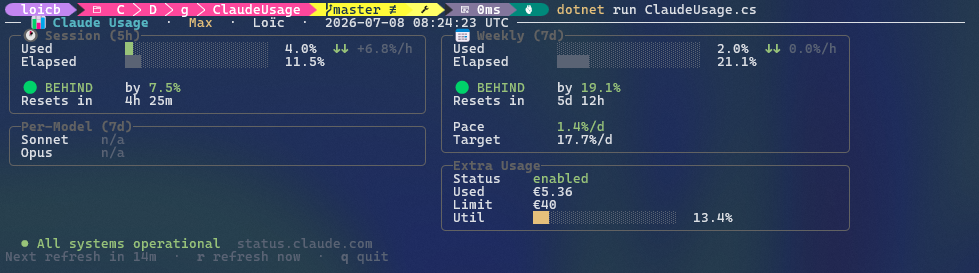
A terminal dashboard for your Claude subscription read-time usage and service status, tells you if you're on track/ahead/behind of your quotas.
It reads the OAuth token that claude login already stored on your machine, polls Anthropic's usage
endpoint, and paints a live TUI with your session/weekly windows, per-model
breakdown, extra-usage spend, burn-rate pace, current Claude and GitHub
service status, and a blinking alert when Anthropic ships a new model or a major
Claude Code feature.
dotnet tool install --global ClaudeUsage
claude-usage
Published on NuGet as a .NET global
tool. Under the hood it's still a .NET file-based app — a single
ClaudeUsage.cs that declares its own dependencies via #:package directives —
so you can also run it straight from source with no build step and no .csproj,
see Run from source below.
Requirements
- .NET SDK 10.0 or newer. Check with
dotnet --version. - An authenticated Claude CLI session — run
claude loginif you haven't. Works on Windows, Linux, and macOS; the credentials are read from wherever the Claude CLI stored them (see How it authenticates).
Install
dotnet tool install --global ClaudeUsage   # install
dotnet tool update --global ClaudeUsage    # upgrade to the latest version
dotnet tool uninstall --global ClaudeUsage # remove
This puts a claude-usage command on your PATH (make sure
~/.dotnet/tools — or %USERPROFILE%\.dotnet\tools on Windows — is on it; the
.NET SDK installer usually adds it for you).
Run from source
Clone the repo and run the file directly — no install, no build step:
dotnet run ClaudeUsage.cs
Dependencies (Spectre.Console) are restored automatically on first run.
Usage
claude-usage                 # live dashboard, refreshes every 15 min
claude-usage --once          # print one report and exit
claude-usage --interval 5    # refresh every 5 minutes
claude-usage --dump          # probe raw usage endpoints (debug)
claude-usage --help
Running from source instead of the installed tool? Same flags, just prefix with
dotnet run ClaudeUsage.cs -- (the -- separates dotnet run's own arguments
from the app's):
dotnet run ClaudeUsage.cs -- --once
Flags
| Flag | Alias | Description |
|---|---|---|
--once |
-1 |
Print the report once and exit (good for scripts/cron). |
--interval <minutes> |
Live refresh interval. Default 15. |
|
--dump |
Probe candidate OAuth endpoints and dump raw JSON. | |
--help |
-h |
Show help. |
⚠️
--dumpprints raw account data — your org UUID, plan, display name, and full usage JSON. Redact it before pasting into a bug report or sharing publicly.
Live-mode keys
r— refresh nowa— acknowledge news (stops the blinking)q— quit
How it authenticates (unofficial)
This tool uses an undocumented, unofficial endpoint. There is no public
Anthropic API for subscription (Pro/Max) usage. It works by reusing the OAuth
token the Claude CLI already stores, then calling the same internal endpoint the
CLI itself uses. It sends the token as Authorization: Bearer <token> with the
anthropic-beta: oauth-2025-04-20 header to
https://api.anthropic.com/api/oauth/usage.
The token is resolved from the first source that has it, matching how the Claude CLI stores it per platform:
CLAUDE_CODE_OAUTH_TOKENenvironment variable, if set (handy over SSH / headless, where the macOS Keychain is locked).~/.claude/.credentials.json— theclaudeAiOauth.accessTokenfield. This is the default on Windows and Linux.- macOS login Keychain — the
Claude Code-credentialsgeneric-password item, read viasecurity find-generic-password. This is the default on macOS, used when the file above is absent. The first read may pop a one-time Keychain permission prompt; click Always Allow to stop it recurring.
Because the endpoint is internal, Anthropic can change or remove it at any time
and this tool may break without notice. It's fine for a personal dashboard; don't
build anything load-bearing on it. The token is read straight from your local
Claude CLI credentials — this project never stores, logs, or transmits it anywhere
except as the Authorization header to Anthropic's own API.
How it works
- Auth — reuses the OAuth access token the Claude CLI already stored (env var, file, or macOS Keychain); the token is re-read as the CLI rotates it, so long-running sessions keep working without a restart.
- Rendering — a background fetcher owns the network and publishes immutable view-models; the render loop only paints. The clock, countdown, and keypresses stay responsive even during an in-flight request or its timeout.
- Resilience — the last successful response is cached, so panels paint instantly on startup and survive transient network/API failures with backoff.
- Trends — a small local history is kept to show short-term deltas and burn-rate pace against your window limits.
- Service status — the Claude and GitHub status pages (both Statuspage-hosted, same schema) are polled every 5 minutes without auth. All green collapses to a single line; the moment either reports trouble it opens into a panel with one row per service — degraded components, the active incident, and any scheduled maintenance window.
- News — polled every 30 minutes without auth, from two curated sources: the
Claude Platform release notes
(new models and API features, published the same day) and the Claude Code
What's new weekly digest (major
features only; bug fixes and minor releases stay out). The latest Claude Code
version comes from npm and is shown but never alerted on. Anything new opens a
blinking panel until you press
a. The first run only records what's already published, so an install doesn't replay history.
Local state
Cache and history are stored outside the repo, in your platform's local
application-data directory (ClaudeUsage\cache.json, history.json, and
news.json, the acknowledged-news list):
- Windows —
%LOCALAPPDATA%\ClaudeUsage\ - macOS —
~/Library/Application Support/ClaudeUsage/ - Linux —
$XDG_DATA_HOME/ClaudeUsage/(or~/.local/share/ClaudeUsage/)
Privacy
This tool talks only to api.anthropic.com (usage/profile), status.claude.com
and www.githubstatus.com (service status), and platform.claude.com,
code.claude.com and registry.npmjs.org (news). All but the first are public
pages; no credentials are sent to them.
It does not transmit your token or usage data to any third party. Your credentials never leave your machine except as the
Authorization header to Anthropic's own API.
Disclaimer
Not affiliated with, endorsed by, or supported by Anthropic. "Claude" is a trademark of Anthropic. Use at your own risk.
License
Released into the public domain under The Unlicense — do whatever you want with it.
| Product | Versions Compatible and additional computed target framework versions. |
|---|---|
| .NET | net10.0 is compatible. net10.0-android was computed. net10.0-browser was computed. net10.0-ios was computed. net10.0-maccatalyst was computed. net10.0-macos was computed. net10.0-tvos was computed. net10.0-windows was computed. |
This package has no dependencies.