CleanArchSharp 3.0.2
dotnet new install CleanArchSharp@3.0.2
CleanArchSharp
A modern Clean Architecture template for ASP.NET Core Web APIs — production-ready with JWT auth, PostgreSQL, Redis caching, RabbitMQ messaging, and more.
src/
├── MyProject.API            ← HTTP layer (controllers, middleware)
├── MyProject.Application    ← Use cases, CQRS handlers, domain events
├── MyProject.Contracts      ← Shared DTOs, settings, interfaces
├── MyProject.Infrastructure ← External services (Redis, RabbitMQ, Stripe, etc.)
├── MyProject.Persistence    ← EF Core DbContext, migrations, seeders
└── MyProject.Domain         ← Core entities, value objects, domain interfaces
Prerequisites
| Tool | Minimum Version | Download |
|---|---|---|
| .NET SDK | 10.0 | dotnet.microsoft.com |
| PostgreSQL | 15+ | postgresql.org |
| Redis (optional) | 6+ | redis.io |
| RabbitMQ (optional) | 3.12+ | rabbitmq.com |
Verify installation:
dotnet --version    # should be 10.0.100 or higher
psql --version      # should be 15+
Getting Started
1. Install the Template



dotnet new install CleanArchSharp@3.0.2
After installation, verify it’s available:
dotnet new list
You should see entries like:
cleanarchsharp
Clean Architecture Template for WebAPI by Sushil
Create a New API Project
dotnet new cleanarchsharp -n ProjectName
2. Configure the database
Edit src/MyProject.API/appsettings.Development.json:
{
  "ConnectionStrings": {
    "DefaultConnection": "Host=localhost;Port=5432;Database=myproject;Username=postgres;Password=your_password;"
  }
}
Tip:
appsettings.*.jsonfiles are in.gitignore— they will not be committed.
3. Create the database
cd src/MyProject.API
dotnet ef database update
This applies all migrations and creates the myproject database.
4. Run the API
dotnet run
The API starts at https://localhost:5001 (or the port shown in the console).
Open Swagger UI: https://localhost:5001/swagger
Configuration Reference
appsettings.json — mandatory settings
{
  "JwtSettings": {
    "Secret": "your-32-char-min-secret-key-here!",
    "Issuer": "MyProject",
    "Audience": "MyProject"
  },
  "ConnectionStrings": {
    "DefaultConnection": "Host=localhost;Port=5432;Database=myproject;Username=postgres;Password=your_password;"
  }
}
| Setting | Required | Notes |
|---|---|---|
JwtSettings.Secret |
✅ | Minimum 32 characters |
ConnectionStrings.DefaultConnection |
✅ | PostgreSQL connection string |
Optional features
{
  "ConnectionStrings": {
    "Redis": "localhost:6379"       // Enables Redis caching + SignalR backplane
  },
  "RabbitMqOptions": {
    "Enabled": true,                 // Enables RabbitMQ messaging
    "Host": "localhost",
    "Username": "guest",
    "Password": "guest"
  },
  "PushKit": {
    "Fcm": { "ProjectId": "..." },  // Firebase Cloud Messaging
    "Apn": { "BundleId": "..." }    // Apple Push Notification
  },
  "GoogleOAuth": {
    "ClientId": "...",
    "ClientSecret": "..."
  },
  "Stripe": {
    "SecretKey": "...",
    "WebhookSecret": "..."
  }
}
Database Seeding
Seed roles & resources
cd src/MyProject.API
dotnet run seed role
This creates: SuperAdmin, Admin, User roles + all system resources.
Seed subscription plans
dotnet run seed plan
Seed currencies
dotnet run seed currency
Seed email templates
dotnet run seed mail-templates
Create users
dotnet run seed user <email> <password> <name> <role>
Examples:
# SuperAdmin
dotnet run seed user superadmin@myproject.com SuperAdmin@123 "Super Admin" SuperAdmin

# Admin
dotnet run seed user admin@myproject.com Admin@123 "Admin User" Admin

# Regular user
dotnet run seed user user@myproject.com User@123 "Regular User" User
Developer Workflow
Add a new migration
cd src/MyProject.API
dotnet ef migrations add MigrationName
Run tests
dotnet test
Architecture rules
| Layer | Depends on | Can reference |
|---|---|---|
| API | Application, Contracts | Infrastructure, Persistence (project refs only) |
| Application | Contracts, Domain | — |
| Infrastructure | Application, Contracts | — |
| Persistence | Domain, Contracts | — |
| Domain | Contracts | — |
Program.csonly importsMyProject.Application.DependencyInjectionandMyProject.Contracts.Interfaces. All DI wiring is handled byApplicationLayerBootstrapper.
Project Features
| Category | What's included |
|---|---|
| Architecture | Clean Architecture with dependency inversion |
| API | Versioning (v1, v2), Swagger, rate limiting, CORS |
| Auth | JWT bearer tokens, refresh tokens, API keys, Google OAuth |
| 2FA | TOTP-based two-factor authentication |
| Database | EF Core + PostgreSQL with migrations |
| Caching | Redis (with in-memory fallback) |
| Messaging | RabbitMQ (domain events, notifications) |
| Push | Firebase Cloud Messaging + Apple Push Notification |
| Payments | Stripe integration |
| Real-time | SignalR with Redis backplane, SSE |
| Localization | Multi-language support (EN, JA, ES, FR) |
| Audit | Security audit logging |
| Notifications | Email (AWS SES), in-app, push |
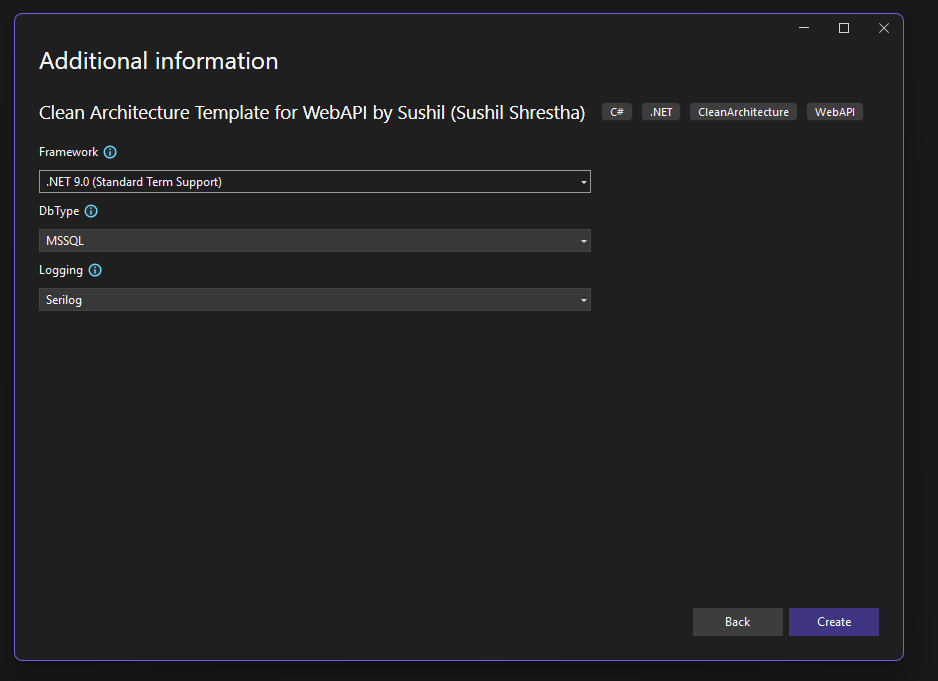
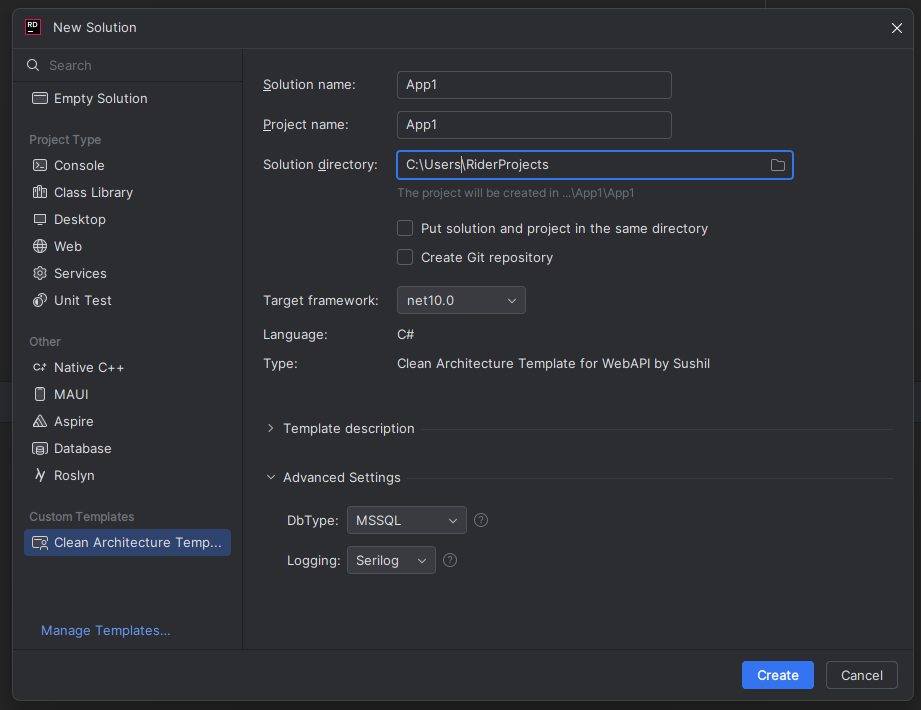
IDE Integration (Visual Studio & JetBrains Rider)
CleanArchSharp appears in the New Project dialog in:
Visual Studio
Open File → New → Project
Search for CleanArchSharp
Choose:
- CleanArchSharp Solution Template
- CleanArchSharp API Template
JetBrains Rider
Go to New Solution
Search for CleanArchSharp
Select your desired template and framework
-
.NETStandard 2.1
- No dependencies.
NuGet packages
This package is not used by any NuGet packages.
GitHub repositories
This package is not used by any popular GitHub repositories.