Code4mk.McpServer.Template
1.0.0
dotnet new install Code4mk.McpServer.Template@1.0.0
.NET MCP Server Template



A production-ready Model Context Protocol server for ASP.NET Core in one command. Sign-in with any identity provider, interactive UIs inside the chat, typed API clients, tests, Docker and docs: the parts that take weeks are already done, so you write tools.
dotnet new install Code4mk.McpServer.Template
dotnet new code4mk-mcp -n Acme.Mcp -o acme-mcp
Built on the official MCP C# SDK 2.0 and .NET 10.
Why this template
Remote MCP servers need real OAuth, and that's the hard part. MCP clients such as Claude expect OAuth 2.1 with dynamic client registration, PKCE, and protected resource metadata. Most identity providers (Entra ID, Google, Okta, ...) don't offer dynamic registration. This template ships an OIDC proxy that makes any OIDC provider work with three settings, including the consent screen, encrypted token storage and Redis for multiple instances. Users sign in once: expired tokens renew silently with rotating refresh tokens, and sign-ins survive restarts and deploys.
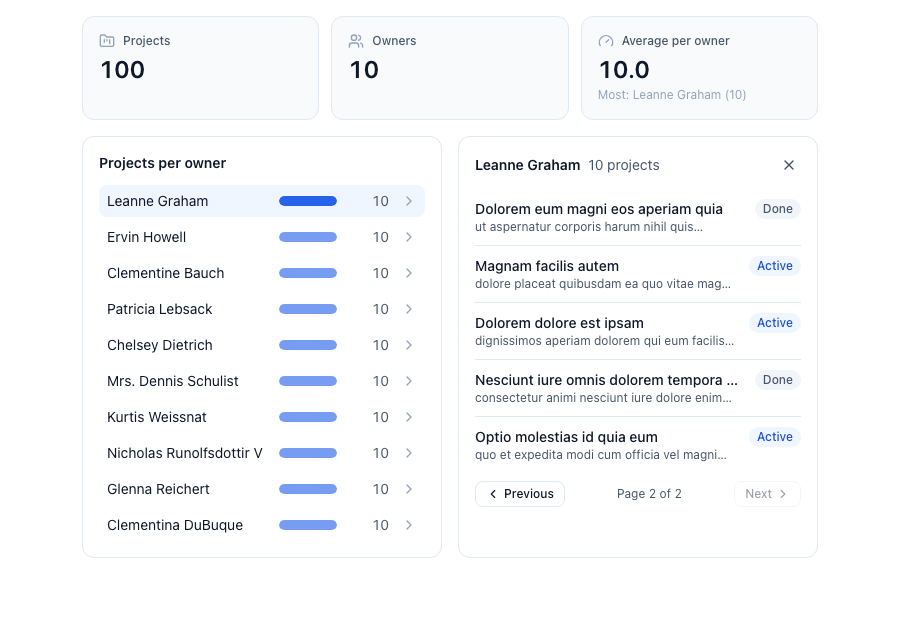
Tools can show real UI, not just text. MCP Apps are wired end to end: React + Tailwind views that follow the host's theme, call your tools themselves (paging, drill-down), validate every response, and preview with sample data without a server.
The structure stays clean as it grows. Tools → services → integrations, one direction, enforced by architecture tests: the build fails if a tool skips auth, calls an API directly, or leaks external models.
Errors the model can fix. Every tool and prompt argument is validated before your code runs; the model gets a
list like request.durationDays: High-priority projects must be 90 days or less. and retries correctly.
 |
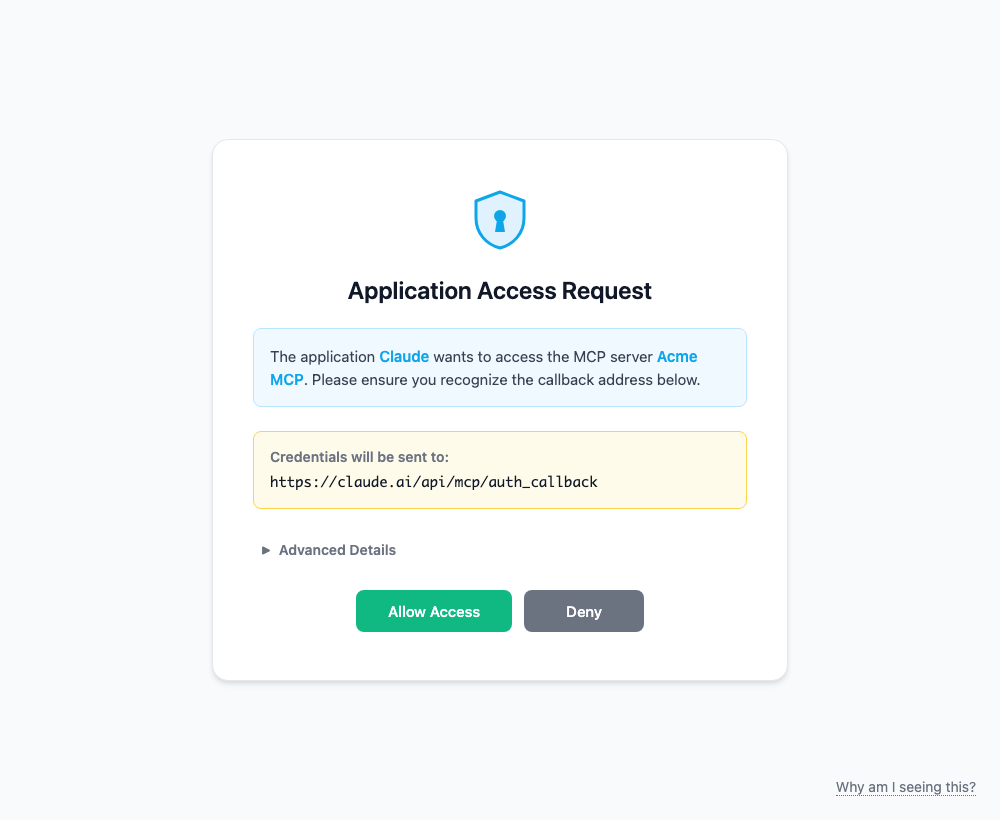 |
| An MCP App: the tool's result as a dashboard; selecting an owner calls another tool from the view | Consent before a new MCP client connects, then sign-in at your identity provider |
Quick start
dotnet new install Code4mk.McpServer.Template
dotnet new code4mk-mcp -n Acme.Mcp -o acme-mcp
cd acme-mcp
cp .env.example .env                   # set MCP_AUTH_MODE=none for a first run without an identity provider
dotnet watch --project src/Acme.Mcp    # → Server running at http://localhost:5080
npx @modelcontextprotocol/inspector    # Streamable HTTP → http://localhost:5080/mcp
-n is the .NET name (PascalCase), -o the folder. Namespaces, the solution, Docker names and GUIDs follow it.
Connect a real identity provider: register one web app with redirect URI http://localhost:5080/oauth/callback,
then set OIDC_DISCOVERY_URL, OIDC_CLIENT_ID and OIDC_CLIENT_SECRET in .env and MCP_AUTH_MODE=required.
Add the server in Claude (Settings → Connectors → Add custom connector) and it opens your login page.
What you get
| Area | Included |
|---|---|
| MCP | Tools, resources and prompts discovered from attributes; stateless Streamable HTTP (scales horizontally); annotations; structured content with output schemas |
| Auth | OIDC proxy for any OIDC provider (Entra ID, Google, Auth0, Okta, Keycloak, Zitadel, ...): DCR, PKCE, consent, ID token + userinfo merged into one AppUser. Any MCP client can connect, no allow-list. Or the jwt provider, or your own IAuthProvider. [Authorize] per item, scope policies, any IdP claim when you need it. AppUser injectable everywhere; ISignInHandler calls your backend at sign-in (sync users, permissions, deny); ITokenClaimsEnricher shapes the token's claims |
| MCP Apps | ui/ workspace (React 19, Vite, Tailwind 4, ext-apps 2): one bundle per view, host theme, tool calls from the view, zod-validated outputs, sandbox preview, per-entry builds |
| Validation | Data annotations and IValidatableObject on every tool and prompt call, nested objects included |
| Integrations | Typed API clients from one line of registration; retries, circuit breaker, timeouts; bearer, api_key, basic, client_credentials, or the signed-in user's token |
| Redis | Optional, for scale-out or your own caching: one shared StackExchange.Redis connection, REDIS_URL as URL or connection string (cluster, Sentinel, TLS), and one IRedisConnectionFactory to plug in any vendor (Azure Entra ID, AWS, GCP, certificates). Health-checked |
| Settings | .env plus typed settings classes validated at startup, every problem listed by variable name |
| Dev loop | dotnet watch with hot reload, pnpm run watch for views, dual-stack localhost, startup URL in the log |
| Tests | Unit, integration (a real MCP client against the in-memory server, including the full OAuth flow against a fake IdP) and architecture rules: 96 tests out of the box |
| Ship | Multi-stage Dockerfile, Compose, GitHub Actions (build, test, UI bundle check, Docker), pinned SDK, central package versions |
| Docs | 12 guides organized by task, 4 architecture decision records |
Project layout
acme-mcp/
├── src/Acme.Mcp/
│   ├── Capabilities/       Tools/, Resources/, Prompts/: what the server exposes (thin)
│   ├── Services/           Business logic
│   ├── Models/             Request / response DTOs
│   ├── Integrations/       One folder per external API
│   ├── Core/               Auth, MCP setup and filters, validation, settings, errors: plumbing you rarely touch
│   └── ui_dist/            Built MCP App bundles
├── ui/                     MCP App views (React + Vite + Tailwind)
├── tests/                  Unit, Integration, Architecture (mirror src/)
├── docs/                   Guides and ADRs
└── docker/                 Dockerfile, Compose
Adding a tool is one class; there is no registration line:
[McpServerToolType]
[Authorize]
public sealed class InvoiceTools(IInvoiceService invoices)
{
    [McpServerTool(Name = "get_invoice", ReadOnly = true, UseStructuredContent = true)]
    [Description("Gets an invoice by number.")]
    public Task<InvoiceDto> GetInvoice(
        [Required, RegularExpression("^INV-[0-9]{6}$")] string number,
        AppUser user,
        CancellationToken cancellationToken) =>
        invoices.GetAsync(number, user, cancellationToken);
}
Works with
- Clients: Claude (claude.ai and Desktop), VS Code, Cursor, MCP Inspector, and any client that speaks Streamable HTTP with OAuth.
- Identity providers: anything with an OpenID Connect discovery URL.
- Hosting: anywhere a container runs; set
APP_URLbehind a reverse proxy.
Documentation
Each generated project includes its docs. Browse them on GitHub:
- Development guides: getting started, configuration, tools, validation, MCP Apps, API clients, auth, testing, connecting clients
- MCP Apps UI workspace
- Architecture decisions
- Changelog
Requirements: .NET 10 SDK. Optional: Docker; Node 22+ and pnpm for MCP App views.
Contributing
Issues and pull requests are welcome. To work on the template itself:
git clone https://github.com/code4mk/dotnet-mcp-server-template
dotnet new install ./dotnet-mcp-server-template/templates/DotnetMcpTemplate --force
dotnet new code4mk-mcp -n Sample.Mcp -o ../sample-mcp     # always create projects outside the repo
DotnetMcpTemplate(anddotnetmcptemplate-slug) are placeholders; keep them. Package versions live intemplates/DotnetMcpTemplate/Directory.Packages.props.- CI creates a project from the template, builds and tests it, checks the UI bundles, and packs the template.
- Changing, testing and publishing the template: nuget-publish.md.
License
MIT © Code4mk
-
net10.0
- No dependencies.
NuGet packages
This package is not used by any NuGet packages.
GitHub repositories
This package is not used by any popular GitHub repositories.
| Version | Downloads | Last Updated |
|---|---|---|
| 1.0.0 | 77 | 9/26/2026 |