ColumnWeaver.NET
1.0.3-beta
dotnet add package ColumnWeaver.NET --version 1.0.3-beta
NuGet\Install-Package ColumnWeaver.NET -Version 1.0.3-beta
<PackageReference Include="ColumnWeaver.NET" Version="1.0.3-beta" />
<PackageVersion Include="ColumnWeaver.NET" Version="1.0.3-beta" />
<PackageReference Include="ColumnWeaver.NET" />
paket add ColumnWeaver.NET --version 1.0.3-beta
#r "nuget: ColumnWeaver.NET, 1.0.3-beta"
#:package ColumnWeaver.NET@1.0.3-beta
#addin nuget:?package=ColumnWeaver.NET&version=1.0.3-beta&prerelease
#tool nuget:?package=ColumnWeaver.NET&version=1.0.3-beta&prerelease
ColumnWeaver.NET
Client-specific data formatting without rewriting your application's transformation code.



Repository: GitHub · NuGet: ColumnWeaver.NET · Documentation and project site: ColumnWeaver.NET · Common questions · AI-readable project summary: llms.txt · Full AI reference · Source-verified feature and configurator guide · Full logo: PNG · Compact mark: PNG · Package icon: 128×128 PNG



For help choosing between schema-based formatting, template engines, and CSV libraries, see the formatter comparison.
Overview
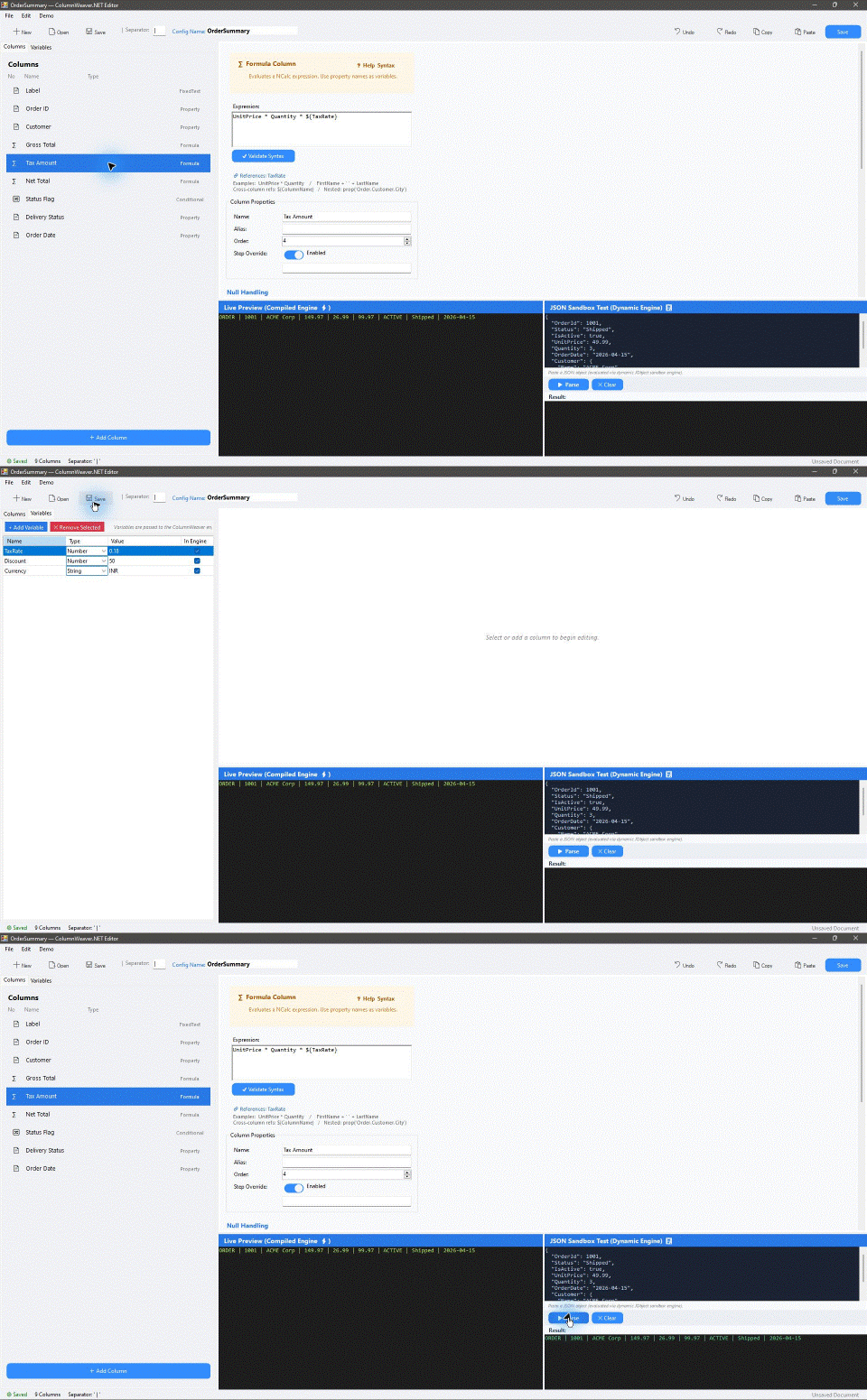
ColumnWeaver.NET exists to let each client or product define its own output format without forcing the host application to grow another hard-coded formatter. Integrate the library into a .NET Framework 4.8 or modern .NET (.NET 6/8/9+) project, define a reusable formatting configuration, and apply that configuration to source objects through the same transformation engine.
This is especially useful in trading and financial software, where multiple products, integrations, or clients may require different field selection, ordering, labels, calculations, conditions, separators, and value formatting. Instead of copying and rewriting transformation code for every project or customer, the application can reuse ColumnWeaver.NET and supply a different schema for each output contract.
See the client-specific trading record guide for an illustrative example that applies two output schemas to the same execution object, including a fixed label, a conditional side code, and a calculated notional.
When to use ColumnWeaver.NET
Use it when the same .NET object must be rendered into different customer, broker, or product-specific text layouts and those layouts should be changed through configuration rather than a new hard-coded formatter and application release. A schema can select and order properties, add fixed labels, calculate fields, apply conditions and formatting, and be reused across records. The library returns strings; the host application remains responsible for protocol rules, escaping, transport, and delivery. See the common questions and worked use cases.
Choosing a formatter
ColumnWeaver.NET is a schema-driven object-to-record formatter. It is designed for named output columns, calculated or conditional fields, stable field order, separators, and fixed-width rules that can be configured per destination. Compare it with other .NET options:
| Library | Best fit | Difference from ColumnWeaver.NET |
|---|---|---|
| ColumnWeaver.NET | Reusable, configurable structured records from .NET objects | Property, formula, conditional, custom-function, and fixed-text columns; delimited or fixed-width string output |
| Scriban | Free-form templates for text, HTML, emails, reports, and generated files | A full template and scripting language with loops, functions, and layout control; better when the template itself is the output definition |
| Handlebars.Net or Fluid | Mustache or Liquid-style user-authored templates | Template-language syntax and helper/filter ecosystems; better for narrative or document-like text |
| CsvHelper | Reading and writing CSV | Strong CSV mappings, conversion, and quoting/escaping; better when standards-oriented CSV behavior is the main requirement |
Choose a template engine for free-form documents with nested layout and loops. Choose CsvHelper for CSV correctness and read/write support. Choose ColumnWeaver.NET when the output is a structured record schema with configurable columns, formulas, conditions, order, and field formatting. Its configurable delimiter does not implement CSV quoting or protocol escaping. The FAQ comparison expands on these tradeoffs.
The same scenario is available as runnable code in Example11_ClientSpecificTradingRecords. Run the examples on Windows with dotnet run --project examples/ColumnWeaver.NET.Examples.csproj -c Release.
Typical outputs include delimited records, export rows, logs, and product-specific text formats. The library provides the transformation mechanism; the integrating application remains responsible for the surrounding transport, protocol compliance, persistence, and delivery.
One integration, multiple client formats
The application creates or loads the configuration appropriate for the destination and reuses the same library API:
var clientAParser = ColumnWeaverClient.CreatePrecompiled(clientAFormat, typeof(TradeRecord));
var clientBParser = ColumnWeaverClient.CreatePrecompiled(clientBFormat, typeof(TradeRecord));

string clientARow = clientAParser.Parse(trade);
string clientBRow = clientBParser.Parse(trade);
The configurations can define different output columns, order, labels, formulas, conditions, separators, and formatting rules. The host application does not need a separate hard-coded formatter for each output layout.
For code-authored schemas, the library also includes a fluent ParserConfigurationBuilder for property, formula, conditional, and fixed-text columns. Use JSON/XML configuration when schemas need to be loaded or edited as data; the builder is a C# authoring option, not a separate formatting engine.
var config = ParserConfigurationBuilder.Create()
    .WithName("TradeExport")
    .WithGlobalSeparator("|")
    .AddProperty("Symbol", "Symbol")
    .AddProperty("Quantity", "Quantity")
    .AddFormula("Notional", "UnitPrice * Quantity", field => field.WithFormat("F2"))
    .AddConditional("Side", "IsBuy == true", "B", "S")
    .Build();
Client-owned format customization
The shared transformation engine exposes five column types: property, formula, conditional, custom function, and fixed text. Every column type shares settings for name/alias, order, enablement, separator override, null policy, formatting, and ordered replacement rules. A client schema can combine these settings per field and combine fields into one output row. See the feature and configurator reference for the complete supported surface, examples, and UI/API distinctions.
The WinForms configurator is an authoring tool rather than a runtime dependency. It edits columns and variables, previews CLR sample objects, tests pasted JSON in a separate sandbox, and opens/saves JSON configurations. The library also exposes JSON and XML serializer APIs. Two API-level settings do not currently have dedicated controls in the configurator: XML file open/save, and preservation of separator slots for disabled columns.
Current Implementation (V2.5)
- Target Frameworks: Multi-targets
.NET Framework 4.8(net48) and.NET Standard 2.0(netstandard2.0, compatible with .NET 6/8/9+). The WinForms visual configurator runs on Windows/.NET Framework 4.8. - Compiled Execution:
CompiledParserEnginepre-compiles column pipelines into reusable execution plans. Simple property paths and expressions compile to LINQ expression tree delegates viaLambdaExpressionEngine. - NCalc Fallback: Complex mathematical and boolean expressions can use the NCalc 7.2.0 runtime fallback. Expression support and execution cost depend on the expression and selected execution path.
- Cross-Column & Variable Binding: Formulas and conditions can reference previous columns (
${ColumnName}) and external variables (${VariableName}). Variables are passed as typed parameters into expressions, preserving strings with quotes and special characters, numbers, booleans, and nulls without string corruption. - Plan Caching: Compiled plans are cached using a 64-bit FNV-1a fingerprint derived from configuration content and source type. This is a non-cryptographic cache key, not a collision-proof identity. Mutable configurations are checked for changes on the standard client path; use a frozen/precompiled client when the schema is stable and the hot path must avoid that scan.
- WinForms Configurator Parity: The WinForms configurator preview executes the same compiled engine (
CompiledParserEngine+LambdaExpressionEngine) as the publicColumnWeaverClient. An isolated dynamic sandbox engine backed byJObjectPropertyResolveris provided for ad-hoc JSON testing without CLR classes.
Quick Start
Install the published package into a compatible project:
dotnet add package ColumnWeaver.NET --version 1.0.3-beta
The currently published prerelease is 1.0.3-beta; review the NuGet package page and license before integrating it. The library targets .NET Framework 4.8 and .NET Standard 2.0 (compatible with .NET 6/8/9+).
using ColumnWeaver.NET;
using ColumnWeaver.NET.Core.Columns;
using ColumnWeaver.NET.Core.ParserConfiguration;

// 1. Define your configuration
var config = new ParserConfiguration
{
    Name = "OrderExport",
    GlobalSeparator = "|",
    Variables =
    {
        ["TaxRate"] = 0.18,
        ["Prefix"]  = "ORD"
    },
    Columns =
    {
        new PropertyColumn { Name = "Id",       PropertyPath = "Id" },
        new PropertyColumn { Name = "Customer", PropertyPath = "Customer.Name" },
        new FormulaColumn  { Name = "Gross",    Expression   = "UnitPrice * Quantity" },
        new FormulaColumn  { Name = "Tax",      Expression   = "${Gross} * ${TaxRate}" },
        new ConditionalColumn
        {
            Name                = "Status",
            ConditionExpression = "IsActive == true",
            TrueValue           = "Active",
            FalseValue          = "Inactive"
        }
    }
};

// 2. Create the client (compiles the execution plan)
var client = ColumnWeaverClient.Create(config);

// 3. Parse an object
var sample = new
{
    Id        = 1001,
    Customer  = new { Name = "ACME Corp" },
    UnitPrice = 49.99,
    Quantity  = 3,
    IsActive  = true
};

string result = client.Parse(sample);
// Output: "1001|ACME Corp|149.97|26.9946|Active"
Column Types
| Type | Purpose | Expression / Value Syntax |
|---|---|---|
PropertyColumn |
Extracts object property values via reflection / cached getter delegates | PropertyPath = "Customer.Address.City" |
FormulaColumn |
Computes arithmetic or string operations referencing columns or variables | Expression = "${Gross} * ${TaxRate}" |
ConditionalColumn |
Evaluates a boolean condition and selects true/false branch | ConditionExpression = "${Total} > 100"<br>TrueValue = "Bulk"<br>FalseValue = "Standard" |
CustomFunctionColumn |
Invokes custom functions registered with ICustomFunctionRegistry |
FunctionName = "MaskCard", Parameters = { "${CardNum}" } |
FixedTextColumn |
Emits a constant string token | Text = "---" |
Variable Store
Configurations support an arbitrary dictionary of read-only variables passed to the pipeline:
config.Variables["Discount"]     = 15.50;                          // Numeric
config.Variables["IsEligible"]   = true;                           // Boolean
config.Variables["TargetStatus"] = "O'Reilly & \"Sons\" / Active"; // Strings with quotes and symbols
config.Variables["NullVar"]      = null;                           // Null
Variables are case-insensitive and can be referenced in formulas and conditions using ${VariableName}. The engine binds variables as typed parameters, preventing syntax breakage from string interpolation. Variable names colliding with existing column names or aliases are rejected at validation time.
Client Execution Models & Recompilation Contract
ColumnWeaver.NET provides two operational client execution paths:
1. Dynamic Mutation Detection (ColumnWeaverClient.Create)
The standard client monitors configuration state on every Parse invocation using a zero-allocation, 64-bit FNV-1a fingerprint:
- No fingerprint allocation: The fingerprint itself allocates no managed objects, but it walks configuration content on each call, so its cost grows with schema size. An unchanged schema reuses the compiled plan rather than recompiling it.
- Automatic Invalidation: If columns, ordering, separators, formatting options, or variable values are mutated at runtime, the client automatically detects the change, invalidates the cached plan, and compiles a fresh execution plan on the next parse.
2. High-Throughput Precompiled Clients (CreatePrecompiled / Freeze)
For high-frequency record loops and latency-critical services:
// Option A: Factory precompilation with target source type
var client = ColumnWeaverClient.CreatePrecompiled(config, typeof(BenchmarkOrder));

// Option B: Freeze an existing client
var client = ColumnWeaverClient.Create(config);
client.Freeze();
- Bypasses Fingerprinting: Reuses the compiled specialized row delegate directly, eliminating per-record configuration scanning and cache lookups. Steady-state parse latency drops to ~107 ns.
- Explicit Recompilation: When frozen, callers who intentionally modify their configuration can call
client.Recompile()to rebuild the plan, or callconfig.Snapshot()to decouple independent configuration instances.
3. Safe, Single-Pass Streaming (ParseMany)
ParseMany consumes IEnumerable<object?> using a single forward-only enumerator pass. It processes items on the fly without buffering the collection into memory or enumerating twice, guaranteeing safety for single-use or streaming inputs (such as database readers and network streams).
WinForms Configurator & Architecture
The WinForms application (ColumnWeaver.NET.UI.exe) provides interactive editing and testing:
- Live Preview (
CompiledParserEngine): Evaluates real CLR objects (SampleOrder) throughCompiledParserEnginewithLambdaExpressionEngine, guaranteeing output identical toColumnWeaverClient. - JSON Sandbox Test (
ParserEngine): Evaluates pasted JSON text usingJObjectPropertyResolverand the dynamicParserEngine. Because JSON tokens are dynamic rather than CLR types, this mode operates in an isolated dynamic sandbox.
Performance & Reproducible Benchmarks
ColumnWeaver.NET provides a reproducible BenchmarkDotNet suite with per-operation allocation tracking via MemoryDiagnoser.
Benchmark Environment
- Harness: BenchmarkDotNet v0.13.12 with
MemoryDiagnoser - OS: Windows 11 (10.0.22000.2176 / 21H2 / SunValley) 64-bit
- Processor: Intel Core i7-10700F CPU @ 2.90GHz (1 CPU, 8 physical cores, 16 logical cores)
- Runtime Target: .NET Framework 4.8.1 (4.8.9277.0), X64 RyuJIT VectorSize=256
- Build Configuration: Release (
-c Release) - Full BenchmarkDotNet Command:
dotnet run --project benchmarks/ColumnWeaver.NET.Benchmarks/ColumnWeaver.NET.Benchmarks.csproj -c Release -- --bdn - Generated Report: BenchmarkDotNet summary
Benchmark Results (BenchmarkDotNet v0.13.12)
All implementations use identical input objects and are asserted in setup to produce 100% equivalent string outputs prior to measurement.
| Feature Scenario | Implementation / Engine | Mean Latency | Error | StdDev | Gen0 / 1k Ops | Allocated / Op |
|---|---|---|---|---|---|---|
1. Property Extraction<br>(Flat Id + nested Customer.Name, City) |
Hard-coded C# | 95.68 ns | 8.49 ns | 2.20 ns | 0.0395 | 249 B |
| Compiled Client | 110.41 ns | 2.47 ns | 0.64 ns | 0.0126 | 80 B | |
| NCalc / Interpreted | 5,816.63 ns | 173.40 ns | 61.84 ns | 0.9460 | 5,978 B | |
2. Formula Calculations<br>(Arithmetic UnitPrice * Quantity + "F2") |
Hard-coded C# | 219.50 ns | 2.26 ns | 0.59 ns | 0.0062 | 40 B |
| Compiled Client | 281.46 ns | 5.07 ns | 1.81 ns | 0.0124 | 80 B | |
| NCalc / Interpreted | 7,616.83 ns | 121.44 ns | 43.31 ns | 1.3733 | 8,665 B | |
3. Conditional Columns<br>(Full row: Id + boolean status branch) |
Hard-coded C# (Micro) | 0.70 ns | 0.02 ns | 0.01 ns | - | - |
| Hard-coded C# (Full Row) | 47.56 ns | 0.71 ns | 0.25 ns | 0.0134 | 84 B | |
| Compiled Client (Full Row) | 71.68 ns | 1.21 ns | 0.32 ns | 0.0082 | 52 B | |
| NCalc / Interpreted | 8,252.35 ns | 273.94 ns | 71.14 ns | 1.3733 | 8,702 B | |
4. Variables (Numeric & String)<br>(Formula with ${TaxRate} + Condition with ${Currency}) |
Hard-coded C# | 238.19 ns | 13.75 ns | 4.90 ns | 0.0162 | 104 B |
| Compiled Client | 301.39 ns | 8.89 ns | 3.17 ns | 0.0162 | 104 B | |
| NCalc / Interpreted | 19,749.90 ns | 339.21 ns | 88.09 ns | 2.7466 | 17,403 B | |
| 5. Fixed Text / Labels<br>(Constant labels prepended & appended) | Hard-coded C# | 47.59 ns | 0.62 ns | 0.22 ns | 0.0153 | 96 B |
| Compiled Client | 80.07 ns | 0.75 ns | 0.20 ns | 0.0088 | 56 B | |
| NCalc / Interpreted | 3,640.71 ns | 142.97 ns | 37.13 ns | 0.7095 | 4,469 B | |
6. Custom Functions<br>(Function registry delegate invocation Upper) |
Hard-coded C# | 72.16 ns | 1.11 ns | 0.29 ns | 0.0191 | 120 B |
| Compiled Client | 189.57 ns | 15.27 ns | 5.45 ns | 0.0241 | 152 B | |
| NCalc / Interpreted | 8,183.72 ns | 303.60 ns | 78.84 ns | 1.1749 | 7,438 B | |
7. Null Handling<br>(Full row: Id + fallback Notes ?? "(none)") |
Hard-coded C# (Micro) | 0.72 ns | 0.11 ns | 0.04 ns | - | - |
| Hard-coded C# (Full Row) | 47.88 ns | 0.39 ns | 0.10 ns | 0.0137 | 86 B | |
| Compiled Client (Full Row) | 70.02 ns | 2.52 ns | 0.90 ns | 0.0086 | 54 B | |
| NCalc / Interpreted | 4,000.49 ns | 150.80 ns | 53.78 ns | 0.7706 | 4,868 B | |
| 8. Formatting Options<br>(TrimBoth, UpperCase, PadRight, Prefix, Suffix) | Hard-coded C# | 114.22 ns | 3.12 ns | 0.81 ns | 0.0331 | 209 B |
| Compiled Client | 208.28 ns | 5.21 ns | 1.86 ns | 0.0508 | 321 B | |
| NCalc / Interpreted | 2,616.34 ns | 46.17 ns | 11.99 ns | 0.6599 | 4,164 B | |
| 9. Replacement Rules<br>(Sequential string substitution rules) | Hard-coded C# | 37.92 ns | 1.52 ns | 0.54 ns | 0.0102 | 64 B |
| Compiled Client | 316.18 ns | 18.94 ns | 6.75 ns | 0.0558 | 353 B | |
| NCalc / Interpreted | 2,781.71 ns | 113.08 ns | 29.37 ns | 0.6828 | 4,301 B | |
10. Disabled Column Slot<br>(PreserveSeparatorForDisabledColumns = true) |
Hard-coded C# | 47.28 ns | 2.18 ns | 0.78 ns | 0.0153 | 96 B |
| Compiled Client | 73.92 ns | 2.27 ns | 0.81 ns | 0.0088 | 56 B | |
| NCalc / Interpreted | 4,047.77 ns | 215.69 ns | 76.92 ns | 0.7782 | 4,910 B | |
| 11. Dependency-Heavy Formulas<br>(5 chained formulas + conditional tier) | Hard-coded C# | 1,260.50 ns | 32.36 ns | 11.54 ns | 0.0839 | 530 B |
| Compiled Client | 1,275.45 ns | 4.31 ns | 1.54 ns | 0.0477 | 305 B | |
| NCalc / Interpreted | 42,913.16 ns | 581.37 ns | 207.32 ns | 6.4697 | 40,816 B | |
| 12. Batch 10k Items<br>(Representative schema across 10,000 items) | Hard-coded C# | 8,131,809.38 ns | 321,481.28 ns | 114,643.32 ns | 734.3750 | 4,648,404 B |
Compiled Client (ParseMany) |
8,491,350.00 ns | 485,184.22 ns | 173,021.37 ns | 312.5000 | 2,001,312 B | |
| NCalc / Interpreted | 321,509,900.00 ns | 11,451,800.55 ns | 4,083,822.39 ns | 42500.0000 | 269,831,116 B | |
| 13. Lifecycle: Cold Start vs Steady State | Cold Start (Clone & Compile & Parse) | 563,945.69 ns | 10,377.62 ns | 3,700.76 ns | 7.8125 | 53,363 B |
| Steady State (Precompiled Parse) | 107.45 ns | 2.63 ns | 0.94 ns | 0.0126 | 80 B | |
| 14. Configuration Validation | Representative Config Validation | 16,763.29 ns | 901.18 ns | 321.37 ns | 2.5940 | 16,432 B |
Performance Analysis & Trade-offs
- Where Hard-coded C# is Faster: Hard-coded C# compiles directly to static machine instructions with ahead-of-time type resolution, avoiding dynamic string parsing and indirect dispatch. For simple micro-operations (e.g. single-field property extracts), native C# is naturally slightly faster.
- Where ColumnWeaver Excels: ColumnWeaver enables business analysts and software developers to define, edit, validate, and persist parsing and export schemas at runtime (via JSON/XML or the WinForms UI) without writing, compiling, testing, and redeploying application code.
- Specialized Whole-Row Compilation (
SpecializedPipelineBuilder):- Statically compilable pipelines (Property, Formula, Conditional, FixedText, Variables) compile into a single specialized row delegate (
Func<object?, StringBuilder, string>). - Eliminates per-node virtual dispatch, array clearing, value-type boxing, and per-column string allocations on the steady-state hot path.
- Zero-allocation integer and long formatting is implemented via thread-static char buffers, bypassing .NET Framework 4.8's heap-allocating
StringBuilder.Append(int)implementation. - Property extraction executes in ~110.4 ns (down from 311.1 ns), with only 80 B allocation (68% lower allocation than hard-coded C#'s 249 B).
- Formula calculations execute in ~281.5 ns (down from 369.8 ns; uncompiled NCalc takes ~7,617 ns — a 27x speedup).
- Conditionals evaluate full rows in ~71.7 ns (allocating 52 B vs 84 B for hard-coded C#; uncompiled NCalc takes ~8,252 ns — a 115x speedup).
- Variables achieve 301.4 ns (down from 641.6 ns; 2.1x speedup) with exact allocation parity to hard-coded C# (104 B).
- Dependency-heavy chained formulas execute in ~1,275 ns vs ~1,260 ns (1.012x latency ratio, only 1.2% overhead) while allocating 42% less memory than hard-coded C# (305 B vs 530 B).
- Statically compilable pipelines (Property, Formula, Conditional, FixedText, Variables) compile into a single specialized row delegate (
- Batch Processing Throughput & 4.4% Overhead:
- Batch Latency:
ParseManyprocesses 10,000 items in 8.49 ms compared to 8.13 ms for equivalent hard-coded C#. This achieves a 1.044x latency ratio (4.4% overhead), handily beating the ≤13% overhead stretch target. - Batch Memory Efficiency:
ParseManyallocates only 2.00 MB across 10,000 items compared to 4.65 MB for equivalent hard-coded C# (57% lower memory footprint) because it streams output rows through a reused string builder rather than performing intermediate string concatenations. - Compared with interpreted NCalc batch processing (321.5 ms and 269.8 MB), ColumnWeaver compiled batching is 37.9x faster and allocates 99.3% less memory.
- Batch Latency:
- Throughput Realities:
- In steady-state single-record parsing (
Parse), precompiled execution takes ~107.5 ns per record (down from 315 ns) allocating only 80 bytes. - In batch parsing (
ParseMany), throughput exceeds 1,177,000 records/sec per core (~0.85 µs per record). - Cold-start execution plan compilation takes ~564 µs once per schema.
- Standard mutable clients compute an allocation-free FNV-1a fingerprint from configuration content when retrieving a plan. This work grows with configuration size; the precompiled/frozen path avoids the per-record configuration scan for stable schemas. FNV-1a is non-cryptographic and has a theoretical collision risk.
- In steady-state single-record parsing (
- Limitations: The suite benchmarks representative features and scenarios. Throughput in production will vary with complex object graphs, deep reflection hierarchies, and external garbage collection load.
Comparative object-to-string benchmark (.NET 8)
The comparative harness and evaluation now includes Scriban, SmartFormat, Handlebars.Net, Fluid, StringTokenFormatter, and TinyString. All seven implementations passed exact single-row and 10,000-row output checks before timing. On this five-field structured record, ColumnWeaver took 250 ns / 128 B for one row and 3.348 ms / 1.50 MB for 10,000 rows. The closest external alternatives in this workload were Handlebars.Net (706 ns, 8.182 ms) and Fluid (890 ns, 8.993 ms). Template engines provide free-form authoring and related features not measured by this schema workload; see the comparison for fit, capabilities, methodology, and limitations.
BenchmarkDotNet 0.13.12 on Windows 11 / .NET 8.0.1 did not identify the processor and could not set the power plan. Treat these measurements as an indicative run and repeat on a controlled host for adoption decisions. See the full report, CSV, and harness.
Roadmap & Status
| Feature | Status | Notes |
|---|---|---|
| Core column definitions & pipeline | Completed | Full support for 5 column types |
| Clean Architecture layers | Completed | Core, Application, Infrastructure, UI |
Expression compilation (LambdaExpressionEngine) |
Completed | LINQ expression trees for property paths |
| NCalc expression engine | Completed (Fallback) | Retained as robust runtime expression evaluator |
| Variable Store & safe escaping | Completed | Typed parameter binding for string, number, bool, null |
| Deterministic execution plan caching | Completed | Automatic cache invalidation on configuration mutation |
| WinForms configurator parity | Completed | Live preview aligned with ColumnWeaverClient |
| Reproducible benchmark suite | Completed | ColumnWeaver.NET.Benchmarks (BenchmarkDotNet & MemoryDiagnoser) |
Fluent configuration builder (ParserConfigurationBuilder) |
Completed | Fluent API for constructing configurations |
| .NET Standard 2.0 & modern .NET multi-targeting | Completed | Dual-targets net48 and netstandard2.0 (compatible with .NET 6/8/9+) |
| Web UI / Blazor configurator | Planned (V3) | Browser-based pipeline designer |
| REST API & AI-Agent integration | Planned (V3) | HTTP service for remote parsing pipelines |
Requirements & Building
- Target Frameworks: Core library: .NET Framework 4.8 & .NET Standard 2.0 (compatible with .NET 6/8/9+). WinForms UI: .NET Framework 4.8 (Windows).
- SDK: .NET 8.0 SDK (version 8.0.100+) or Visual Studio 2022
# Build the core library and tests
dotnet build ColumnWeaver.NET.sln

# Run unit and regression tests
dotnet test ColumnWeaver.NET.sln

# Build the WinForms UI
dotnet build ColumnWeaver.NET.Win.UI.sln

# Run Quick Profiling mode (Stopwatch loop)
dotnet run --project benchmarks/ColumnWeaver.NET.Benchmarks/ColumnWeaver.NET.Benchmarks.csproj -c Release

# Run Full BenchmarkDotNet harness (with MemoryDiagnoser)
dotnet run --project benchmarks/ColumnWeaver.NET.Benchmarks/ColumnWeaver.NET.Benchmarks.csproj -c Release -- --bdn
Project Credits
Concept and project direction: Hitesh Bhanushali. AI-assisted development tools: Codex 6 Luna and Antigravity with Gemini 3.8. The developer reviews and verifies each release; see the release-specific test, build, and benchmark results.
License
ColumnWeaver.NET is licensed under the GNU Affero General Public License v3 or any later version (AGPL-3.0-or-later). See LICENSE for the SPDX identifier and link to the full license text.
Organizations that need to embed ColumnWeaver.NET in a proprietary or closed-source product may request a separate commercial license from the rights holder by emailing Hitesh Bhanushali. Commercial scope, fees, and support terms are not yet published; until a separate agreement is signed, the AGPL applies. The commercial option does not take away rights already granted under the AGPL. See COMMERCIAL-LICENSING.md for the current policy and important scope notes.
The software license applies to the library code; it does not impose a separate fee or permission requirement on ordinary output strings or records generated by using the library. The output may still be subject to rights based on its content. AGPL copyleft can affect distribution of applications incorporating the library, and the AGPL has extra source-offer requirements for modified versions used over a network. Organizations should review the full license for their architecture.
| Product | Versions Compatible and additional computed target framework versions. |
|---|---|
| .NET | net5.0 was computed. net5.0-windows was computed. net6.0 was computed. net6.0-android was computed. net6.0-ios was computed. net6.0-maccatalyst was computed. net6.0-macos was computed. net6.0-tvos was computed. net6.0-windows was computed. net7.0 was computed. net7.0-android was computed. net7.0-ios was computed. net7.0-maccatalyst was computed. net7.0-macos was computed. net7.0-tvos was computed. net7.0-windows was computed. net8.0 was computed. net8.0-android was computed. net8.0-browser was computed. net8.0-ios was computed. net8.0-maccatalyst was computed. net8.0-macos was computed. net8.0-tvos was computed. net8.0-windows was computed. net9.0 was computed. net9.0-android was computed. net9.0-browser was computed. net9.0-ios was computed. net9.0-maccatalyst was computed. net9.0-macos was computed. net9.0-tvos was computed. net9.0-windows was computed. net10.0 was computed. net10.0-android was computed. net10.0-browser was computed. net10.0-ios was computed. net10.0-maccatalyst was computed. net10.0-macos was computed. net10.0-tvos was computed. net10.0-windows was computed. |
| .NET Core | netcoreapp2.0 was computed. netcoreapp2.1 was computed. netcoreapp2.2 was computed. netcoreapp3.0 was computed. netcoreapp3.1 was computed. |
| .NET Standard | netstandard2.0 is compatible. netstandard2.1 was computed. |
| .NET Framework | net461 was computed. net462 was computed. net463 was computed. net47 was computed. net471 was computed. net472 was computed. net48 is compatible. net481 was computed. |
| MonoAndroid | monoandroid was computed. |
| MonoMac | monomac was computed. |
| MonoTouch | monotouch was computed. |
| Tizen | tizen40 was computed. tizen60 was computed. |
| Xamarin.iOS | xamarinios was computed. |
| Xamarin.Mac | xamarinmac was computed. |
| Xamarin.TVOS | xamarintvos was computed. |
| Xamarin.WatchOS | xamarinwatchos was computed. |
-
.NETFramework 4.8
- NCalc (>= 7.2.0)
- Newtonsoft.Json (>= 13.0.3)
-
.NETStandard 2.0
- NCalc (>= 7.2.0)
- Newtonsoft.Json (>= 13.0.3)
NuGet packages
This package is not used by any NuGet packages.
GitHub repositories
This package is not used by any popular GitHub repositories.
| Version | Downloads | Last Updated |
|---|---|---|
| 1.0.3-beta | 76 | 10/25/2026 |
| 1.0.2-beta | 73 | 10/24/2026 |
| 1.0.1-beta | 72 | 10/23/2026 |
| 1.0.0-beta | 70 | 10/16/2026 |
Updates the published package readme with current install instructions and clarifies the fit for schema-driven structured records. No runtime API changes.