Comentality.PluginStepCodegen
1.2.0
dotnet add package Comentality.PluginStepCodegen --version 1.2.0
NuGet\Install-Package Comentality.PluginStepCodegen -Version 1.2.0
<PackageReference Include="Comentality.PluginStepCodegen" Version="1.2.0" />
<PackageVersion Include="Comentality.PluginStepCodegen" Version="1.2.0" />
<PackageReference Include="Comentality.PluginStepCodegen" />
paket add Comentality.PluginStepCodegen --version 1.2.0
#r "nuget: Comentality.PluginStepCodegen, 1.2.0"
#:package Comentality.PluginStepCodegen@1.2.0
#addin nuget:?package=Comentality.PluginStepCodegen&version=1.2.0
#tool nuget:?package=Comentality.PluginStepCodegen&version=1.2.0
 Plugin Step Codegen

An XrmToolBox tool that documents your Dataverse plugin step registrations in your C# source.
It reads the steps and images registered in the connected environment and writes them
back into your plugin classes as Xrm Tools
compatible [Plugin], [Step] and [Image] attributes.
Your registration stops living only in an environment you have to go look at, and starts living in the code review, the diff and the git history.
Why
Registration lives in the environment, source lives in git, and nothing keeps them
honest. The only existing tool that closes the gap is spkl instrument, a CLI buried in
the largely dormant SparkleXrm framework. This does the same job from inside XrmToolBox,
against the modern attribute model.
Built for Xrm Tools — go and look at it
The attribute model is Xrm Tools', and being
compatible with it is this tool's whole premise: what gets written here is what Xrm Tools
reads back, down to the constructor overload it binds and the order the attributes are
in. Every release is compiled and evaluated against the real
XrmTools.Meta.Attributes
package at four versions to keep that true.
If you are not using it yet, it is worth the detour. It is a Visual Studio extension — "all the missing features for Power Platform, one release at a time" — that turns those same attributes into the registration itself: one-click assembly deploy and step registration, Dataverse-aware IntelliSense over your metadata, typed entity and plugin generation, and a FetchXML designer, with no build-time codegen and no telemetry.
The two run in opposite directions and meet in the middle. Xrm Tools takes the attributes in your source and makes the environment match them; this takes an environment somebody already registered by hand and writes it back into your source in the same shape — which is exactly what you want on the day you inherit a plugin project with no attributes in it at all.
Install
Tool Library in XrmToolBox → search for Plugin Step Codegen → Install. Nothing else to set up, and nothing to configure.
The Tool Library installs it from nuget, where it lives as
Comentality.PluginStepCodegen.
What it does
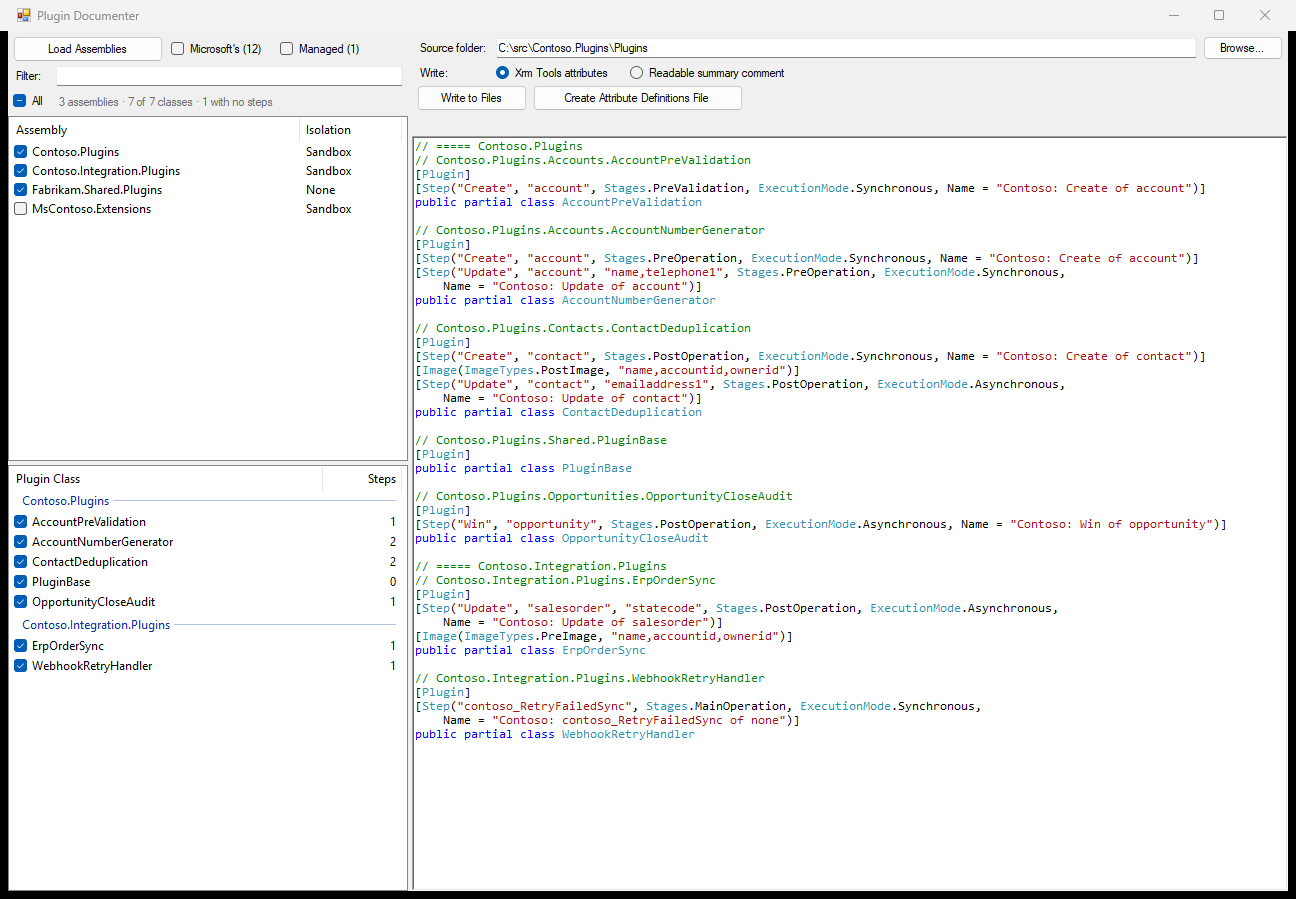
- Load Assemblies lists the unmanaged plugin assemblies in the connected environment — the ones somebody is writing. Microsoft's and everything else shipped in a solution are a switch away.
- Ticking one — or All of them, for a project that ships an assembly per plugin — loads every plugin type that has at least one registered step, grouped by assembly.
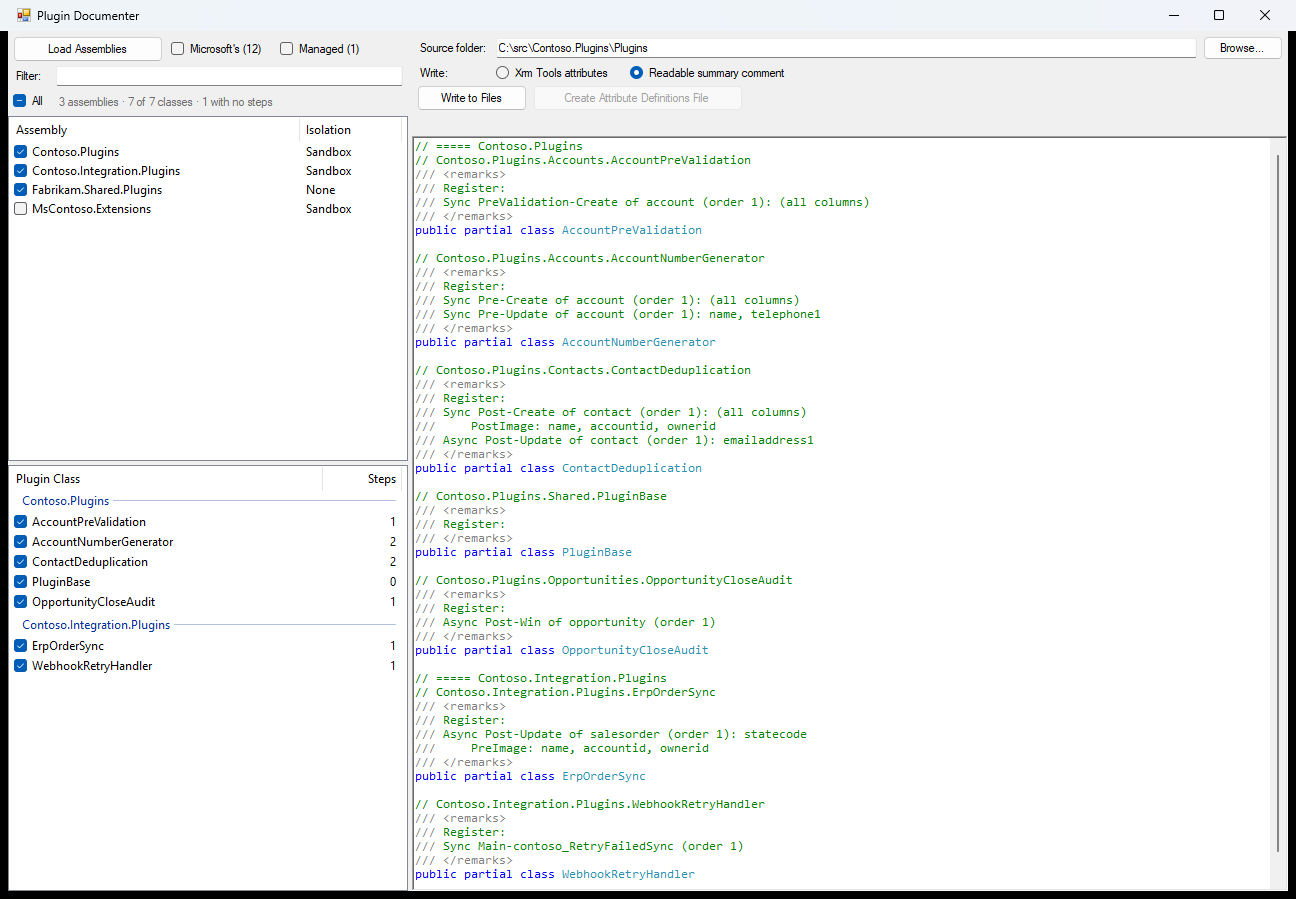
- Write chooses the output: Xrm Tools attributes or a readable summary comment.
- The preview pane shows exactly what would be written, and follows the ticks and the mode as you change them.
- Write to Files finds the
.csfile declaring each class and splices the output in above the class declaration. - Create Attribute Definitions File drops a dependency-free
XrmToolsMetaAttributes.csinto your project so the emitted attributes compile without the NuGet package or the Visual Studio extension.
Every file that changes gets a timestamped .bak copy beside it, and nothing is ever
written to the environment.
Output
Two shapes, chosen with the Write toggle. They are independent: each replaces only its own block, so switching modes never deletes the other one's work, and a class can carry both.
Xrm Tools attributes
/// <summary>Handles account writes.</summary>
[Obsolete("your own attributes are left alone")]
[Plugin(Description = "Keeps account data consistent.")]
[Step("Create", "account", Stages.PreOperation, ExecutionMode.Synchronous)]
[Image(ImageTypes.PostImage, "name")]
[Step("Update", "account", "name,address1_line1", Stages.PostOperation, ExecutionMode.Asynchronous,
    Name = "Recalculate rollups",
    ExecutionOrder = 25,
    Description = "Runs after the write completes.",
    AsyncAutoDelete = true)]
[Image(ImageTypes.PreImage, "name", Name = "Before", EntityAlias = "Before")]
[Step("Associate", Stages.PreValidation, ExecutionMode.Synchronous)]
public partial class AccountManager : IPlugin
Style follows the XrmTools.Meta.Attributes
README: the widest positional constructor the step's data supports, remaining facts as
named properties, wrapping one argument per line only when the line gets long.
Attribute order is load bearing — [Image] binds to the nearest preceding [Step],
so steps are written in execution order with their own images following them, which is
the order Xrm Tools reads them back in and not ours to rearrange.
Readable summary comment
The same registration as prose, for the reader rather than the compiler:
/// <summary>Handles course history.</summary>
/// <remarks>
/// Register:
/// Sync Pre-Delete of ilac_class (order 1, disabled, As SYSTEM)
///     PreImage: (all columns)
/// Sync Post-Create of mshied_coursehistory (order 3): ilac_suggestedesllevel
///     PreImage:
///         mshied_academicperioddetailsid, ilac_class, mshied_courseid, ilac_currentlevel,
///         ilac_enddate, ilac_exitlevel, ilac_isstudentleaving, ilac_sessiontype
/// Sync Post-Update of mshied_coursehistory (order 1):
///     ilac_enddate, mshied_enrollmentstatus, ilac_startdate, ilac_suggestedesllevel
/// </remarks>
public partial class CourseHistoryHandler : IPlugin
Because nothing here has to compile, the comment carries two facts no attribute can
express: a disabled step, and the user a step impersonates, as As <name>.
Documentation
| Getting started | Install it, connect, and do a first run. |
| Choosing assemblies | Why the list starts short, what the two switches hold, and how the filter behaves. |
| What gets written | Both output modes in full: what is emitted, what is suppressed, and in what order. |
| Writing to files | How a class is matched to a file, what is replaced, the backups, and the report. |
| Attribute definitions file | Making the emitted attributes compile, with or without the NuGet package. |
| Limits and troubleshooting | What the tool cannot express, and what to do when a run does not go as expected. |
Building
.\build.ps1     # build Debug and copy the DLL into your local XrmToolBox Plugins folder
.\deploy.ps1    # copy the existing Debug DLL without rebuilding
.\publish.ps1   # build Release, pack, and push to NuGet.org
Testing
tests/ holds an end to end suite: six assemblies of empty plugin classes, under two
publishers, registered every way this tool has to describe — four in managed solutions and
two by hand, the way a plugin you are writing is registered — driven entirely by pac.
Several assemblies rather than one because that is where the interesting failures live:
a class name that is not unique across a source tree, an assembly whose source is missing,
an assembly named Microsoft that is nothing of the sort.
cd tests
.\register.ps1      # build the assemblies, pack three solutions, import them
.\verify.ps1        # confirm the environment matches the test matrix
.\write.ps1         # run the real emit and write path over sandbox copies of the fixtures
.\compat.ps1        # check what is emitted against the real XrmTools package from nuget
.\perf.ps1          # time the scan and the write over generated repositories
.\unregister.ps1    # take it all away again
.\xtb.ps1           # build the tool and open it in an XrmToolBox of its own
.\ui.ps1            # screenshot the layout without XrmToolBox or a connection
write.ps1, compat.ps1 and perf.ps1 need no environment and no connection.
perf.ps1 generates plugin repositories of 250, 1000 and 4000 files and times the real
scan and the real write over them, judged against what reading the folder once costs on
the same machine. It exists because the answer to "why is this slow" was never the disk:
a phase costing many times a read is a phase reading the folder once per class.
compat.ps1 is the one that keeps the tool's premise honest. It builds a corpus hitting
every decision the emitter makes, compiles it against both the generated definitions file
and the real XrmTools.Meta.Attributes package at four versions, and checks that the two
do not merely both compile but mean the same thing — same constructor bound, same value in
every property of the constructed attribute, defaults included.
xtb.ps1 puts a private XrmToolBox in tests\.xtb holding nothing but this tool, connects
it to the same environment and opens it, so testing a change is one command and cannot
disturb the XrmToolBox you work in.
Then compare what the tool writes with the expected output in tests/README.md, which spells out, class by class, exactly what both output modes should produce.
License
MIT
Learn more about Target Frameworks and .NET Standard.
-
.NETFramework 4.8
- XrmToolBox (>= 1.2025.7.71)
NuGet packages
This package is not used by any NuGet packages.
GitHub repositories
This package is not used by any popular GitHub repositories.
v1.2.0
- A registered class with no steps is no longer filed as unregistered.
- The assembly list drops its Isolation column and spends the width on saying what is wrong with each assembly's source.
- Stale files have a group of their own, so "what have I got to rewrite" is one look rather than a scan.
- The tool behaves itself on a slow link: eight ways a fetch still in flight could mislead you or lose your work are fixed.
- The source folder can be slow too, and no longer freezes the window when it is.
- The source folder is read once, not once per class, so a 250-file project scans in 17 ms rather than four seconds.
- Write no longer freezes the window: it runs under the same progress overlay that loading the assemblies does.
- Marks from another folder are cleared when you change folders.
- The summary comment is grouped by table, so a plugin registered against a dozen tables reads as a dozen short lists.
- The docs, the store listing and the generated definitions file now name Xrm Tools as whose attribute model this is.
- Nothing that goes wrong should reach XrmToolBox's crash dialog.
Full changelog, with screenshots: https://github.com/comentality/xrm-plugin-step-codegen/releases/tag/v1.2.0
v1.1.0
- An image or filter covering nearly all of a table's columns can say "all columns except" instead of reciting seventy names.
- Experimental settings live behind a new † button in the write toolbar, and are remembered across sessions.
- A third column scans your source folder in the background and marks every class current, stale, missing or ambiguous.
- Write to both files when a class is declared twice, so a partial class is documented on both halves.
- The code preview collapses, giving its width to the source column.
- Refresh rereads the assemblies and steps without losing your ticks, filter or folder.
- A short-name tie between two files is settled by the registered namespace, so same-named classes stop coming back ambiguous.
v1.0.0
- Reads the plugin steps and images registered in the connected environment and writes them into your C# source.
- The assembly list defaults to the unmanaged assemblies; Microsoft's and Managed are switches carrying the count of what they hold back.
- Writes above the class declaration, replacing only its own block; every changed file gets a timestamped .bak beside it.
- Create Attribute Definitions File emits a dependency-free XrmToolsMetaAttributes.cs, so the attributes compile with no package at all.
- Read-only: nothing is ever written back to the environment.