CompuMaster.Dms.BrowserUI
2026.10.13
dotnet add package CompuMaster.Dms.BrowserUI --version 2026.10.13
NuGet\Install-Package CompuMaster.Dms.BrowserUI -Version 2026.10.13
<PackageReference Include="CompuMaster.Dms.BrowserUI" Version="2026.10.13" />
<PackageVersion Include="CompuMaster.Dms.BrowserUI" Version="2026.10.13" />
<PackageReference Include="CompuMaster.Dms.BrowserUI" />
paket add CompuMaster.Dms.BrowserUI --version 2026.10.13
#r "nuget: CompuMaster.Dms.BrowserUI, 2026.10.13"
#:package CompuMaster.Dms.BrowserUI@2026.10.13
#addin nuget:?package=CompuMaster.Dms.BrowserUI&version=2026.10.13
#tool nuget:?package=CompuMaster.Dms.BrowserUI&version=2026.10.13
CompuMaster.Dms
DMS Browser component for Scopevisio Teamwork, CenterDevice, WebDAV (e.g. NextCloud, OwnCloud)



CompuMaster.Dms ecosystem
These separately versioned repositories form the CompuMaster.Dms ecosystem; they are not Git submodules. Repository names, local directory names, and NuGet package IDs can differ.
| Component | Repository | Responsibility |
|---|---|---|
| CompuMaster.Dms | CompuMaster.Dms | Provider-independent DMS workflows, provider adapters, and BrowserUI. |
| CompuMaster.Ocs | CompuMaster.OpenCollaborationService | ownCloud/Nextcloud OCS protocol, sharing, and account/group operations. |
| CompuMaster.Scopevisio.OpenApi | CompuMaster.Scopevisio.OpenApi | Scopevisio OpenScope REST API and authorization. |
| CompuMaster.Scopevisio.Teamwork | CompuMaster.Scopevisio.Teamwork | Teamwork integration connecting OpenScope authorization with CenterDevice clients. |
| CompuMaster.CenterDevice | CompuMaster.CenterDevice.IO | CenterDevice REST and file-system SDK; the DMS package dependency is CompuMaster.CenterDevice.Rest. |
DMS uses WebDAV for ownCloud/Nextcloud file operations and OCS for supported sharing operations. Teamwork builds on OpenScope and CenterDevice clients. Actual package versions and optional source references are defined by the project files on the branch being tested; an unmerged upstream change is not automatically available in DMS.
For cross-repository work, evaluate the affected libraries before adding a DMS-only workaround. Keep reusable protocol, authentication, transport, and SDK behavior in its owning library, while DMS retains the common workflow/capability model and UI mapping. Preserve standalone library consumers, synchronous APIs, identity semantics, and existing defaults.
Track each upstream change in an issue in its owning repository, link its implementing PR there, and reference that issue as a dependency in the affected DMS issue. Keep reciprocal links, exact commit/package versions, integration order, and verification status current. Distinguish implemented, tested, merged, published, and consumed states; do not close a dependency merely because an upstream branch is green.
Shared remote test systems require coordinated exclusive access across repositories and local sessions, including setup and cleanup. Identically named GitHub Actions concurrency groups in different repositories do not provide a shared lock. See AGENTS.md for working rules.
Simple download/installation using NuGet
Install-Package CompuMaster.Dms.Providers
respectively
Install-Package CompuMaster.Dms.BrowserUI
Also see: https://www.nuget.org/packages/CompuMaster.Dms.Providers and https://www.nuget.org/packages/CompuMaster.Dms.BrowserUI
Modules Overview
There are following main modules for your use:
- CompuMaster.Dms.Providers – The base library (compatible with .NET Standard/Core/Framework) for your own implementations to access your DMS systems (with build-in support for WebDAV (e.g. NextCloud, OwnCloud) and Scopevisio Teamwork (a flavored CenterDevice implementation)
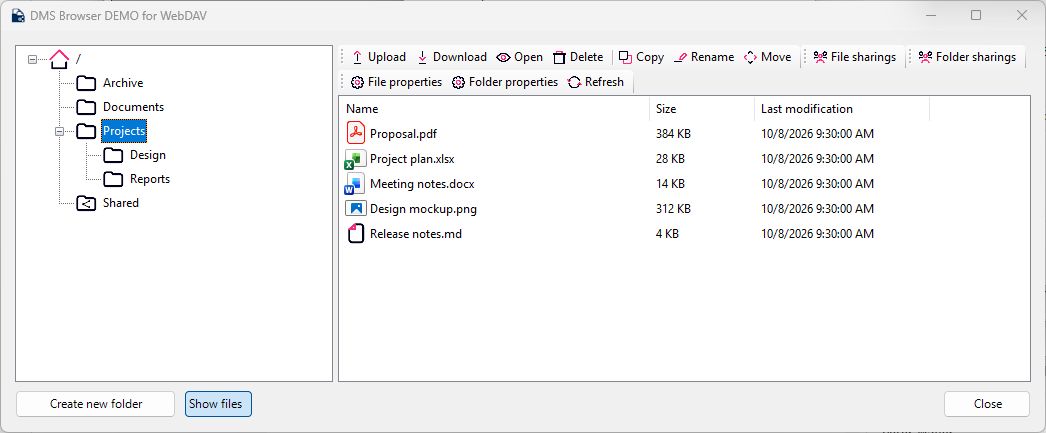
- CompuMaster.Dms.BrowserUI – An implementation of all required forms and dialogs with System.Windows.Forms (requires .NET Framework 4.8 or .NET 5.0-Windows). The UI follows
CurrentUICulture, provides neutral English resources and a German translation, and falls back to English for unsupported languages. Use it to- download and upload files
- setup user sharings and link sharings (if supported by the underlying provider)
- provide several levels of allowed actions depending on required action context (manage folder structure only without viewing files, view and edit folder structure and files, or view everything without editing, etc.)
- CompuMaster.Dms.TestDemo.WebDav – A demo application to show functionality of CompuMaster.Dms.BrowserUI components with a WebDAV server (based on System.Windows.Forms which requires .NET Framework 4.8 or .NET 5.0-Windows)
- CompuMaster.Dms.TestDemo.OwnCloudClassic – A dedicated ownCloud Classic demo using its own local credential store.
- CompuMaster.Dms.TestDemo.Nextcloud – A dedicated Nextcloud demo using its own local credential store and accepting either the instance URL or a complete WebDAV URL.
- CompuMaster.Dms.TestDemo.ScopevisioTeamwork – A demo application to show functionality of CompuMaster.Dms.BrowserUI components with Scopevisio Teamwork (based on System.Windows.Forms which requires .NET Framework 4.8 or .NET 5.0-Windows)
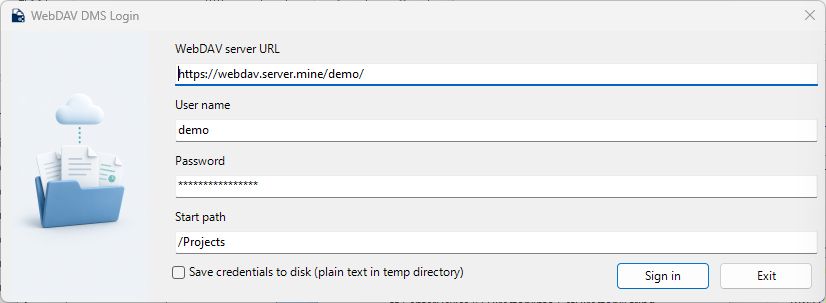
All four demo logins use a shared document-management illustration. Applications can supply their own or provider-specific artwork through the additive LoginForm(formIcon, loginImage) constructor or the LoginImage property. See demo login artwork for image ownership, reset behavior and asset provenance.
File transfers in BrowserUI
Transfer dialogs display localized binary units, recent payload throughput and a per-file time estimate based on average throughput since that file started. Unknown counters and provider-finalization phases remain explicit. Failures include the exception message and diagnostic tooltips; closing an already displayed failure does not produce a second browser error or a success notification. Supported upload retries restart failed files from the beginning and skip successful files. Remaining files can be uploaded separately; byte-offset upload resume is not advertised.
Upload folder and Explorer file/folder drops preserve the selected directory hierarchy, including empty folders. Folder-upload availability follows the existing file-upload action and AllowUploadFiles; drops are accepted only when upload is allowed and no operation is active. A drop on the file list uses its current directory; a drop on a tree node uses that node. Recursive planning rejects linked paths and conflicting selected destination names before making changes.
Selected remote files can be dragged to Explorer or another Windows target supporting shell virtual files when AllowDownloadFiles is enabled. File content is downloaded on request after the drop, preserving selected resource IDs and using owned temporary files with bounded buffers. Only copying is offered; remote sources are retained. Other platforms can consume the provider APIs independently of the Windows Forms and shell UI.
Download folder is available from the selected tree node when AllowDownloadFiles
is enabled. It downloads the complete hierarchy, including empty folders, into a
chosen local parent directory and merges existing directories. Existing files are
replaced only after a confirmation, with replace/skip/cancel and an apply-to-all
choice. Unrelated local files remain intact. Failed or cancelled downloads remove
their owned temporary files and preserve existing destination contents.
Local-file uploads preserve source modification dates on Scopevisio/CenterDevice and recognized ownCloud Classic/Nextcloud servers, including new versions, folder uploads and progress reporting. Stream/byte uploads without a known date retain their existing defaults. Generic WebDAV servers do not share a universal writable modification-date protocol.
Large ownCloud Classic/Nextcloud uploads use native DAV chunks after an authenticated upload-namespace check. The provider streams bounded parts and waits for server-confirmed assembly and session cleanup. Unsupported namespaces, legacy paths without a known protocol user ID, and generic servers retain ordinary PUT. Permission and transport failures remain errors; uncertain native writes are not replayed as PUT. Ordinary PUT still depends on the server and proxy accepting the complete request body within their configured deadlines. Downloads stream the response body; an ingress request-body timeout does not itself limit GET responses.
Providers can implement the additive DownloadFileWithProgressAsync selected-resource overload to report locally written payload bytes. WebDAV retains its staging/replacement behavior, and Scopevisio/CenterDevice retain their selected identity, timestamp and cancellation contracts. Existing derived providers use the compatible download fallback with unknown counters.
Asynchronous browsing
Use ListDirectoryEntriesAsync and ListFileEntriesAsync to populate a browser tree and file list. Native Scopevisio/CenterDevice listings retain resource identities, paths, sizes, timestamps, child metadata and sharing indicators, including download links, upload-only links and visible/hidden user/group shares. They use the existing resource conversion and batched upload-link lookup without first resolving every principal name and link's detailed settings. Retrieve full details for the selected resource through an item or identifier lookup before displaying properties or managing shares. Existing full-snapshot ListAll...Async methods retain their behavior; other providers and existing derived implementations use the compatible virtual-method fallback.
BrowserUI uses these entry listings for navigation and resolves selected details asynchronously, retaining the selected resource's path and parent context even for duplicate names. Pending operations keep the window active with a wait cursor and lock its content/action controls until completion; success, failure and cancellation restore their previous states. API request allowances remain in force.
Browser failure diagnostics
Subscribe to DmsBrowser.OperationFailed before showing the browser to receive the original exception, including its stack trace and inner exceptions, together with the browser phase and operation name. This works without an attached debugger. Startup failures cancel and close the browser; failures caught by normal UI handlers remain handled internally. Provider APIs and task-returning operations retain their exception propagation. Expected user cancellation is not reported.
AddHandler browser.OperationFailed,
    Sub(sender, failure)
        'Pass failure.Exception, failure.Phase and failure.Operation to an
        'approved diagnostics sink which redacts credentials and tokens.
        'Set failure.SuppressDialog = True only when the host presents its own error UI.
    End Sub
BrowserUI does not automatically persist diagnostic exceptions. The normal browser error dialog uses a concise localized message instead of raw provider exception text. Hosts must protect sensitive data before logging or forwarding the original exception. Subscriber failures do not replace the browser failure or interrupt cleanup. SuppressDialog affects the standard browser dialog; transfer-progress views retain their separate presentation and recovery controls. Provider-internal subphases are not inferred from a browser request boundary.
File-version history workflows
DmsBrowser.FileOrFolderActions.AllowViewFileVersionHistory (256), AllowRestoreFileVersions (512) and AllowRemoveFileVersions (1024) are independent caller permissions. Existing action values and masks are unchanged; the previous 255 mask does not opt into version actions. Historical downloads additionally require AllowDownloadFiles; ordinary file deletion does not permit removing history.
BaseDmsProvider.SupportsFileVersionHistory, SupportsFileVersionDownload, SupportsFileVersionRestore and SupportsFileVersionRemoval independently describe implemented workflows and default to false. The browser offers history for one selected file only when caller permission and provider support allow it. Its localized, resizable window independently gates downloads, restoration and removal, confirms mutations, and refreshes history/current metadata after changes. Historical downloads use a temporary local file before replacing an explicitly confirmed destination. Remote authorization and retained-version availability still apply; unavailable or denied history remains an error.
The new cloud and CenterDevice/Scopevisio adapters require explicitly selected immutable SDK source checkpoints until their owning packages are published and integrated. Default package references retain unsupported capability defaults. See file-version contracts and integration for exact pins, activation and remaining live acceptance.
Nextcloud documents version listing and restoration through its DAV extension; ownCloud Server documents its distinct file-version API. Generic WebDAV does not guarantee either feature; optional DeltaV versioning is not implemented by the generic adapter. CenterDevice/Scopevisio integration also requires the appropriate published SDK and DMS adapter workflow. Follow-up implementation and exact SDK integration are tracked in #100 and #90; no moving SDK branch is imported.
WebDAV sharing capabilities
The WebDAV provider keeps generic WebDAV servers provider-neutral. For recognized Nextcloud and ownCloud personal-file endpoints, it probes the Open Collaboration Services (OCS) API and enables user, group, and public-link sharing only when that probe succeeds. OCS permission bits are mapped without silently changing their meaning; view and download remain coupled because the classic OCS bit field cannot represent modern Nextcloud download restrictions separately. Server policies such as maximum link-name length remain server-validated because they differ between products and deployments.
Sharing discovery requires both a successful OCS share-list request and the authenticated cloud/capabilities response. The adapter honors api_enabled, ownCloud's can_share and public.can_create_public_link, the current Nextcloud group.enabled or legacy group_sharing, and public.enabled/public.upload. Missing or malformed capability data does not enable optional operations. A failed discovery leaves ordinary WebDAV browsing available. Product identification alone never grants capabilities. Password, expiration, recipient and per-resource restrictions remain subject to server validation.
OCS user IDs remain operation identifiers. Display names use the sharee display name or label, with the common ID fallback. The current OCS client does not expose a distinct login-name field for these responses; LoginName therefore stays unknown rather than copying the ID or guessing from additional information. Existing WebDAV owner metadata takes precedence over supplemental share-owner metadata.
ownCloud Infinite Scale personal-file compatibility endpoints are only candidates for the same capability probe; they have not been verified against a real Infinite Scale server. Space endpoints (/dav/spaces/<space-id>) remain regular WebDAV endpoints because their sharing model uses LibreGraph roles and item identifiers; a future LibreGraph adapter can add that capability without changing the common DMS sharing API.
The isolated sharing tests cover policy differences and identity mapping. The ownCloud Classic and Nextcloud CI fixtures additionally require successful sharing discovery and exercise public-link create/read/update/delete with verified test-owned directory cleanup. User/group mutations are covered in isolation, not yet against explicitly configured remote recipient accounts. See the upstream capability contracts for Nextcloud and ownCloud Classic.
Development and remote integration-test guidance is documented in TESTING.md. See Local test credentials for the mapping between demo applications, environment variables, and local integration-test credential stores.
WebDAV resource owners
WebDavDmsProvider reads owner metadata returned for each file or folder. Generic WebDAV servers may provide an owner principal through the optional WebDAV ACL DAV:owner property. ownCloud Classic and Nextcloud may provide oc:owner-id and oc:owner-display-name; other servers may expose these properties too. Availability depends on the server and resource, including whether an item is shared. The provider requests the properties by name because some servers omit them from allprop responses even when asked through include. It prefers the account properties when available. It leaves the owner blank when the server does not return usable owner metadata, including when a requested property is missing or forbidden. A known owner ID without a display name is shown as the ID. This does not require user-directory or sharing support.
Screenshots
Login form, customized for WebDAV
Browser dialog window
Extended file properties windows

Sharing setup
Dialogs for sharing setup for internal users (user accounts) or external users (web links) depend on DMS provider
| Product | Versions Compatible and additional computed target framework versions. |
|---|---|
| .NET | net8.0-windows7.0 is compatible. net9.0-windows was computed. net10.0-windows was computed. |
| .NET Framework | net48 is compatible. net481 was computed. |
-
.NETFramework 4.8
- CompuMaster.Dms.Providers (>= 2026.10.13)
- CompuMaster.IO.TemporaryFile (>= 2025.10.16)
- CompuMaster.VisualBasicCompatibility (>= 1.0.6)
- InformationBox (>= 1.3.0.162)
- System.Drawing.Common (>= 6.0.0)
- System.Resources.Extensions (>= 6.0.0)
-
net8.0-windows7.0
- CompuMaster.Dms.Providers (>= 2026.10.13)
- CompuMaster.IO.TemporaryFile (>= 2025.10.16)
- CompuMaster.VisualBasicCompatibility (>= 1.0.6)
- InformationBox (>= 1.3.0.162)
- System.Drawing.Common (>= 6.0.0)
- System.Resources.Extensions (>= 6.0.0)
NuGet packages
This package is not used by any NuGet packages.
GitHub repositories
This package is not used by any popular GitHub repositories.
| Version | Downloads | Last Updated |
|---|---|---|
| 2026.10.13 | 33 | 10/13/2026 |
| 2026.10.11 | 66 | 10/11/2026 |
| 2026.10.10 | 71 | 10/10/2026 |
| 2026.10.8 | 66 | 10/8/2026 |
| 2026.10.7 | 65 | 10/7/2026 |
| 2026.8.12 | 227 | 8/12/2026 |
| 2026.5.21 | 192 | 5/21/2026 |
| 2026.1.2.1 | 227 | 1/2/2026 |
| 2026.1.2 | 191 | 1/2/2026 |
| 2025.8.8 | 358 | 8/8/2025 |
| 2025.5.21.4 | 341 | 5/21/2025 |
| 2025.5.21.3 | 311 | 5/21/2025 |
| 2025.5.21.2 | 338 | 5/21/2025 |
| 2025.5.21.1 | 315 | 5/21/2025 |
| 2025.5.21 | 316 | 5/21/2025 |
| 2024.11.20 | 344 | 11/20/2024 |
| 2023.12.13 | 536 | 12/13/2023 |
| 2023.5.22 | 428 | 5/22/2023 |
| 2023.3.14 | 445 | 3/14/2023 |
| 2023.2.7.101 | 472 | 2/7/2023 |