CopperSkin.Core
0.3.0
See the version list below for details.
dotnet add package CopperSkin.Core --version 0.3.0
NuGet\Install-Package CopperSkin.Core -Version 0.3.0
<PackageReference Include="CopperSkin.Core" Version="0.3.0" />
<PackageVersion Include="CopperSkin.Core" Version="0.3.0" />
<PackageReference Include="CopperSkin.Core" />
paket add CopperSkin.Core --version 0.3.0
#r "nuget: CopperSkin.Core, 0.3.0"
#:package CopperSkin.Core@0.3.0
#addin nuget:?package=CopperSkin.Core&version=0.3.0
#tool nuget:?package=CopperSkin.Core&version=0.3.0
CopperSkin



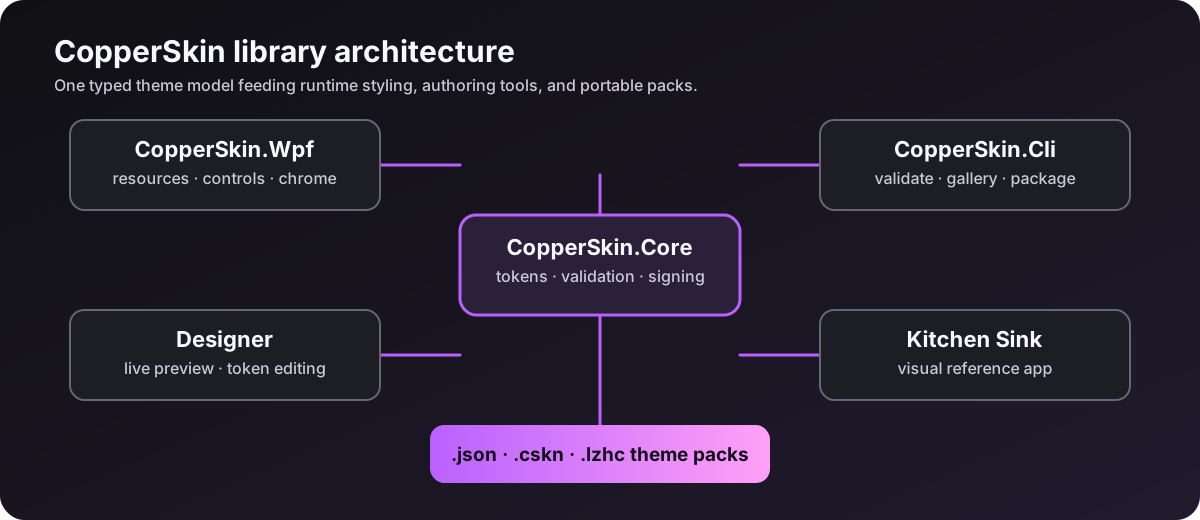
CopperSkin is a reusable WPF theming platform for desktop applications that need runtime theme switching, consistent standard-control styling, custom window chrome, scoped themes, icon authoring, portable theme packs, and deterministic validation.
The 0.3.0 release is the first public release. It includes the reusable Core and WPF libraries, the Designer, command-line tooling, the sample application, the graphics document format, and the release pipeline.
 egis/plans/2026-07-16-library-deployment.md/d
Contents
- Install
- First application
- Theme switching
- WPF resources and scoped themes
- Windows, dialogs, and standard controls
- Graphics editor and icons
- Theme packs and CLI tooling
- Build and test from source
- Packages and compatibility
- Documentation
What is included
| Project | Purpose | Target frameworks |
|---|---|---|
CopperSkin.Core |
Theme model, validation, JSON, archives, signatures, graphics documents, and audits | netstandard2.0, net7.0, net8.0, net9.0, net10.0 |
CopperSkin.Wpf |
Runtime resources, implicit styles, scoped themes, chrome, dialogs, and graphics rendering | net7.0-windows, net8.0-windows, net9.0-windows, net10.0-windows |
CopperSkin.Cli |
Theme export, validation, galleries, baselines, diffs, signatures, and packaging | net8.0, net9.0, net10.0 |
CopperSkin.Designer |
Live theme preview, token editing, graphics authoring, diagnostics, and export | net8.0-windows, net9.0-windows, net10.0-windows |
CopperSkin.SampleKitchenSink |
Runnable visual reference application | net8.0-windows, net9.0-windows, net10.0-windows |
Install
For a WPF application, install both runtime packages:
dotnet add package CopperSkin.Core --version 0.3.0
dotnet add package CopperSkin.Wpf --version 0.3.0
CopperSkin.Core is renderer-neutral and can be used by services, build tools, and theme-pack pipelines. CopperSkin.Wpf adds the WPF resource dictionaries and controls.
First application
Install CopperSkin during application startup. The built-in catalog supplies the included themes:
using System.Windows;
using CopperSkin.Core.Theming;
using CopperSkin.Wpf;

public partial class App : Application
{
    protected override void OnStartup(StartupEventArgs e)
    {
        base.OnStartup(e);

        CopperSkinApp.Use(this)
            .Pack(BuiltInThemeCatalog.Create())
            .Theme("Neon Studio")
            .Backdrop(CopperSkinBackdropKind.Mica)
            .Install();
    }
}
The same setup can be expressed in App.xaml when the resource dictionary should be available before the first window is created:
<Application
    x:Class="MyApp.App"
    xmlns="http://schemas.microsoft.com/winfx/2006/xaml/presentation"
    xmlns:x="http://schemas.microsoft.com/winfx/2006/xaml"
    xmlns:copper="clr-namespace:CopperSkin.Wpf;assembly=CopperSkin.Wpf">
  <Application.Resources>
    <ResourceDictionary>
      <ResourceDictionary.MergedDictionaries>
        <copper:CopperSkinThemeResources Theme="Neon Studio" />
      </ResourceDictionary.MergedDictionaries>
    </ResourceDictionary>
  </Application.Resources>
</Application>
Theme switching
Keep a reference to the theme manager when the user can change themes at runtime:
using CopperSkin.Core.Theming;
using CopperSkin.Wpf;

var manager = CopperSkinApp.Use(Application.Current)
    .Pack(BuiltInThemeCatalog.Create())
    .Theme("Copper Desk")
    .Install();

manager.ApplyTheme("FL Grape");
Themes are token-based. Controls consume dynamic resources, so changing the active theme updates the application without rebuilding the visual tree. Use the built-in catalog as a starting point or load a validated ThemePack from JSON.
WPF resources and scoped themes
Apply a different theme to a subtree with CopperSkinThemeScope:
<Border
    xmlns:cs="clr-namespace:CopperSkin.Wpf;assembly=CopperSkin.Wpf"
    cs:CopperSkinThemeScope.Theme="Copper Desk"
    Padding="16">
  <StackPanel>
    <TextBlock Text="This subtree has its own theme." />
    <Button Content="Continue" />
  </StackPanel>
</Border>
The 0.3.0 control wave covers common WPF input, navigation, data, text, layout, and dialog surfaces with shared focus, validation, disabled/read-only, keyboard-navigation, RTL, and theme-switch behavior. See control coverage for the exact support boundary.
egis/plans/2026-07-16-library-deployment.md/d
Windows, dialogs, and standard controls
Use CopperWindow when CopperSkin should own the application chrome:
<controls:CopperWindow
    x:Class="MyApp.MainWindow"
    xmlns="http://schemas.microsoft.com/winfx/2006/xaml/presentation"
    xmlns:x="http://schemas.microsoft.com/winfx/2006/xaml"
    xmlns:controls="clr-namespace:CopperSkin.Wpf.Controls;assembly=CopperSkin.Wpf"
    Title="My Copper App"
    Width="1100"
    Height="720">
  <Grid>
    <StackPanel Margin="24">
      <TextBlock Text="CopperSkin" FontSize="26" />
      <TextBox Margin="0,16,0,0" />
      <Button Content="Save" Margin="0,12,0,0" />
    </StackPanel>
  </Grid>
</controls:CopperWindow>
Show themed dialogs from code:
using CopperSkin.Wpf.Controls;

CopperMessageBox.Show(this, "Saved", "The theme pack was exported.", "Nice");

new CopperTaskDialog
{
    Title = "Validation",
    Heading = "All good",
    Text = "No blocking theme errors were found.",
    Icon = CopperTaskDialogIcon.Information
}.Show(this);
Graphics editor and icons
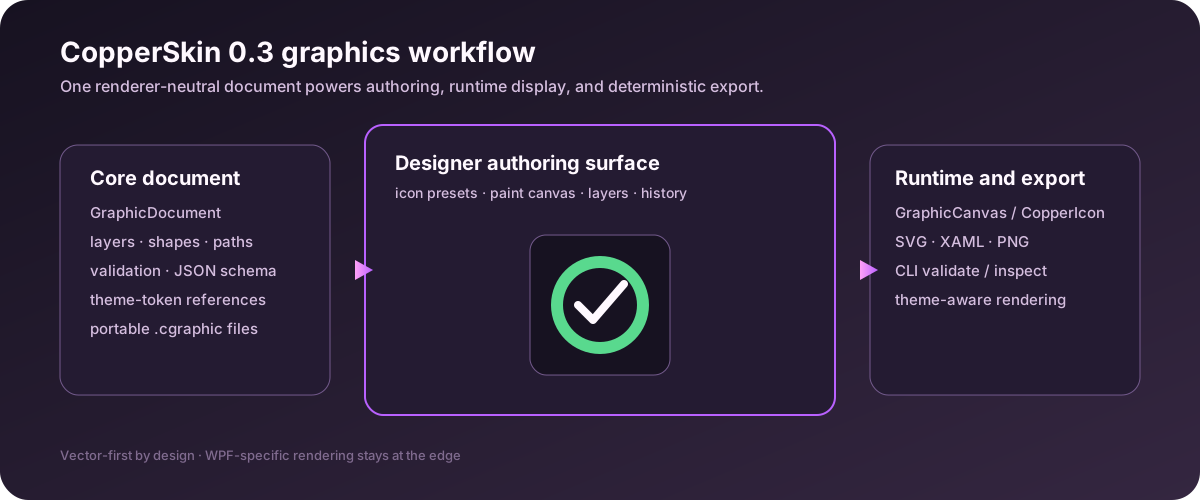
Run the Designer to create vector-first icons and basic paint documents with layers, visibility and lock controls, rectangle/ellipse/line/freehand tools, zoom, undo/redo, save/open, and SVG/XAML/PNG export.
 egis/plans/2026-07-16-library-deployment.md/d
The document model is renderer-neutral, so an icon can be authored once, validated in a build, rendered in WPF, and embedded in a signed theme pack:
using CopperSkin.Core.Graphics;

var icon = new GraphicDocument
{
    Id = "status.ok",
    Name = "Status OK",
    DocumentType = GraphicDocumentType.Icon,
    Width = 24,
    Height = 24,
    Layers =
    [
        new GraphicLayer
        {
            Id = "mark",
            Name = "Mark",
            Elements =
            [
                new GraphicElement
                {
                    Id = "circle",
                    Kind = GraphicElementKind.Ellipse,
                    Geometry = new GraphicGeometry
                    {
                        Bounds = new GraphicRect(2, 2, 20, 20)
                    },
                    Style = new GraphicStyle
                    {
                        FillToken = "color.status.success"
                    }
                }
            ]
        }
    ]
};

var json = GraphicDocumentSerializer.Serialize(icon);
var diagnostics = GraphicDocumentValidator.Validate(icon);
Render the same document in WPF:
<copper:CopperIcon
    Document="{Binding StatusIcon}"
    AccessibleName="Success"
    Width="24"
    Height="24"
    xmlns:copper="clr-namespace:CopperSkin.Wpf.Controls;assembly=CopperSkin.Wpf" />
 egis/plans/2026-07-16-library-deployment.md/d
Theme packs and CLI tooling
Run the Designer:
dotnet run --project .\src\CopperSkin.Designer\CopperSkin.Designer.csproj -c Release -f net10.0-windows
Export and validate built-in themes:
$cli = ".\src\CopperSkin.Cli\CopperSkin.Cli.csproj"
dotnet run --project $cli -c Release -f net10.0 -- list
dotnet run --project $cli -c Release -f net10.0 -- export-builtins .\artifacts\theme-pack.json
dotnet run --project $cli -c Release -f net10.0 -- validate .\artifacts\theme-pack.json
dotnet run --project $cli -c Release -f net10.0 -- gallery .\artifacts\theme-pack.json .\artifacts\gallery
dotnet run --project $cli -c Release -f net10.0 -- baseline .\artifacts\theme-pack.json .\artifacts\visual-baseline.json
Validate a graphics document in a headless build:
dotnet run --project $cli -c Release -f net10.0 -- graphics validate .\status.ok.cgraphic
dotnet run --project $cli -c Release -f net10.0 -- graphics inspect .\status.ok.cgraphic
dotnet run --project $cli -c Release -f net10.0 -- graphics export .\status.ok.cgraphic .\artifacts\status.ok.json
Create and verify a signed theme pack. Keep the private key outside source control:
dotnet run --project $cli -c Release -f net10.0 -- keygen .\artifacts\signing.private .\artifacts\signing.public
dotnet run --project $cli -c Release -f net10.0 -- sign .\artifacts\theme-pack.json .\artifacts\signed-theme-pack.json .\artifacts\signing.private
dotnet run --project $cli -c Release -f net10.0 -- verify-signature .\artifacts\signed-theme-pack.json .\artifacts\signing.public
Read the graphics format and the theme format before building a custom pack. egis/plans/2026-07-16-library-deployment.md/d
Build and test from source
Requirements:
- Windows for WPF projects and visual tests.
- .NET SDK
10.0.301or a compatible SDK with the .NET 8, 9, and 10 targeting packs.
From the repository root:
dotnet restore .\CopperSkin.slnx
dotnet build .\CopperSkin.slnx --configuration Release --no-restore
dotnet test .\CopperSkin.slnx --configuration Release --no-build
dotnet pack .\src\CopperSkin.Core\CopperSkin.Core.csproj --configuration Release --output .\artifacts\packages
dotnet pack .\src\CopperSkin.Wpf\CopperSkin.Wpf.csproj --configuration Release --output .\artifacts\packages
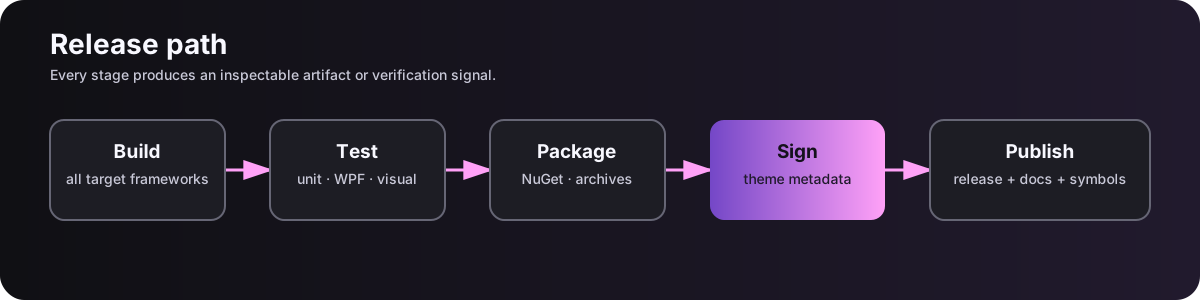
The Windows CI workflow runs the same restore, warnings-as-errors build, multi-target test matrix, and package checks. Release tags beginning with v0.3. additionally publish through NuGet Trusted Publishing using GitHub OIDC; see NuGet publishing.
Packages and compatibility
| Package | Use it when |
|---|---|
CopperSkin.Core |
You need theme models, validation, serialization, signatures, or graphics documents without WPF. |
CopperSkin.Wpf |
You need WPF resources, controls, window chrome, dialogs, or graphics rendering. |
Package version 0.3.0 contains assembly/file version 0.3.0.0. Existing theme packs without graphics remain readable. The graphics schema is versioned independently from the assembly version.
Documentation
- Getting started egis/plans/2026-07-16-library-deployment.md/d
- Graphics format egis/plans/2026-07-16-library-deployment.md/d
- Accessibility and control behavior egis/plans/2026-07-16-library-deployment.md/d
- Theme format egis/plans/2026-07-16-library-deployment.md/d
- Control coverage egis/plans/2026-07-16-library-deployment.md/d
- Release checklist egis/plans/2026-07-16-library-deployment.md/d
- Release notes
- Changelog
License
CopperSkin is released under the MIT License.
| Product | Versions Compatible and additional computed target framework versions. |
|---|---|
| .NET | net5.0 was computed. net5.0-windows was computed. net6.0 was computed. net6.0-android was computed. net6.0-ios was computed. net6.0-maccatalyst was computed. net6.0-macos was computed. net6.0-tvos was computed. net6.0-windows was computed. net7.0 is compatible. net7.0-android was computed. net7.0-ios was computed. net7.0-maccatalyst was computed. net7.0-macos was computed. net7.0-tvos was computed. net7.0-windows was computed. net8.0 is compatible. net8.0-android was computed. net8.0-browser was computed. net8.0-ios was computed. net8.0-maccatalyst was computed. net8.0-macos was computed. net8.0-tvos was computed. net8.0-windows was computed. net9.0 is compatible. net9.0-android was computed. net9.0-browser was computed. net9.0-ios was computed. net9.0-maccatalyst was computed. net9.0-macos was computed. net9.0-tvos was computed. net9.0-windows was computed. net10.0 is compatible. net10.0-android was computed. net10.0-browser was computed. net10.0-ios was computed. net10.0-maccatalyst was computed. net10.0-macos was computed. net10.0-tvos was computed. net10.0-windows was computed. |
| .NET Core | netcoreapp2.0 was computed. netcoreapp2.1 was computed. netcoreapp2.2 was computed. netcoreapp3.0 was computed. netcoreapp3.1 was computed. |
| .NET Standard | netstandard2.0 is compatible. netstandard2.1 was computed. |
| .NET Framework | net461 was computed. net462 was computed. net463 was computed. net47 was computed. net471 was computed. net472 was computed. net48 was computed. net481 was computed. |
| MonoAndroid | monoandroid was computed. |
| MonoMac | monomac was computed. |
| MonoTouch | monotouch was computed. |
| Tizen | tizen40 was computed. tizen60 was computed. |
| Xamarin.iOS | xamarinios was computed. |
| Xamarin.Mac | xamarinmac was computed. |
| Xamarin.TVOS | xamarintvos was computed. |
| Xamarin.WatchOS | xamarinwatchos was computed. |
-
.NETStandard 2.0
- System.Text.Json (>= 8.0.5)
-
net10.0
- No dependencies.
-
net7.0
- System.Text.Json (>= 8.0.5)
-
net8.0
- No dependencies.
-
net9.0
- No dependencies.
NuGet packages (1)
Showing the top 1 NuGet packages that depend on CopperSkin.Core:
| Package | Downloads |
|---|---|
|
CopperSkin.Wpf
Runtime WPF theme engine with standard and custom controls, window chrome, dialogs, detached menus, and notification-area integration. |
GitHub repositories
This package is not used by any popular GitHub repositories.