CreateIT.JohnnyMsgBox
0.3.0
dotnet add package CreateIT.JohnnyMsgBox --version 0.3.0
NuGet\Install-Package CreateIT.JohnnyMsgBox -Version 0.3.0
<PackageReference Include="CreateIT.JohnnyMsgBox" Version="0.3.0" />
<PackageVersion Include="CreateIT.JohnnyMsgBox" Version="0.3.0" />
<PackageReference Include="CreateIT.JohnnyMsgBox" />
paket add CreateIT.JohnnyMsgBox --version 0.3.0
#r "nuget: CreateIT.JohnnyMsgBox, 0.3.0"
#:package CreateIT.JohnnyMsgBox@0.3.0
#addin nuget:?package=CreateIT.JohnnyMsgBox&version=0.3.0
#tool nuget:?package=CreateIT.JohnnyMsgBox&version=0.3.0
JohnnyMsgBox
Modern MessageBox, Dialogs, Alerts and Toast Notifications for Blazor. Also works with HTML/JS and Bootstrap — 9 visual themes: Win98, WinXP, Win7, Win10, Win11, MacBig, MacTahoe, Quick, Ubuntu.
| Author | CreateIT |
| Website | createit.com.mx |
| NuGet | CreateIT.JohnnyMsgBox |
| Latest | 0.3.0 |
| Target | .NET 10 + Bootstrap 5 |
Descargas rápidas / Quick downloads
| Qué / What | Enlace / Link |
|---|---|
| NuGet compilado | packages/CreateIT.JohnnyMsgBox.0.3.0.nupkg |
| HTML + JS (ZIP) | html/johnny-msgbox-html.zip |
| Código fuente completo | git clone https://github.com/t1gr3ju4nmx/JohnnyMsgBox.git |
| Repo en ZIP | Download ZIP |
Puedes ver una Demo funcional en esta liga
También puedes clonar el repo y abrir
html/demo/index.htmlen el navegador para probar la versión JavaScript sin compilar nada.
Capturas / Screenshots
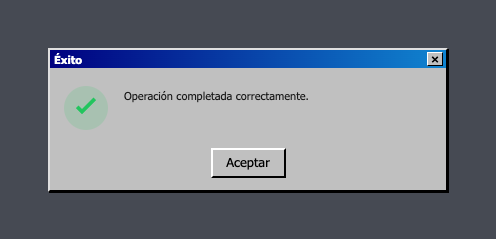
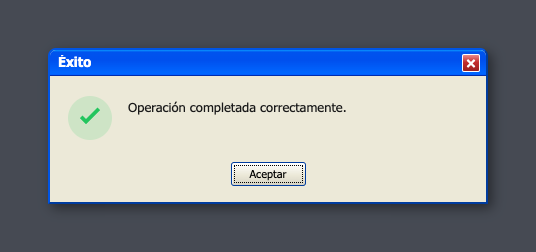
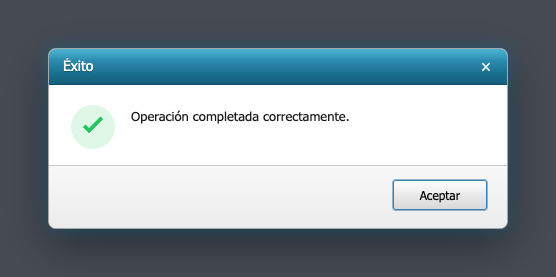
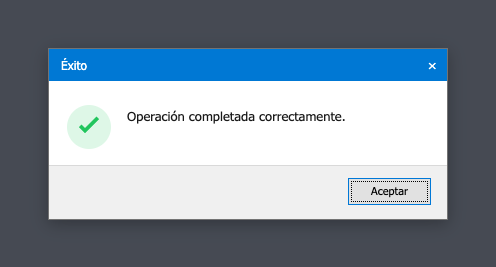
Diálogo Éxito en cada tema — generado desde la demo HTML (sin dependencias de ningún proyecto externo).
| Win98 | WinXP | Win7 | Win10 |
|---|---|---|---|
 |
 |
 |
 |
| Win11 | MacBig | MacTahoe | Quick |
|---|---|---|---|
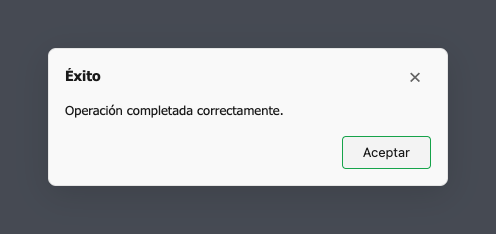 |
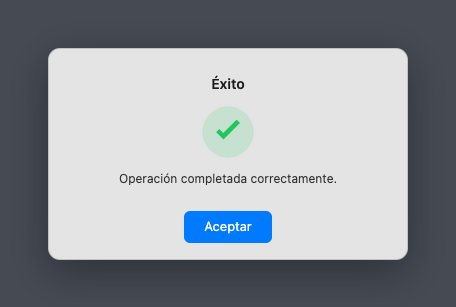 |
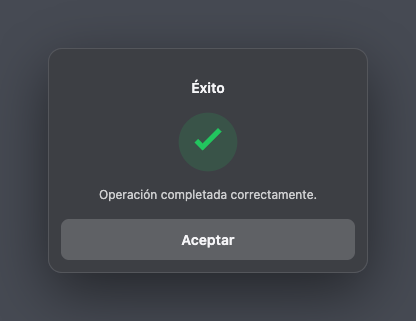 |
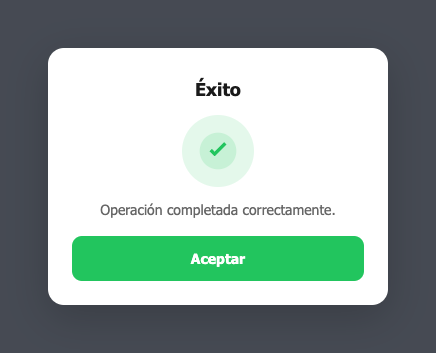 |
| Ubuntu |
|---|
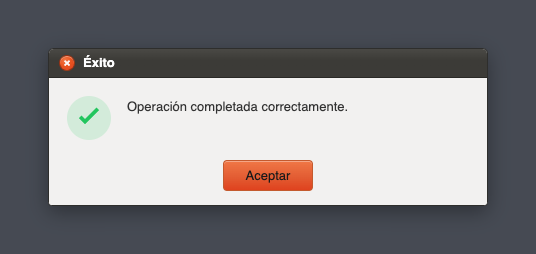 |
Abre
html/demo/index.htmlen tu navegador para probar todos los tipos (error, advertencia, confirmar, toasts…).
Para regenerar estas capturas:npm install playwright && npx playwright install chromium && node scripts/capture-screenshots.mjs
Español
JohnnyMsgBox es un MessageBox moderno para Blazor y HTML/JS: diálogos (Dialog), alertas (Alert), confirmaciones y notificaciones Toast / Notification, con 9 temas visuales.
Estructura del proyecto
JohnnyMsgBox/
├── blazor/src/JohnnyMsgBox/   # RCL Blazor (código fuente)
├── html/dist/                 # CSS + JS listos para copiar
├── html/demo/                 # Demo HTML en el navegador
├── packages/                  # .nupkg compilado
└── scripts/
    ├── pack.sh                # Genera el NuGet
    └── zip-html.sh            # Genera el ZIP HTML/JS
Uso en Blazor (NuGet)
MessageBox, dialogs, alerts y toast notifications listos para inyectar como servicio.
1. Referencia el paquete
<PackageReference Include="CreateIT.JohnnyMsgBox" Version="0.3.0" />
O descarga el .nupkg y apúntalo a un feed local.
2. Registra el servicio (Program.cs)
using JohnnyMsgBox;
using JohnnyMsgBox.Modelos;

builder.Services.AddJohnnyMsgBox(config =>
{
    config.TemaDefecto = JohnnyMsgBoxPreset.WinXP;
});
3. Layout y estilos
<link href="_content/CreateIT.JohnnyMsgBox/css/johnny-msgbox.css" rel="stylesheet" />


<JohnnyMsgBoxHost />
@using JohnnyMsgBox.Servicios
@inject JohnnyMsgBoxService MsgBox
4. Ejemplos
// Diálogos
await MsgBox.ExitoAsync("Éxito", "Guardado correctamente.");
await MsgBox.ErrorAsync("Error", "No se pudo conectar.");
await MsgBox.AdvertenciaAsync("Advertencia", "Revise los datos.", tema: JohnnyMsgBoxPreset.Quick);
await MsgBox.InfoAsync("Info", "Mensaje informativo.");

var r = await MsgBox.ConfirmarAsync("Confirmar", "¿Continuar?", textoConfirmar: "Sí", textoCancelar: "No");
if (r.Confirmado) { /* ... */ }

// Toasts
MsgBox.ToastExito("Registro guardado.");
MsgBox.ToastError("Error de red.");
MsgBox.ToastAdvertencia("Campos incompletos.", tema: JohnnyMsgBoxPreset.MacTahoe);
MsgBox.ToastInfo("Información del sistema.");
Uso en HTML / JavaScript
Opción A — Descarga el ZIP
- Baja
html/johnny-msgbox-html.zip - Descomprime y copia
dist/johnny-msgbox.cssydist/johnny-msgbox.jsa tu proyecto - Abre
demo/index.htmlcomo referencia
Opción B — CDN local
<link href="https://cdn.jsdelivr.net/npm/bootstrap@5.3.3/dist/css/bootstrap.min.css" rel="stylesheet" />
<link href="ruta/a/johnny-msgbox.css" rel="stylesheet" />
<script src="ruta/a/johnny-msgbox.js"></script>
Ejemplos
// Diálogos
await JohnnyMsgBox.exito({ titulo: 'Éxito', mensaje: 'Listo.', tema: 'quick' });
await JohnnyMsgBox.error({ titulo: 'Error', mensaje: 'Falló el guardado.', tema: 'winxp' });
await JohnnyMsgBox.advertencia({ titulo: 'Advertencia', mensaje: 'Revise los datos.', tema: 'quick' });
await JohnnyMsgBox.info({ titulo: 'Info', mensaje: 'Aviso del sistema.', tema: 'win10' });

const r = await JohnnyMsgBox.confirmar({
    titulo: 'Confirmar',
    mensaje: '¿Desea continuar?',
    textoConfirmar: 'Aceptar',
    textoCancelar: 'Cancelar',
    tema: 'win11'
});

// Toasts
JohnnyMsgBox.toastExito('Guardado.', 4000, 'quick');
JohnnyMsgBox.toastError('Error.', 4000, 'mactahoe');
JohnnyMsgBox.toastAdvertencia('Revise los campos.', 4500, 'winxp');
JohnnyMsgBox.toastInfo('Información.', 4000, 'win7');

// Tema por defecto
JohnnyMsgBox.configurar({ temaDefecto: 'winxp' });
Compilar el NuGet tú mismo
./scripts/pack.sh
# Salida: packages/CreateIT.JohnnyMsgBox.<version>.nupkg
Temas disponibles
Win98 · WinXP · Win7 · Win10 · Win11 · MacBig · MacTahoe · Quick · Ubuntu
En Blazor usa JohnnyMsgBoxPreset.WinXP. En JS usa 'winxp' (minúsculas).
English
JohnnyMsgBox provides a modern MessageBox for Blazor and HTML/JS: Dialog, Alert, confirmation modals, and Toast / Notification UI — nine visual themes included.
Project structure
See the tree above. blazor/ is the Razor Class Library; html/dist/ is the standalone CSS/JS bundle.
Blazor (NuGet)
MessageBox, dialogs, alerts and toast notifications as an injectable Blazor service.
1. Package reference
<PackageReference Include="CreateIT.JohnnyMsgBox" Version="0.3.0" />
Or download the compiled .nupkg.
2. Register the service
using JohnnyMsgBox;
using JohnnyMsgBox.Modelos;

builder.Services.AddJohnnyMsgBox(config =>
{
    config.TemaDefecto = JohnnyMsgBoxPreset.WinXP;
});
3. Host component and CSS
<link href="_content/CreateIT.JohnnyMsgBox/css/johnny-msgbox.css" rel="stylesheet" />
<JohnnyMsgBoxHost />
@inject JohnnyMsgBoxService MsgBox
4. Examples
await MsgBox.ExitoAsync("Success", "Saved successfully.");
await MsgBox.ConfirmarAsync("Confirm", "Continue?", textoConfirmar: "Yes", textoCancelar: "No");
MsgBox.ToastAdvertencia("Check required fields.", tema: JohnnyMsgBoxPreset.Quick);
HTML / JavaScript
Download html/johnny-msgbox-html.zip (includes dist/ + demo/), then:
<link href="johnny-msgbox.css" rel="stylesheet" />
<script src="johnny-msgbox.js"></script>
<script>
  JohnnyMsgBox.advertencia({ titulo: 'Warning', mensaje: 'Please review.', tema: 'quick' });
  JohnnyMsgBox.toastInfo('System notice.', 4000, 'win10');
</script>
Open html/demo/index.html in a browser to try all themes without a build step.
Build NuGet locally
./scripts/pack.sh
Themes
Nine presets: Windows classics (98→11), macOS styles (MacBig, MacTahoe), Quick (modern rounded), and Ubuntu (Ambiance).
Licencia / License
MIT — uso libre, modificación y distribución sin restricciones. Ver LICENSE.
MIT — free to use, modify, and distribute. See LICENSE.
Enlaces / Links
- CreateIT: https://www.createit.com.mx
- Repositorio: https://github.com/t1gr3ju4nmx/JohnnyMsgBox
- NuGet: https://www.nuget.org/packages/CreateIT.JohnnyMsgBox
- Demo HTML: https://www.createit.com.mx/johnnymsgbox/demo/
| Product | Versions Compatible and additional computed target framework versions. |
|---|---|
| .NET | net10.0 is compatible. net10.0-android was computed. net10.0-browser was computed. net10.0-ios was computed. net10.0-maccatalyst was computed. net10.0-macos was computed. net10.0-tvos was computed. net10.0-windows was computed. |
-
net10.0
- No dependencies.
NuGet packages
This package is not used by any NuGet packages.
GitHub repositories
This package is not used by any popular GitHub repositories.