Crumpled.VerifyOwnership
2.0.0
dotnet add package Crumpled.VerifyOwnership --version 2.0.0
NuGet\Install-Package Crumpled.VerifyOwnership -Version 2.0.0
<PackageReference Include="Crumpled.VerifyOwnership" Version="2.0.0" />
<PackageVersion Include="Crumpled.VerifyOwnership" Version="2.0.0" />
<PackageReference Include="Crumpled.VerifyOwnership" />
paket add Crumpled.VerifyOwnership --version 2.0.0
#r "nuget: Crumpled.VerifyOwnership, 2.0.0"
#:package Crumpled.VerifyOwnership@2.0.0
#addin nuget:?package=Crumpled.VerifyOwnership&version=2.0.0
#tool nuget:?package=Crumpled.VerifyOwnership&version=2.0.0
Crumpled.VerifyOwnership



Google Search Console and Bing Webmaster Tools site-ownership verification for Umbraco.
Both services' file-based verification methods normally require uploading a static file to your site's root and leaving it there forever. This package serves those files automatically instead - configure one or more verification entries per service and the right file starts responding immediately, with no file to deploy or forget about. Each entry records who it belongs to and when it was added, so offboarding someone has a clear "remove this one" action. A Settings-section backoffice panel lets admins add or remove entries at any time, without a redeploy.

Installation
dotnet add package Crumpled.VerifyOwnership
Configure under Crumpled:VerifyOwnership in appsettings.json (optional - entries can also be managed
entirely from the backoffice panel, which is seeded from this list the first time it runs):
{
  "Crumpled": {
    "VerifyOwnership": {
      "Google": {
        "VerificationCodes": [
          { "Id": "1a2b3c4d5e6f7890", "PersonName": "Jane Doe (SEO Agency)" }
        ]
      },
      "Bing": {
        "VerificationCodes": [
          { "Id": "7B5625FF68322EE169CF17B5C4D878B3", "PersonName": "Jane Doe (SEO Agency)" }
        ]
      }
    }
  }
}
How it works
Google's HTML-file verification method asks you
to host a file named google<code>.html at your site's root, containing the single line
google-site-verification: google<code>.html. This package's middleware intercepts requests matching that
pattern and, if <code> is one of the configured verification codes, responds with the exact expected body
- nothing needs to be added to
wwwroot.
Bing's XML-file verification method asks you to host a single shared file named exactly BingSiteAuth.xml
(casing matters - some hosts are case-sensitive) at your site's root, listing every owner's 32-character
hexadecimal code as a <user> element:
<?xml version="1.0"?><users><user>7B5625FF68322EE169CF17B5C4D878B3</user></users>
Unlike Google's one-file-per-code method, this one file is shared across every configured Bing entry at once - it isn't meaningfully "about" any single code, it's just a fact about the file as a whole. Codes are stored and served with their original casing preserved (Bing's own examples use uppercase).
Backoffice UI
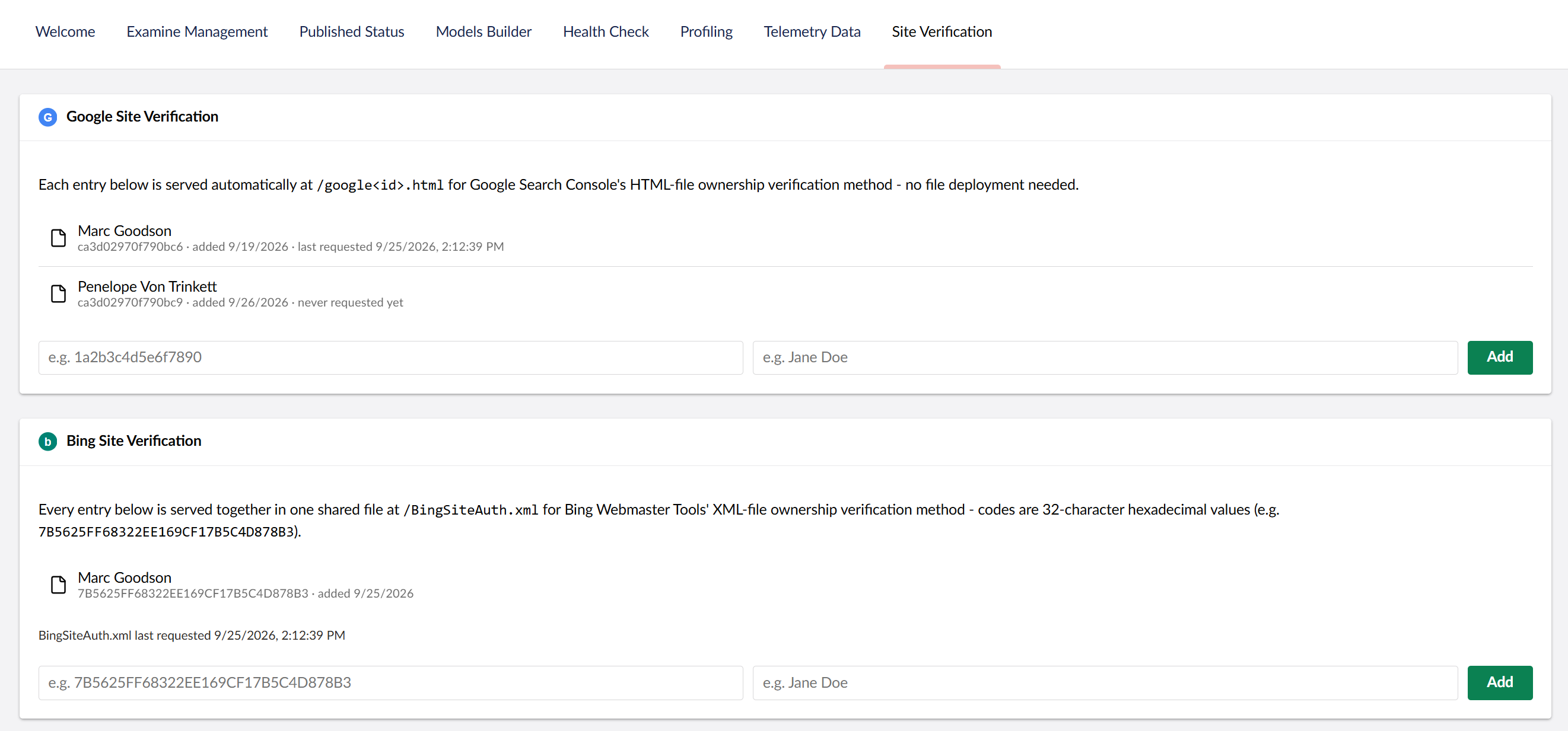
A "Site Verification" panel appears under Settings with a section per service. The Google section lists each entry with the code, the person it belongs to, the date it was added, and when it was last requested. The Bing section lists entries the same way except for "last requested," which is shown once for the whole section (e.g. "BingSiteAuth.xml last requested: ...") rather than per entry, since a single fetch of the shared file touches every code at once. Both sections have a two-field form (code + person name) to add new entries and a Remove action per entry. Changes take effect immediately (no restart needed).
Last requested tracking
Each successful request for a verification file is checked against its User-Agent header; if it loosely
looks like the relevant crawler (google for Google, bing for Bing - the Bing check is an even less
certain heuristic than Google's, since Microsoft's own docs don't confirm bingbot specifically is what
fetches the verification file), the "last requested" time is updated (throttled to at most once per hour).
This is a best-effort hint, not a verified fact - User-Agent is trivially spoofable by anyone.
By default this is tracked in the same key/value row your verification entries already live in. If your
site has a distributed cache configured (e.g. Redis via AddStackExchangeRedisCache in your own
Program.cs), you can opt in to tracking through it instead:
{
  "Crumpled": {
    "VerifyOwnership": {
      "UseDistributedCache": true
    }
  }
}
This flag is trusted as-is - it is not auto-detected. A registered IDistributedCache doesn't reliably
indicate a real, farm-wide-shared cache is configured (some dependencies register the harmless in-process
MemoryDistributedCache as an ambient default even when nothing has been explicitly set up), so this
package can't safely guess on your behalf. Only enable this once you've genuinely registered a real
distributed cache yourself - if you enable it without one, the site will fail to start rather than silently
falling back.
This setting only affects where the "last requested" hint is stored - your verification entries themselves always stay in the key/value store, regardless of this setting. If the distributed cache is later cleared or evicted (a Redis tier change, a restart without persistence, etc.), the only consequence is losing recent "last requested" timestamps - they're repopulated by the next successful request, and nothing about which codes are configured is ever affected.
Requirements
Each Umbraco major has its own package version line, so pick the one that matches your site:
| Package version | Umbraco CMS | Branch |
|---|---|---|
1.x |
17 (>= 17.7.0, < 18.0.0) |
release/v1 |
2.x |
18 (>= 18.2.1, < 19.0.0) |
release/v2 |
# Umbraco 17
dotnet add package Crumpled.VerifyOwnership --version "1.*"

# Umbraco 18
dotnet add package Crumpled.VerifyOwnership --version "2.*"
Both lines get the same features and fixes; the 2.x line is 1.x rebuilt against Umbraco 18.
Contributing
See CONTRIBUTING.md for the branching strategy and formatting requirements.
License
| Product | Versions Compatible and additional computed target framework versions. |
|---|---|
| .NET | net10.0 is compatible. net10.0-android was computed. net10.0-browser was computed. net10.0-ios was computed. net10.0-maccatalyst was computed. net10.0-macos was computed. net10.0-tvos was computed. net10.0-windows was computed. |
-
net10.0
- Microsoft.AspNetCore.OpenApi (>= 10.0.12)
- Umbraco.Cms.Api.Management (>= 18.2.1 && < 19.0.0)
- Umbraco.Cms.Web.Website (>= 18.2.1 && < 19.0.0)
NuGet packages
This package is not used by any NuGet packages.
GitHub repositories
This package is not used by any popular GitHub repositories.