DBPilot.Storage
0.5.2
See the version list below for details.
dotnet add package DBPilot.Storage --version 0.5.2
NuGet\Install-Package DBPilot.Storage -Version 0.5.2
<PackageReference Include="DBPilot.Storage" Version="0.5.2" />
<PackageVersion Include="DBPilot.Storage" Version="0.5.2" />
<PackageReference Include="DBPilot.Storage" />
paket add DBPilot.Storage --version 0.5.2
#r "nuget: DBPilot.Storage, 0.5.2"
#:package DBPilot.Storage@0.5.2
#addin nuget:?package=DBPilot.Storage&version=0.5.2
#tool nuget:?package=DBPilot.Storage&version=0.5.2
DBPilot
Self-hosted database autonomous diagnostics platform.





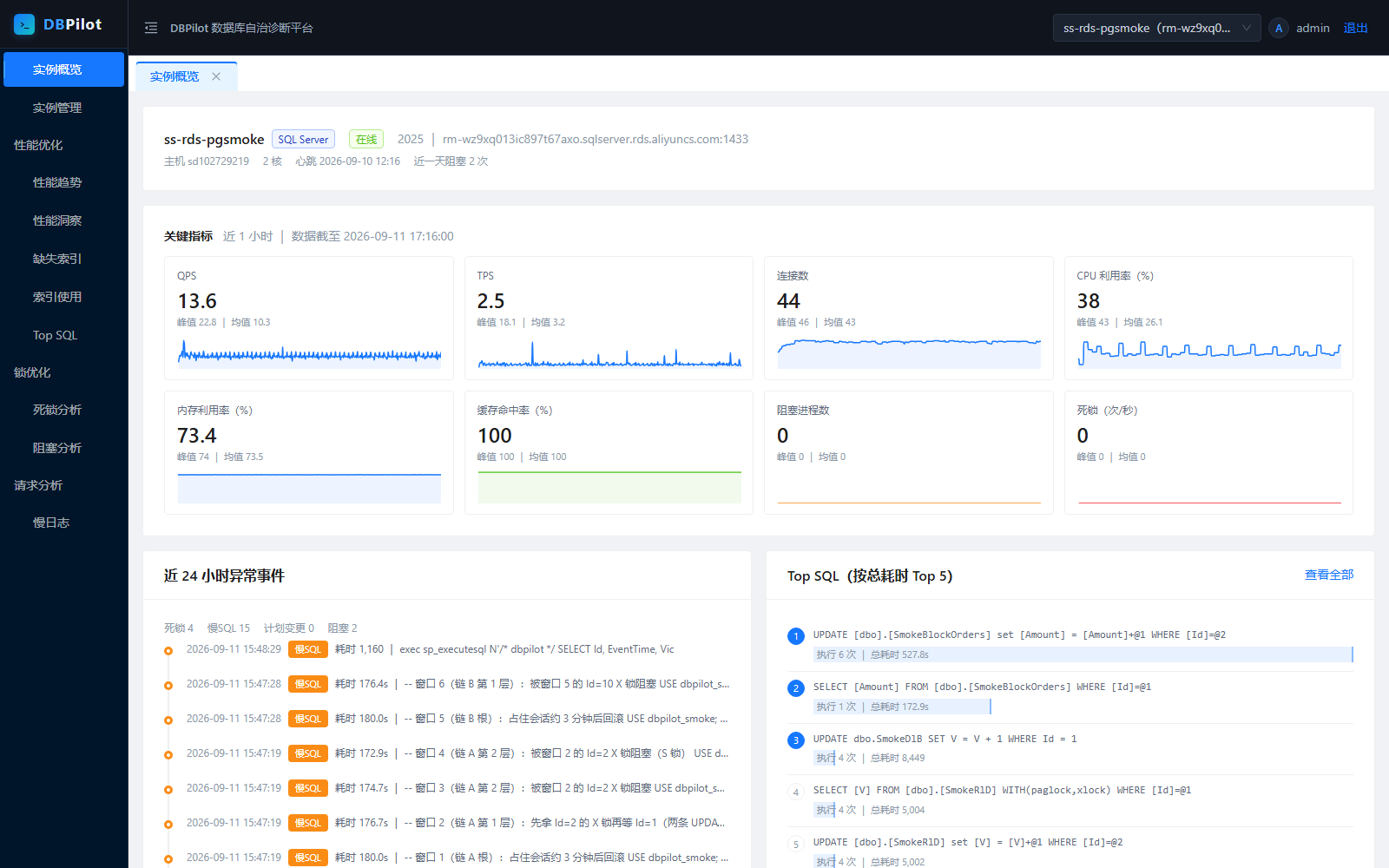
DBPilot continuously samples your database instances and turns the data into the day-to-day DBA workflow in a single web console: performance trends, performance insight (AAS load decomposition), Top SQL, query plan change tracking, missing-index advice, index usage & fragmentation, blocking analysis, deadlock analysis, and slow query logs.
Contents
- Highlights
- Screenshots
- Quick start
- Password and master key
- Building from source
- Architecture
- Features
- Engine support matrix
- AI diagnostics (MCP Server)
- Overhead on monitored instances
- Configuration (appsettings.json)
- Embedding via NuGet
- FAQ
- License
Highlights
- Single-process deployment — one .NET 10 process + one metadata database (schema auto-created on startup). Choose SQL Server, MySQL, PostgreSQL or SQLite as the metadata store.
- Monitors three engines — SQL Server 2008–2022, MySQL 8.0+, PostgreSQL 13+. Monitoring engine and metadata-store engine are independent axes and can be combined freely (e.g. monitor SQL Server while storing history in PostgreSQL).
- Very low overhead — <1% CPU on monitored instances in normal operation. Only in-memory metadata views (DMVs /
pg_stat_*/performance_schema) are read; business tables are never scanned. See Overhead on monitored instances. - AI-ready — built-in read-only MCP Server exposes 11 diagnostic tools to AI agents (Claude Code, Codex CLI, ...), so you can ask questions like "did anything slow down on this instance in the last hour?"
- Capability-driven UI — features without an equivalent data source on a given engine are hidden or degraded automatically (e.g. PostgreSQL gets a deadlock trend instead of deadlock event details); the API answers with explicit, actionable messages.
Screenshots
| Performance insight (AAS) | Performance trends |
|---|---|
 |
 |
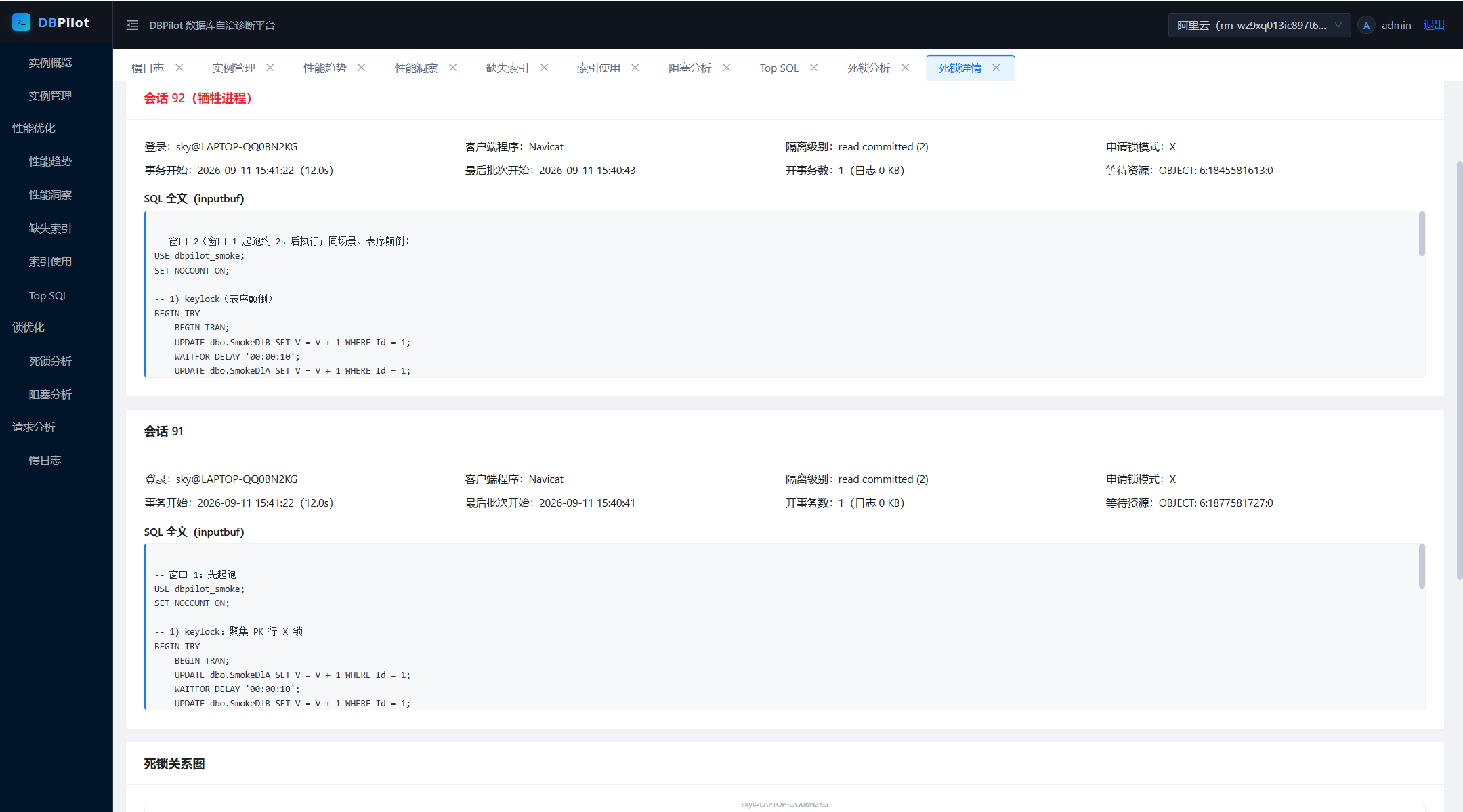
| Deadlock analysis | Deadlock event detail |
|---|---|
 |
 |
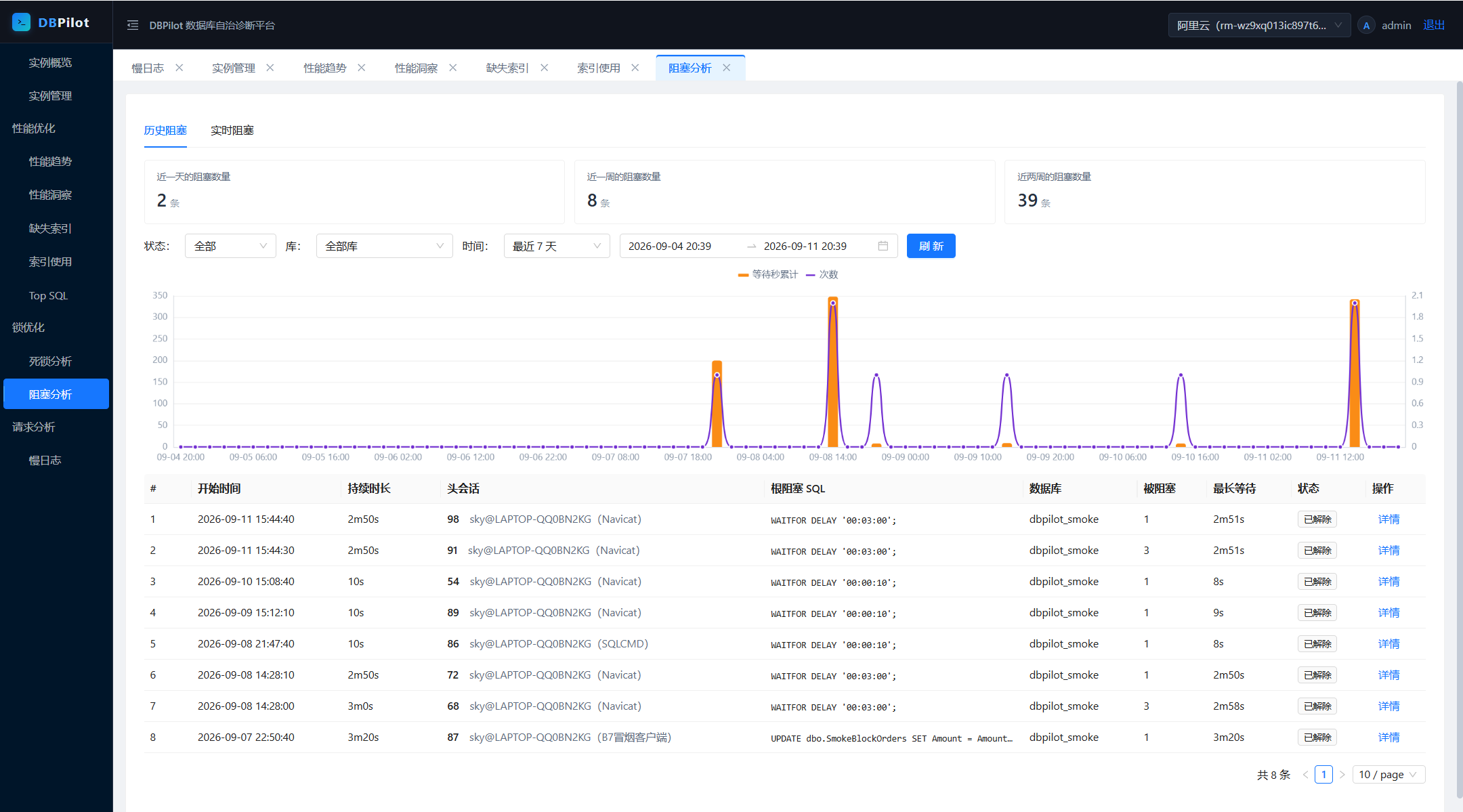
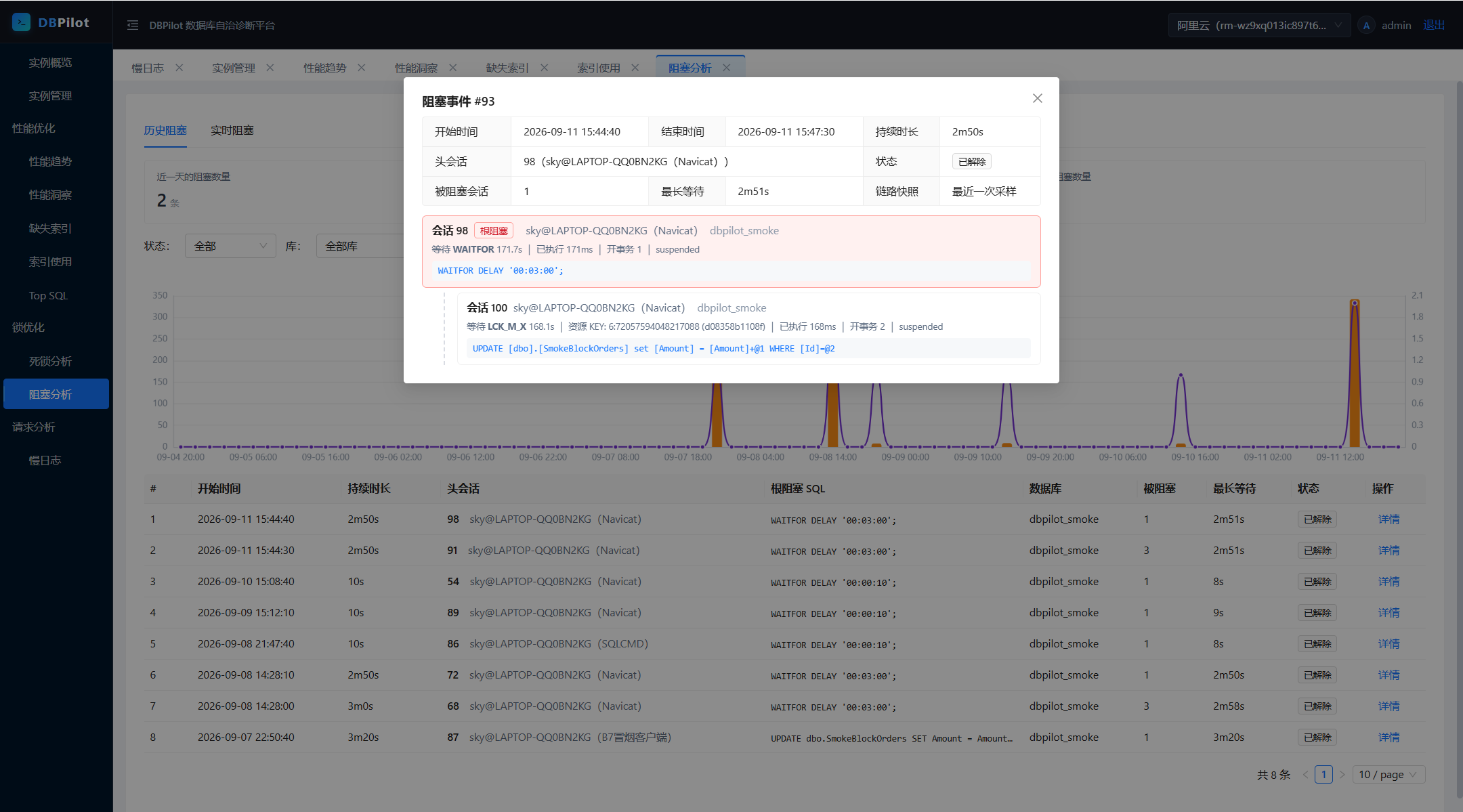
| Blocking analysis | Blocking chain detail |
|---|---|
 |
 |
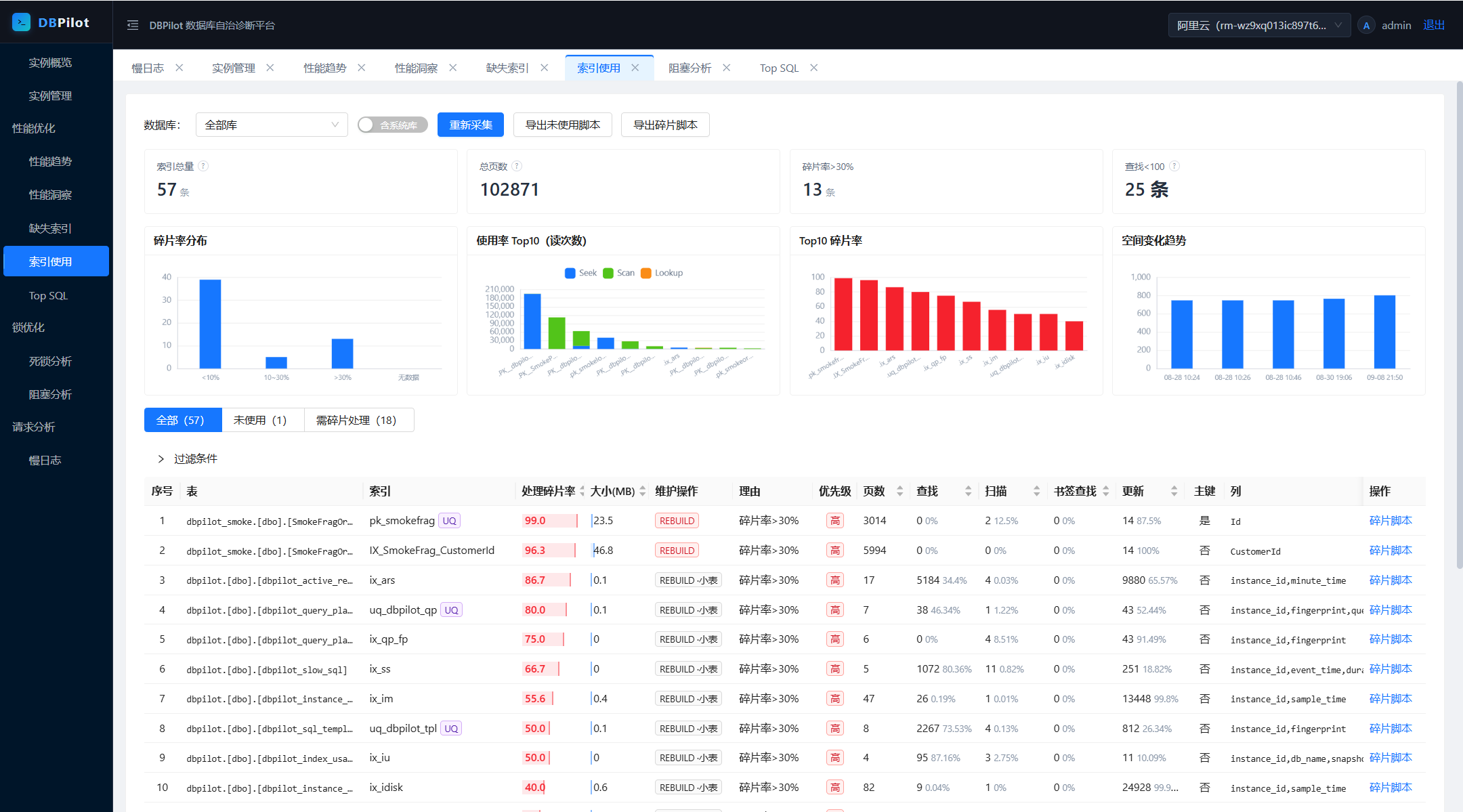
| Index usage | Slow query log |
|---|---|
 |
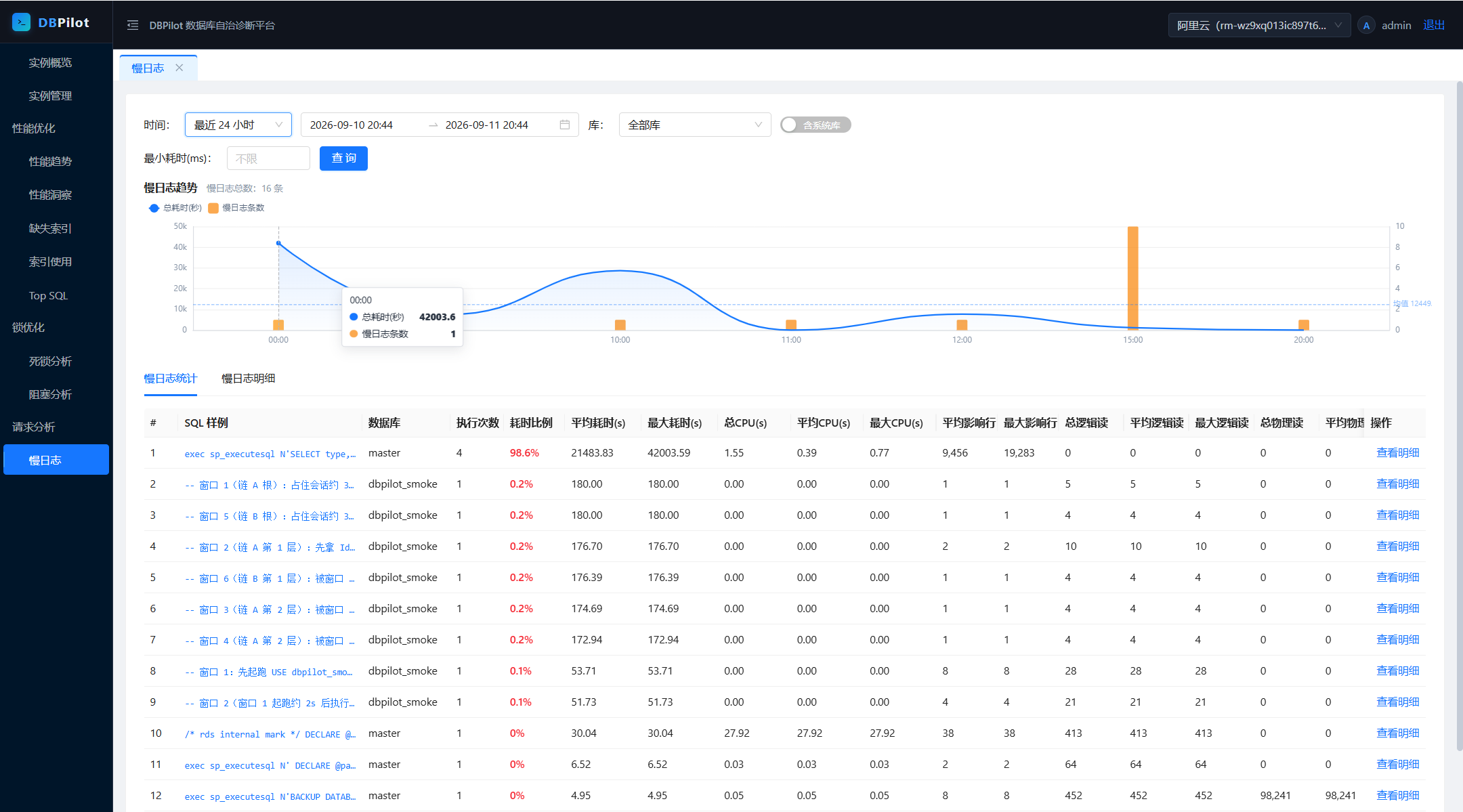 |
Quick start
The fastest path is the NuGet packages (frontend assets are embedded — no Node.js needed):
| Requirement | Version |
|---|---|
| .NET SDK | 10.0+ |
mkdir dbpilot-demo && cd dbpilot-demo
dotnet new web
dotnet add package DBPilot          # metapackage: AspNetCore + all four engine packages
Don't name your host project
dbpilot(orDBPilot.*) — the name would collide with the NuGet package and restore fails with NU1108 (cycle detected).
Program.cs:
using DBPilot.AspNetCore.Extension;
using DBPilot.Core.Providers;

var builder = WebApplication.CreateBuilder(args);
builder.AddDBPilot(o => o.PlatformEngine = DbpilotEngine.Sqlite);  // metadata-store engine: SQLite, zero external dependencies

var app = builder.Build();
app.UseDBPilot();
app.Run();
appsettings.json — copy this template and you are ready to run (SQLite flavor; replace the placeholders):
{
  "Serilog": {
    "MinimumLevel": {
      "Default": "Information",
      "Override": { "Microsoft": "Warning", "System": "Warning" }
    }
  },
  "DBPilot": {
    "ConnectionString": "Data Source=dbpilot_platform.db",
    "Mcp": { "ApiKey": "<random key; non-empty enables MCP, empty = off>" },
    "Auth": {
      "Username": "admin",
      "PasswordHash": "pbkdf2$100000$IOaBWezPYRnzEbBWYwLxZA==$xBWm8jjDfanDmyRttfnZoG4MIk8lcF0UnDbpjJuWaEU=",
      "Secret": "<your master key (>= 32-char random string)>"
    }
  },
  "AllowedHosts": "*"
}
A few notes: ConnectionString and Auth:Secret are the two required keys (the SQLite file and schema are created automatically on startup; the master key signs login cookies and encrypts instance credentials — startup fails without it, see Password and master key for generating one); the PasswordHash above is the hash of the default password dbpilot@2026 — keep it to log in with the default password; Mcp:ApiKey empty = MCP off.
dotnet run # → http://localhost:5000
Log in with the default account admin / dbpilot@2026 (change it after deployment — see Password and master key), then register your first monitored instance: Instances → Add (host + credentials, stored encrypted) → Test connection → Enable. Real-time pages work immediately; history accumulates over time.
SQL Server as the metadata store
Switching the metadata-store engine changes exactly two things (PlatformEngine and the connection string; everything else stays. MySQL / PostgreSQL work the same way via DbpilotEngine.MySql / DbpilotEngine.PostgreSql):
builder.AddDBPilot(o => o.PlatformEngine = DbpilotEngine.SqlServer);
"ConnectionString": "Server=<your-host>,1433;Initial Catalog=dbpilot;User Id=<user>;Password=<password>;Max Pool Size=20;Encrypt=False;TrustServerCertificate=True"
The connection string may point at an empty database (existing, or an account allowed to create one); the schema is created automatically on startup.
SQLite as the metadata store is for zero-dependency out-of-the-box setup — fine for evaluation and single-machine lightweight deployments (no multi-process Roles). For long-term/production use prefer SQL Server / MySQL / PostgreSQL: switching later only changes
PlatformEngineand the connection string. The metadata-store engine and monitored engines are independent axes; already-registered instances are unaffected. Ready-made hosts for this setup live insamples/(SqlServer :5200 / MySql :5201 / Sqlite :5203 / PostgreSql :5204) — see Building from source.
Password and master key
Change the login password: passwords are stored as PBKDF2 hashes (pbkdf2$iterations$salt$hash) in DBPilot:Auth:PasswordHash. Generating one does not require this repository — create a hash.cs anywhere (.NET 10 file-based app; the package directive pulls the dependency automatically, bump the version as needed):
#:package DBPilot.Core@0.5.2
Console.WriteLine(DBPilot.Core.Auth.PasswordHasher.Hash(args[0]));
dotnet run hash.cs <new-password> # paste the whole output into DBPilot:Auth:PasswordHash, restart to apply
If you cloned the repository: dotnet run --project samples/DBPilot.Sample.SqlServer -- --hash <new-password> (any of the four samples works).
Master key (Auth:Secret or env DBPILOT_MASTER_KEY — either one, required): shared by login-cookie signing and instance-credential AES-GCM encryption; startup fails without it (protects against instance credentials becoming undecryptable after a restart). Generate one on the spot:
openssl rand -base64 32                                    # Linux / macOS / Git Bash
# PowerShell: [guid]::NewGuid().ToString("N") + [guid]::NewGuid().ToString("N")
Building from source
Build and run from source. Compared to the NuGet path this additionally requires Node.js 20+: the embedded web UI is produced by the frontend build (output not committed to git; NuGet packages ship prebuilt) — run it once after cloning, and again only when the frontend changes:
git clone https://github.com/SkyChenSky/DBPilot.git
cd DBPilot
cd web && npm install && npm run build    # 1. produce the frontend assets
cd .. && dotnet build                     # 2. embed them into the DLL
cd samples/DBPilot.Sample.SqlServer       # 3. start a host (MySql :5201 / Sqlite :5203 / PostgreSql :5204 variants)
cp appsettings.template.json appsettings.json   # fill in the connection string and Auth:Secret
dotnet run                                      # → http://localhost:5200
Day-to-day development (backend hot-reload + frontend dev server):
scripts\run\dev.bat      # or two terminals:
dotnet watch --project samples/DBPilot.Sample.SqlServer   # backend (Swagger at /swagger)
cd web && npm run dev                                     # frontend → http://localhost:5173
scripts\run\test.bat— build + unit tests + frontend build in one goscripts/test/— self-test load scripts (SQL Server / MySQL; generate load → verify → clean up). Never run them against production databases. Seescripts/README.md- Frontend: dark shell + light workbench, colors from a single source (
web/src/theme/palette.ts), charts via a sharedinitChart()theme, lazy-rendered throughcomposables/useChart.ts
Architecture
flowchart LR
    subgraph browser["Browser"]
        ui["Web console"]
    end

    subgraph host["DBPilot service (single process)"]
        api["Web API + MCP Server"]
        sched["Background collectors (Quartz)"]
        webhost["Static UI hosting"]
    end

    subgraph platform["Metadata DB (schema auto-created)"]
        tables["Historical data"]
    end

    subgraph monitored["Monitored instances (any number)"]
        dmv["DMV / XE / pg_stat_* / performance_schema"]
    end

    ui --> webhost
    ui -->|API| api
    sched -->|scheduled sampling| dmv
    sched --> tables
    api --> tables
    api -->|real-time queries| dmv
The browser talks only to the DBPilot service. Real-time pages query instances directly; history pages read the metadata DB — both paths share the same data conventions (noise exclusion, statement fingerprinting, time windows).
Features
| Page | What it answers |
|---|---|
| Overview | Instance health at a glance: key metric cards with sparklines, recent critical events, Top SQL digest |
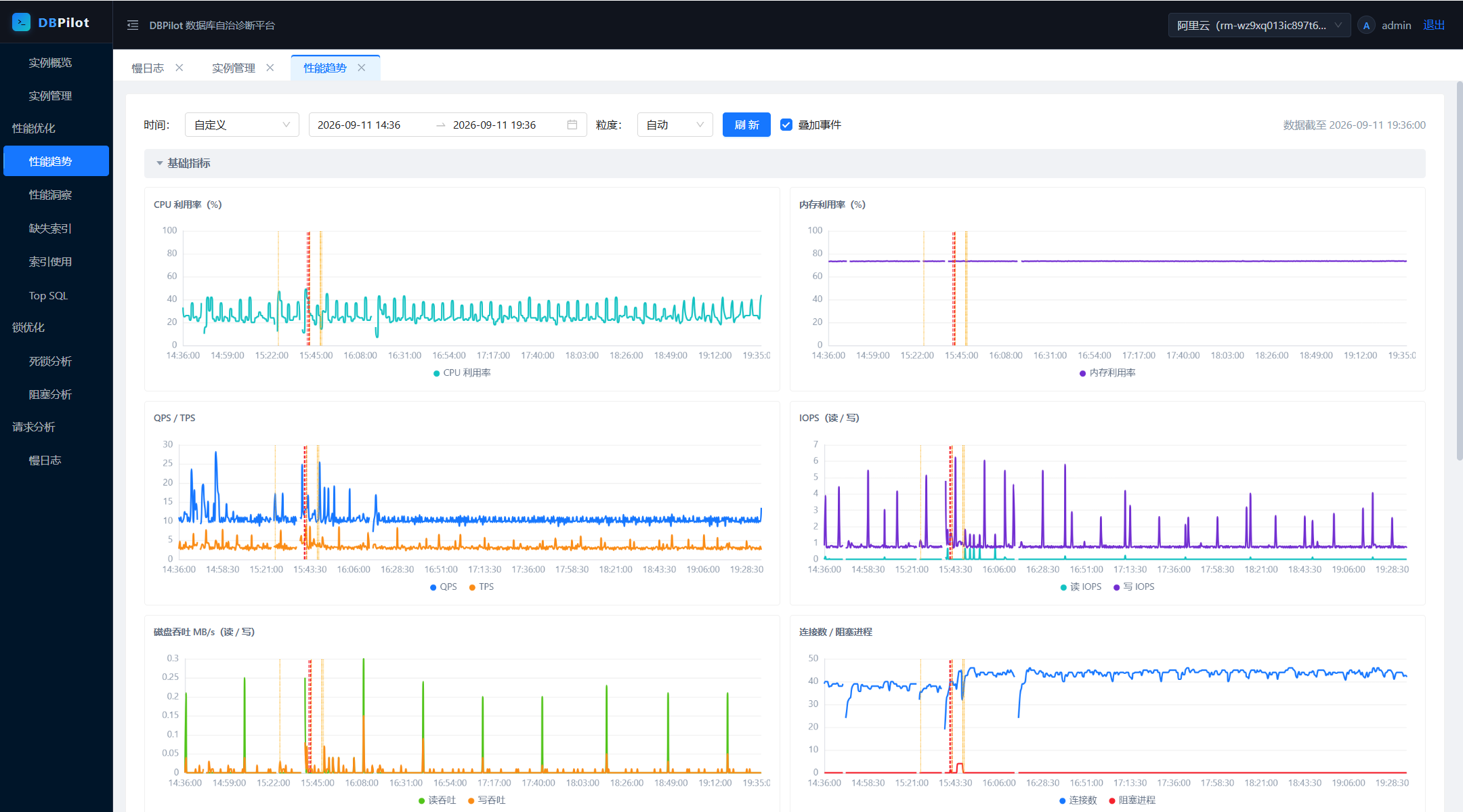
| Performance trends | CPU / memory / PLE / QPS·TPS / IO / disk, 10s granularity (30-day retention, auto down-sampling for long ranges); optional event overlay (deadlocks / slow SQL / plan changes as dashed vertical lines) |
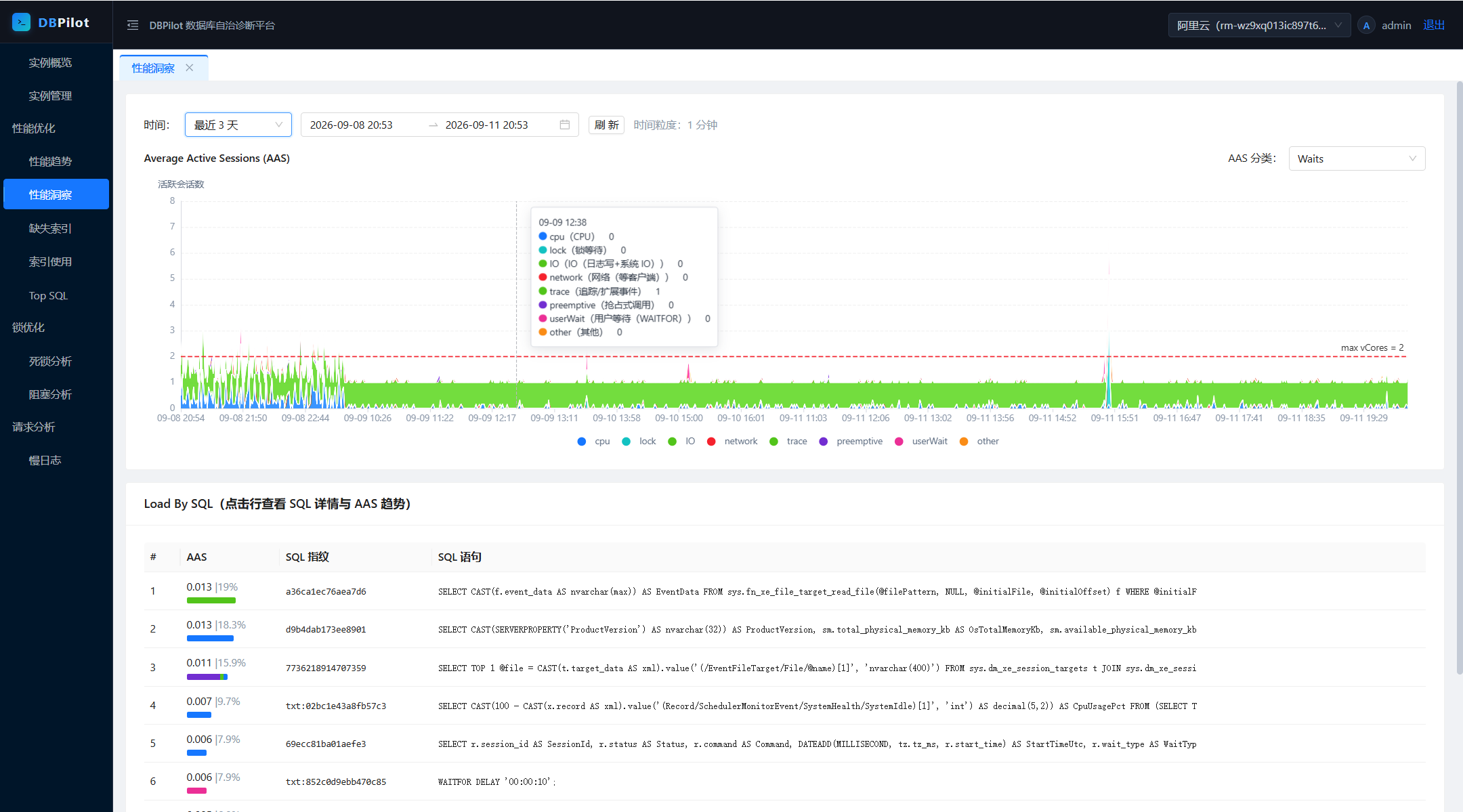
| Performance insight | Average Active Sessions (AAS) decomposed into CPU / lock / IO / waits — find which resource is saturated, drill down to the SQL statements contributing load |
| Top SQL | Real-time leaderboard + history trends, statements merged by fingerprint; one-click noise exclusion (global cross-instance blacklist) |
| Query plans | Plan versions snapshotted automatically; plan changes raise events with before/after resource comparison, plan tree and XML |
| Missing indexes | Optimizer recommendations ranked by impact, with CREATE scripts and overlap/merge hints |
| Index usage / fragmentation | Read/write counters to spot unused indexes (with drop scripts); fragmentation scan with REBUILD / REORGANIZE scripts |
| Blocking analysis | Real-time blocking tree (head blocker, chain, wait times) + historical statistics and trends |
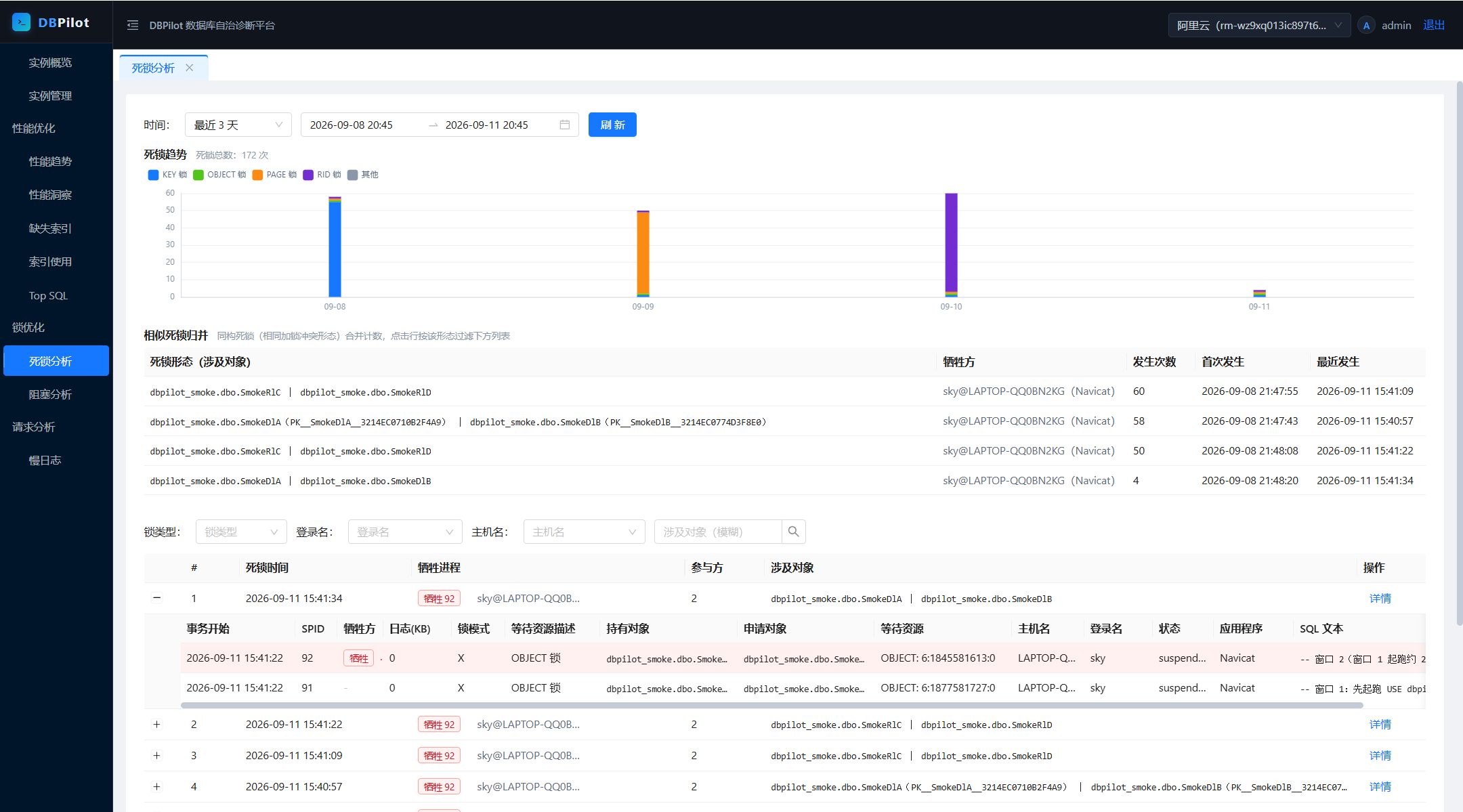
| Deadlock analysis | Deadlock events captured automatically; graph view of the cycle, statements, and lock relationships |
| Slow query log | Above-threshold statements archived automatically: full text, duration, IO, fingerprint; filter by time / database |
Engine support matrix
| Capability | SQL Server | MySQL 8.0+ | PostgreSQL 13+ |
|---|---|---|---|
| Sessions / blocking (real-time tree + history) | ✅ | ✅ | ✅ (pg_stat_activity + pg_blocking_pids) |
| Top SQL (fingerprinted) | ✅ | ✅ (performance_schema digest) |
✅ (pg_stat_statements) |
| Slow query log | ✅ (XE events) | ✅ (mysql.slow_log table) |
◐ template leaderboard (no SQL-channel slow log) |
| Performance trends | ✅ | ◐ (no OS CPU/memory, PLE, compile counters) | ◐ (QPS is transaction-scope: xact_commit + xact_rollback) |
| Deadlock analysis | ✅ event details + graph | ❌ | ◐ trend only (pg_stat_database.deadlocks) |
| Query plan snapshots / change tracking | ✅ | ❌ | ❌ |
| Missing index advice | ✅ | ❌ | ❌ |
| Index usage | ✅ | ◐ (unused-index detection is conservative due to counter semantics) | ◐ (unused indexes reliably detectable) |
| Fragmentation scan | ✅ | ❌ | ❌ |
| Index disable script | ✅ | ✅ (INVISIBLE) |
❌ |
| Disk usage | ✅ volume-level | ◐ database-level capacity | ◐ database-level capacity |
Metadata store (platform DB): SQL Server / MySQL / PostgreSQL / SQLite. Independent from the monitored engines — any combination works (SQLite gives you a single-executable + single-file embedded deployment; see samples/DBPilot.Sample.Sqlite).
Prerequisites by engine
MySQL (monitored): performance_schema=ON, an account with PROCESS + SELECT on performance_schema/mysql. Slow SQL requires slow_query_log=ON and log_output containing TABLE. On managed MySQL, parameter groups often deviate from defaults in ways that cause silent empty data — the connection test checks each parameter and tells you exactly what to change. SP body statements never appear in the digest leaderboard (MySQL design boundary; CALL itself does).
PostgreSQL (monitored): account able to read pg_stat_activity / pg_stat_database / pg_locks / pg_stat_user_indexes with CONNECT on target databases. The single hard requirement is the pg_stat_statements extension with track ≠ none — without it Top SQL stays empty (the wizard's self-check reports this with fix instructions).
SQL Server (monitored): works from 2008 up. Deadlock capture rides the built-in system_health session by default; slow SQL uses an auto-created XE session (or an existing one you configure).
AI diagnostics (MCP Server)
A read-only MCP Server (/mcp, Streamable HTTP + API key) hands the platform's evidence — metrics, slow SQL, deadlocks, blocking, indexes — to AI agents as 11 read-only tools. Tools share the same query conventions as the web UI; SQL text is truncated by default to protect the context window; every call is audit-logged.
Enable it (off by default; a non-empty ApiKey is the switch — there is no separate Enabled flag):
"DBPilot": {
  "Mcp": { "ApiKey": "a sufficiently random key" }
}
Claude Code:
claude mcp add --transport http dbpilot http://localhost:5200/mcp --header "X-Api-Key: <your-key>"
Verify with claude mcp list (or /mcp in a session), then just ask: "use dbpilot to check the instance load over the last hour — any SQL getting slower?"
Codex CLI (~/.codex/config.toml):
[mcp_servers.dbpilot]
url = "http://localhost:5200/mcp"

[mcp_servers.dbpilot.http_headers]
X-Api-Key = "<your-key>"
See examples/ for a command-line diagnostic console (DBPilot.McpConsole) and a fault-drill project (DBPilot.Scenarios) that reference the published NuGet packages.
Overhead on monitored instances
<1% CPU, zero disk pressure in normal operation. Collectors read in-memory metadata views (DMVs, extended event files, pg_stat_*, performance_schema) — no business-table scans, no physical IO, no locks on user objects.
| Collector | Frequency | Cost |
|---|---|---|
| Session sampling / instance metrics / Top SQL delta / deadlocks / slow SQL | 10–60s | millisecond-level metadata queries; XE incremental cursors near zero when idle |
| Query plan snapshots | 5 min | plan XML fetched only on first sight of a fingerprint (XML generation is the expensive part) |
| Index snapshots (incl. fragmentation) | daily 03:10 | heaviest tick of the day, deliberately scheduled at night |
| History writes | — | always to the metadata DB, never to monitored instances |
Mitigations built in: XE predicates exclude the platform's own sessions, self-monitoring statements are tagged out of Top SQL, every cron is configurable, instances can be disabled individually, failed connections back off automatically. Sub-second DMV polling is the industry-standard path (SQL Server's own system_health and AWS Performance Insights work this way).
You can verify it yourself — after running for a day, the monitoring account's accumulated CPU seconds on the monitored instance is the true cost:
SELECT login_name, SUM(cpu_time)/1000 AS cpu_seconds_total
FROM sys.dm_exec_sessions
WHERE host_process_id IS NOT NULL
GROUP BY login_name;
Configuration (appsettings.json)
Two required keys + one required value: DBPilot:ConnectionString, DBPilot:PlatformEngine (enum in code or config key — either form), and a master key (DBPilot:Auth:Secret or env DBPILOT_MASTER_KEY — either form); missing → startup error. Everything else is optional with sane defaults.
| Key | Required | Notes |
|---|---|---|
DBPilot:ConnectionString |
yes | Metadata DB connection string; schema auto-created on startup |
DBPilot:PlatformEngine |
yes (one of the two forms) | sqlserver / mysql / postgresql / sqlite. Preferred form in code: o.PlatformEngine = DbpilotEngine.SqlServer; config key is read automatically. Determines schema & ORM dialect; independent of which engines you monitor |
DBPilot:Auth:Secret |
yes (or the env var) | Master key: signs login cookies + encrypts instance credentials (AES-GCM); ≥32-char random string; missing → startup error (protects against instance credentials becoming undecryptable after a restart) |
DBPILOT_MASTER_KEY (env) |
yes (or Auth:Secret) | Environment-variable form of the master key — friendly for containers/secret managers; the config value takes precedence |
DBPilot:Auth:Username / DBPilot:Auth:PasswordHash |
no | Login username (default admin) / password hash (default password dbpilot@2026); see Password and master key |
DBPilot:Mcp:ApiKey |
no | MCP Server switch (non-empty = enabled) |
DBPilot:Roles |
no | Process roles (Web / Collector, both by default); multi-process deployment = 1 collector + N web fronts. Two collectors on one metadata DB double-collect |
DBPilot:AutoInitSchema |
no | Auto-create schema on startup (default true; set false when your DBA owns the schema) |
DBPilot:TopSqlExcludePatterns |
no | Top SQL noise filters (LIKE patterns); defaults built in, explicit [] clears them |
DBPilot:Jobs |
no | Per-collector switch & cron; explicit empty value disables that collector (the only place to turn collection off) |
DBPilot:Retention / DBPilot:Collect |
no | Retention days (auto-purged) / parallelism & backoff |
Connection info for monitored instances never lives in config files — it is maintained in the UI and stored encrypted in the metadata DB.
Embedding via NuGet
Published on nuget.org:
dotnet add package DBPilot            # metapackage: everything, one line (AspNetCore + all engines)
# or pick exactly what you need:
dotnet add package DBPilot.AspNetCore # main package: API / MCP / auth / scheduling / embedded frontend
dotnet add package DBPilot.SqlServer  # engine packages, pick any combination:
dotnet add package DBPilot.MySql      #   SqlServer / MySql / PostgreSql (monitor + platform storage)
dotnet add package DBPilot.Sqlite     #   Sqlite (platform storage only, embedded deployments)
using DBPilot.AspNetCore.Extension;
using DBPilot.Core.Providers;

var builder = WebApplication.CreateBuilder(args);
builder.AddDBPilot(o =>
{
    o.PlatformEngine = DbpilotEngine.SqlServer;  // no default — set explicitly (or via DBPilot:PlatformEngine)
    // o.WebOnly();                               // delegate sets only what you want to change
});

var app = builder.Build();
app.UseDBPilot();
app.Run();
Notes:
- Zero wiring for engines — referenced engine packages are discovered by scanning output
DBPilot.*.dllassemblies; instances route by theirenginecolumn. Explicit registration (AddDbpilotSqlServer()etc.) can be mixed in (first registration wins per engine). Single-file publishes pack assemblies into the host, so use explicit registration there. - Package graph:
DBPilot.AspNetCore → Core → Storage → Common; engine packages depend on Core + Storage. - Frontend static assets ship through two channels:
buildTransitivetargets copy them into the consumer'swwwroot, and an embedded manifest in the DLL serves as fallback — the UI works even with an empty wwwroot. - Fine-grained methods (
AddDbpilotWeb/AddDbpilotMcp/AddDbpilotQuartz/ ...) remain available for advanced compositions.
FAQ
| Symptom | Fix |
|---|---|
Startup warning 平台库结构初始化失败 (metadata schema init failed) |
Check DBPilot:ConnectionString and DB reachability; ignorable if you don't need persistence yet |
| Home page 404 / stale UI | Frontend not built: cd web && npm install && npm run build, rebuild (dotnet build), restart |
| Startup error "DBPilot 主密钥未配置" (master key not configured) | The master key is required: set DBPilot:Auth:Secret or the env var DBPILOT_MASTER_KEY (either one), see Configuration |
| Performance insight empty | Instance enabled and collecting? Insights need ~1 minute of samples |
| Deadlock / slow SQL events not showing yet | Event files have ~1 minute write buffering — wait and refresh |
License
| Product | Versions Compatible and additional computed target framework versions. |
|---|---|
| .NET | net10.0 is compatible. net10.0-android was computed. net10.0-browser was computed. net10.0-ios was computed. net10.0-maccatalyst was computed. net10.0-macos was computed. net10.0-tvos was computed. net10.0-windows was computed. |
-
net10.0
- Chloe (>= 5.56.0)
- DBPilot.Common (>= 0.5.2)
- Microsoft.Extensions.DependencyInjection.Abstractions (>= 10.0.11)
- Microsoft.Extensions.Logging.Abstractions (>= 10.0.11)
NuGet packages (6)
Showing the top 5 NuGet packages that depend on DBPilot.Storage:
| Package | Downloads |
|---|---|
|
DBPilot.Core
Core domain services for DBPilot — collectors, query services and performance-insight logic shared by hosts and tests. DBPilot is the self-hosted database autonomous diagnostics platform (DAS-style) for SQL Server, MySQL and PostgreSQL. |
|
|
DBPilot.PostgreSql
DBPilot engine package for PostgreSQL 13+ — monitoring provider (pg_stat_* / pg_stat_statements) plus platform-store support so PostgreSQL can also host the metadata DB. |
|
|
DBPilot.AspNetCore
Turn any ASP.NET Core app into the DBPilot console — Web API, read-only MCP server, auth, Quartz collectors and the embedded web UI. builder.AddDBPilot() + app.UseDBPilot() and you are running. |
|
|
DBPilot.MySql
DBPilot engine package for MySQL 8.0+ — monitoring provider (performance_schema / slow_log) plus platform-store support so MySQL can also host the metadata DB. |
|
|
DBPilot.SqlServer
DBPilot engine package for SQL Server 2008–2022 — monitoring provider (DMV / Extended Events) plus platform-store support so SQL Server can also host the metadata DB. |
GitHub repositories
This package is not used by any popular GitHub repositories.