DemaConsulting.HelpCards
0.1.0-beta.3
Prefix Reserved
dotnet add package DemaConsulting.HelpCards --version 0.1.0-beta.3
NuGet\Install-Package DemaConsulting.HelpCards -Version 0.1.0-beta.3
<PackageReference Include="DemaConsulting.HelpCards" Version="0.1.0-beta.3" />
<PackageVersion Include="DemaConsulting.HelpCards" Version="0.1.0-beta.3" />
<PackageReference Include="DemaConsulting.HelpCards" />
paket add DemaConsulting.HelpCards --version 0.1.0-beta.3
#r "nuget: DemaConsulting.HelpCards, 0.1.0-beta.3"
#:package DemaConsulting.HelpCards@0.1.0-beta.3
#addin nuget:?package=DemaConsulting.HelpCards&version=0.1.0-beta.3&prerelease
#tool nuget:?package=DemaConsulting.HelpCards&version=0.1.0-beta.3&prerelease



Overview
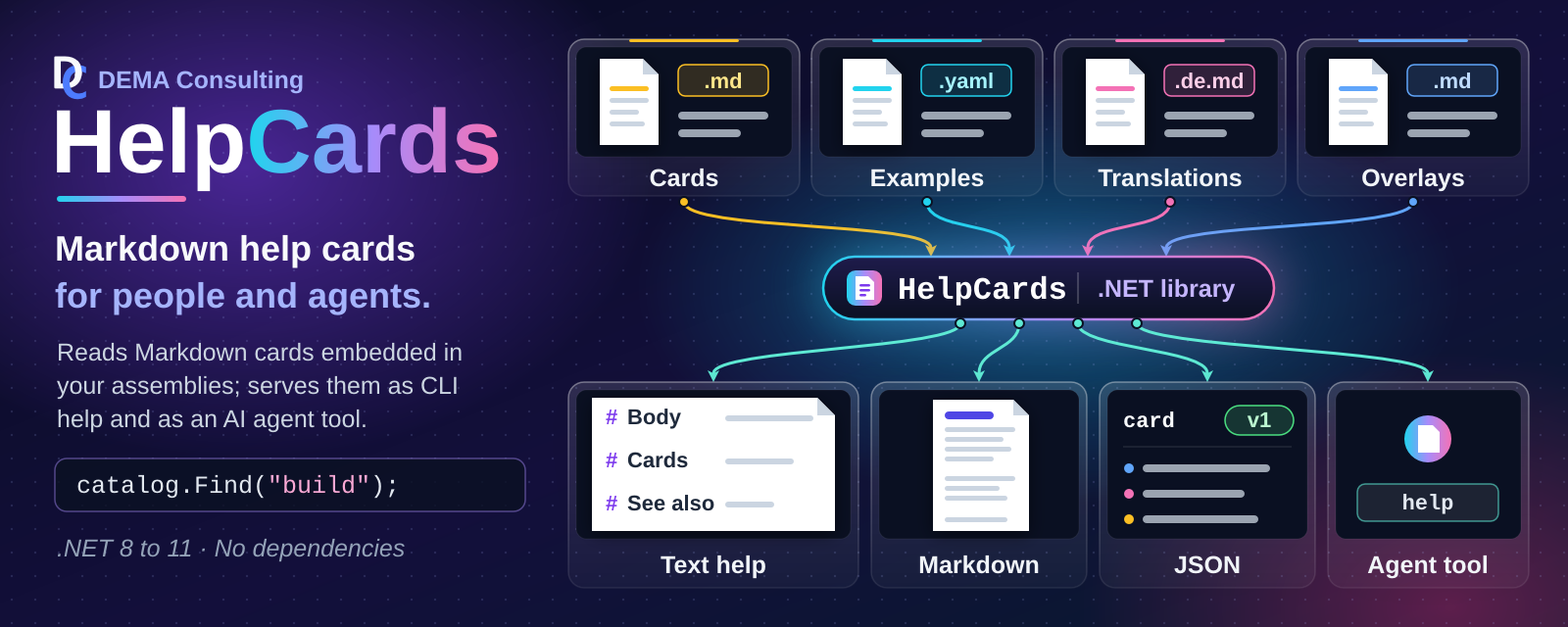
HelpCards is a .NET library for authoring help and knowledge content as Markdown cards with a small block of front
matter, embedding them in assemblies, and serving them as command-line help for people and as searchable knowledge
for AI agents. A card is one Markdown file; its path is its address, so build/compile.md is the card
build/compile. The library has no dependencies beyond the .NET Base Class Library, so every tool or library that
adopts it stays dependency-free.
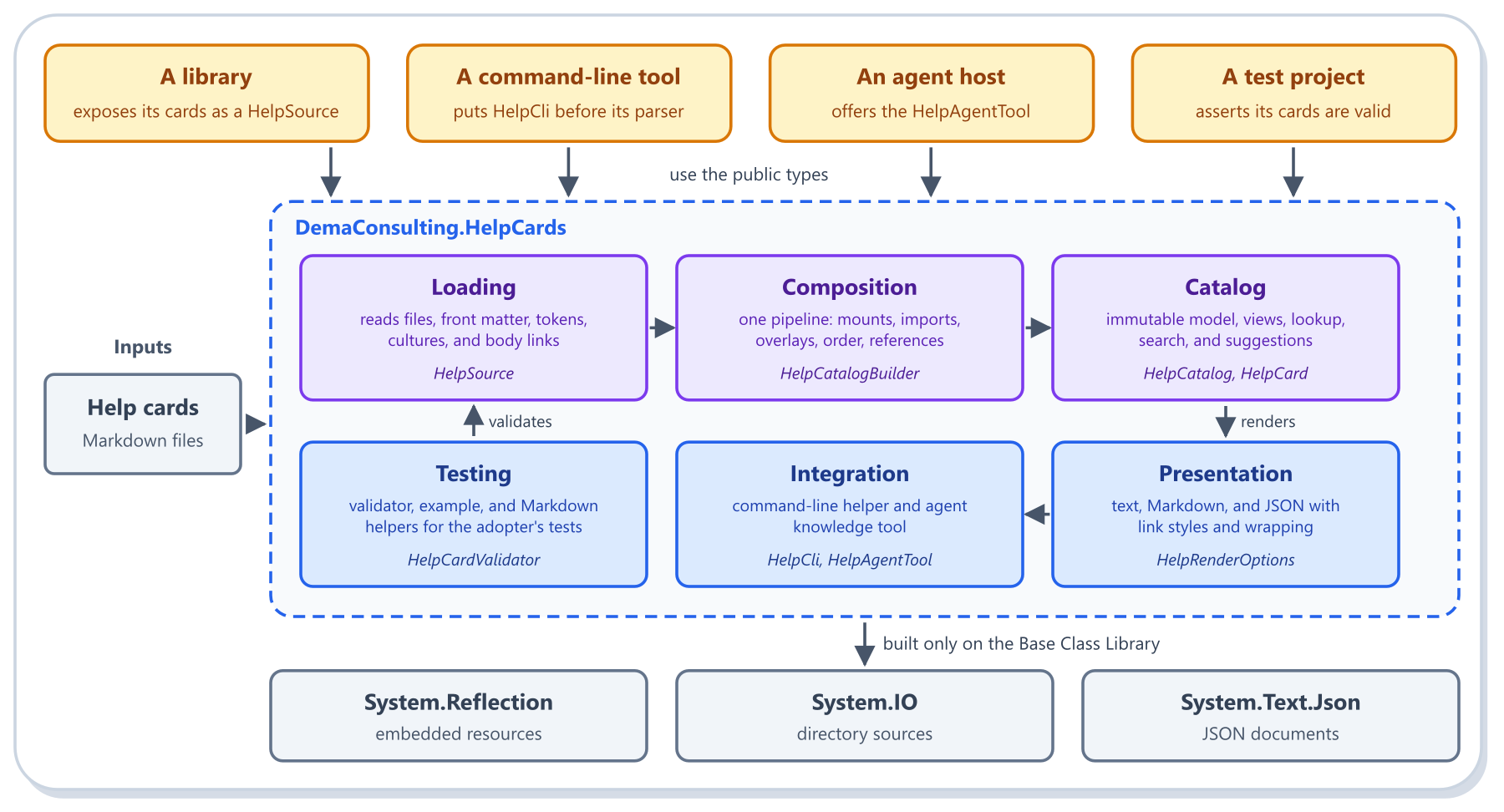
The diagram below shows how a library, a command-line tool, an agent host, and a test project use HelpCards: the cards go in as Markdown files, the Loading, Composition, and Catalog subsystems turn them into an immutable catalog, and Presentation, Integration, and Testing build on that catalog.
Features
- Markdown Cards: One file per topic, with a title, summary, aliases, tags, see-also links, and examples
- Examples with Expected Results: A command example can state the exit code and the output it gives (
exit:andexpect:), so a test can run every example and compare; HelpCards itself never starts a process. Show a complete file only for a format that users author; explain what the tool produces in prose, and keep test data in the test project - Resource Embedding: A packaged MSBuild targets file embeds the
Helpfolder of a project in its assembly - Links and Tokens:
[[card]]links checked at build time and{{token}}values per library - Multi-Library Composition: Several libraries expose a
HelpSource; an application mounts them, imports, overlays, and links across them, and reports the defects it finds in every source - Cultures: Translations in culture-suffixed files with a per-file fallback chain
- Presentation: Text, Markdown, and JSON output with three link styles and a versioned JSON contract
- Command-Line Helper:
HelpClianswershelp,help <path>,--examples,--example,--search, and--tag, and is independent of any argument-parsing library - Agent Tool:
HelpAgentToolis a provider-neutral knowledge tool (index, card, example, and search) with a JSON schema and output budgets - Testing Helpers:
HelpCardValidatorand example helpers prove in your own tests that your cards are valid, andHelpExampleRunnerruns every command example through your own entry point and compares the result it states - API Reference: A generated Markdown API reference in the package's
api/folder, organized for gradual disclosure so a developer or a coding agent reads one small page at a time - Dependency-Free: Built only on the .NET Base Class Library, with its own restricted front-matter parser
- Continuous Compliance: Requirements, design, verification, and a SysML2 model, following the Continuous Compliance methodology
Installation
Install the library using the .NET CLI:
dotnet add package DemaConsulting.HelpCards
The package targets net8.0, net9.0, net10.0, and net11.0. Its build files embed your cards automatically when your project references the package.
Quick Start
A library that ships cards
Put the cards in a Help folder of the project. A _source.md file names the source and describes it; every source
needs a name, so its name: line is required (or call HelpSource.WithName instead), and without a name the catalog
fails with the rule source-invalid:
MyLib/
├── MyLib.csproj
└── Help/
    ├── _source.md
    ├── getting-started.md
    └── getting-started/
        └── install.md
---
name: demo
title: MyLib
summary: Help cards of MyLib.
---
MyLib reads data files and writes reports.
---
title: Getting started
summary: Install MyLib and run it for the first time.
tags:
  - tutorial
examples:
  - name: load
    kind: command
    language: shell
    content: '{{tool}} load data.csv'
    description: Load a data file.
---
Install the package first, see [[getting-started/install]], then run [[#load]].
Expose the cards as a HelpSource. Creating a source does no file reading; the catalog reads the files when it is
built:
using DemaConsulting.HelpCards.Loading;

public static class MyLibHelp
{
    public static HelpSource Source { get; } = HelpSource.FromAssembly(typeof(MyLibHelp).Assembly);
}
A command-line tool
Create a HelpCli once, before your own argument parser. The catalog is built only when the first argument is the
help verb, so every other command pays nothing:
using DemaConsulting.HelpCards.Integration;

static readonly HelpCli Help = HelpCli.Create(new HelpCliOptions
{
    ToolName = "tool",
    Version = "1.4.0",
    ConfigureCatalog = (builder, culture) => builder.AddSource(MyLibHelp.Source)
});

public static int Main(string[] args)
{
    if (Help.TryRun(args, out var exitCode))
    {
        return exitCode;
    }

    // ... the tool's own commands; print Help.Footer at the end of the usage text
    return 0;
}
The tool name and the version are set once: the helper gives them (and the culture of --lang) to the catalog builder.
In your tests, options.GetCatalogConfiguration() returns the same configuration for HelpCardValidator, so the
cards are validated in the composition that users get. OutputProvider and ErrorProvider choose the writers when a
command writes, for example to silence help.
Then tool help prints the topics, tool help getting-started prints a card, tool help --search install
searches, and tool help getting-started --json writes the card as JSON.
An application that composes several libraries and exposes the agent tool
An application adds the sources of its libraries to one catalog. Mounting puts a source under its own prefix, so the
card getting-started of demo becomes demo/getting-started:
using DemaConsulting.HelpCards.Catalog;
using DemaConsulting.HelpCards.Integration;

var catalog = HelpCatalog.Create(builder => builder
    .AddMountedSource(MyLibHelp.Source)
    .AddMountedSource(OtherLibHelp.Source, "other")
    .AddSource(AppHelp.Source)
    .ToolName("myapp"));

var tool = HelpAgentTools.Create(catalog, new HelpAgentToolOptions { Name = "myapp_help" });

// Register tool.Name, tool.Description, and tool.ParametersSchema with the agent framework of your choice,
// and answer each call with the text that tool.Invoke(argumentsJson) returns.
string answer = tool.Invoke("""{"query":"install"}""");
The user guide covers imports, overlays, links across libraries, cultures, and the testing helpers.
The public types are in these namespaces: DemaConsulting.HelpCards.Loading (HelpSource),
DemaConsulting.HelpCards.Composition (HelpCatalogBuilder), DemaConsulting.HelpCards.Catalog (HelpCatalog,
HelpCard, and the result types), DemaConsulting.HelpCards.Presentation (HelpRenderOptions),
DemaConsulting.HelpCards.Integration (HelpCli, HelpAgentTools), and DemaConsulting.HelpCards.Testing
(HelpCardValidator, HelpExampleRunner, and the example and Markdown helpers).
Supported front matter
The front matter of a card is a restricted subset of YAML. HelpCards reads it with its own small parser instead of a YAML library, and every other construct is an error that names the file, the line, and a rule id. This section lists exactly what is accepted and what is rejected.
Why a restricted parser
- Adopters stay dependency-free. HelpCards is embedded in command-line tools and libraries. A YAML library would become a dependency of every one of them, with its own transitive packages and version conflicts.
- Errors are exact. The parser reports every defect with the file, the line, and a rule id. A syntax error ends only the file that has it, so one run lists the broken cards of every file.
- No dialect drift. YAML parsers disagree about unquoted values such as
no,on,1.0, or0x1F. Here a value is read as written, the key decides whether it is text, a number, or a flag, and the few constructs that could be read in two ways are errors that ask you to quote the value. - Small and checkable. The accepted subset is small enough to document in two tables, and each construct in the tables has a test.
Accepted constructs
A card is a --- line, the front matter, a --- line, and the Markdown body. In the tests, a test name in the table
below is the part after FrontMatterDecoder_TryDecode_.
| Construct | Example | Test |
|---|---|---|
| Plain scalar | title: Flow charts |
PlainScalar_Accepted |
Single-quoted scalar ('' is a quote) |
title: 'It''s: fine' |
SingleQuotedScalar_Accepted |
Double-quoted scalar (\\ and \" only) |
title: "Say \"hi\"" |
DoubleQuotedScalar_Accepted |
| Full-line comment between entries | # a note |
FullLineComments_Accepted |
| List of scalars, indented | tags: then - authoring |
IndentedListOfScalars_Accepted |
| List of scalars at the first column | tags: then - authoring |
ListAtFirstColumn_Accepted |
| List of maps (examples) | examples: then - name: run |
ListOfMaps_Accepted |
| Colon without a space inside a value | title: a:b |
ColonWithoutSpaceInValue_Accepted |
| Empty value | x-note: |
EmptyValue_Accepted |
| Extension key | x-audience: agent |
ExtensionKey_Accepted |
Literal block \| for example content |
content: \| then indented lines |
ExampleBlockScalarPipe_Accepted |
Literal block \|- for example content |
content: \|- |
ExampleBlockScalarPipeMinus_Accepted |
Literal block \| for example expect |
expect: \| then lines |
ExampleExpectBlockScalar_Accepted |
Blank, #, and nested lines in a block |
lines kept as content | BlockScalarKeepsBlankHashAndNestedLines_Accepted |
| Trailing blank lines in a block | removed | BlockScalarTrailingBlankLines_Accepted |
| LF or CRLF line endings | CrLfLineEndings_Accepted |
|
| Byte order mark | stripped | ByteOrderMark_Accepted |
| Blank line before the body | BlankLineBeforeBody_Accepted |
|
| No body | NoBody_Accepted |
|
--- line inside the body |
a thematic break | ThematicBreakInBody_Accepted |
| The full example of the specification | SpecificationExample_Accepted |
Rejected constructs
Every rejected construct is reported with the rule id syntax unless the table says otherwise. The test names carry the
same prefix as above, and each ends in _Rejected.
| Construct | Example | Test |
|---|---|---|
Missing opening --- |
the file starts with title: A |
MissingOpeningDelimiter |
Missing closing --- |
the front matter never ends | MissingClosingDelimiter |
| Flow sequence | tags: [a, b] |
FlowSequence |
| Flow sequence as a list item | - [a] |
FlowSequenceAsListItem |
| Flow mapping | x-a: {b: c} |
FlowMapping |
| Anchor | title: &anchor value |
Anchor |
| Alias | summary: *anchor |
Alias |
| Tag | title: !!str value |
Tag |
| Trailing comment | summary: text # comment |
TrailingComment |
| Comment after a quoted value | title: 'text' # comment |
CommentAfterQuotedValue |
Plain value starting with # |
title: #tag |
ValueStartingWithHash |
Plain value starting with % |
x-note: %y |
ValueStartingWithPercent |
Plain value starting with @ |
title: @user |
ValueStartingWithAt |
| Plain value starting with a backtick | title: `code` |
ValueStartingWithBacktick |
| Plain value containing a colon and a space | title: Note: this |
PlainValueWithColonSpace |
| Plain value ending with a colon | title: Setup: |
PlainValueEndingWithColon |
| Tab in the indentation | a tab before - a |
TabInIndentation |
| Duplicate key | title twice |
DuplicateKey |
| Duplicate key in a list item | name twice in one example |
DuplicateKeyInListItem |
| Nested mapping below a key | meta: then author: me |
NestedMappingBelowKey |
| List inside a list item | kind: then - x in an example |
ListInsideListItem |
| Document marker | --- !tag |
DocumentMarker |
| Document end marker | ... |
DocumentEndMarker |
| Unterminated single quote | title: 'open |
UnterminatedSingleQuote |
| Unterminated double quote | title: "open |
UnterminatedDoubleQuote |
| Unsupported escape | title: "a\nb" |
UnsupportedEscape |
| Text after a closing quote | title: "a" b |
TextAfterClosingQuote |
Block scalar for an ordinary key (block-scalar-not-allowed) |
summary: \| |
BlockScalarForOrdinaryKey |
Block scalar as a list item (block-scalar-not-allowed) |
- \| |
BlockScalarAsListItem |
content block outside examples (block-scalar-not-allowed) |
content: \| |
BlockScalarContentOutsideExamples |
expect block outside examples (block-scalar-not-allowed) |
expect: \| |
BlockScalarExpectOutsideExamples |
Other example key (block-scalar-not-allowed) |
description: \| |
BlockScalarForOtherExampleKey |
| Keep indicator | content: \|+ |
BlockScalarKeepIndicator |
| Indentation indicator | content: \|2 |
BlockScalarIndentationIndicator |
| Folded block scalar | content: > |
FoldedBlockScalar |
| List item without a key | - a |
ListItemWithoutKey |
| Unexpected indentation | stray: b |
UnexpectedIndentation |
| Space before the colon of a key | title : A |
KeyWithSpaceBeforeColon |
| Empty list item | - |
EmptyListItem |
| Misaligned keys in a list item | keys of one item at two columns | MisalignedKeysInListItem |
A file that is syntactically valid is then checked against the key matrix: an unknown key is key-unknown, a missing
required key is key-missing, and a value of the wrong shape is value-invalid. Keys that start with x- are always
allowed and are kept in HelpCard.Extensions. The user guide has the full key matrix.
Keys and the version that introduced them
Every key of the first release is available from HelpCards 0.1.0. A library that uses a key introduced in a later
release must reference at least that version in its PackageReference.
| Key | Introduced in |
|---|---|
title, summary, aliases, tags, order, children, see-also, examples |
0.1.0 |
extends, optional (overlays) |
0.1.0 |
schema, name, language (_source.md) |
0.1.0 |
x-* (extensions) |
0.1.0 |
exit, expect (command examples) |
0.1.0-beta.3 |
save-as (examples), with schema: 2 |
0.1.0-beta.3 |
| Same example name in several cards of one source (per-card names) | 0.1.0-beta.3 |
HelpCliOptions.ConfigureCatalog, GetCatalogConfiguration, OutputProvider, ErrorProvider (API) |
0.1.0-beta.3 |
Omitting schema means schema 1. Schema 2 splits the file key of an example into save-as (the name to save it as)
and file (a companion data file); schema 1 is still read exactly as before and stays supported. A source that declares
a schema newer than the library supports fails with the rule schema-unsupported. Example names are unique within a
card, not within a family of cards; a card that has none of a name is searched below, where the name must be unique.
Target frameworks
HelpCards targets net8.0, net9.0, net10.0, and net11.0. It does not target .NET Standard or .NET Framework.
Building
Every project script requires an explicit scope: run with no arguments it prints its usage text and
exits 1. Run pwsh ./build.ps1 -Help (likewise lint.ps1 and fix.ps1) for the switches.
pwsh ./build.ps1 -All       # full build and all tests
pwsh ./build.ps1 -Changed   # only what your changes affect, while iterating
pwsh ./lint.ps1 -All        # all lint checks (what CI runs)
pwsh ./fix.ps1 -Changed     # auto-fix the changed file types
User Guide
The HelpCards User Guide is available on the HelpCards releases page.
API Reference
The package ships its API reference as Markdown in the package's api/ folder, generated from the XML doc comments by
ApiMark and organized for gradual disclosure, so a developer or a coding agent can read a small targeted
page instead of one large document. Start at api/api.md (the index, one row per namespace), open a namespace page for
an overview, the common usage steps, and a complete usage example, then follow the links to type and member pages. For
example, the DemaConsulting.HelpCards.Integration namespace page shows how to wire HelpCli into a command-line tool
and how to expose the cards to an AI agent with HelpAgentTools; the DemaConsulting.HelpCards.Loading page shows how
a library exposes its embedded cards as a HelpSource and is the complete card-format reference (front-matter keys,
links, examples, tokens, cultures, and the MSBuild embedding properties); the remarks of HelpProblem list every rule
id. To read it from a restored package, open the package folder in
the NuGet global-packages cache, or unzip the .nupkg. When building from source, the same files are written to
src/DemaConsulting.HelpCards/api/.
Contributing
Contributions are welcome. See CONTRIBUTING.md for development setup, coding standards, and the pull request process.
License
Copyright (c) DEMA Consulting. Licensed under the MIT License. See LICENSE for details.
By contributing to this project, you agree that your contributions will be licensed under the MIT License.
Support
| Product | Versions Compatible and additional computed target framework versions. |
|---|---|
| .NET | net8.0 is compatible. net8.0-android was computed. net8.0-browser was computed. net8.0-ios was computed. net8.0-maccatalyst was computed. net8.0-macos was computed. net8.0-tvos was computed. net8.0-windows was computed. net9.0 is compatible. net9.0-android was computed. net9.0-browser was computed. net9.0-ios was computed. net9.0-maccatalyst was computed. net9.0-macos was computed. net9.0-tvos was computed. net9.0-windows was computed. net10.0 is compatible. net10.0-android was computed. net10.0-browser was computed. net10.0-ios was computed. net10.0-maccatalyst was computed. net10.0-macos was computed. net10.0-tvos was computed. net10.0-windows was computed. net11.0 is compatible. |
-
net10.0
- No dependencies.
-
net11.0
- No dependencies.
-
net8.0
- No dependencies.
-
net9.0
- No dependencies.
NuGet packages
This package is not used by any NuGet packages.
GitHub repositories
This package is not used by any popular GitHub repositories.
| Version | Downloads | Last Updated |
|---|---|---|
| 0.1.0-beta.3 | 66 | 11/25/2026 |
| 0.1.0-beta.2 | 65 | 11/24/2026 |
| 0.1.0-beta.1 | 46 | 11/24/2026 |