DemaConsulting.TextLint.Tool
0.1.0-beta.5
Prefix Reserved
dotnet tool install --global DemaConsulting.TextLint.Tool --version 0.1.0-beta.5
dotnet new tool-manifest
dotnet tool install --local DemaConsulting.TextLint.Tool --version 0.1.0-beta.5
#tool dotnet:?package=DemaConsulting.TextLint.Tool&version=0.1.0-beta.5&prerelease
nuke :add-package DemaConsulting.TextLint.Tool --version 0.1.0-beta.5
TextLint



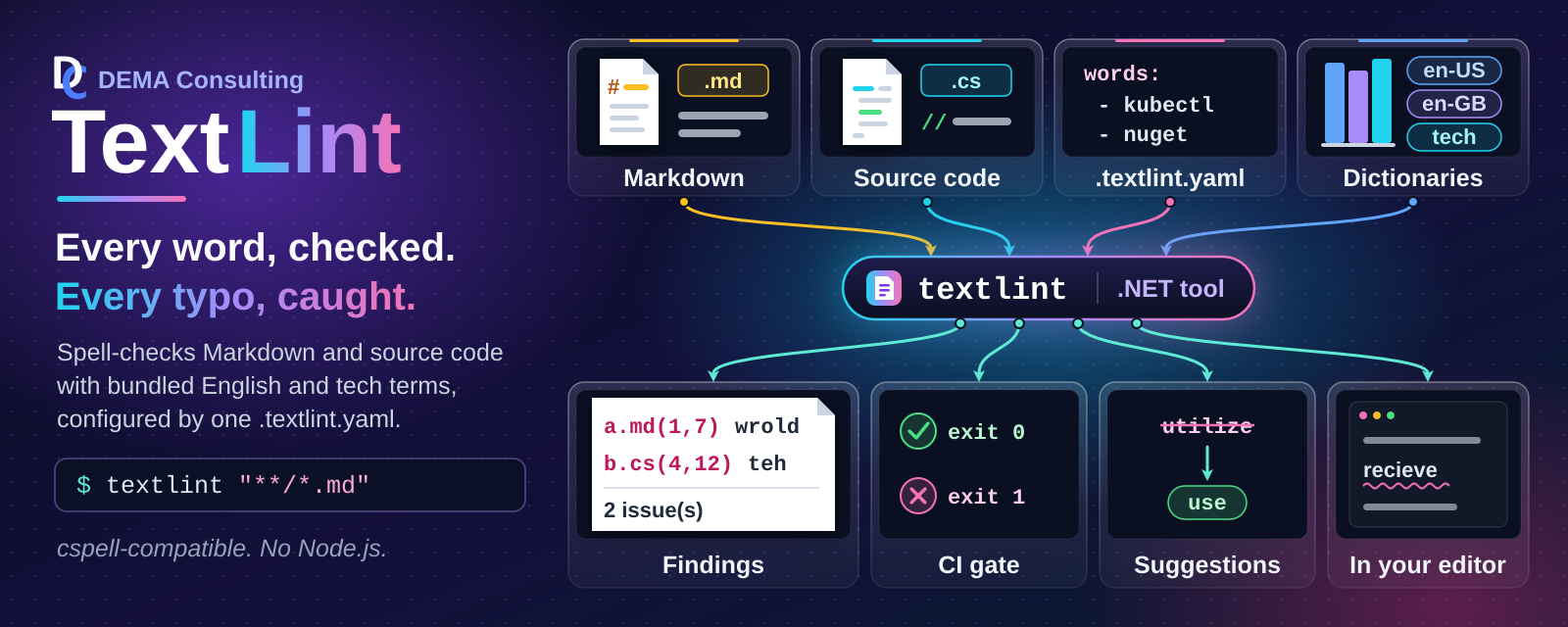
TextLint is a fast, cspell-compatible text linter for source code and documentation. It is delivered as the
DemaConsulting.TextLint .NET library and the DemaConsulting.TextLint.Tool .NET tool (command textlint), which is
a thin command-line front-end over the library.
Status: under active development. Both the library and the tool can already select files from a .textlint.yaml
settings file, check their spelling in parallel with cspell's rules, and look words up in embedded dictionaries.
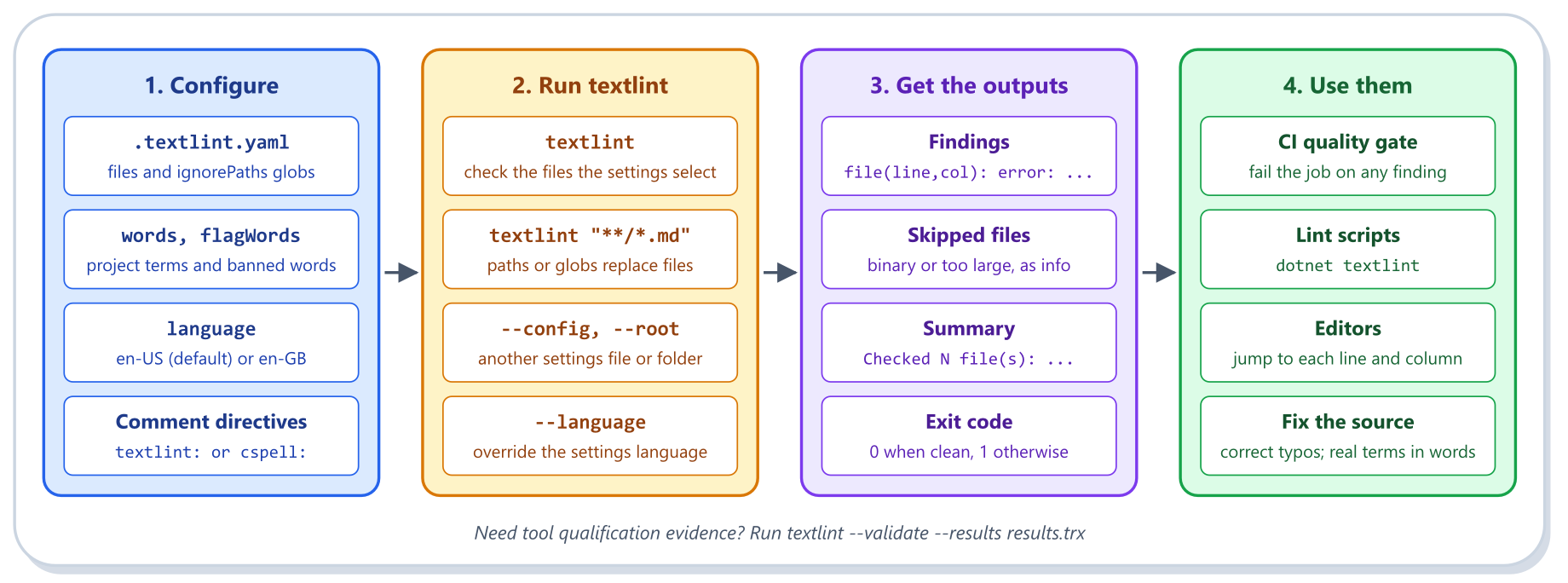
The workflow below shows how to use the tool: configure the files to check, the project words, and the language
in .textlint.yaml, run textlint locally or in a CI pipeline, and use the compiler-style findings, summary, and
exit code as a CI quality gate, in lint scripts, and in editors to fix the source.
Features
TextLint provides:
- 🧾 cspell-Compatible Settings: Configures checks with a familiar
.textlint.yamlfile - 🗂️ Glob File Selection: Selects files with globs and ordered
!exclusions - 🎛️ Per-File Overrides: Gives some files their own settings, or switches them off with
enabled - ⚡ Parallel Spell Checking: Checks files on all processor cores with deterministic results
- 🐪 Identifier Splitting: Splits camelCase and snake_case words before checking them
- 🙈 Ignore Patterns: Skips URLs, hashes, random strings, and text matching your own patterns
- 💬 Inline Directives: Adjusts or disables checks from comments in the checked files
- 📖 Embedded Dictionaries: Ships US and UK English plus technical terms; no data files needed
- 🚦 Compiler-Style Output: Reports
file(line,col): error:lines, a summary, and exit codes - 📦 Reusable Library: Embeds the same checker in your own .NET applications
- ✅ Self-Validation: Built-in tests that spell-check sample files end to end and assert the exact findings, with TRX and JUnit output
- 🖥️ Multi-Platform Support: Builds and runs on Windows, Linux, and macOS
- ⚙️ Multi-Runtime Support: The tool needs .NET 10; the library supports .NET 10 and 11
- 🔁 Comprehensive CI/CD: GitHub Actions workflows for quality checks, builds, and tests
- 🛡️ Continuous Compliance: CI generates evidence using Continuous Compliance
- 📚 Documentation Tooling: Automates build notes, user guide, and compliance reports
Installation
Install the tool globally using the .NET CLI (installing requires the .NET SDK; running the tool requires the .NET 10 runtime):
dotnet tool install -g DemaConsulting.TextLint.Tool
Add the reusable library to a project with:
dotnet add package DemaConsulting.TextLint
Tool Quick Start
# Check the files that match the globs (quote them so that your shell does not expand them)
textlint "**/*.md"

# Check the files selected by the 'files' setting of ./.textlint.yaml
textlint

# Use another settings file, another project folder, or another language
textlint --config ci/textlint.yaml "**/*.md"
textlint --root ../other-project "docs/**/*.md"
textlint --language en-GB "**/*.md"

# Run self-validation and save the results
textlint --validate --results results.trx
A minimal .textlint.yaml:
files:
  - "**/*.md"
  - "!CHANGELOG.md"
ignorePaths:
  - node_modules
words:
  - TextLint
overrides:
  - filename: docs/uk/**
    language: en-GB
Library Quick Start
Load a .textlint.yaml settings file, check the files it selects, and print every finding:
using DemaConsulting.TextLint.Configuration;
using DemaConsulting.TextLint.SpellChecking;

// Problems in the settings file are returned, not thrown
var result = await SettingsLoader.LoadAsync(".textlint.yaml");
if (!result.Succeeded)
{
    foreach (var diagnostic in result.Diagnostics)
    {
        Console.Error.WriteLine(diagnostic);
    }

    return 1;
}

// Check every selected file in parallel; findings are ordered by file, line, and column
var check = await SpellChecker.CheckAsync(result.Settings!, Directory.GetCurrentDirectory());
foreach (var issue in check.Issues)
{
    Console.WriteLine(issue); // docs/guide.md(12,5): error: Unknown word 'wrold'
}

// Files that were skipped or could not be read are reported separately
foreach (var problem in check.FileDiagnostics)
{
    Console.WriteLine(problem);
}

Console.WriteLine($"{check.FilesChecked} checked, {check.FilesSkipped} skipped, problems: {check.HasProblems}");
return check.HasProblems ? 1 : 0;
Skipped or unreadable files are reported in FileDiagnostics and never stop the run, and HasProblems is the
value to base an exit code on: it is true for any finding or any file that could not be checked, but not for
skipped binary or oversized files alone.
More Information
The User Guide covers everything else:
- Command-Line Options, Output, and Exit Codes
- Settings File, Glob Patterns, and Overrides
- Comment Directives and Differences from cspell
- Library Usage and Self-Validation
See also CONTRIBUTING.md for how to report bugs, suggest features, and submit pull requests, and the releases and the NuGet package for downloads.
Third-Party Data
The library embeds English and technical-term dictionaries built from third-party data (SCOWL, and the MIT-licensed cspell-dicts packages), and ports default ignore patterns from cspell-lib (MIT license). The required license notices are in THIRD-PARTY-NOTICES.txt, which is also included at the root of both NuGet packages, and the provenance of every list is described in the dictionaries README.
License
Copyright (c) DEMA Consulting. Licensed under the MIT License. See LICENSE for details.
By contributing to this project, you agree that your contributions will be licensed under the MIT License.
| Product | Versions Compatible and additional computed target framework versions. |
|---|---|
| .NET | net10.0 is compatible. net10.0-android was computed. net10.0-browser was computed. net10.0-ios was computed. net10.0-maccatalyst was computed. net10.0-macos was computed. net10.0-tvos was computed. net10.0-windows was computed. |
This package has no dependencies.
| Version | Downloads | Last Updated |
|---|---|---|
| 0.1.0-beta.5 | 524 | 11/18/2026 |
| 0.1.0-beta.4 | 5,065 | 11/15/2026 |
| 0.1.0-beta.3 | 58 | 11/13/2026 |
| 0.1.0-beta.2 | 8,172 | 11/9/2026 |
| 0.1.0-beta.1 | 151 | 11/7/2026 |