DiskScout 26.3.3
dotnet tool install --global DiskScout --version 26.3.3
This package contains a .NET tool you can call from the shell/command line.
dotnet new tool-manifest
dotnet tool install --local DiskScout --version 26.3.3
This package contains a .NET tool you can call from the shell/command line.
#tool dotnet:?package=DiskScout&version=26.3.3
The NuGet Team does not provide support for this client. Please contact its maintainers for support.
nuke :add-package DiskScout --version 26.3.3
The NuGet Team does not provide support for this client. Please contact its maintainers for support.
DiskScout


Fast disk usage analyzer with visual breakdown, space waster detection, and cleanup suggestions.
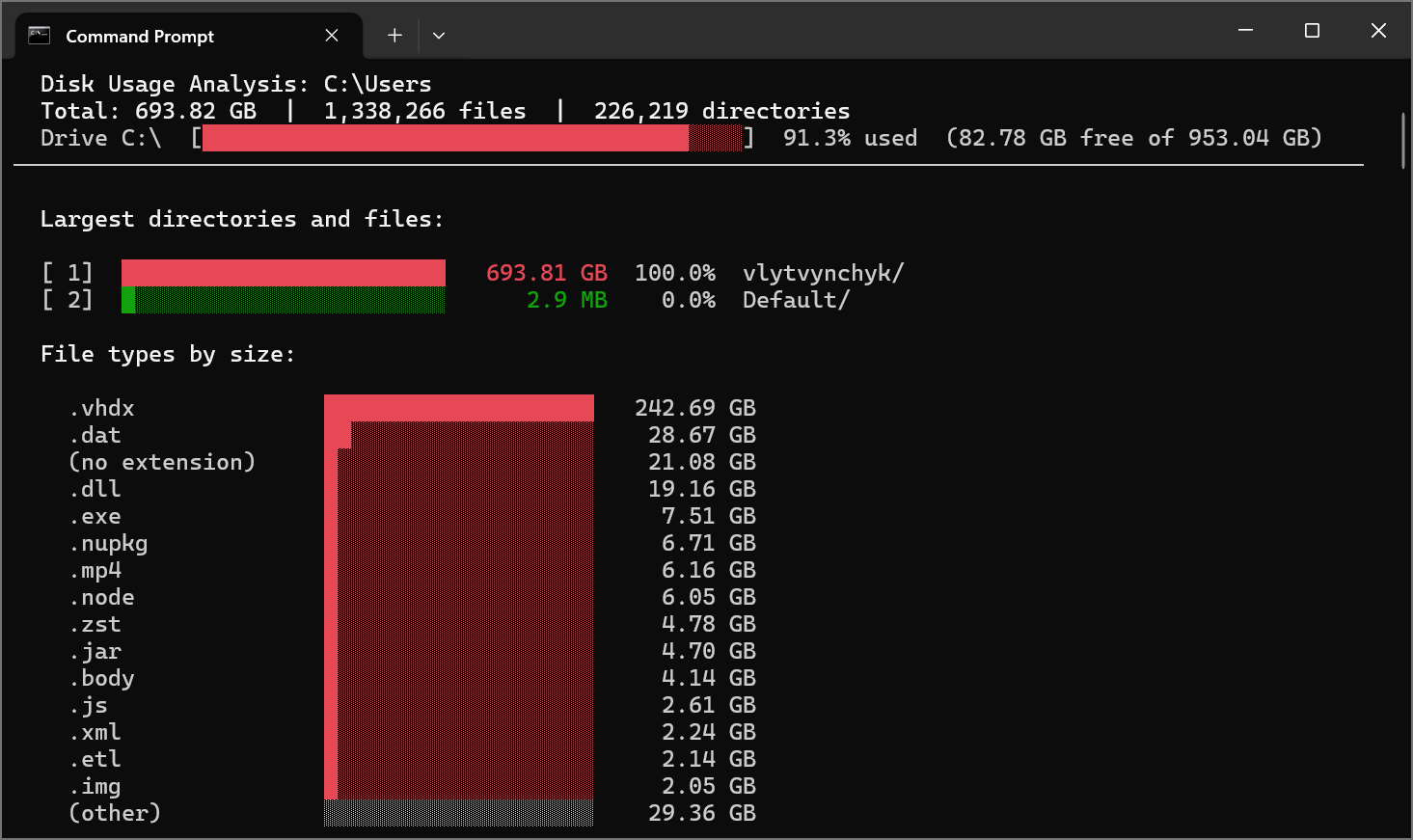
Features
- Parallel directory scanning for fast analysis
- Color-coded visual bar charts in the terminal
- Interactive drill-down navigation
- Identifies common space wasters:
node_modules,bin/obj,.git, browser caches, temp files, Docker, Python venvs, and more - Suggests cleanup commands for each category
- File type distribution analysis
- Top N largest files listing
Install
As a .NET tool (recommended)
dotnet tool install -g DiskScout
As a standalone executable
Download the latest release from GitHub Releases.
Usage
# Scan current drive (interactive)
diskscout

# Scan a specific path
diskscout --path C:\Users

# Non-interactive with custom settings
diskscout --path C:\ --no-interactive --min-size 50MB --top-files 30

# Disable cleanup suggestions
diskscout --no-suggest

# Skip node_modules and .git for faster scans
diskscout --path C:\projects --exclude node_modules,.git

# Export results to JSON or CSV
diskscout --path C:\ --no-interactive --output report.json
diskscout --path C:\ --no-interactive --output report.csv
Example Output
$ diskscout --path D:\Projects

  Scanning D:\Projects ...
  Scanned 84,310 directories.

  Disk Usage Analysis: D:\Projects
  Total: 187.45 GB  |  512,083 files  |  84,310 directories
  Drive D:\  [█████████████████████████░░░░░░░░░░░░░░░]  63.8% used  (175.20 GB free of 484.00 GB)
────────────────────────────────────────────────────────────────────────────────────────────────────

  Largest directories and files:

  [ 1]  ████████████████████████    68.32 GB   36.4%  backend/
  [ 2]  ██████████░░░░░░░░░░░░░░    41.75 GB   22.3%  ml-training/
  [ 3]  █████░░░░░░░░░░░░░░░░░░░    25.10 GB   13.4%  mobile-app/
  [ 4]  ████░░░░░░░░░░░░░░░░░░░░    18.93 GB   10.1%  frontend/
  [ 5]  ███░░░░░░░░░░░░░░░░░░░░░    14.67 GB    7.8%  data-pipeline/
  [ 6]  ██░░░░░░░░░░░░░░░░░░░░░░    10.24 GB    5.5%  infrastructure/
  [ 7]  █░░░░░░░░░░░░░░░░░░░░░░░     8.44 GB    4.5%  archived/

  File types by size:

    .bin               ████████████████████    38.21 GB
    .dll               ██████░░░░░░░░░░░░░░    14.82 GB
    .js                ████░░░░░░░░░░░░░░░░    11.53 GB
    .pth               ████░░░░░░░░░░░░░░░░     9.67 GB
    .exe               ███░░░░░░░░░░░░░░░░░     7.34 GB
    .node              ██░░░░░░░░░░░░░░░░░░     5.18 GB
    .jar               ██░░░░░░░░░░░░░░░░░░     4.90 GB
    .nupkg             █░░░░░░░░░░░░░░░░░░░     3.42 GB
    .so                █░░░░░░░░░░░░░░░░░░░     2.85 GB
    .whl               █░░░░░░░░░░░░░░░░░░░     2.31 GB
    (other)            ░░░░░░░░░░░░░░░░░░░░    87.22 GB
Interactive drill-down
  Enter number to drill into a directory, b to go back, q to quit: 4

  Disk Usage Analysis: D:\Projects\frontend
  Total: 18.93 GB  |  185,420 files  |  12,830 directories
  Drive D:\  [█████████████████████████░░░░░░░░░░░░░░░]  63.8% used  (175.20 GB free of 484.00 GB)
────────────────────────────────────────────────────────────────────────────────────────────────────

  Largest directories and files:

  [ 1]  ████████████████████████     7.82 GB   41.3%  web-dashboard/
  [ 2]  ████████████░░░░░░░░░░░░     5.14 GB   27.2%  design-system/
  [ 3]  █████░░░░░░░░░░░░░░░░░░░     3.21 GB   17.0%  marketing-site/
  [ 4]  ██░░░░░░░░░░░░░░░░░░░░░░     1.68 GB    8.9%  admin-panel/
  [ 5]  █░░░░░░░░░░░░░░░░░░░░░░░     1.08 GB    5.7%  shared-components/

  Enter number to drill into a directory, b to go back, q to quit:
Cleanup suggestions
  Cleanup suggestions:

    1. Delete node_modules folders and reinstall when needed
       Potential savings: 12.38 GB
       Command: npx npkill  (interactive node_modules cleaner)

    2. Remove unused virtual environments
       Potential savings: 8.74 GB
       Command: Delete .venv/venv folders in unused projects

    3. Clean .NET build artifacts
       Potential savings: 5.62 GB
       Command: dotnet clean  (in each project directory)

    4. Clean Rust build artifacts
       Potential savings: 3.91 GB
       Command: cargo clean  (in each project directory)

    5. Clear browser caches from browser settings
       Potential savings: 2.15 GB
       Command: Open browser Settings > Privacy > Clear browsing data

    6. Delete __pycache__ directories
       Potential savings: 412.7 MB
       Command: Get-ChildItem -Recurse -Directory -Filter __pycache__ | Remove-Item -Recurse

    7. Use shallow clones, run git gc, or use Git LFS for large files
       Potential savings: 287.3 MB
       Command: git gc --aggressive --prune=now
Options
| Option | Short | Default | Description |
|---|---|---|---|
--path |
-p |
Current drive | Path to scan |
--depth |
-d |
50 | Maximum scan depth |
--min-size |
-m |
1MB | Minimum size to display (e.g., 500KB, 10MB, 1GB) |
--top-files |
-t |
20 | Number of largest files to show |
--suggest |
-s |
true | Show cleanup suggestions |
--exclude |
-e |
Comma-separated directory names to skip | |
--output |
-o |
Export results to file (.json or .csv) | |
--no-interactive |
false | Disable interactive drill-down | |
--no-color |
false | Disable color output |
Interactive Mode
After scanning, use the interactive drill-down to explore directories:
- Enter a number to drill into that directory
- Press b to go back to the parent
- Press q to quit
Space Wasters Detected
| Category | What it finds |
|---|---|
| node_modules | Node.js dependency folders |
| .NET Build Output | bin/ and obj/ next to .csproj files |
| Git Repositories | Large .git directories (>50MB) |
| NuGet Cache | ~/.nuget/packages |
| Python Cache | __pycache__ directories |
| Python Virtual Envs | .venv and venv folders |
| Rust Build Output | target/ next to Cargo.toml |
| Browser/App Cache | Chrome, Edge, Firefox caches |
| Recycle Bin | $Recycle.Bin |
| Temp Files | Windows temp directories |
| Docker | Docker data directories |
| WSL | WSL virtual disk images (ext4.vhdx) |
Build from source
dotnet build
dotnet test
dotnet run --project src/DiskScout -- --path C:\
License
MIT
| Product | Versions Compatible and additional computed target framework versions. |
|---|---|
| .NET | net8.0 is compatible. net8.0-android was computed. net8.0-browser was computed. net8.0-ios was computed. net8.0-maccatalyst was computed. net8.0-macos was computed. net8.0-tvos was computed. net8.0-windows was computed. net9.0 was computed. net9.0-android was computed. net9.0-browser was computed. net9.0-ios was computed. net9.0-maccatalyst was computed. net9.0-macos was computed. net9.0-tvos was computed. net9.0-windows was computed. net10.0 was computed. net10.0-android was computed. net10.0-browser was computed. net10.0-ios was computed. net10.0-maccatalyst was computed. net10.0-macos was computed. net10.0-tvos was computed. net10.0-windows was computed. |
Compatible target framework(s)
Included target framework(s) (in package)
Learn more about Target Frameworks and .NET Standard.
This package has no dependencies.