DocumentTemplateXRay 1.2.20
dotnet add package DocumentTemplateXRay --version 1.2.20
NuGet\Install-Package DocumentTemplateXRay -Version 1.2.20
<PackageReference Include="DocumentTemplateXRay" Version="1.2.20" />
<PackageVersion Include="DocumentTemplateXRay" Version="1.2.20" />
<PackageReference Include="DocumentTemplateXRay" />
paket add DocumentTemplateXRay --version 1.2.20
#r "nuget: DocumentTemplateXRay, 1.2.20"
#:package DocumentTemplateXRay@1.2.20
#addin nuget:?package=DocumentTemplateXRay&version=1.2.20
#tool nuget:?package=DocumentTemplateXRay&version=1.2.20
 Document Template XRay


An XrmToolBox tool that extracts and displays all Dynamics 365 field references from Word (.docx) document templates.
When you build Word templates for Dynamics 365, it's easy to lose track of which entity fields, relationships, and repeating sections are actually used. Document Template XRay reads the underlying XML content controls and presents every field in a clear flat list or tree view — no need to click through the template one control at a time.
The problem it solves
Here is a real template open in Word:
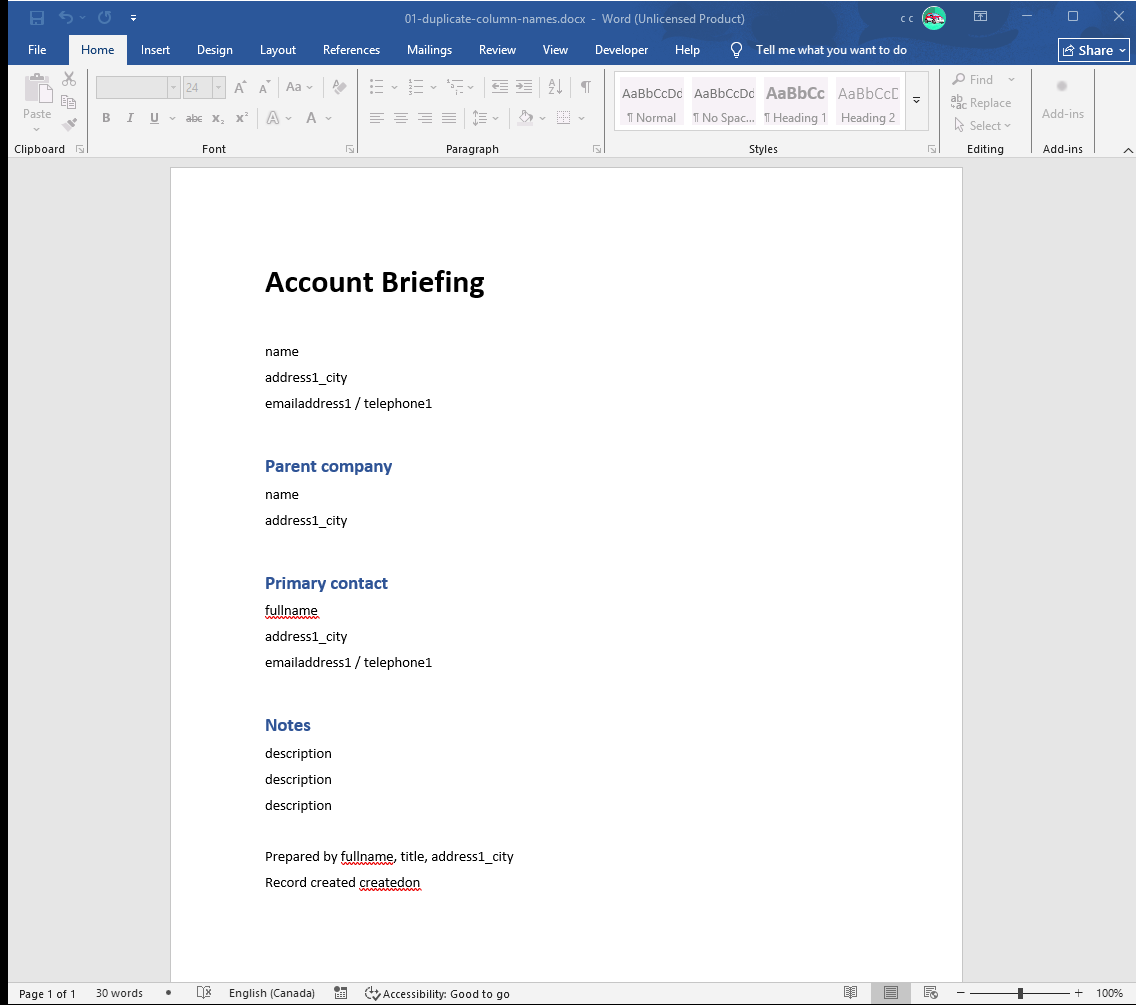
Three of those lines say description. Two say name. address1_city appears four times. Column names repeat across tables — every table in Dataverse has a description and a createdon — so the moment a template pulls in a related record, the page fills up with controls that look identical and read from completely different places. Nothing you can see says which is which: the difference is a data binding buried in the XML, and Word will not show it to you without clicking each control in turn.
Here is the same file in Document Template XRay:
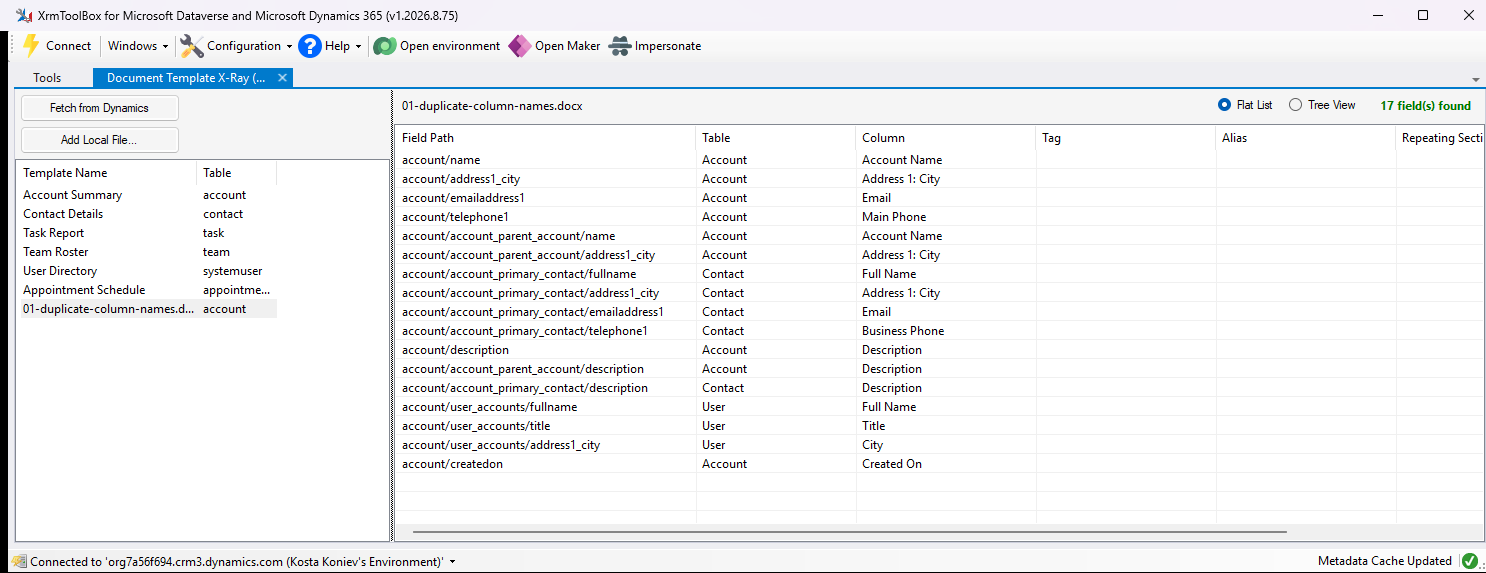
The three description fields turn out to be account/description, account/account_parent_account/description and account/account_primary_contact/description — the account, its parent account, and its primary contact. The Table and Column columns name each one the way the business does, so telephone1 on the account is Main Phone while telephone1 on the contact is Business Phone.
Features
- Fetch templates from Dynamics 365 — connects via XrmToolBox and lists all Word document templates in your environment
- Browse local files — open any
.docxtemplate from disk - Drag & drop — drop
.docxfiles directly onto the tool - Flat list view — shows every field reference with table, column, tag, alias, repeating section, and location (document body / header / footer)
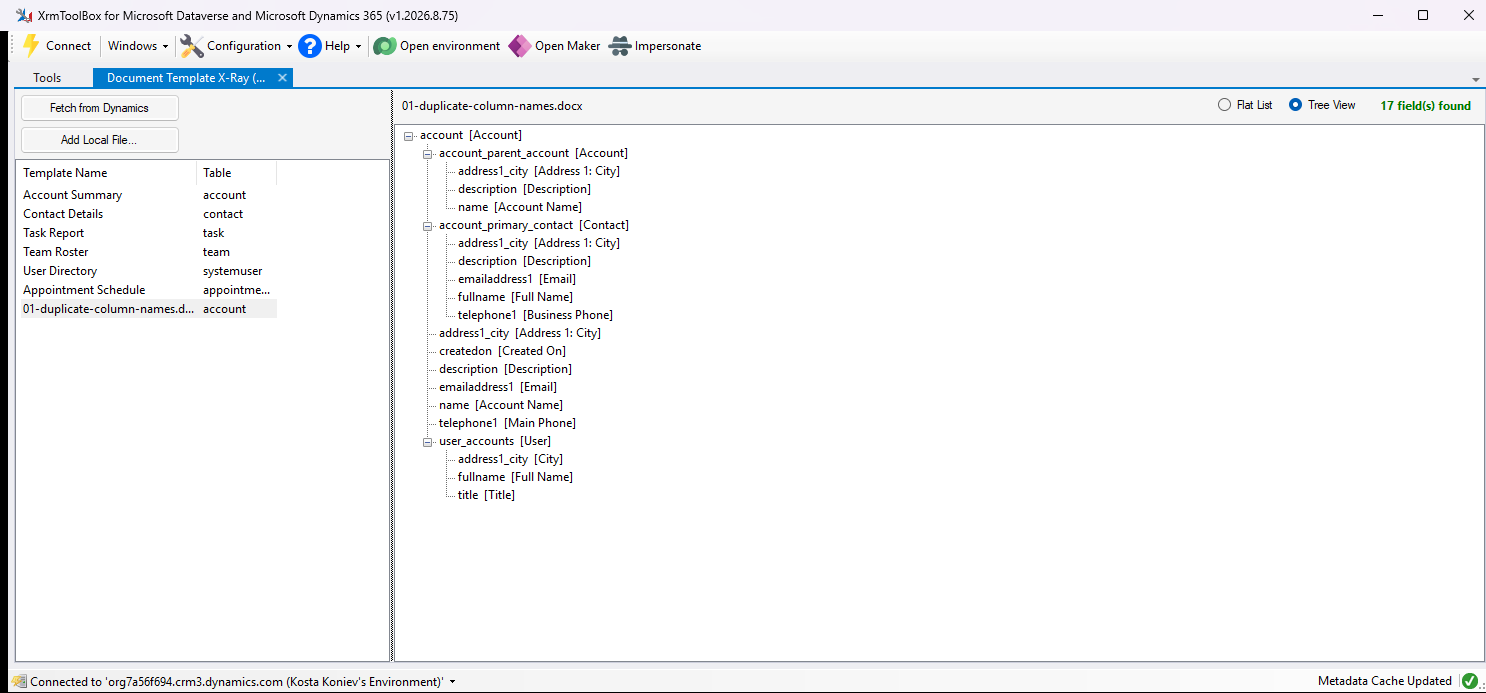
- Tree view — groups fields by their entity/relationship path for a structural overview
- Display name resolution — resolves logical names to display names using Dataverse metadata (when connected)
- Repeating section detection — identifies and highlights repeating sections and their child fields
Tree view
Tree view makes the same point structurally — three description leaves hanging off three different parents:
Repeating sections and document parts
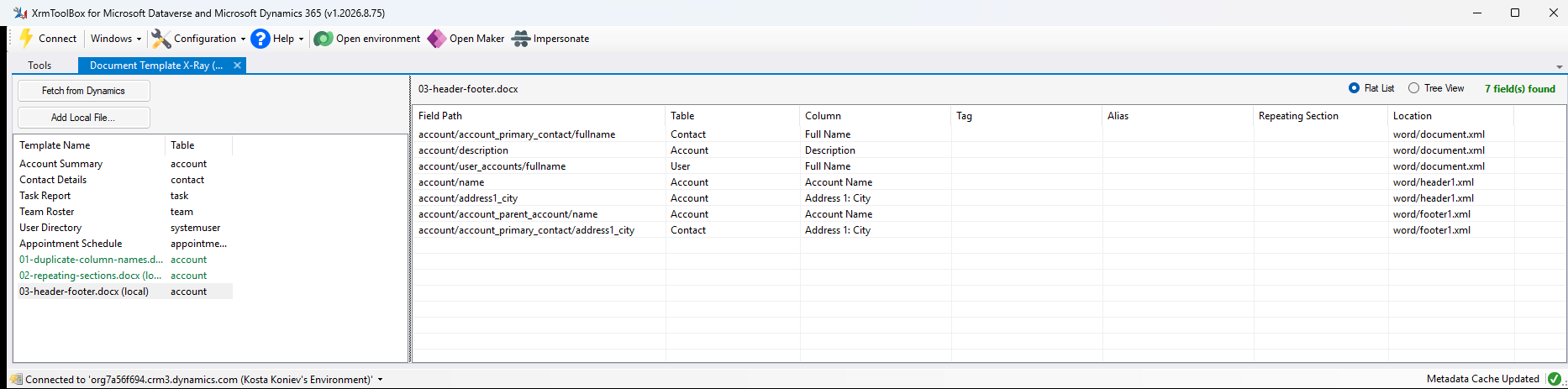
Repeating sections appear in bold with (section), and every field inside one is coloured and tagged with the section it repeats under — so you can tell the description that prints once from the one that prints per contact and the one that prints per task:
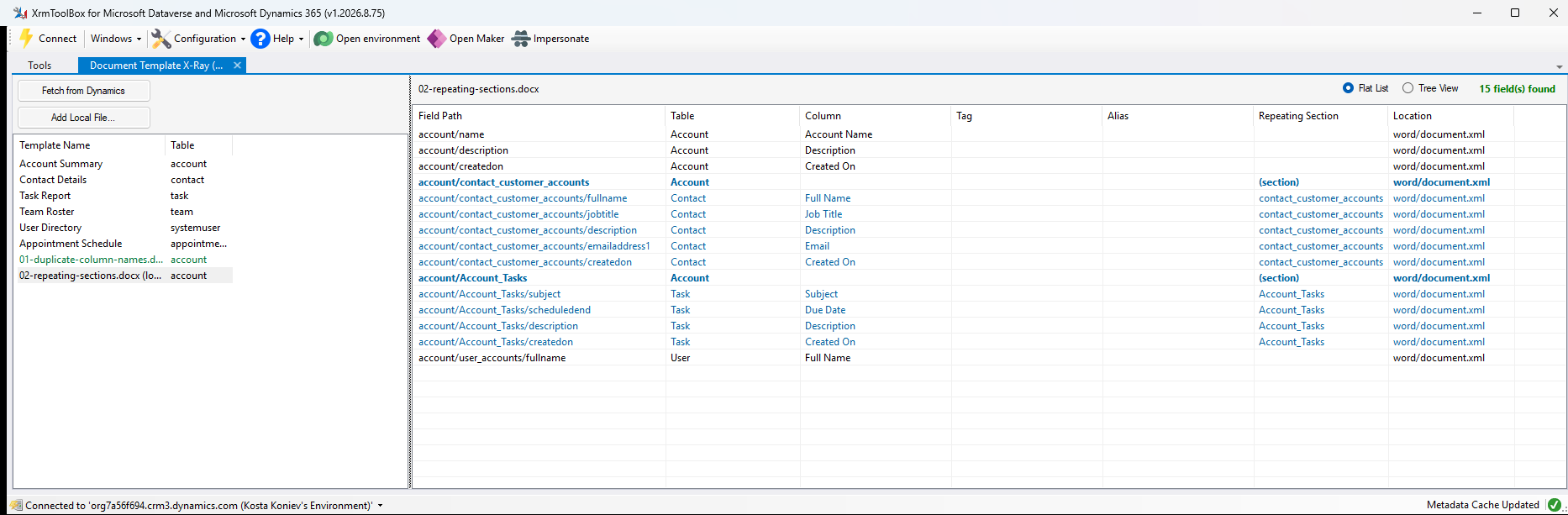
The Location column covers the fields that are easiest to miss entirely: the ones in the header and the footer rather than the body.
How It Works
Word document templates for Dynamics 365 store field bindings as structured document tags (content controls) in the underlying XML. Each content control has a w:dataBinding element with an XPath like:
/ns0:DocumentTemplate[1]/account[1]/name[1]
The plugin opens the .docx as a ZIP archive, reads word/document.xml and any header*.xml / footer*.xml parts, then extracts these XPath bindings and converts them into readable field paths like account/name.
When connected to Dynamics 365, it also fetches entity metadata to resolve logical names (e.g., account/name) to display names (e.g., Account / Account Name).
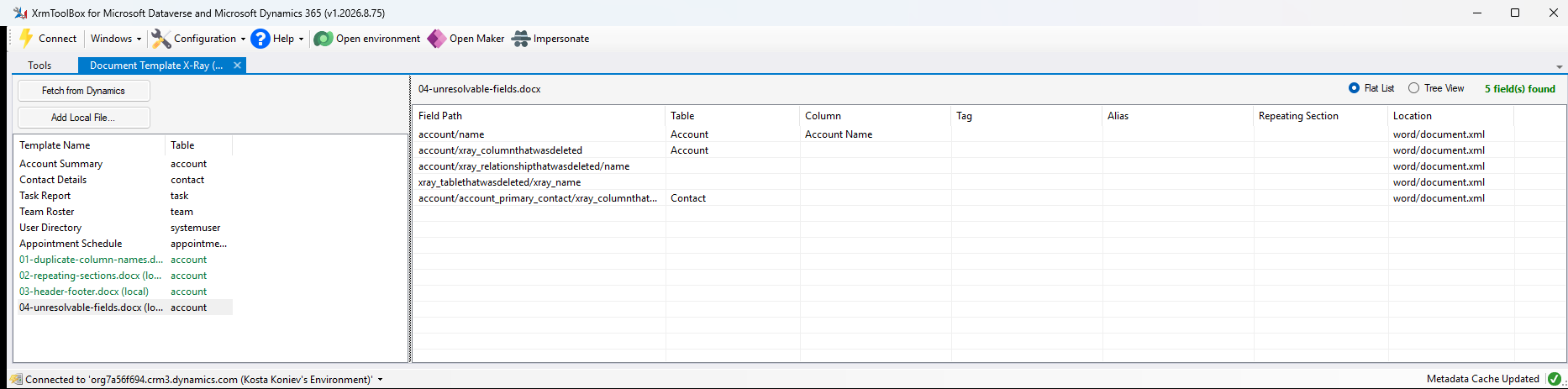
A template built against an environment it no longer matches still reads: every binding is listed, and only the display names it cannot resolve are left blank.
Testing
fixtures/ holds a Word template per behaviour worth checking — duplicate column names, repeating sections, header and footer fields, stale bindings, and a document with no bindings at all — together with the script that generates them. See fixtures/README.md for what each one proves. Every screenshot above is one of them, loaded against a live environment.
xtb.ps1 builds the tool and launches a private XrmToolBox containing nothing but it, connected to the current pac auth environment, so you can try a change against a real environment without disturbing the XrmToolBox you use for work.
License
MIT
Learn more about Target Frameworks and .NET Standard.
-
.NETFramework 4.8
- XrmToolBox (>= 1.2025.7.71)
NuGet packages
This package is not used by any NuGet packages.
GitHub repositories
This package is not used by any popular GitHub repositories.
v1.2.20 - Rename to "Document Template XRay". The hyphen in "X-Ray" meant a search for "xray" in the XrmToolBox tools list did not match this tool.