EasyBI.Abstractions
0.6.0-beta.1
dotnet add package EasyBI.Abstractions --version 0.6.0-beta.1
NuGet\Install-Package EasyBI.Abstractions -Version 0.6.0-beta.1
<PackageReference Include="EasyBI.Abstractions" Version="0.6.0-beta.1" />
<PackageVersion Include="EasyBI.Abstractions" Version="0.6.0-beta.1" />
<PackageReference Include="EasyBI.Abstractions" />
paket add EasyBI.Abstractions --version 0.6.0-beta.1
#r "nuget: EasyBI.Abstractions, 0.6.0-beta.1"
#:package EasyBI.Abstractions@0.6.0-beta.1
#addin nuget:?package=EasyBI.Abstractions&version=0.6.0-beta.1&prerelease
#tool nuget:?package=EasyBI.Abstractions&version=0.6.0-beta.1&prerelease
EasyBI



A self-service BI library for WPF. The developer declares what can be analyzed, end users build their visuals and dashboards by drag-and-drop, and rendering is delegated to interchangeable connectors (LiveCharts2, OxyPlot).
 Source (IQueryable) ─▶ Semantic model ─▶ AnalyticQuery ─▶ ResultSet ─▶ ChartData ─▶ IVisualRenderer
                         (developer)       (end user)       (engine)     (pivot)      (connector)
Features
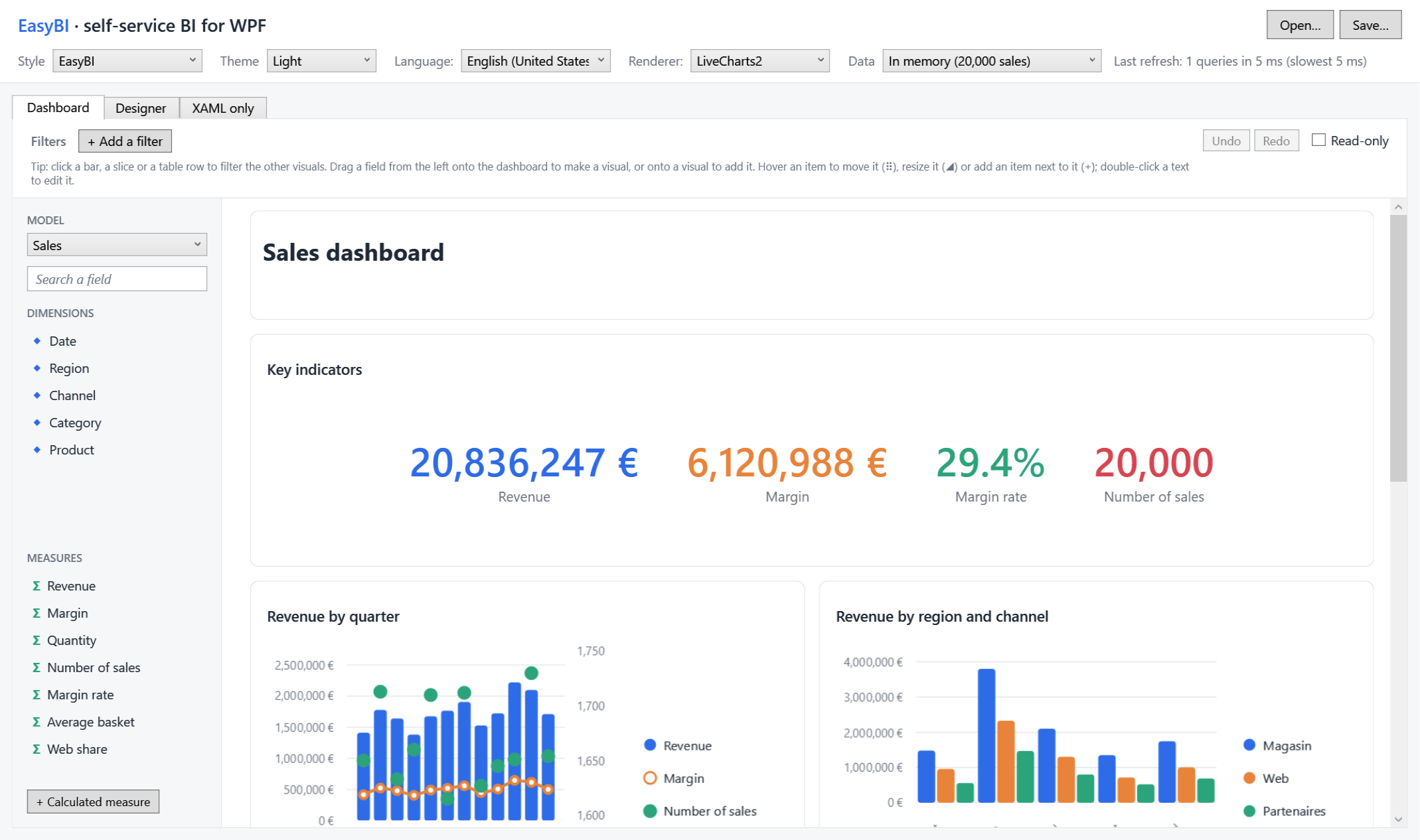
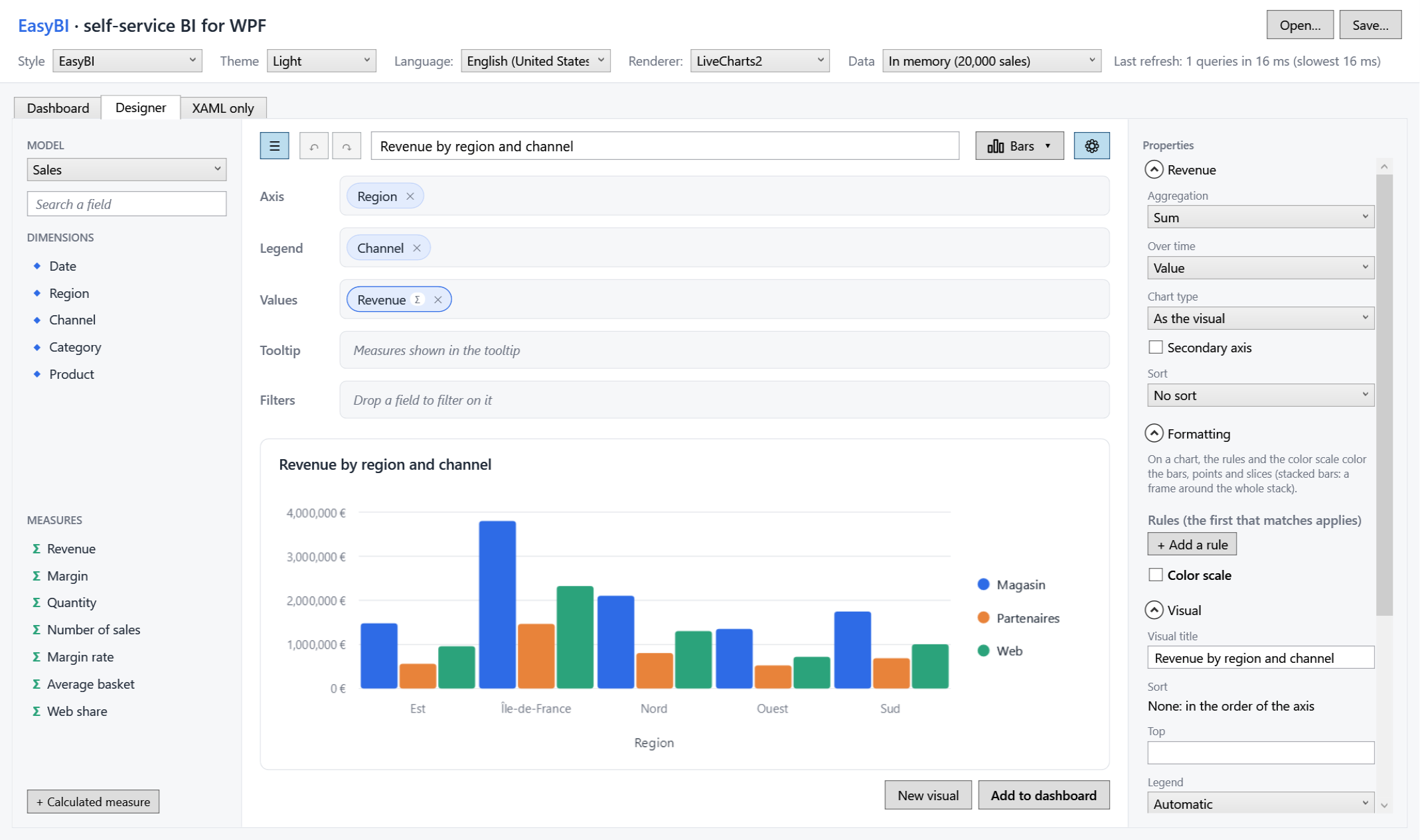
- Designer: fields dragged onto wells, a gallery of visual types (bars, lines, pies, donuts, waterfalls, KPIs, gauges, tables, matrices), a properties panel, undo / redo.
- Dashboards that end users arrange and fill by dragging fields, with global filters and cross-filtering.
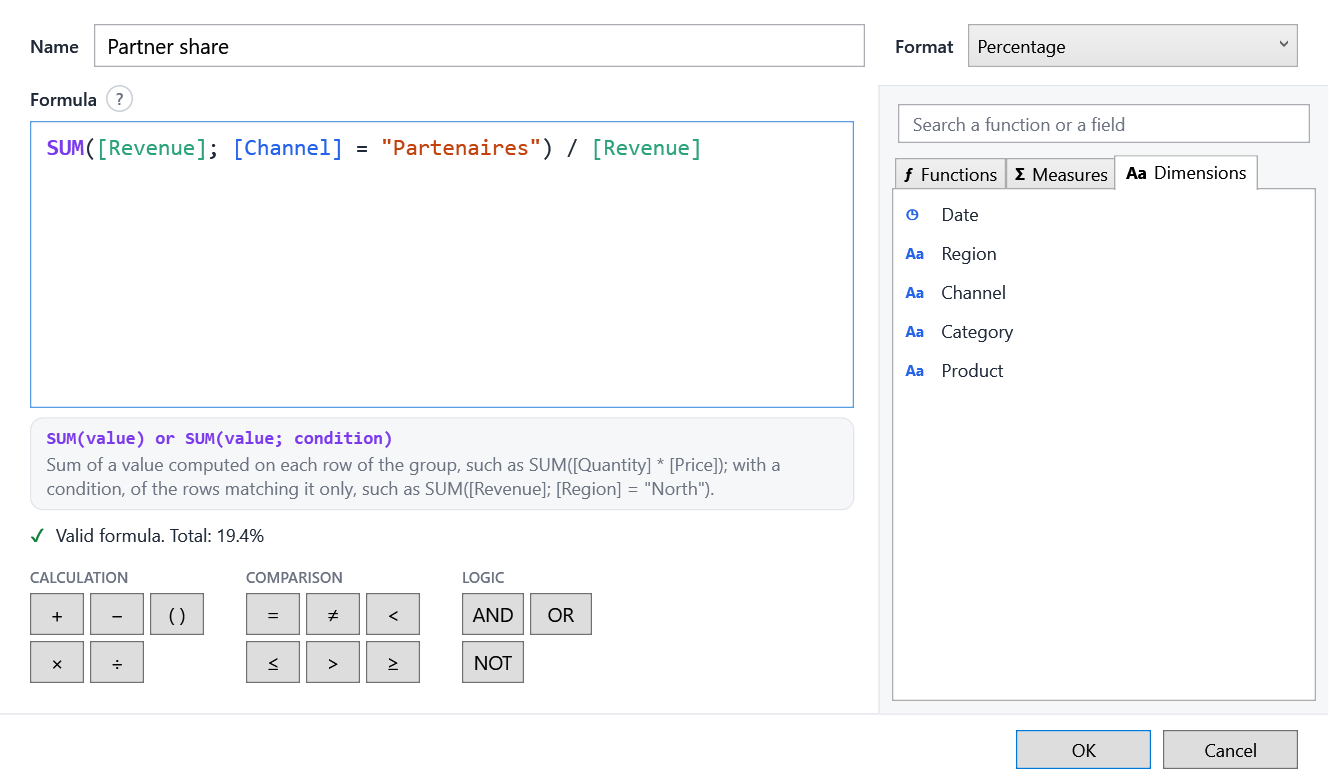
- Calculated measures written by end users (
SUM([Revenue]; [Region] = "North") / [Revenue]), with a formula editor that suggests what can be written. - Comparisons over time, conditional formatting, custom tooltips, legends, value labels.
- One query per visual, pushed down to the provider: with EF Core, grouping, aggregates, sort and top run in SQL.
- Themes: light and dark, following WPF UI or Material Design (dark with WPF UI); English and French, switched at runtime.
- Open: lookless controls with slots, your own chart connector, a JSON report format.
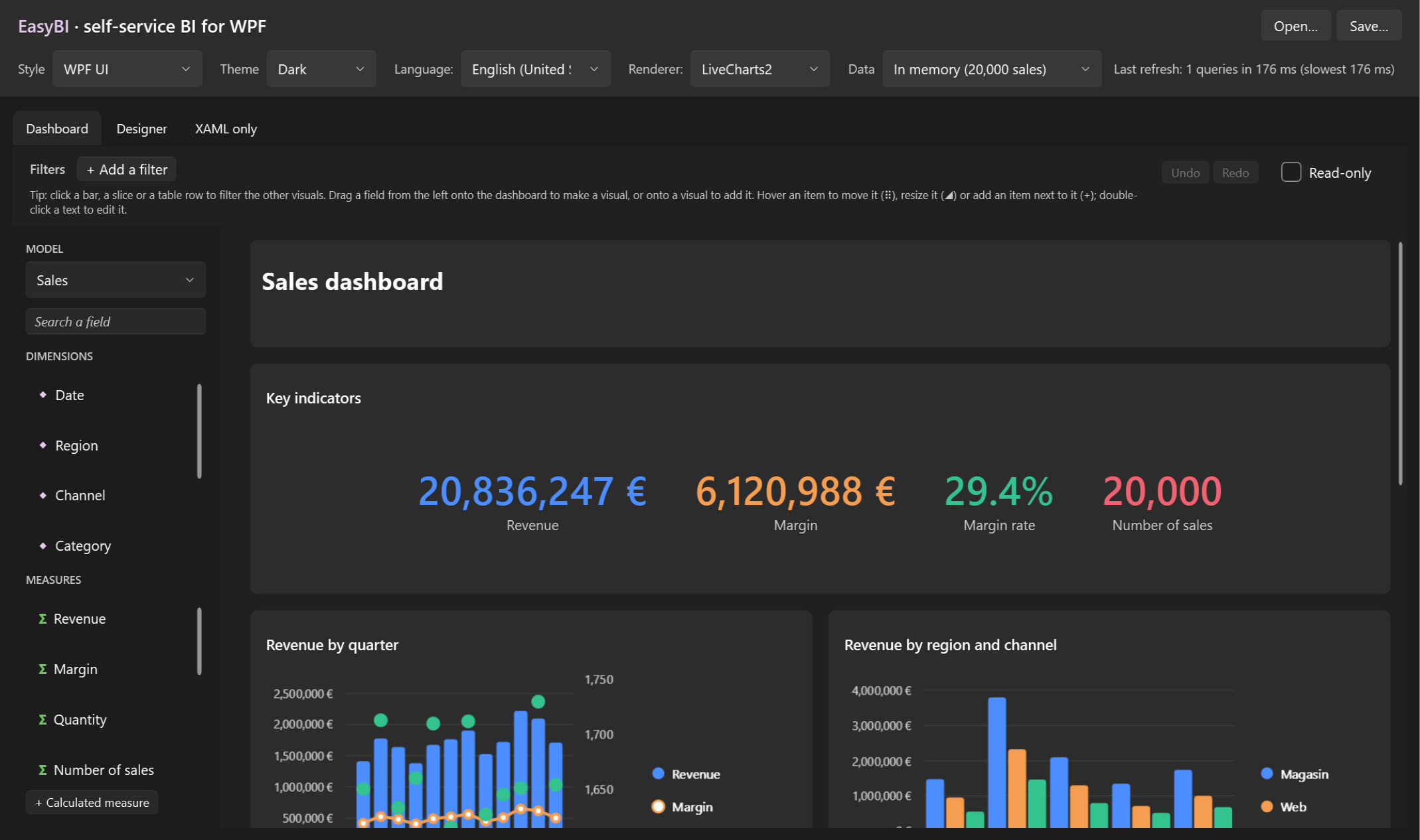
| The designer | The formula editor |
|---|---|
 |
 |
Get started
dotnet add package EasyBI.Wpf
dotnet add package EasyBI.Renderers.LiveCharts2   # and/or EasyBI.Renderers.OxyPlot
Declare what can be analyzed, then show the designer:
var model = SemanticModel.For(dbContext.Sales, "sales", "Sales")
    .Dimension(s => s.Date, "Date")
    .Dimension(s => s.Region, "Region")
    .Measure(s => s.Amount, "Revenue", format: "#,##0 €")
    .Count("Number of sales");

Context = EasyBIContext.Create()
    .AddModel(model)
    .UseRenderer(new LiveCharts2Renderer());
<Window xmlns:bi="https://github.com/TheoCvg/EasyBI">
    <bi:ReportDesigner Context="{Binding Context}" />
</Window>
Then follow the getting started guide, or run the demo:
dotnet run --project samples/EasyBI.Sample
Packages
| Package | Role |
|---|---|
EasyBI.Wpf |
The designer, visuals, dashboard and filter bar (brings EasyBI.Core and EasyBI.Abstractions) |
EasyBI.Renderers.LiveCharts2 |
Charts drawn with LiveCharts2 |
EasyBI.Renderers.OxyPlot |
Charts drawn with OxyPlot |
EasyBI.Themes.WpfUi |
EasyBI follows a WPF UI theme |
EasyBI.Themes.MaterialDesign |
EasyBI follows a Material Design in XAML theme |
Contributing
See AGENTS.md for the code style, language rules and Git
workflow, and the changelog for what changed in each version.
The documentation lives in the docs folder.
License
| Product | Versions Compatible and additional computed target framework versions. |
|---|---|
| .NET | net5.0 was computed. net5.0-windows was computed. net6.0 was computed. net6.0-android was computed. net6.0-ios was computed. net6.0-maccatalyst was computed. net6.0-macos was computed. net6.0-tvos was computed. net6.0-windows was computed. net7.0 was computed. net7.0-android was computed. net7.0-ios was computed. net7.0-maccatalyst was computed. net7.0-macos was computed. net7.0-tvos was computed. net7.0-windows was computed. net8.0 is compatible. net8.0-android was computed. net8.0-browser was computed. net8.0-ios was computed. net8.0-maccatalyst was computed. net8.0-macos was computed. net8.0-tvos was computed. net8.0-windows was computed. net9.0 was computed. net9.0-android was computed. net9.0-browser was computed. net9.0-ios was computed. net9.0-maccatalyst was computed. net9.0-macos was computed. net9.0-tvos was computed. net9.0-windows was computed. net10.0 was computed. net10.0-android was computed. net10.0-browser was computed. net10.0-ios was computed. net10.0-maccatalyst was computed. net10.0-macos was computed. net10.0-tvos was computed. net10.0-windows was computed. |
| .NET Core | netcoreapp2.0 was computed. netcoreapp2.1 was computed. netcoreapp2.2 was computed. netcoreapp3.0 was computed. netcoreapp3.1 was computed. |
| .NET Standard | netstandard2.0 is compatible. netstandard2.1 was computed. |
| .NET Framework | net461 was computed. net462 was computed. net463 was computed. net47 was computed. net471 was computed. net472 was computed. net48 was computed. net481 was computed. |
| MonoAndroid | monoandroid was computed. |
| MonoMac | monomac was computed. |
| MonoTouch | monotouch was computed. |
| Tizen | tizen40 was computed. tizen60 was computed. |
| Xamarin.iOS | xamarinios was computed. |
| Xamarin.Mac | xamarinmac was computed. |
| Xamarin.TVOS | xamarintvos was computed. |
| Xamarin.WatchOS | xamarinwatchos was computed. |
-
.NETStandard 2.0
- Microsoft.Bcl.HashCode (>= 6.0.0)
- System.Text.Json (>= 8.0.5)
-
net8.0
- No dependencies.
NuGet packages (1)
Showing the top 1 NuGet packages that depend on EasyBI.Abstractions:
| Package | Downloads |
|---|---|
|
EasyBI.Core
EasyBI query engine: semantic models over IQueryable (EF Core, LINQ to objects), expression-tree query translation, pivot, cross-filtering and JSON reports. |
GitHub repositories
This package is not used by any popular GitHub repositories.
| Version | Downloads | Last Updated |
|---|---|---|
| 0.6.0-beta.1 | 100 | 10/28/2026 |
| 0.5.0-beta.1 | 91 | 10/26/2026 |
| 0.4.0-beta.1 | 93 | 10/21/2026 |
| 0.3.0-beta.1 | 98 | 10/19/2026 |
| 0.2.0-beta.1 | 88 | 10/19/2026 |
| 0.1.0-beta.1 | 84 | 10/16/2026 |