EasyCore.Invocation
8.0.0
See the version list below for details.
dotnet add package EasyCore.Invocation --version 8.0.0
NuGet\Install-Package EasyCore.Invocation -Version 8.0.0
<PackageReference Include="EasyCore.Invocation" Version="8.0.0" />
<PackageVersion Include="EasyCore.Invocation" Version="8.0.0" />
<PackageReference Include="EasyCore.Invocation" />
paket add EasyCore.Invocation --version 8.0.0
#r "nuget: EasyCore.Invocation, 8.0.0"
#:package EasyCore.Invocation@8.0.0
#addin nuget:?package=EasyCore.Invocation&version=8.0.0
#tool nuget:?package=EasyCore.Invocation&version=8.0.0
🔗 EasyCore.Invocation
EasyCore.Invocation is a Castle DynamicProxy-based method invocation pipeline. Apply custom
IInvocationwrappers with attributes for before / after, try / catch / finally, retry, cache short-circuit, and argument / return mutation — not an ASP.NET Core Filter, and no base class or marker interface required.
<p align="center"> <img src="https://raw.githubusercontent.com/RockyWang0521/EasyCore.Invocation/master/png/EasyCoreLogo.png" alt="EasyCore Logo" width="120" /> </p>






🌍 Language
- Chinese: README.md
- English (this document)
📚 Table of Contents
Part I — Overview
Part II — Getting Started
Part III — Capabilities & DI
- 9. Short-Circuit / Retry / Mutation / Exceptions
- 10. Return Types (Sync + Async)
- 11. DI Registration
- 12. InvocationOptions
- 13. Auto-Discovery Rules
- 14. Interface Proxy vs Class Proxy
Part IV — Limits & Practice
1. 🎯 Positioning
| Pain point | EasyCore.Invocation approach |
|---|---|
| Hand-written AOP / decorator boilerplate | [Audit] + IInvocation + await next() |
| Mistaken for ASP.NET Filters | Not a Filter — pure Castle proxy pipeline |
| Forced base class / marker interface | Plain business types work as-is |
| Awkward return-type handling | void / sync / Task / Task<T> / ValueTask / ValueTask<T> |
| Manual proxy registration per service | EasyCoreInvocation() auto-discovers and injects |
| Painful class proxies | Prefer interface proxies; impl methods need not be virtual |
Three core concepts
| Concept | Role |
|---|---|
🏷️ InvocationAttribute |
Declares which IInvocation to apply |
🧩 IInvocation |
Fully surrounds the call via await next() |
🔌 EasyCoreInvocation() |
Scans attributes and auto-registers / injects proxies |
2. 🏗️ Architecture & Call Chain
2.1 Component diagram
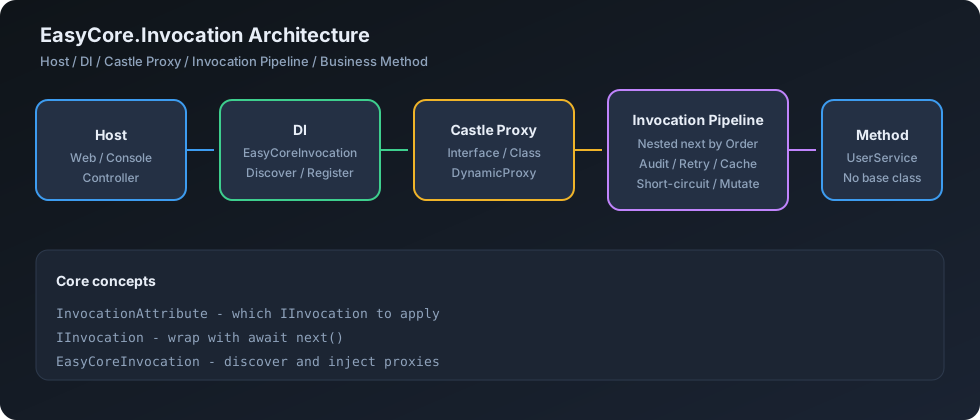
2.2 Call sequence
Controller / Caller
        │
        ▼
   Castle Proxy  (interface preferred)
        │
        ▼
InvocationAsyncInterceptor
        │
        ▼
 DescriptorProvider (merge attrs → Order sort, cached)
        │
        ▼
 Pipeline: nested next
   Audit → Retry → Cache → …
        │
        ▼
   Business method (UserService)
3. 📁 Repository Layout
EasyCore.Invocation/
├── src/EasyCore.Invocation/            # Packable library (MIT)
│   ├── Abstractions/                     # IInvocation / Context / Delegate
│   ├── Attributes/                     # InvocationAttribute / OfT
│   ├── Descriptors/                    # Discovery + ConcurrentDictionary cache
│   ├── Discovery/                      # Assembly scan (auto proxy registration)
│   ├── Interceptors/                   # Castle interceptor (internal)
│   ├── Proxy/                          # InvocationProxyFactory
│   ├── DependencyInjection/            # EasyCoreInvocation / Invocation / InvocationService
│   ├── Options/                        # InvocationOptions
│   └── Internal/                       # Pipeline / ReturnTypeHelper / MethodMappingCache
├── demo/WebApp.Invocation/             # Web API + Swagger
│   ├── Attributes/
│   ├── Invocations/
│   ├── Services/
│   └── Controllers/
├── tests/EasyCore.Invocation.Tests/    # xUnit + FluentAssertions (42+)
├── docs/svg/                           # README diagrams (no Mermaid)
├── png/EasyCoreLogo.png
├── README.md / README.en.md
└── LICENSE
Folders are organizational only; the public namespace stays
EasyCore.Invocation.
| Package / project | Role | Required |
|---|---|---|
EasyCore.Invocation |
Core library | ✅ |
demo/WebApp.Invocation |
Swagger demo | Sample |
tests/EasyCore.Invocation.Tests |
Unit tests | Dev |
4. 📦 Installation
dotnet add package EasyCore.Invocation
| Item | Value |
|---|---|
| TFMs | net6.0 / net7.0 / net8.0 |
| Dependencies | Castle.Core.AsyncInterceptor 2.1.0, ME DI / Options 8.0.0 |
| License | MIT |
5. ⚡ Quick Start
5.1 Register (one line)
services.EasyCoreInvocation();

// Optional: pin wrapper lifetime (independent; explicit wins)
services.Invocation<AuditInvocation>(ServiceLifetime.Singleton);
services.Invocation<CacheInvocation>(ServiceLifetime.Singleton);
5.2 Custom attribute + Invocation
public sealed class AuditAttribute : InvocationAttribute<AuditInvocation>
{
}

public sealed class AuditInvocation : IInvocation
{
    public async ValueTask<object?> InvokeAsync(
        InvocationContext context,
        InvocationDelegate next)
    {
        Console.WriteLine($"Before {context.MethodName}");
        try
        {
            var result = await next();
            Console.WriteLine($"After {context.MethodName}");
            return result;
        }
        catch (Exception ex)
        {
            Console.WriteLine(ex.Message);
            throw;
        }
        finally
        {
            Console.WriteLine($"Finally {context.MethodName}");
        }
    }
}
5.3 Business method
public interface IUserService
{
    Task CreateAsync();
}

public sealed class UserService : IUserService
{
    [Audit]
    public async Task CreateAsync() => await Task.Delay(100);
}
⚠️ Resolve IUserService from DI; do not new UserService().
6. 🧩 Core APIs
6.1 InvocationDelegate
public delegate ValueTask<object?> InvocationDelegate();
Represents the next wrapper or the original method.
6.2 IInvocation
public interface IInvocation
{
    ValueTask<object?> InvokeAsync(InvocationContext context, InvocationDelegate next);
}
Do not split into Before/After/Exception — surround the call in one method with try/catch/finally + await next().
6.3 InvocationAttribute
[AttributeUsage(
    AttributeTargets.Class | AttributeTargets.Method | AttributeTargets.Interface,
    AllowMultiple = true,
    Inherited = true)]
public class InvocationAttribute : Attribute
{
    public InvocationAttribute(Type invocationType); // non-abstract IInvocation implementor
    public Type InvocationType { get; }
    public int Order { get; set; } // lower = outer; same Order keeps declaration order
}
6.4 InvocationAttribute<TInvocation>
public abstract class InvocationAttribute<TInvocation> : InvocationAttribute
    where TInvocation : class, IInvocation
{
    protected InvocationAttribute() : base(typeof(TInvocation)) { }
}

public sealed class AuditAttribute : InvocationAttribute<AuditInvocation> { }
7. 🧾 InvocationContext
Each proxied call gets a mutable context:
| Member | Meaning |
|---|---|
ServiceProvider |
Current scope DI |
Proxy |
Castle proxy instance |
Target |
Real business object |
Method |
Implementation method (preferred) |
Arguments |
Castle argument array (mutable, visible to original method) |
ReturnValue |
Readable / writable result |
Exception |
Last exception if any |
CancellationToken |
Detected from args, else None |
Items |
Per-call shared bag |
TargetType / MethodName / Parameters |
Convenience read-only props |
GetArgument<T>(int\|string) |
Read arguments |
GetRequiredService<T>\|Type |
Resolve from DI |
public async ValueTask<object?> InvokeAsync(InvocationContext context, InvocationDelegate next)
{
    var id = context.GetArgument<int>("id");
    var logger = context.GetRequiredService<ILogger<AuditInvocation>>();
    context.Arguments[0] = id + 1;
    var result = await next();
    return result + "!";
}
8. 🔍 Attribute Discovery & Order
8.1 Merge order
interface attrs → interface method attrs → class attrs → implementation method attrs
Then sort by Order ascending; same Order keeps stable discovery order.
Toggles: EnableInterfaceAttributes / EnableClassAttributes / EnableMethodAttributes — see InvocationOptions.
8.2 Nesting
[Audit(Order = 0)]
[Transaction(Order = 10)]
[Retry(Order = 20)]
Task CreateAsync();
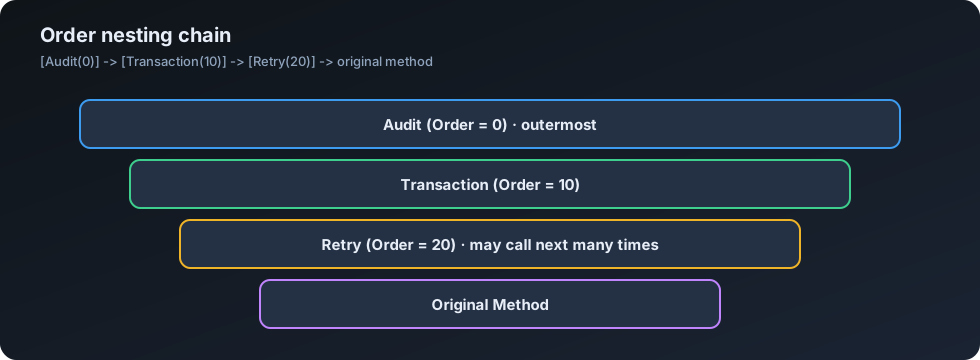
Audit before
  Transaction before
    Retry before
      original method
    Retry after
  Transaction after
Audit after
Descriptors are cached in a ConcurrentDictionary (including generic method signatures).
9. 🔁 Short-Circuit / Retry / Mutation / Exceptions
9.1 Short-circuit
public ValueTask<object?> InvokeAsync(InvocationContext context, InvocationDelegate next)
    => ValueTask.FromResult<object?>(_cache.Get(key)); // do not call next
9.2 Retry
for (var i = 0; i < 3; i++)
{
    try { return await next(); }
    catch when (i < 2) { /* retry */ }
}
next may be called multiple times.
9.3 Mutate args / return
context.Arguments[0] = "mutated";
var result = await next();
return result + "!";
9.4 Exceptions
| Capability | Notes |
|---|---|
| Catch / transform / swallow + fallback / rethrow | Supported |
context.Exception |
Records last exception |
No pointless TargetInvocationException / AggregateException wrapping |
Prefer ExceptionDispatchInfo |
| Incompatible return type | Clear exception with method name + expected / actual types |
10. 🔄 Return Types (Sync + Async)
| Signature | Supported |
|---|---|
void |
✅ |
T (sync) |
✅ |
Task |
✅ |
Task<T> |
✅ |
ValueTask |
✅ |
ValueTask<T> |
✅ |
Pipeline normalizes to ValueTask<object?>, then restores. Async business methods are never blocked with .Wait() / .Result / GetAwaiter().GetResult().
11. 🔌 DI Registration
services.EasyCoreInvocation(); // auto-discover + inject business proxies

// Optional: wrapper lifetime (explicit wins; independent from EasyCoreInvocation)
services.Invocation<AuditInvocation>(ServiceLifetime.Scoped);
services.Invocation<CacheInvocation>(ServiceLifetime.Singleton);

// Optional: manual business proxy (usually unnecessary)
services.InvocationService<IUserService, UserService>(ServiceLifetime.Scoped);
services.InvocationService<UserServiceClass>(ServiceLifetime.Scoped); // class proxy
| API | Role | Default lifetime | Precedence |
|---|---|---|---|
EasyCoreInvocation() |
Scan attrs, register business proxies | See DiscoveredServiceLifetime (default Scoped) |
Discovery TryAdd — never overwrites explicit regs |
Invocation<T>(lifetime) |
Register wrapper | Parameter (API default Transient) | Replace — always wins |
InvocationService<TI, TImpl>(lifetime) |
Manual interface proxy | Parameter (API default Scoped) | Replace |
InvocationService<TImpl>(lifetime) |
Manual class proxy | Parameter (API default Scoped) | Replace |
Defaults when only EasyCoreInvocation() is used
| Object | Default |
|---|---|
Business proxies (e.g. IUserService) |
Scoped (DiscoveredServiceLifetime) |
Wrappers (e.g. AuditInvocation) |
If not Invocation<T>: created per call via ActivatorUtilities (≈ transient) |
Core services use TryAdd; safe to call repeatedly.
12. ⚙️ InvocationOptions
services.EasyCoreInvocation(options =>
{
    // Production: narrow the scan
    options.AddAssemblyFrom<UserService>();
    // options.AddAssembly(typeof(UserService).Assembly);

    options.AutoDiscoverServices = true;                    // default true
    options.DiscoveredServiceLifetime = ServiceLifetime.Scoped; // default Scoped
    options.AutoRegisterInvocations = true;                 // default true

    options.EnableClassAttributes = true;                   // default true
    options.EnableInterfaceAttributes = true;               // default true
    options.EnableMethodAttributes = true;                  // default true
});
| Option | Default | Meaning |
|---|---|---|
AutoDiscoverServices |
true |
Scan types with InvocationAttribute and register proxies |
DiscoveredServiceLifetime |
Scoped |
Lifetime for auto-discovered business proxies |
AutoRegisterInvocations |
true |
Create wrappers at call time if not Invocation<T>() |
EnableClassAttributes |
true |
Merge class-level attributes |
EnableInterfaceAttributes |
true |
Merge interface-level attributes |
EnableMethodAttributes |
true |
Merge method-level attributes |
AddAssemblyFrom<T>() |
(empty → broad scan) | Add assembly containing T |
AddAssembly(Assembly) |
(empty → broad scan) | Add assembly explicitly |
Assemblies |
read-only list | Current scan set |
Everyday:
services.EasyCoreInvocation();
Pin wrapper lifetime:services.Invocation<AuditInvocation>(ServiceLifetime.Singleton);
13. 🧭 Auto-Discovery Rules
When AutoDiscoverServices=true:
- Assemblies: use
Assembliesif non-empty; otherwise scan entry / references / base-directory candidate DLLs (skipMicrosoft.*,System.*,Castle.*, self, etc.). - Find concrete types with
InvocationAttributeon class / methods / implemented interfaces (and their methods). - Skip: abstract, interface, open generic, value types,
IInvocationimplementors, Attribute subclasses. - Match interface: prefer
I{ImplName}(e.g.UserService→IUserService); else an instrumented interface. - Interface found → interface proxy; else if non-sealed → class proxy; sealed without interface → skip.
14. 🪞 Interface Proxy vs Class Proxy
| Mode | Requirements | Recommend |
|---|---|---|
Interface proxy IUserService / UserService |
Impl methods need not be virtual; class may be sealed |
✅ Preferred |
Class proxy UserService |
Class not sealed; methods must be virtual |
Fallback |
new UserService() |
No proxy | ❌ No interception |
15. ⚠️ Castle Limitations
| Scenario | Intercepted? |
|---|---|
| ✅ Interface members on an interface proxy | Yes |
| ✅ virtual instance methods on a class proxy | Yes |
❌ Class proxy for a sealed class |
No |
| ❌ Non-virtual / private / static | No |
❌ Instances from new |
No |
| ❌ In-place weaving | No |
Always call through the DI-resolved proxy.
16. 🧪 Demo Projects
| Project | Description | Command |
|---|---|---|
WebApp.Invocation |
Web API + Swagger: Audit / Retry / Cache + sync/async | dotnet run --project demo/WebApp.Invocation |
// demo/Program.cs
builder.Services.EasyCoreInvocation();
Open: http://localhost:5188/swagger
| Method | Path | Effect |
|---|---|---|
📮 POST |
/api/users/ping |
Sync void + [Audit] |
📥 GET |
/api/users/status |
Sync string + [Audit] |
📮 POST |
/api/users |
Async [Audit] |
📥 GET |
/api/users/{id} |
[Cache] + [Audit] (2nd same id = HIT) |
🔁 GET |
/api/users/unstable |
[Retry] + [Audit] |
dotnet test
dotnet run --project demo/WebApp.Invocation
17. ✅ Production Checklist
- Use
EasyCoreInvocation(); preferAddAssemblyFrom<T>()in production - Prefer interface proxies (
IXxx/Xxxnaming) - Shared wrappers (e.g. in-memory cache) →
Invocation<T>(Singleton) - Avoid Singleton wrappers capturing Scoped dependencies incorrectly
- Never
newimplementations expecting interception - For class proxies:
virtual+ non-sealed - CI runs
dotnet test
18. ❓ FAQ
Q: Is EasyCoreInvocation() enough?
A: Yes. It discovers and injects proxies. Wrappers are created per call by default; use Invocation<T>(lifetime) to pin lifetime.
Q: Do EasyCoreInvocation and Invocation<T> overwrite each other?
A: No. Discovery uses TryAdd; Invocation<T> uses Replace — explicit lifetime wins.
Q: Are business proxies Transient by default?
A: No. Auto-discovered business proxies default to Scoped. Unregistered wrappers are ≈ transient per call.
Q: Attribute applied but nothing happens?
A: Call the DI proxy (IUserService), not a new-ed implementation.
Q: Class proxy method not intercepted?
A: Class must not be sealed; method must be virtual. Prefer an interface proxy.
Q: Is this an ASP.NET Filter?
A: No. Works in Console / Worker / Web.
Q: Short-circuit / retry?
A: Skip next to short-circuit; call await next() multiple times to retry.
Q: Sync methods?
A: Supported — void, sync T, plus Task / ValueTask families.
Q: Wrong return type?
A: Throws InvalidOperationException with method name + expected / actual types.
Q: Service not discovered?
A: Ensure InvocationAttribute exists; prefer I{ClassName}; or AddAssemblyFrom<T>(); don't leave AutoDiscoverServices=false on the host by mistake.
19. 📄 License
MIT
🤝 Contributing
- Fork and create a feature branch
- Add tests under
tests/EasyCore.Invocation.Tests - Run
dotnet testanddotnet build EasyCore.Invocation.sln - Open a Pull Request
Issues / PRs welcome 🚀
| Product | Versions Compatible and additional computed target framework versions. |
|---|---|
| .NET | net6.0 is compatible. net6.0-android was computed. net6.0-ios was computed. net6.0-maccatalyst was computed. net6.0-macos was computed. net6.0-tvos was computed. net6.0-windows was computed. net7.0 is compatible. net7.0-android was computed. net7.0-ios was computed. net7.0-maccatalyst was computed. net7.0-macos was computed. net7.0-tvos was computed. net7.0-windows was computed. net8.0 is compatible. net8.0-android was computed. net8.0-browser was computed. net8.0-ios was computed. net8.0-maccatalyst was computed. net8.0-macos was computed. net8.0-tvos was computed. net8.0-windows was computed. net9.0 was computed. net9.0-android was computed. net9.0-browser was computed. net9.0-ios was computed. net9.0-maccatalyst was computed. net9.0-macos was computed. net9.0-tvos was computed. net9.0-windows was computed. net10.0 was computed. net10.0-android was computed. net10.0-browser was computed. net10.0-ios was computed. net10.0-maccatalyst was computed. net10.0-macos was computed. net10.0-tvos was computed. net10.0-windows was computed. |
-
net6.0
- Castle.Core.AsyncInterceptor (>= 2.1.0)
- Microsoft.Extensions.DependencyInjection (>= 8.0.0)
- Microsoft.Extensions.DependencyInjection.Abstractions (>= 8.0.0)
- Microsoft.Extensions.Options (>= 8.0.0)
-
net7.0
- Castle.Core.AsyncInterceptor (>= 2.1.0)
- Microsoft.Extensions.DependencyInjection (>= 8.0.0)
- Microsoft.Extensions.DependencyInjection.Abstractions (>= 8.0.0)
- Microsoft.Extensions.Options (>= 8.0.0)
-
net8.0
- Castle.Core.AsyncInterceptor (>= 2.1.0)
- Microsoft.Extensions.DependencyInjection (>= 8.0.0)
- Microsoft.Extensions.DependencyInjection.Abstractions (>= 8.0.0)
- Microsoft.Extensions.Options (>= 8.0.0)
NuGet packages
This package is not used by any NuGet packages.
GitHub repositories
This package is not used by any popular GitHub repositories.