Esatto.Umbraco.Backoffice.BlockPreview
1.0.3
dotnet add package Esatto.Umbraco.Backoffice.BlockPreview --version 1.0.3
NuGet\Install-Package Esatto.Umbraco.Backoffice.BlockPreview -Version 1.0.3
<PackageReference Include="Esatto.Umbraco.Backoffice.BlockPreview" Version="1.0.3" />
<PackageVersion Include="Esatto.Umbraco.Backoffice.BlockPreview" Version="1.0.3" />
<PackageReference Include="Esatto.Umbraco.Backoffice.BlockPreview" />
paket add Esatto.Umbraco.Backoffice.BlockPreview --version 1.0.3
#r "nuget: Esatto.Umbraco.Backoffice.BlockPreview, 1.0.3"
#:package Esatto.Umbraco.Backoffice.BlockPreview@1.0.3
#addin nuget:?package=Esatto.Umbraco.Backoffice.BlockPreview&version=1.0.3
#tool nuget:?package=Esatto.Umbraco.Backoffice.BlockPreview&version=1.0.3
Esatto.Umbraco.Backoffice.BlockPreview
Live frontend previews for Umbraco 17/18 Block List blocks in the backoffice.
Instead of a plain label row, every block shows its real frontend rendering. Your own Razor partial is rendered on the server inside your own <head> and shown in a sandboxed iframe, so:
- your CSS applies exactly: the preview has its own
:root,remand media queries, at the block's width; - your JavaScript runs: a Bootstrap carousel slides, and its arrows and dots work;
- edits show up before the page is saved: the preview refreshes when the block editor's changes are applied (Update).
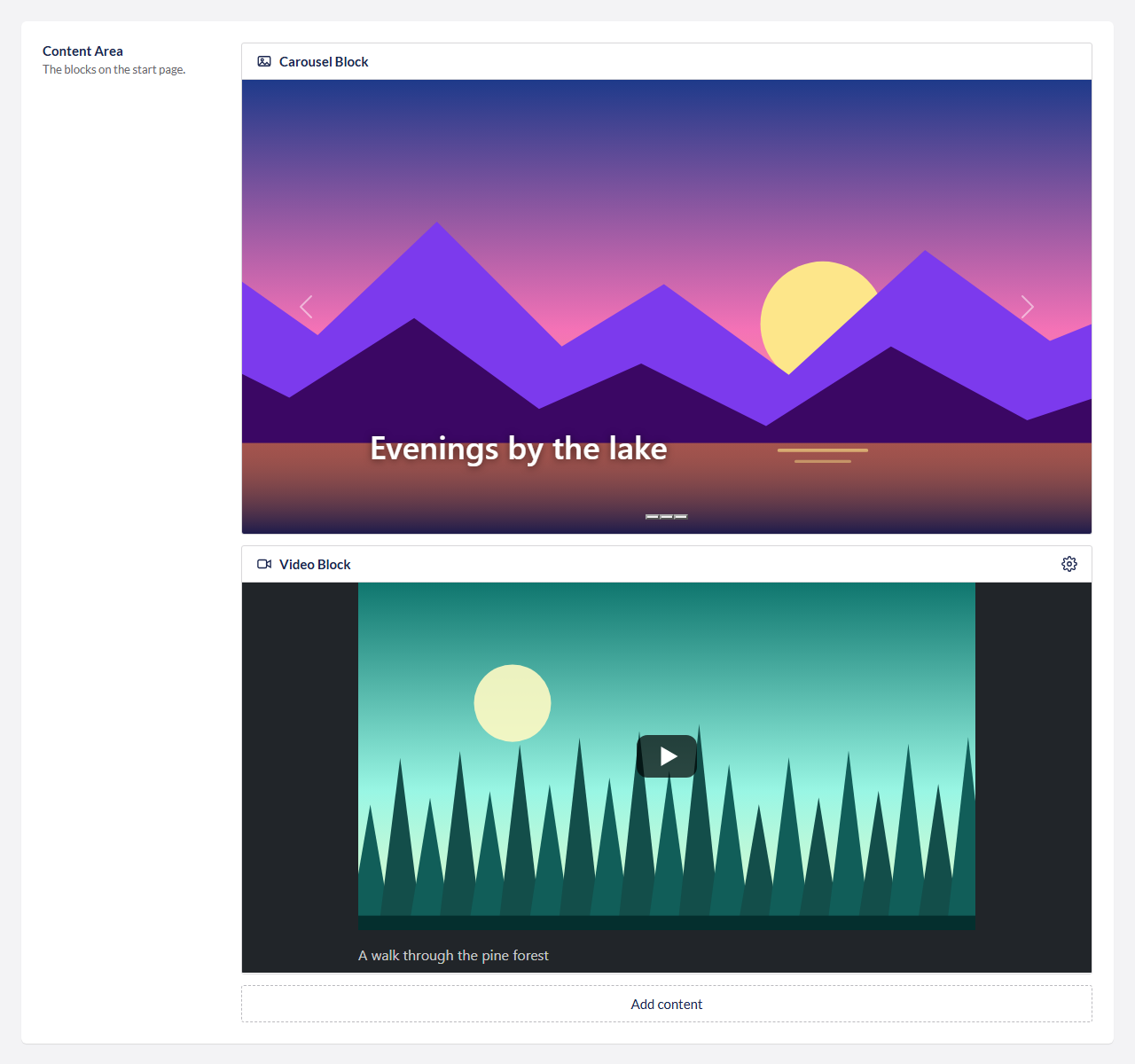
The package also ships two configurable preview elements, video and code, that you can register for specific block types.
Install
dotnet add package Esatto.Umbraco.Backoffice.BlockPreview
Restart the site and hard-refresh the backoffice.
Live frontend preview
1. Add a preview layout
Create Views/BlockPreview.cshtml with the <head> (stylesheets, fonts) and scripts your blocks need, and @RenderBody() where the block goes:
@{
    Layout = null;
}
<!doctype html>
<html lang="@System.Globalization.CultureInfo.CurrentCulture.TwoLetterISOLanguageName">
<head>
    <meta charset="utf-8" />
    <meta name="viewport" content="width=device-width, initial-scale=1" />
    <link href="https://cdn.jsdelivr.net/npm/bootstrap@5.3.8/dist/css/bootstrap.min.css" rel="stylesheet" crossorigin="anonymous">
    <link href="~/css/site.css" rel="stylesheet" asp-append-version="true" />
</head>
<body>
    @RenderBody()
    <script src="https://cdn.jsdelivr.net/npm/bootstrap@5.3.8/dist/js/bootstrap.bundle.min.js" crossorigin="anonymous"></script>
</body>
</html>
The layout must be plain Razor: no @model and no @inherits UmbracoViewPage. It receives the package's own frame model, not a content page. Keep menus, headers and footers out of it: the preview shows one block, not a page.
Without this file, a built-in layout loads the Stylesheets and Scripts listed in the settings below.
2. That's it
Every Block List block whose partial exists at Views/Partials/blocklist/Components/<content type alias>.cshtml shows its real rendering. This is the same partial Umbraco's blocklist/default.cshtml uses on the website, and it receives the same BlockListItem<TContent, TSettings> model. Works with InMemoryAuto models too.
- Blocks without a partial keep a plain label row.
- A custom view you register yourself for a block type (for example the video preview below) takes precedence over the live preview.
- Click the label bar above a preview to open the block editor. The preview itself is interactive.
- A new page that has never been saved shows "Save the page once to see a preview."
Partials should depend only on their model. A partial that reads page context (Umbraco.AssignedContentItem, ViewData set by a page controller) shows an error line in the preview instead of the block.
Settings
All optional, in appsettings.json:
{
  "Esatto": {
    "BlockPreview": {
      "BlockList": {
        "Enabled": true,
        "IgnoredContentTypes": [ "someBlock" ]
      },
      "Layout": "~/Views/BlockPreview.cshtml",
      "Stylesheets": [ "/css/site.css" ],
      "Scripts": [ "/js/site.js" ]
    }
  }
}
| Key | Default | Description |
|---|---|---|
BlockList.Enabled |
true |
false switches the live preview off (its script isn't loaded) |
BlockList.IgnoredContentTypes |
[] |
Block content type aliases that keep the plain label row |
Layout |
~/Views/BlockPreview.cshtml |
Your preview layout |
Stylesheets / Scripts |
[] |
Used by the built-in layout when your layout file doesn't exist |
Good to know
- Permissions. A preview renders draft content, so it requires the same access as opening the document: access to the Content tree and read permission on that document.
- Fonts and module scripts. The preview iframe is sandboxed with an opaque origin, and browsers fetch fonts and
<script type="module">with CORS even from your own site. The package addsAccess-Control-Allow-Origin: *to font and script responses requested from a preview (Origin: null) and to nothing else. Self-hosted fonts and module bundles work without extra setup. - Viewport units size against the preview, not the browser window.
100vhmeans the height of the preview frame. Previews are capped at 3000px tall. - The preview grows to fit, and never scrolls vertically. Content wider than the block (a wide table, for example) scrolls sideways, as it would on the page.
Playing videos in the preview
YouTube's player can't run inside the sandboxed preview. Instead of inserting the player, let your script hand it to the backoffice, which shows it over your element, outside the sandbox:
const src = `https://www.youtube-nocookie.com/embed/${videoId}?autoplay=1`;
if (window.EsattoBlockPreview) {
  // In the backoffice preview: the player is shown over `poster`.
  window.EsattoBlockPreview.playEmbed(poster, src);
} else {
  // On the page: insert the player as usual.
}
Only YouTube embed players (https://www.youtube.com/embed/… and https://www.youtube-nocookie.com/embed/…) are accepted. The player follows the element when the preview resizes, and goes away when the preview refreshes.
Limitations (1.0)
- Block List only. Block Grid and blocks in the Rich Text editor are planned.
- Inline editing mode. On a Block List configured with "Inline editing mode", the preview replaces Umbraco's inline editor, and blocks open in the editor instead. To keep inline editing, list those block types in
IgnoredContentTypes, or setBlockList.Enabledtofalse. - Nested Block Lists. A Block List inside a block (edited in the block's own editor) shows a plain row, with no preview.
- A refresh starts the preview over. For example, a carousel goes back to its first slide.
- One request and one iframe per block. That's fine for typical pages.
Video and code previews
These elements don't register themselves, because they can't know your content types. Register a blockEditorCustomView for your block type and pass your property aliases via meta.
Element (elementName) |
Served path | Purpose |
|---|---|---|
backoffice-blockpreview-video |
/App_Plugins/Esatto.Umbraco.Backoffice.BlockPreview/video-preview.element.js |
YouTube video preview (thumbnail + play overlay) |
backoffice-blockpreview-code |
/App_Plugins/Esatto.Umbraco.Backoffice.BlockPreview/code-preview.element.js |
Syntax-highlighted code preview with copy button (bundled highlight.js) |
From a TypeScript bundle
const videoPreview: ManifestBlockEditorCustomView = {
  type: "blockEditorCustomView",
  alias: "MySite.BlockView.Video",
  name: "Video Preview",
  element: "/App_Plugins/Esatto.Umbraco.Backoffice.BlockPreview/video-preview.element.js",
  elementName: "backoffice-blockpreview-video",
  forContentTypeAlias: "videoRow",      // your content type
  forBlockEditor: "block-list",         // or "block-grid"
  meta: { urlAlias: "videoUrl", captionAlias: "caption" }, // your property aliases
};
From a plain umbraco-package.json
{
  "type": "blockEditorCustomView",
  "alias": "MySite.BlockView.Video",
  "name": "Video Preview",
  "element": "/App_Plugins/Esatto.Umbraco.Backoffice.BlockPreview/video-preview.element.js",
  "elementName": "backoffice-blockpreview-video",
  "forContentTypeAlias": "videoRow",
  "forBlockEditor": "block-list",
  "meta": { "urlAlias": "videoUrl", "captionAlias": "caption" }
}
Video preview meta
| Key | Default | Description |
|---|---|---|
urlAlias |
videoUrl |
Property alias holding the YouTube URL (accepts watch?v=, youtu.be/, /embed/, /shorts/, or a bare id) |
captionAlias |
caption |
Property alias holding an optional caption |
Code preview meta
| Key | Default | Description |
|---|---|---|
codeAlias |
code |
Property alias holding the code/source text |
captionAlias |
caption |
Property alias holding an optional caption/title |
themeUrl |
bundled VS2015 dark | URL of a highlight.js theme stylesheet to use instead of the bundled default |
The code preview bundles highlight.js (v11.8.0, BSD-3-Clause) and a VS2015 dark theme, so it highlights without depending on the consuming site. The language is auto-detected, and a copy-to-clipboard button appears on hover.
These two previews render in shadow DOM with their own styling. They approximate a typical frontend look rather than mirroring your stylesheet. Use the live preview when it has to be exact.
Migrating from Backoffice.BlockPreview
This package replaces the private Backoffice.BlockPreview:
- New package ID:
Esatto.Umbraco.Backoffice.BlockPreview. - New element path:
/App_Plugins/Backoffice.BlockPreview/…becomes/App_Plugins/Esatto.Umbraco.Backoffice.BlockPreview/…. Update theelementpath in your registrations. - Unchanged: element names (
backoffice-blockpreview-video,backoffice-blockpreview-code) and theirmetakeys. - New: the live frontend preview is on for every Block List block. Set
BlockList.Enabledtofalseif you only want the video and code previews.
Compatibility
| Umbraco | Status |
|---|---|
| 17.x | Supported |
| 18.x | Verified |
License
MIT.
| Product | Versions Compatible and additional computed target framework versions. |
|---|---|
| .NET | net10.0 is compatible. net10.0-android was computed. net10.0-browser was computed. net10.0-ios was computed. net10.0-maccatalyst was computed. net10.0-macos was computed. net10.0-tvos was computed. net10.0-windows was computed. |
-
net10.0
- MailKit (>= 4.16.0)
- MessagePack (>= 3.1.7)
- Microsoft.OpenApi (>= 2.7.5)
- MimeKit (>= 4.16.0)
- System.Security.Cryptography.Pkcs (>= 10.0.13)
- Umbraco.Cms.Api.Management (>= 17.0.0)
- Umbraco.Cms.Core (>= 17.0.0)
- Umbraco.Cms.Infrastructure (>= 17.0.0)
- Umbraco.Cms.Web.Common (>= 17.0.0)
NuGet packages
This package is not used by any NuGet packages.
GitHub repositories
This package is not used by any popular GitHub repositories.