FindLiteAI.Extensions.DependencyInjection
1.0.3
dotnet add package FindLiteAI.Extensions.DependencyInjection --version 1.0.3
NuGet\Install-Package FindLiteAI.Extensions.DependencyInjection -Version 1.0.3
<PackageReference Include="FindLiteAI.Extensions.DependencyInjection" Version="1.0.3" />
<PackageVersion Include="FindLiteAI.Extensions.DependencyInjection" Version="1.0.3" />
<PackageReference Include="FindLiteAI.Extensions.DependencyInjection" />
paket add FindLiteAI.Extensions.DependencyInjection --version 1.0.3
#r "nuget: FindLiteAI.Extensions.DependencyInjection, 1.0.3"
#:package FindLiteAI.Extensions.DependencyInjection@1.0.3
#addin nuget:?package=FindLiteAI.Extensions.DependencyInjection&version=1.0.3
#tool nuget:?package=FindLiteAI.Extensions.DependencyInjection&version=1.0.3
FindLiteAI



Embedded offline AI-powered semantic, keyword, and hybrid search for .NET desktop and server applications.
FindLiteAI is a lightweight, offline-first search engine for .NET applications that enables semantic, keyword, and hybrid search without Python, Docker, cloud APIs, external vector databases, or AI infrastructure.
It is designed for developers who want practical AI-powered search inside ASP.NET Core, Worker Services, WPF, WinForms, desktop tools, intranet systems, enterprise applications, and offline environments.
Designed for lightweight embedded AI retrieval scenarios where simplicity, offline capability, and low operational overhead are )
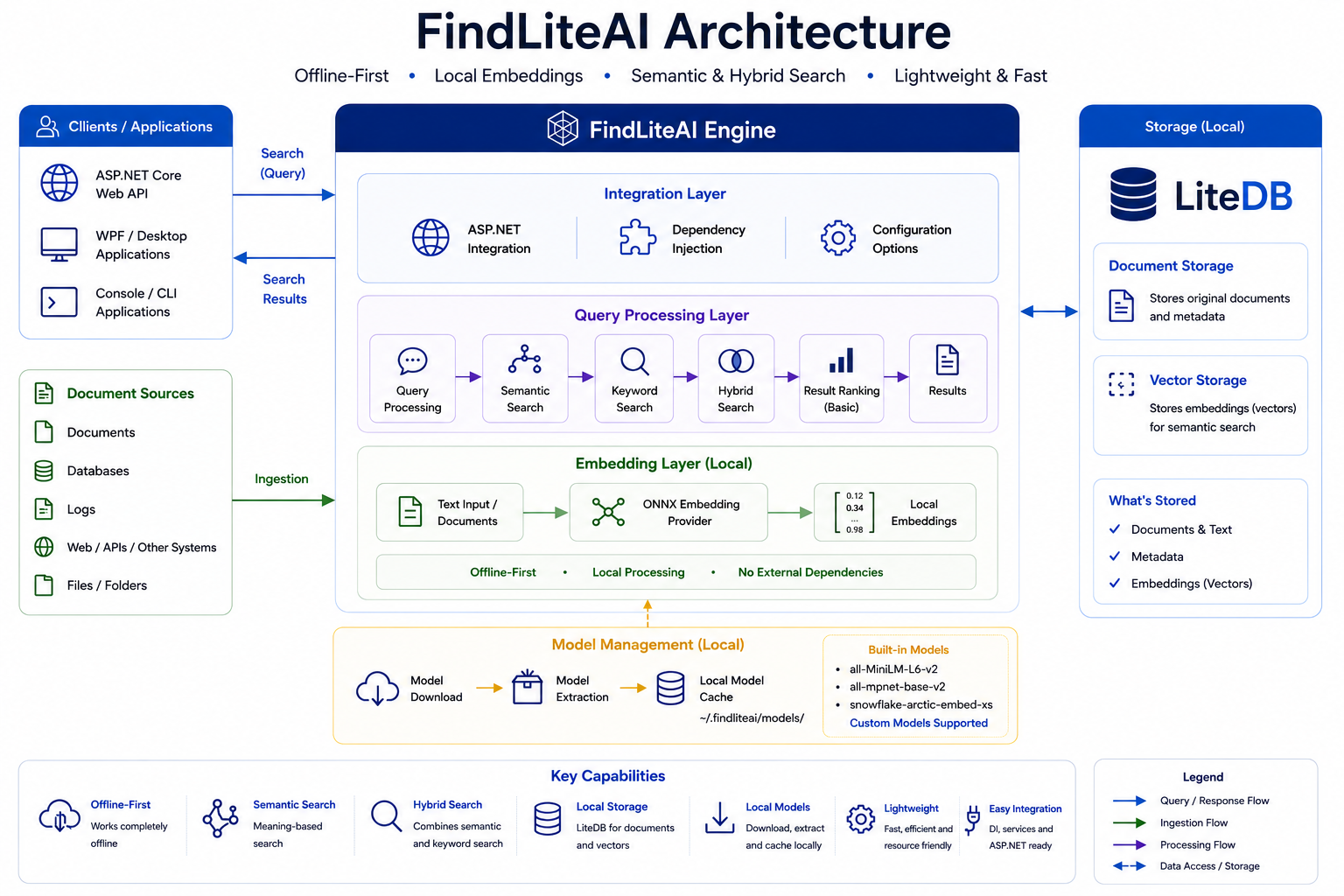
Architecture
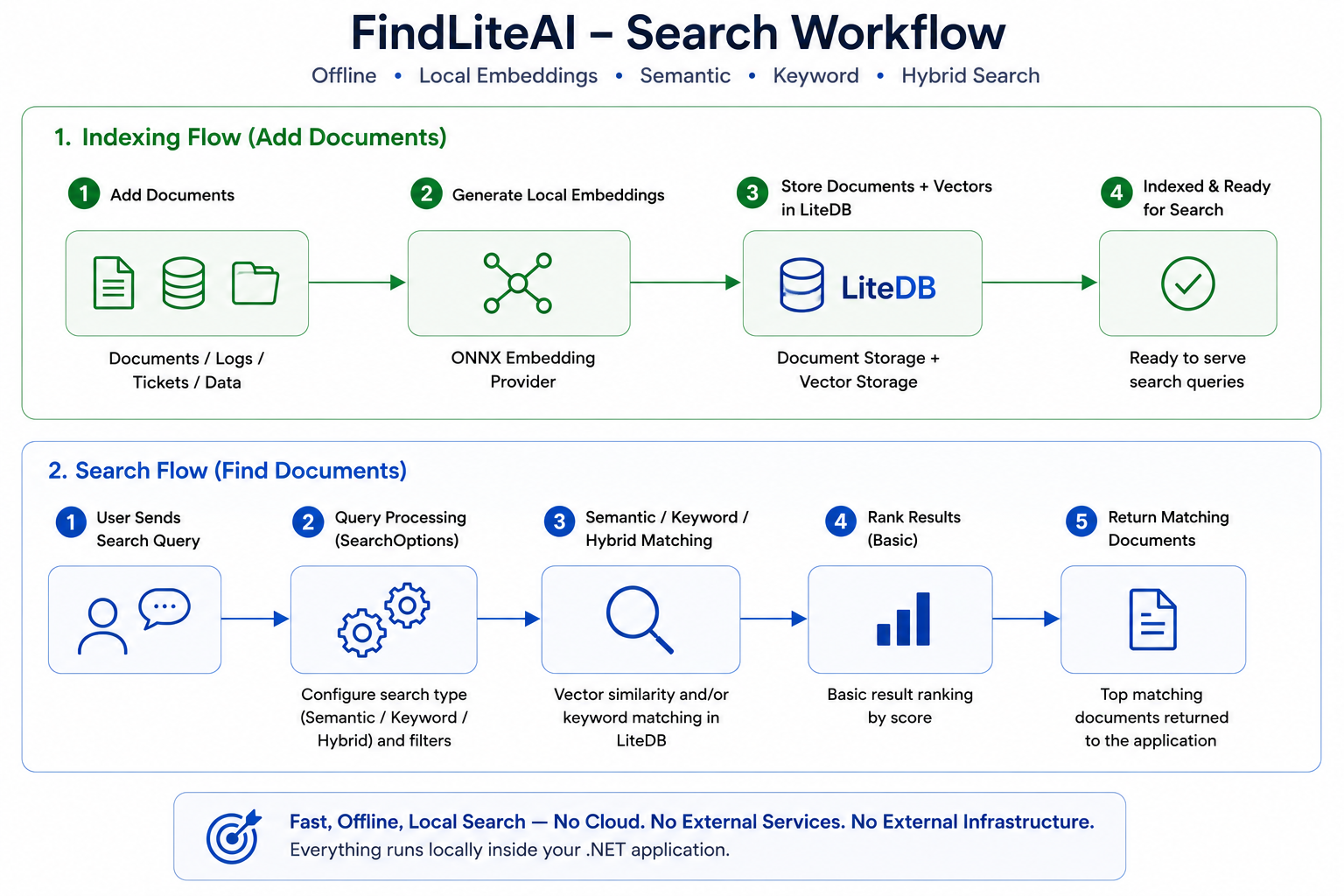
Search Workflow
NuGet Packages
- FindLiteAI
- FindLiteAI.Core
- FindLiteAI.Embeddings.Onnx
- FindLiteAI.Storage.LiteDb
- FindLiteAI.Extensions.DependencyInjection
- FindLiteAI.AspNetCore
Package Architecture
| Package | Purpose |
|---|---|
| FindLiteAI | Main search engine package (includes core dependencies) |
| FindLiteAI.Core | Core abstractions, models, and contracts |
| FindLiteAI.Embeddings.Onnx | ONNX-based embedding provider |
| FindLiteAI.Storage.LiteDb | LiteDB-based embedded storage provider |
| FindLiteAI.Extensions.DependencyInjection | Dependency injection extensions for easy setup |
| FindLiteAI.AspNetCore | ASP.NET Core integration for search API endpoints |
Why FindLiteAI?
Most AI search stacks require:
- Python environments
- Docker infrastructure
- external vector databases
- OpenAI or cloud APIs
- GPU infrastructure
- complex orchestration tools
FindLiteAI takes a different approach.
It provides:
- embedded offline AI-powered search
- lightweight local storage
- local ONNX models
- pure .NET integration
- simple NuGet-based setup
- zero external infrastructure after model download
Key Features
- Semantic search
- Keyword search
- Hybrid search
- Offline-first architecture
- Local ONNX embedding models
- LiteDB embedded storage
- ASP.NET Core integration
- WPF desktop integration
- Worker Service support
- Automatic model package installation
- No OpenAI dependency
- No Python dependency
- No Docker dependency
- No GPU required
- Cross-platform .NET support
- Lightweight deployment model
Supported Search Modes
| Search Mode | Description |
|---|---|
| Semantic | Finds meaning-based matches using AI embeddings |
| Keyword | Finds exact keyword matches |
| Hybrid | Combines semantic and keyword ranking |
Search Configuration
FindLiteAI search behavior can be configured using SearchOptions.
Example:
IReadOnlyList<SearchResult> results =
    await engine.SearchAsync(
        "logs",
        "smtp issue",
        new SearchOptions
        {
            SearchMode = SearchMode.Hybrid,
            MaxResults = 5,
            MinimumScore = 0.10
        });
SearchMode
Controls how matching is performed.
| Mode | Description | Best For |
|---|---|---|
| Semantic | AI meaning-based similarity search | Natural language queries |
| Keyword | Exact keyword matching | IDs, logs, structured data |
| Hybrid | Combines semantic + keyword ranking | General-purpose search |
Semantic
SearchMode = SearchMode.Semantic
Uses AI embeddings to find meaning-based matches.
Example:
Stored document:
SMTP authentication failed.
Search query:
email login problem
Semantic search may still retrieve the document even without exact keyword matches.
Keyword
SearchMode = SearchMode.Keyword
Uses direct keyword matching.
Best for:
- log analysis
- IDs
- filenames
- error codes
- exact matching scenarios
Hybrid
SearchMode = SearchMode.Hybrid
Combines semantic similarity and keyword relevance.
Recommended as the default mode for most applications.
MaxResults
Controls the maximum number of results returned.
Example:
MaxResults = 5
Lower Values
MaxResults = 3
Benefits:
- faster responses
- smaller payloads
- cleaner UI presentation
Higher Values
MaxResults = 25
Benefits:
- broader retrieval
- larger search coverage
- analytics scenarios
MinimumScore
Controls the minimum similarity score required for results.
Example:
MinimumScore = 0.10
Higher values produce stricter and cleaner results.
Lower values produce broader but potentially noisier results.
Typical Score Ranges
| Score Range | Meaning |
|---|---|
| 0.80+ | Very strong match |
| 0.60+ | Strong match |
| 0.40+ | Moderate match |
| 0.20+ | Weak semantic relation |
| Below 0.10 | Often noisy or unrelated |
Actual score behavior depends on:
- embedding model
- document quality
- query quality
- search mode
- document length
Recommended Starting Configuration
General Applications
new SearchOptions
{
    SearchMode = SearchMode.Hybrid,
    MaxResults = 5,
    MinimumScore = 0.10
}
Enterprise Search
new SearchOptions
{
    SearchMode = SearchMode.Hybrid,
    MaxResults = 10,
    MinimumScore = 0.25
}
Broad Discovery Search
new SearchOptions
{
    SearchMode = SearchMode.Semantic,
    MaxResults = 15,
    MinimumScore = 0.05
}
Built-In Models
| Model | Profile | Dimensions | Recommended RAM |
|---|---|---|---|
| all-MiniLM-L6-v2 | Fast | 384 | 4 GB+ |
| all-mpnet-base-v2 | Balanced | 768 | 8 GB+ |
| Snowflake Arctic Embed XS | Advanced | 384 | 8 GB+ |
All models run locally using ONNX Runtime.
Installation
Default Installation
Desktop Applications (WPF, WinForms, Console, Worker Services)
For most desktop and general .NET applications, install the main package:
dotnet add package FindLiteAI
This package includes the core search engine and automatically installs the required ONNX embedding and LiteDB storage dependencies.
Suitable for:
- WPF applications
- WinForms applications
- Console applications
- Worker Services
- Background processing applications
- Offline desktop tools
- Local enterprise utilities
ASP.NET Core Applications
For ASP.NET Core applications, install:
dotnet add package FindLiteAI.AspNetCore
dotnet add package FindLiteAI.Embeddings.Onnx
FindLiteAI.AspNetCore provides:
- ASP.NET Core endpoint integration
- API routing helpers
- dependency injection extensions
- search endpoint support
FindLiteAI.Embeddings.Onnx provides:
- local ONNX embedding support
- built-in model definitions
- model installer APIs
- embedding generation services
This setup is recommended for:
- ASP.NET Core Web APIs
- enterprise intranet systems
- local AI-powered search APIs
- internal knowledge systems
- offline enterprise applications
Optional Packages
Install these packages only if you need direct access to a specific component.
ONNX Embedding Provider
dotnet add package FindLiteAI.Embeddings.Onnx
LiteDB Storage Provider
dotnet add package FindLiteAI.Storage.LiteDb
Dependency Injection Extensions
dotnet add package FindLiteAI.Extensions.DependencyInjection
Core Abstractions and Models
dotnet add package FindLiteAI.Core
Custom Models
FindLiteAI supports custom ONNX embedding models.
Developers can use:
- custom SentenceTransformer models
- private enterprise embedding models
- internally trained ONNX models
- downloaded HuggingFace embedding models
- organization-specific embedding models
Built-In Model Definitions
Built-in model metadata is defined in:
src/FindLiteAI.Embeddings.Onnx/FindLiteAIModels.cs
This file contains:
- model identifiers
- dimensions
- download URLs
- tokenizer paths
- runtime settings
- package metadata
Developers can use this file as a reference when adding custom models.
Custom Model Package Structure
A custom model package should contain:
custom-model/
├── model.onnx
├── vocab.txt
├── MODEL_INFO.json
└── 1_Pooling/
    └── config.json
Optional files:
sentence_bert_config.json
modules.json
README_MODEL.txt
LICENSE.txt
MODEL_INFO.json Example
{
  "id": "custom-model",
  "displayName": "Custom Embedding Model",
  "dimensions": 384,
  "runtime": "ONNX",
  "pooling": "Mean",
  "optimizedFor": "Semantic Search"
}
Hosting Custom Models
Custom model packages can be distributed as ZIP files.
Example:
custom-model-v1.zip
Recommended hosting locations:
- GitHub Releases
- Azure Blob Storage
- AWS S3
- internal enterprise servers
- intranet download servers
- private package repositories
GitHub Release Example
Repository:
https://github.com/company/custom-models/releases
ZIP asset:
custom-model-v1.zip
Direct download URL example:
https://github.com/company/custom-models/releases/download/v1/custom-model-v1.zip
Installing a Custom Model
Extract the ZIP package locally.
Example:
D:\Models\custom-model
Then configure FindLiteAI:
builder.Services.AddFindLiteAI(options =>
{
    options.DatabasePath = "findliteai.db";

    options.ModelCacheDirectory =
        @"D:\Models\custom-model";
});
Quick Start
ASP.NET Core Example
using FindLiteAI.Core.Abstractions;
using FindLiteAI.Core.Models;
using FindLiteAI.Embeddings.Onnx;
using FindLiteAI.Extensions.DependencyInjection;

WebApplicationBuilder builder =
    WebApplication.CreateBuilder(args);

string cacheDirectory =
    Path.Combine(
        Path.GetTempPath(),
        "FindLiteAI",
        "Models");

await ModelInstallService.InstallAsync(
    FindLiteAIModels.MiniLm,
    cacheDirectory);

builder.Services.AddFindLiteAI(options =>
{
    options.DatabasePath = "findliteai.db";

    options.ModelCacheDirectory =
        Path.Combine(
            cacheDirectory,
            FindLiteAIModels.MiniLm.Id);
});

WebApplication app =
    builder.Build();

app.MapGet(
    "/",
    () => "FindLiteAI running.");

app.Run();
Adding Documents
await engine.AddAsync(
    "logs",
    new SemanticDocument
    {
        Text = "SMTP email relay timeout occurred."
    });
Document identifiers are automatically generated if not provided.
Semantic Search
IReadOnlyList<SearchResult> results =
    await engine.SearchAsync(
        "logs",
        "email sending issue",
        new SearchOptions
        {
            SearchMode = SearchMode.Semantic,
            MaxResults = 5,
            MinimumScore = 0.10
        });
Hybrid Search
IReadOnlyList<SearchResult> results =
    await engine.SearchAsync(
        "logs",
        "smtp issue",
        new SearchOptions
        {
            SearchMode = SearchMode.Hybrid,
            MaxResults = 5,
            MinimumScore = 0.10
        });
Example Use Cases
Log Search
Stored log:
SMTP relay timeout occurred.
User searches:
email sending issue
FindLiteAI can return semantically related results without exact keyword matching.
Helpdesk Systems
Stored ticket:
VPN authentication failed during remote access.
User searches:
cannot connect remotely
FindLiteAI can retrieve related support tickets using semantic similarity.
Enterprise Knowledge Bases
Stored document:
Annual leave approval workflow.
User searches:
vacation request process
FindLiteAI can retrieve semantically related policies and procedures.
Architecture
Application
    ↓
FindLiteAI Engine
    ↓
ONNX Embedding Provider
    ↓
LiteDB Embedded Storage
Documents are converted into embeddings using local ONNX models and stored alongside metadata inside LiteDB.
Search queries generate embeddings which are compared against stored vectors to retrieve similar content.
Offline-First Design
After model packages are downloaded once:
- all searches run locally
- all embeddings run locally
- no cloud calls are required
- no external AI services are required
This makes FindLiteAI suitable for:
- intranet systems
- enterprise desktop applications
- restricted networks
- government environments
- industrial applications
- offline-capable systems
Who Is This For?
FindLiteAI is designed for:
- .NET developers
- ASP.NET Core developers
- WPF developers
- Worker Service developers
- internal enterprise tools
- desktop applications
- intranet systems
- offline business applications
- embedded search scenarios
Samples
The repository includes:
| Sample | Description |
|---|---|
| Console Sample | Validates all official model packages |
| ASP.NET Core Sample | Demonstrates API integration |
| Worker Service Sample | Demonstrates background service integration |
| WPF Sample | Demonstrates desktop application integration |
See:
samples/README.md
for detailed setup instructions.
Model Packages
Official model packages are distributed as ZIP packages through GitHub Releases.
The package system supports:
- automatic download
- automatic extraction
- local caching
- offline reuse
Storage
FindLiteAI currently uses LiteDB for embedded local storage.
LiteDB stores:
- document text
- metadata
- embeddings
- indexes
No external database server is required.
Current Scope
FindLiteAI focuses on:
- lightweight embedded AI search
- practical .NET integration
- offline-first deployment
- simple developer experience
It is intentionally not:
- a chatbot framework
- a vector database server
- an LLM platform
- a cloud AI orchestration system
Limitations
FindLiteAI currently focuses on lightweight embedded retrieval scenarios.
Current limitations include:
- no distributed clustering
- no GPU acceleration
- no incremental model training
- no built-in reranking models
- no distributed vector database support
The project intentionally prioritizes simplicity, portability, and local deployment.
Roadmap
Planned future improvements may include:
- metadata filtering
- additional embedding providers
- custom model registration
- batch optimization
- reranking improvements
- optional SQLite provider
- additional storage providers
Requirements
- .NET 8
- ONNX Runtime compatible environment
No GPU required.
License
MIT License
Contributing
Contributions, issues, feature requests, and improvements are welcome.
Status
Current version:
v0.1.0
FindLiteAI is under active development.
Open Source Credits
FindLiteAI is built using several excellent open source projects and publicly available embedding models.
Embedding Models
all-MiniLM-L6-v2
Source:
https://huggingface.co/sentence-transformers/all-MiniLM-L6-v2
License:
Apache-2.0
all-mpnet-base-v2
Source:
https://huggingface.co/sentence-transformers/all-mpnet-base-v2
License:
Apache-2.0
Snowflake Arctic Embed XS
Source:
https://huggingface.co/Snowflake/snowflake-arctic-embed-xs
License:
Apache-2.0
Runtime and Libraries
ONNX Runtime
Source:
https://github.com/microsoft/onnxruntime
License:
MIT
LiteDB
Source:
https://github.com/litedb-org/LiteDB
License:
MIT
Microsoft.ML.Tokenizers
Source:
https://github.com/dotnet/machinelearning
License:
MIT
Used during development and related tooling workflows.
FindLiteAI itself is released under the MIT License.
Links
- Repository: https://github.com/zameerthakur/FindLiteAI
- NuGet: https://www.nuget.org/packages/FindLiteAI
- ONNX Runtime: https://onnxruntime.ai
- LiteDB: https://www.litedb.org
| Product | Versions Compatible and additional computed target framework versions. |
|---|---|
| .NET | net8.0 is compatible. net8.0-android was computed. net8.0-browser was computed. net8.0-ios was computed. net8.0-maccatalyst was computed. net8.0-macos was computed. net8.0-tvos was computed. net8.0-windows was computed. net9.0 was computed. net9.0-android was computed. net9.0-browser was computed. net9.0-ios was computed. net9.0-maccatalyst was computed. net9.0-macos was computed. net9.0-tvos was computed. net9.0-windows was computed. net10.0 was computed. net10.0-android was computed. net10.0-browser was computed. net10.0-ios was computed. net10.0-maccatalyst was computed. net10.0-macos was computed. net10.0-tvos was computed. net10.0-windows was computed. |
-
net8.0
- FindLiteAI (>= 1.0.3)
- FindLiteAI.Core (>= 1.0.3)
- FindLiteAI.Embeddings.Onnx (>= 1.0.3)
- FindLiteAI.Storage.LiteDb (>= 1.0.3)
- Microsoft.Extensions.DependencyInjection.Abstractions (>= 8.0.2)
- Microsoft.Extensions.Logging (>= 8.0.1)
NuGet packages (1)
Showing the top 1 NuGet packages that depend on FindLiteAI.Extensions.DependencyInjection:
| Package | Downloads |
|---|---|
|
FindLiteAI.AspNetCore
ASP.NET Core Minimal API integration for FindLiteAI offline AI-powered semantic, keyword, and hybrid search. |
GitHub repositories
This package is not used by any popular GitHub repositories.