GhostFx 0.4.5
dotnet tool install --global GhostFx --version 0.4.5
This package contains a .NET tool you can call from the shell/command line.
dotnet new tool-manifest
dotnet tool install --local GhostFx --version 0.4.5
This package contains a .NET tool you can call from the shell/command line.
#tool dotnet:?package=GhostFx&version=0.4.5
The NuGet Team does not provide support for this client. Please contact its maintainers for support.
nuke :add-package GhostFx --version 0.4.5
The NuGet Team does not provide support for this client. Please contact its maintainers for support.
GhostFx
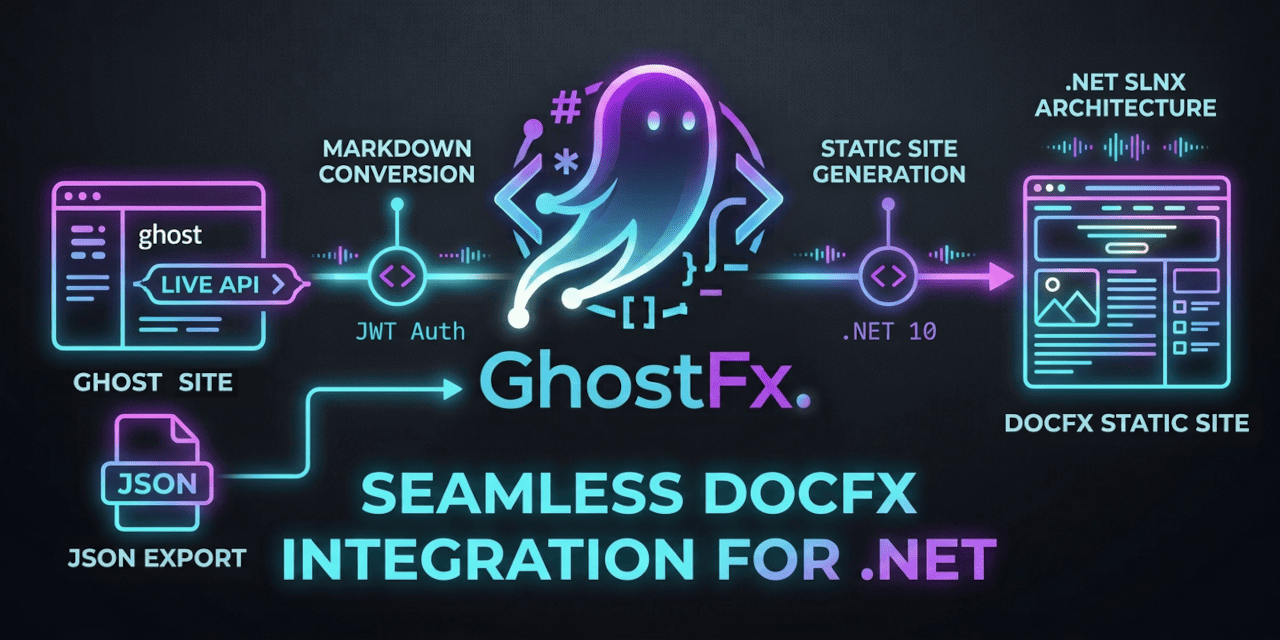
Live-migrate Ghost blogs & JSON exports to git-versioned
markdown files configured for DocFX static site generation.




🚀 Key Features
- 👻 Live Ghost Admin & Content API Integration: Connect to live Ghost instances using JWT-authenticated Admin API keys or public Content API keys to extract posts, pages, tags, and drafts.
- 📦 Offline JSON Export & Stdin Piping: Parse local Ghost database JSON exports (
sample-ghost-export.json) or pipe JSON directly via standard input (stdin). - 📝 Markdown & Front-Matter Engine: Converts Ghost HTML posts into clean Markdown files with YAML front-matter (
uid,title,slug,date,tags,metaTitle,metaDescription,image,og_title,og_description). - 📚 DocFX Static Site Builder Integration: Automatically generates
docfx.json,index.md,toc.yml, and tag index pages organized into clean subfolders (published/,pages/,draft/,scheduled/,content/images/). - 🎨 Theme Conversion: Convert active Ghost themes (ZIP archives or unzipped folders) directly into DocFX modern theme overrides (
public/main.css,public/main.js). - 🤫 Quiet Mode & Cross-Platform Pipe Workflows: Run silently with
--quiet/-qor pipe input/output streams cleanly across Windows, Linux, and macOS. - ⚡ Built on .NET 10 & SLNX: High-performance, cross-platform CLI powered by
.NET 10and modern.slnxsolution architecture.
📦 Installation
Quick Run via dnx
Run ghostfx instantly without global installation:
dnx ghostfx [options]
Global Tool Installation
Pack and install ghostfx as a global .NET CLI tool:
dotnet tool install --global GhostFx
Or build and install locally from source:
dotnet pack GhostFx.Cli/GhostFx.Cli.csproj
dotnet tool install --global --add-source ./GhostFx.Cli/nupkg GhostFx
🛠️ Usage
Quick Start with Configuration File
Create a ghostfx.json configuration file in your directory:
{
  "ghostUrl": "https://myblog.ghost.io",
  "adminApiKey": "YOUR_KEY_ID:YOUR_KEY_SECRET",
  "contentApiKey": "YOUR_CONTENT_API_KEY",
  "ghostExportJson": "sample-ghost-export.json",
  "outputDir": "articles",
  "indexFile": "index.md",
  "siteTitle": "My Static DocFX Site",
  "includeDrafts": false,
  "downloadTheme": false,
  "themePath": "ghostfx.zip",
  "cleanUrls": false,
  "migrateTheme": true,
  "googleAnalyticsTag": "G-XXXXXXXXXX",
  "quiet": false
}
Run the migration:
ghostfx
CLI Command Options & Pipe Workflows
Override or supply all migration settings directly via CLI flags or piped streams:
# Migrate from a live Ghost instance using shorthands
ghostfx -u "https://myblog.ghost.io" -k "ID:SECRET" -o "articles" --site-title "My Tech Blog" -y

# Migrate from a local Ghost JSON export
ghostfx -i "./sample-ghost-export.json" -o "articles" --include-drafts true

# Quiet mode execution with custom config file
ghostfx -c "./configs/my-ghostfx-config.json" -q

# Pipe JSON export directly via stdin
cat sample-ghost-export.json | ghostfx -q -o sample_output -y
CLI Flags Reference
| Option | Shorthand | Description | Default |
|---|---|---|---|
--config <path> |
-c |
Path to custom ghostfx.json configuration file |
ghostfx.json |
--url <url> |
-u |
Live Ghost blog base URL | — |
--admin-api-key <key>, --api-key <key> |
-k |
Ghost Admin API key (ID:SECRET) |
— |
--content-api-key <key> |
Ghost Content API key | — | |
--input <path> |
-i |
Path to offline Ghost JSON export file | — |
--output <dir> |
-o |
Target output directory for Markdown posts | articles |
--index-file <file> |
Path for generated homepage Markdown file | index.md |
|
--site-title <title> |
Title of static site | My Migrated Ghost Blog |
|
--include-drafts |
Process draft posts in addition to published posts | false |
|
--clean-urls |
Generate {slug}/index.md for clean URLs |
false |
|
--logo-path |
Generate _appLogoPath in docfx.json |
true |
|
--ga-tag <tag> |
Google Analytics Tag ID to inject into docfx.json |
— | |
--download-theme |
Download active Ghost theme | false |
|
--theme-path <path> |
-t |
Path to theme ZIP archive or unzipped theme folder | — |
--migrate-theme |
Convert Ghost theme to DocFX theme override | true |
|
--purge-template |
Purge existing template output directory before migration | — | |
--yes |
-y |
Non-interactive automatic confirmation | false |
--quiet |
-q |
Quiet mode (suppresses banners and progress animations) | false |
📁 Output Directory Structure
Generated static site source files are organized under outputDir:
<outputDir>/
├── docfx.json
├── index.md
├── tags.md
├── toc.yml
├── author/            # Ghost authors
│   └── author-slug.md
├── content/
│   └── images/        # Backwards-compatible Ghost media & brand assets
│       └── 2024/05/sample.jpg
├── draft/             # Draft posts
│   └── draft-slug.md
├── ghostfx/           # Converted DocFX modern theme overrides
│   └── (theme files)
│   └── index.html.primary.tmpl
├── pages/             # Ghost pages
│   └── page-slug.md
├── published/         # Published posts
│   └── post-slug.md
├── scheduled/         # Scheduled posts (optional)
│   └── post-slug.md
└── tags/              # Ghost tags
    └── tag-slug.md
🏗️ Repository Architecture
GhostFx is organized into modular .NET 10 projects:
GhostFx/
├── GhostFx.slnx           # Modern XML solution file (.NET 10)
├── GhostFx.Core/          # Core library (MigrationEngine, GhostAdminClient, DocfxGenerator, MarkdownConverter)
├── GhostFx.Cli/           # Command-line entrypoint powered by System.CommandLine
└── GhostFx.Tests/         # xUnit unit test suite
Developer Workflow
# Build solution
dotnet build GhostFx.slnx

# Run tests
dotnet test GhostFx.slnx

# Execute CLI locally
dotnet run --project GhostFx.Cli/GhostFx.Cli.csproj -- --help
📄 License
This project is licensed under the MIT License.
| Product | Versions Compatible and additional computed target framework versions. |
|---|---|
| .NET | net10.0 is compatible. net10.0-android was computed. net10.0-browser was computed. net10.0-ios was computed. net10.0-maccatalyst was computed. net10.0-macos was computed. net10.0-tvos was computed. net10.0-windows was computed. |
Compatible target framework(s)
Included target framework(s) (in package)
Learn more about Target Frameworks and .NET Standard.
This package has no dependencies.