GitExtensions.ZimerfeldLFS
1.0.4
dotnet add package GitExtensions.ZimerfeldLFS --version 1.0.4
NuGet\Install-Package GitExtensions.ZimerfeldLFS -Version 1.0.4
<PackageReference Include="GitExtensions.ZimerfeldLFS" Version="1.0.4" />
<PackageVersion Include="GitExtensions.ZimerfeldLFS" Version="1.0.4" />
<PackageReference Include="GitExtensions.ZimerfeldLFS" />
paket add GitExtensions.ZimerfeldLFS --version 1.0.4
#r "nuget: GitExtensions.ZimerfeldLFS, 1.0.4"
#:package GitExtensions.ZimerfeldLFS@1.0.4
#addin nuget:?package=GitExtensions.ZimerfeldLFS&version=1.0.4
#tool nuget:?package=GitExtensions.ZimerfeldLFS&version=1.0.4
GitExtensions.ZimerfeldLFS





 Version: 1.0.2 — Updated: 2026-07-04
 Versão: 1.0.2 — Atualizado em: 2026-07-04
Plugin for GitExtensions that manages Git Large File Storage (LFS) in a dedicated, non-modal window. Git LFS replaces large files (audio, video, datasets) with lightweight text pointers inside your repository; the real content lives on a separate remote server, speeding up cloning and preventing repository bloat. The window walks you through the LFS workflow in three steps and targets a working directory chosen independently of the GitExtensions host.
Plugin para o GitExtensions que gerencia o Git Large File Storage (LFS) em uma janela dedicada e não-modal. O Git LFS substitui arquivos grandes (áudio, vídeo, datasets) por ponteiros de texto leves no repositório; o conteúdo real fica em um servidor remoto separado, acelerando o clone e evitando o inchaço do repositório. A janela conduz o fluxo de LFS em três etapas e usa um diretório de trabalho escolhido de forma independente do GitExtensions.
⚡ Executive summary / Resumo executivo
English
- What it is: a GitExtensions plugin (MEF) that surfaces Git LFS in a dedicated, non-modal window, guiding you through a 3-step flow — Installation → Track/Commit/Push → Clone/Pull.
- Problem it solves: Git LFS is powerful but command-line heavy and easy to misconfigure (
git lfs install,track,.gitattributes). The plugin turns that flow into clicks, with a visible log of everygit/git lfscommand it runs. - Differentiators: persistent window (never interrupts your work in the host); working directory independent of the active GitExtensions repo; i18n (Automatic / EN-US / PT-BR); custom icon; sponsor banner (GitHub Sponsors + Ko-fi).
- Stack: C# / WinForms
Library, target net9.0-windows, packaged as a nupkg; build & versioning automated viabuild.ps1. - Current state: version
1.0.2— functional, with 36 unit tests (xUnit) coveringLfsService. - Target audience: developers and teams versioning large assets (games, media, ML datasets) already using GitExtensions on Windows.
Português
- O que é: plugin (MEF) para o GitExtensions que expõe o Git LFS numa janela dedicada e não-modal, guiando por um fluxo de 3 etapas — Instalação → Track/Commit/Push → Clone/Pull.
- Problema que resolve: o Git LFS é poderoso, mas dependente de linha de comando e propenso a erros de configuração (
git lfs install,track,.gitattributes). O plugin transforma esse fluxo em cliques, com log visível de cada comandogit/git lfsexecutado. - Diferenciais: janela persistente (não interrompe o trabalho no host); diretório de trabalho independente do repositório ativo do GitExtensions; i18n (Automático / EN-US / PT-BR); ícone próprio; banner de patrocínio (GitHub Sponsors + Ko-fi).
- Stack: C# / WinForms
Library, alvo net9.0-windows, empacotado como nupkg; build e versionamento automatizados viabuild.ps1. - Estado atual: versão
1.0.2— funcional, com 36 testes unitários (xUnit) cobrindo oLfsService. - Público-alvo: desenvolvedores e times que versionam ativos grandes (jogos, mídia, datasets de ML) e já usam o GitExtensions no Windows.
What is Git LFS? / O que é o Git LFS?
Git Large File Storage (LFS) is an open-source extension for Git that replaces large files (like audio, video, or datasets) with lightweight text pointers inside your repository. The actual file content is hosted on a separate remote server, speeding up cloning and preventing repository bloat.
O Git Large File Storage (LFS) é uma extensão open-source do Git que substitui arquivos grandes (como áudio, vídeo ou datasets) por ponteiros de texto leves dentro do repositório. O conteúdo real do arquivo é hospedado em um servidor remoto separado, acelerando o clone e evitando o inchaço do repositório.
The three steps / As três etapas
The window mirrors the standard Git LFS workflow as three tabs / A janela espelha o fluxo padrão do Git LFS em três abas:
1 · Installation / Instalação
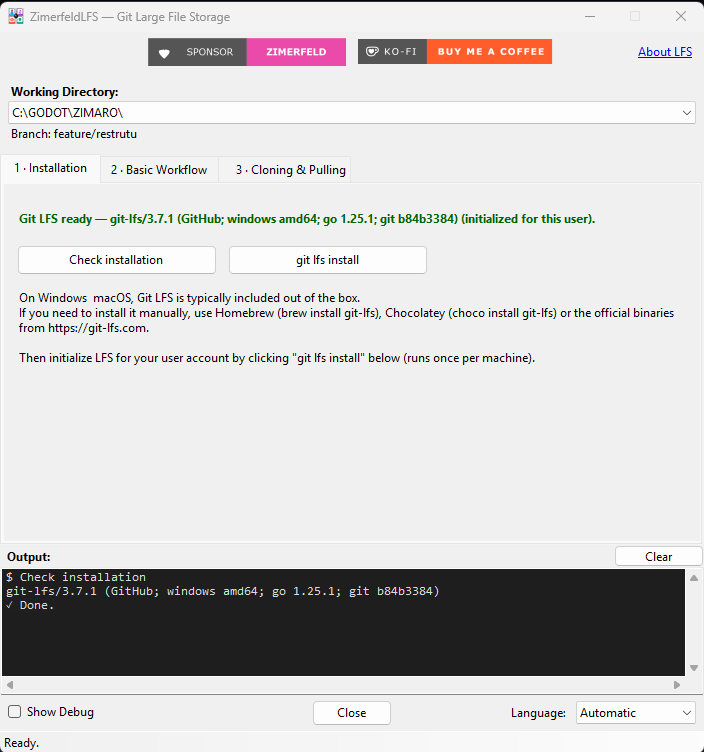
git-lfs/3.7.1, initialized for this user) for the repository chosen in the Working Directory dropdown; the Output console echoes theCheck installationrun finishing with✓ Done.git-lfs/3.7.1, inicializado para este usuário) para o repositório escolhido no dropdown Working Directory; o console de Output ecoa a verificação concluída com✓ Done.
On Windows & macOS, Git LFS is typically included out of the box. If you need to install it manually, use Homebrew (brew install git-lfs), Chocolatey (choco install git-lfs) or the official binaries from git-lfs.com. Then initialize LFS for your user account by clicking git lfs install (runs once per machine). The Check installation button runs git lfs version and shows the detected status.
No Windows e no macOS, o Git LFS normalmente já vem incluído. Se precisar instalar manualmente, use o Homebrew (brew install git-lfs), o Chocolatey (choco install git-lfs) ou os binários oficiais em git-lfs.com. Depois, inicialize o LFS para a sua conta clicando em git lfs install (executa uma vez por máquina). O botão Verificar instalação roda git lfs version e mostra o status detectado.
2 · Basic workflow — track / commit / push / Fluxo básico
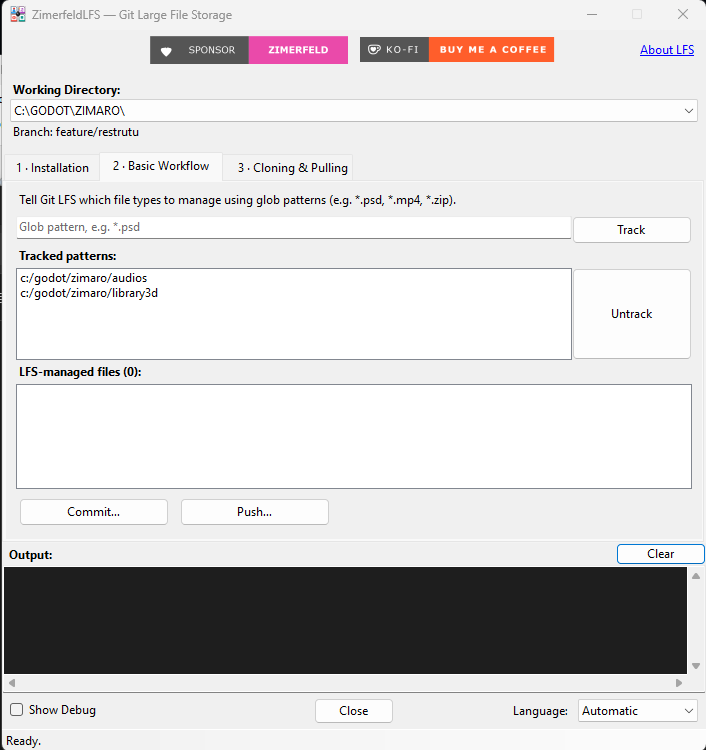
audiosandlibrary3dfolders); type a glob in the box and press Track, select a pattern and press Untrack to remove it. LFS-managed files lists whatgit lfs ls-filesreturns, and Commit… / Push… open the native dialogs for the selected repo.audioselibrary3d); digite um glob na caixa e clique em Track (Rastrear), selecione um padrão e clique em Untrack para removê-lo. LFS-managed files lista o que ogit lfs ls-filesretorna, e Commit… / Push… abrem os diálogos nativos para o repositório selecionado.
Tell Git LFS which file types to manage using glob patterns (e.g. *.psd, *.mp4, *.zip). Type a pattern and click Track — the plugin runs git lfs track "<pattern>" and stages the updated .gitattributes. The window lists the tracked patterns (with an Untrack button) and the LFS-managed files (git lfs ls-files). Then Commit and Push open the native GitExtensions dialogs for the selected repository.
git lfs track "*.psd"
git add .gitattributes
git add my_large_design_file.psd
git commit -m "Add large PSD file"
git push origin main
Informe ao Git LFS quais tipos de arquivo gerenciar usando padrões glob (ex.: *.psd, *.mp4, *.zip). Digite um padrão e clique em Rastrear — o plugin executa git lfs track "<padrão>" e adiciona o .gitattributes ao stage. A janela lista os padrões rastreados (com botão Deixar de rastrear) e os arquivos gerenciados pelo LFS (git lfs ls-files). Em seguida, Commit e Push abrem os diálogos nativos do GitExtensions para o repositório selecionado.
3 · Cloning & pulling / Clone & Pull
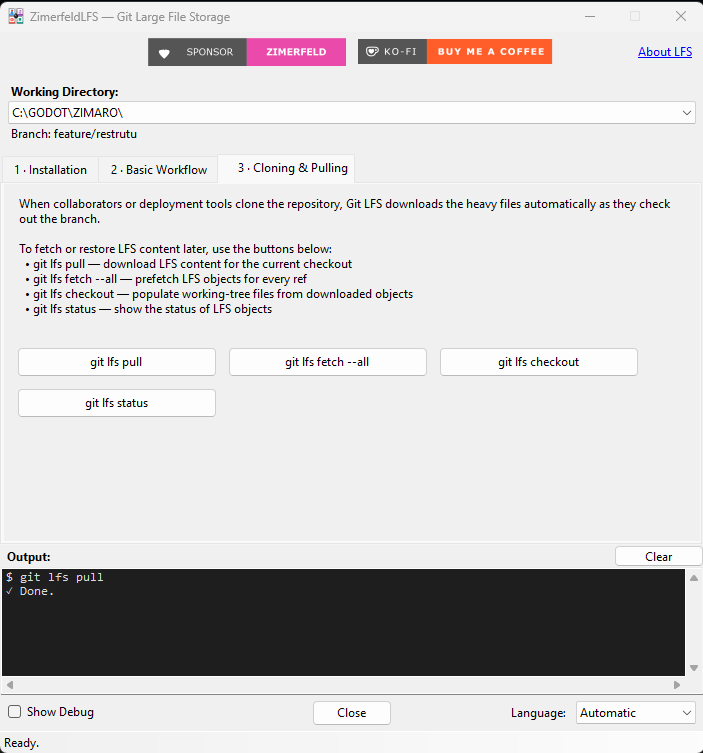
✓ Done.in the Output console. Each button maps to one command —git lfs pull,git lfs fetch --all,git lfs checkout,git lfs status— always executed against the repository in the Working Directory dropdown.✓ Done.no console de Output. Cada botão corresponde a um comando —git lfs pull,git lfs fetch --all,git lfs checkout,git lfs status— sempre executado no repositório do dropdown Working Directory.
When collaborators or deployment tools clone the repository, Git LFS downloads the heavy files automatically as they check out the branch. To fetch or restore LFS content later, use the buttons: git lfs pull, git lfs fetch --all, git lfs checkout and git lfs status.
Quando colaboradores ou ferramentas de deploy clonam o repositório, o Git LFS baixa os arquivos pesados automaticamente ao fazer checkout da branch. Para buscar ou restaurar o conteúdo LFS depois, use os botões: git lfs pull, git lfs fetch --all, git lfs checkout e git lfs status.
Highlights / Destaques
English
- Independent working directory — a dropdown populated from the GitExtensions repository history lets you point the window at any repo, regardless of what the host window is doing.
- Three-step guided workflow — Installation, Basic workflow (track/commit/push) and Cloning & pulling, each as its own tab.
- Live LFS state — detected
git lfsversion, whether it is initialized for your user, the tracked glob patterns and the LFS-managed files, refreshed automatically. - Output console — every button shows the exact
git/git lfscommand and its output, so nothing is hidden. - Localized (English / Portuguese) with an automatic mode following the OS, plus a Show Debug toggle that reveals control IDs.
Português
- Diretório de trabalho independente — um dropdown preenchido com o histórico de repositórios do GitExtensions permite apontar a janela para qualquer repo, sem depender da janela do host.
- Fluxo guiado em três etapas — Instalação, Fluxo básico (track/commit/push) e Clone & Pull, cada um em sua aba.
- Estado do LFS ao vivo — versão do
git lfsdetectada, se está inicializado para o usuário, os padrões glob rastreados e os arquivos gerenciados pelo LFS, atualizados automaticamente. - Console de saída — cada botão mostra o comando
git/git lfsexato e sua saída, sem esconder nada. - Localizado (Inglês / Português) com modo automático seguindo o SO, além do Mostrar Debug que revela os IDs dos controles.
Installation / Instalação
Via GitExtensions Plugin Manager: search for ZimerfeldLFS in the in-app Plugin Manager (Plugins → Plugin Manager) and install. Restart GitExtensions and open Plugins → ZimerfeldLFS.
Pelo Gerenciador de Plugins do GitExtensions: procure por ZimerfeldLFS no Plugin Manager interno (Plugins → Plugin Manager) e instale. Reinicie o GitExtensions e abra Plugins → ZimerfeldLFS.
Manual: run build.ps1 (as Administrator to auto-deploy) or copy GitExtensions.Plugins.ZimerfeldLFS.dll into C:\Program Files\GitExtensions\Plugins\, or run tools\install.ps1 as Administrator.
Manual: execute o build.ps1 (como Administrador para deploy automático) ou copie GitExtensions.Plugins.ZimerfeldLFS.dll para C:\Program Files\GitExtensions\Plugins\, ou execute tools\install.ps1 como Administrador.
Requirements / Requisitos
- GitExtensions 6.x (.NET 9) / GitExtensions 6.x (.NET 9)
gitandgit-lfson thePATH/gitegit-lfsnoPATH
Build
pwsh .\build.ps1          # increments version, builds Release, packs the .nupkg
pwsh .\build.ps1 -Force   # always rebuild/pack
Integrated plugins / Plugins integrados
Other GitExtensions plugins from the same author that pair well with ZimerfeldLFS:
Outros plugins do GitExtensions do mesmo autor que combinam bem com o ZimerfeldLFS:
License / Licença
Copyright © 2026 Zimerfeld — CC BY-NC-ND 4.0 (see LICENSE.txt).
| Product | Versions Compatible and additional computed target framework versions. |
|---|---|
| .NET Framework | net is compatible. |
-
- GitExtensions.Extensibility (>= 0.4.0 && < 0.5.0)
NuGet packages
This package is not used by any NuGet packages.
GitHub repositories
This package is not used by any popular GitHub repositories.
1.0.0 — Initial public release.
1.0.0 — Primeiro lançamento público.