HeatonLife.Core
1.1.0
dotnet add package HeatonLife.Core --version 1.1.0
NuGet\Install-Package HeatonLife.Core -Version 1.1.0
<PackageReference Include="HeatonLife.Core" Version="1.1.0" />
<PackageVersion Include="HeatonLife.Core" Version="1.1.0" />
<PackageReference Include="HeatonLife.Core" />
paket add HeatonLife.Core --version 1.1.0
#r "nuget: HeatonLife.Core, 1.1.0"
#:package HeatonLife.Core@1.1.0
#addin nuget:?package=HeatonLife.Core&version=1.1.0
#tool nuget:?package=HeatonLife.Core&version=1.1.0
HeatonLife.Core


HeatonLife.Core is a .NET library for exploring emergence: simple rules that give rise to complex, organic-looking behavior. It brings together cellular automata (MergeLife, Life-like, Elementary, Cyclic, and Wireworld), three flavors of Lenia, fractals (Newton's basins, and Mandelbrot, Julia, and Burning Ship with deep zoom, to 10⁹⁰⁰⁰ for Mandelbrot and Julia), Reynolds boids, and Gray-Scott reaction-diffusion under one consistent API. Every system steps and renders the same way, so a few lines of C# give you a frame as a plain array, colormapped RGB, or a PNG, and a genetic evolver can search for new MergeLife rules.
It is pure C# with no dependencies: a single netstandard2.1 assembly, so it runs on
.NET Core 3.0 and later, .NET 5 through .NET 10, Mono 6.4 and later, and Unity 2021.2
and later (IL2CPP, WebGL, and mobile); .NET Framework 4.x does not implement .NET
Standard 2.1. The step and frame APIs write into buffers you own and allocate nothing,
so the library is comfortable inside a game loop. The fractal renderers and the evolver
take an optional workers count (default 1, fully serial); results are identical for
any worker count, but keep it at 1 on Unity WebGL, which has no threads.
Results are reproducible by design. Each system follows a written specification and a set of conformance vectors, so the same parameters and seed always give the same run, and the library's Python implementation is held to the same vectors: the discrete automata produce identical states in both languages, and the continuous systems agree within a recorded tolerance. The specifications, the vectors, and the Python package live in the heaton-life repository.
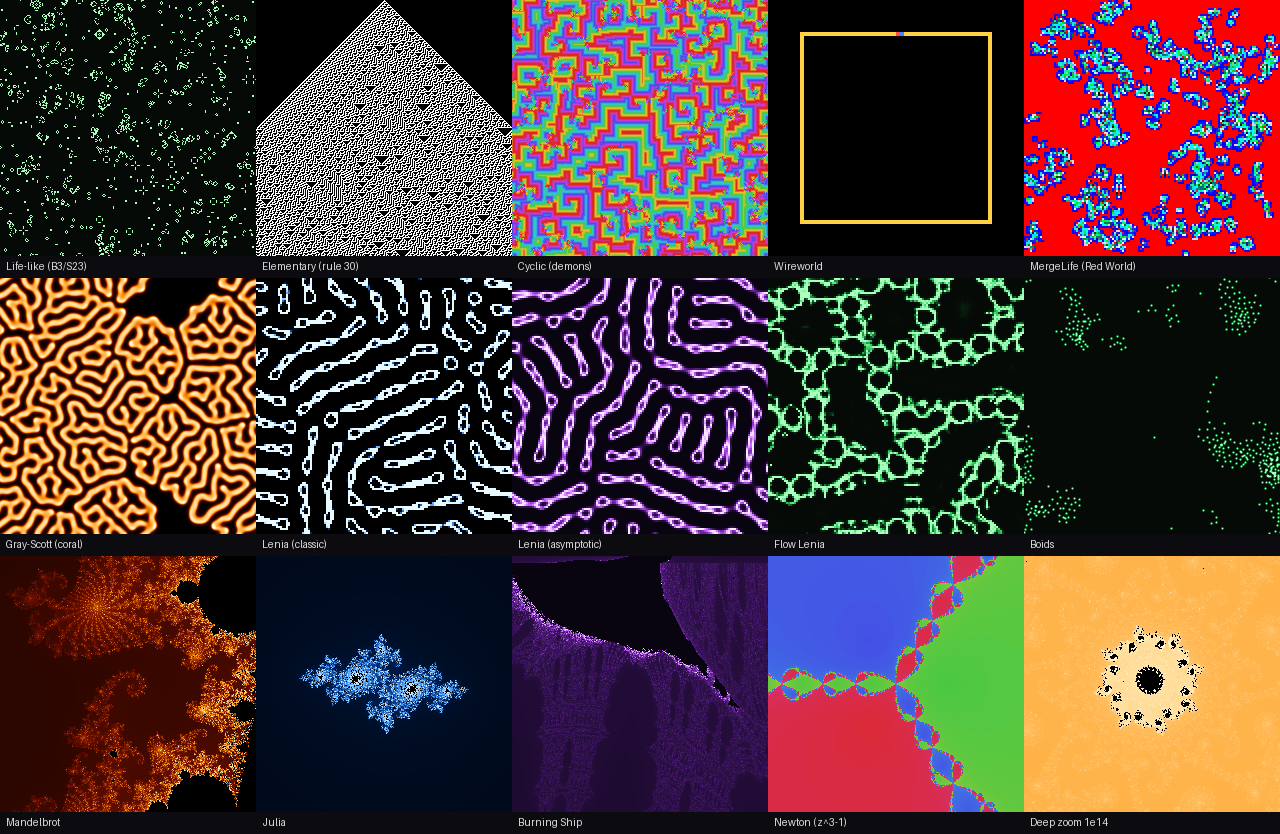
Here is every system in the library. The tiles were rendered by the repository's Python implementation, which this package matches vector for vector; the bottom-right one is the Mandelbrot set at a zoom of 10¹⁴, far beyond what plain floating point can resolve:
Install
Install from NuGet.
dotnet add package HeatonLife.Core
For Unity (2021.2 or newer, which supports .NET Standard 2.1), copy
HeatonLife.Core.dll and the HeatonLife.Core.xml beside it (for IntelliSense) into
your project's Assets/Plugins folder. There is no native code and nothing else to
install. Each release also ships the DLL, the XML docs, and the PDB together as
heaton-life-dotnet-1.1.0.zip.
The NuGet package also carries a symbols package (.snupkg, a portable PDB with
SourceLink to this repository), so a debugger configured for the NuGet.org symbol
server can step into the library's source.
Sample Code
using System;
using System.IO;
using HeatonLife;

// A Life-like automaton from a random soup, stepped 500 generations and saved as a PNG.
var life = new LifeLike("B3/S23", 256, 256);
life.SeedSoup(density: 0.35, seed: 42);
life.Step(500);
var frame = new byte[life.Width * life.Height];
life.WriteFrame(frame);                                     // palette indices
var rgb = Colormaps.ApplyIndexed(frame, Colormaps.Get("phosphor"));
File.WriteAllBytes("life.png", PngGrid.EncodeRgb(rgb, life.Width, life.Height, scale: 2));

// MergeLife frames are already RGB, so no colormap is involved.
var merge = new MergeLife(MergeLife.DefaultRule, 128, 128);
merge.SeedSoup(7);
merge.Step(300);
File.WriteAllBytes("mergelife.png", merge.ToPng(scale: 3));

// Deep zoom: float64 pixelates near 1e13; this renders via perturbation + rebasing.
var mandelbrot = new Mandelbrot(maxIter: 5000, workers: Environment.ProcessorCount);
double[] field = mandelbrot.Render(1920, 1080, new Viewport(
    centerRe: "-0.743643887037158704752191506114774",
    centerIm: "0.131825904205311970493132056385139",
    zoomLog10: 14.0));
File.WriteAllBytes("deep.png",
    PngGrid.EncodeRgb(Colormaps.ApplyFloat(field, Colormaps.Get("fire")), 1920, 1080));

// Evolve MergeLife rules with the paper's objective, reproducible from a seed:
var best = new Evolver(width: 64, height: 64, populationSize: 20, seed: 42).Run(maxEvals: 200);
Console.WriteLine($"{best.Genome} {best.Score}");
Driving it from a host
Every time-stepped system (the cellular automata, the three Lenias, boids, and
Gray-Scott) implements ISimulation (Width, Height, Generation, Step, and
Reset) plus one of three frame-source interfaces, depending on what its frame holds:
IIndexedFrameSource (palette indices), IFloatFrameSource (floats in [0, 1]), or
IRgbFrameSource (RGB bytes). A host such as a Unity adapter can therefore drive any
of them through one code path, and the WriteFrame and Colormaps.Apply* overloads
that take an output buffer never allocate:
using HeatonLife;

var sim = new GrayScott(256, 256, feed: 0.0545, kill: 0.062);   // the "Coral" preset
var frame = new double[sim.Width * sim.Height];
var rgba = new byte[frame.Length * 4];
var lut = Colormaps.Get("ice");

// Each tick of the game loop:
sim.Step();
sim.WriteFrame(frame);
Colormaps.ApplyFloatRgba(frame, lut, rgba);   // RGBA32, ready for Texture2D.SetPixelData
The fractals are renderers rather than simulations: Render(width, height, viewport)
returns a new field of doubles in [0, 1], which you colormap exactly like an
IFloatFrameSource frame, as the deep-zoom sample above does.
The built-in colormaps are gray, phosphor, fire, ice, violet, wireworld, and
rainbow (Colormaps.Names lists them). For fractals there are also four cyclic
palettes, deep, classic, embers and glacier (Colormaps.CyclicNames), which
Colormaps.ApplyPhase wraps around: with FractalColor.DepthPhase a point keeps its
color at every zoom, so a dive does not flicker the way a per-frame stretch does.
Checking the runtime
The identical results rest on IEEE-754 double arithmetic with no fused multiply-add contraction, no flush-to-zero, and no extended precision. A host that runs the library somewhere unusual (Unity's IL2CPP on a phone, Mono, WebGL) can confirm that its runtime keeps that contract with the platform self-check: 21 checks against answers embedded in the assembly, needing no files and taking well under a second on a phone. Run it once, and off the main thread wherever the host has threads (WebGL has none, so there it runs on the main thread):
using HeatonLife;

bool ok = SelfCheck.Run(out string report);   // report: one PASS/FAIL line per check

// Or gate a feature on exactly what a failure would invalidate:
SelfCheck.Result[] results = SelfCheck.RunAll();
bool deepZoomSafe = SelfCheck.Passed(results, SelfCheckScope.T1 | SelfCheckScope.T2);
Helpful Links
- Repository — specifications, conformance vectors, and the Python implementation
- Algorithm specifications
- Python package and its intro notebook, which runs in Colab and shows the same systems
- Release notes — what changed in each version
- Bug tracker
Development
Working on the library itself, from the checks to cutting a release, is covered in the development guide: the build, format, and test gates, how the specifications and conformance vectors shape every change, the parity rules with the Python implementation, and the release workflow.
| Product | Versions Compatible and additional computed target framework versions. |
|---|---|
| .NET | net5.0 was computed. net5.0-windows was computed. net6.0 was computed. net6.0-android was computed. net6.0-ios was computed. net6.0-maccatalyst was computed. net6.0-macos was computed. net6.0-tvos was computed. net6.0-windows was computed. net7.0 was computed. net7.0-android was computed. net7.0-ios was computed. net7.0-maccatalyst was computed. net7.0-macos was computed. net7.0-tvos was computed. net7.0-windows was computed. net8.0 was computed. net8.0-android was computed. net8.0-browser was computed. net8.0-ios was computed. net8.0-maccatalyst was computed. net8.0-macos was computed. net8.0-tvos was computed. net8.0-windows was computed. net9.0 was computed. net9.0-android was computed. net9.0-browser was computed. net9.0-ios was computed. net9.0-maccatalyst was computed. net9.0-macos was computed. net9.0-tvos was computed. net9.0-windows was computed. net10.0 was computed. net10.0-android was computed. net10.0-browser was computed. net10.0-ios was computed. net10.0-maccatalyst was computed. net10.0-macos was computed. net10.0-tvos was computed. net10.0-windows was computed. |
| .NET Core | netcoreapp3.0 was computed. netcoreapp3.1 was computed. |
| .NET Standard | netstandard2.1 is compatible. |
| MonoAndroid | monoandroid was computed. |
| MonoMac | monomac was computed. |
| MonoTouch | monotouch was computed. |
| Tizen | tizen60 was computed. |
| Xamarin.iOS | xamarinios was computed. |
| Xamarin.Mac | xamarinmac was computed. |
| Xamarin.TVOS | xamarintvos was computed. |
| Xamarin.WatchOS | xamarinwatchos was computed. |
-
.NETStandard 2.1
- No dependencies.
NuGet packages
This package is not used by any NuGet packages.
GitHub repositories
This package is not used by any popular GitHub repositories.
What changed in each version: https://github.com/jeffheaton/heaton-life/blob/main/CHANGELOG.md