Hlibz.McpDocs.AspNetCore
0.1.3
dotnet add package Hlibz.McpDocs.AspNetCore --version 0.1.3
NuGet\Install-Package Hlibz.McpDocs.AspNetCore -Version 0.1.3
<PackageReference Include="Hlibz.McpDocs.AspNetCore" Version="0.1.3" />
<PackageVersion Include="Hlibz.McpDocs.AspNetCore" Version="0.1.3" />
<PackageReference Include="Hlibz.McpDocs.AspNetCore" />
paket add Hlibz.McpDocs.AspNetCore --version 0.1.3
#r "nuget: Hlibz.McpDocs.AspNetCore, 0.1.3"
#:package Hlibz.McpDocs.AspNetCore@0.1.3
#addin nuget:?package=Hlibz.McpDocs.AspNetCore&version=0.1.3
#tool nuget:?package=Hlibz.McpDocs.AspNetCore&version=0.1.3

Hlibz.McpDocs.AspNetCore
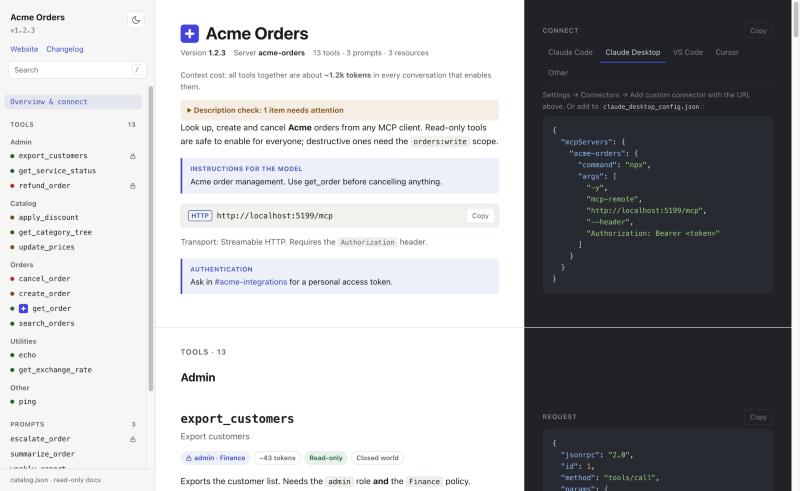
A read-only, ReDoc-style documentation page for an MCP server hosted in ASP.NET Core. It shows what the server offers (tools, prompts, resources) and how to connect to it, from the registrations the MCP SDK already has, with nothing to write twice.




app.MapMcp("/mcp");
app.MapMcpDocs("/mcp-docs");   // that's the whole zero-config path
- Every tool, prompt, resource and template, with parameter and result trees (recursive,
anyOf, maps and enums included), annotation badges, and an example request and response you can fold. - Connect snippets for Claude Code, Claude Desktop, VS Code, Cursor and Goose, with one-click "Add to VS Code" and "Add to Cursor" buttons.
[Authorize]is honoured. A viewer only sees the primitives their MCP client would see.- Exports for agents:
catalog.json,catalog.md,llms.txt, and aserver.jsonfor the MCP Registry. - Checks your descriptions. Missing descriptions and annotations are flagged on the page and logged at startup.
- Strict by default: no inline script or style, a CSP that an existing one of yours always wins over.
- Dark and light themes, accent colour, print styles, keyboard navigation.
Why
An MCP client sees your server through tools/list, which is fine for a model and no use to the
person deciding whether to connect to it. A hand-written page drifts the first time someone renames
a parameter. This page is generated from the same registrations tools/list is, serialized with the
SDK's own JSON options, so what it shows is what a client gets. A test in this repo diffs the two.
About this project
This started as a companion to an MCP server I build at work. I wanted a page that shows, at a glance,
what our MCP server can do, so that I, my colleagues or a client can see it without reading code or
poking tools/list by hand. The project grows as I discover more of MCP, so expect it to change and pick up
new features over time.
If you hit a problem or have an idea, please open an issue. I'll do my best to keep the project moving.
Install
dotnet add package Hlibz.McpDocs.AspNetCore
With central package management, set the version in Directory.Packages.props:
<PackageVersion Include="Hlibz.McpDocs.AspNetCore" Version="0.1.3" />
Quick start
builder.Services.AddMcpServer(...).WithHttpTransport().WithToolsFromAssembly()...;

app.MapMcp("/mcp");
app.MapMcpDocs("/mcp-docs", o =>
{
    o.Description = "What this server is for, **Markdown** subset.";
    o.AuthHeader = "Authorization";    // optional: adds the header to the snippets
    o.AuthHint = "Where to get a token.";
})
.RequireAuthorization();               // RouteGroupBuilder: covers page, catalog.json and assets
Group tools with [McpDocsGroup("Orders")] on the tool class or method.
To try it, run the sample and open http://localhost:5168/mcp-docs/:
dotnet run --project samples/Sample.McpServer --launch-profile http
Options
All optional. Set them in the MapMcpDocs callback.
| Option | Default | What it does |
|---|---|---|
Title |
server title or name | Page title. |
Description |
server instructions | Intro under the title (Markdown subset). |
McpEndpoint |
found from MapMcp |
Path or absolute URL used in the connect snippets. A path that matches no mapped route stops the app once it has started. |
ServerKey |
server name | Key in the generated client configs, e.g. acme-orders. |
AuthHeader |
none | Adds this header, with AuthPlaceholder, to the snippets. |
AuthPlaceholder |
Bearer <token> |
Placeholder value for AuthHeader. |
AuthHint |
none | How to get credentials (Markdown subset). |
ToolGroup |
McpDocsGrouping.ByAttribute |
Sidebar group per tool; also ByNamePrefix, None, or your own function. |
InstallLinks |
true |
"Add to VS Code" / "Add to Cursor" buttons under the connect snippets. They open the editor's own install dialog; with AuthHeader set they carry the placeholder token. |
RegistryName |
none | Reverse-DNS name (io.github.acme/orders); when set, server.json for the MCP Registry is served at {pattern}/server.json (one streamable-http remote, plus the auth header if configured). |
ShowMeta |
false |
Show each primitive's _meta; when off it is also left out of catalog.json. |
CheckDescriptions |
true |
Flag missing descriptions and annotations on the page and as startup warnings. |
DefaultColorMode |
System |
Colour mode for first-time viewers (System, Light, Dark). |
PrimaryColor |
built-in | Accent colour: hex, rgb(), hsl() or a name. Validated at startup. |
DarkModePrimaryColor |
PrimaryColor |
Accent colour in dark mode. |
DarkPreset |
Default |
Midnight, Nord or GitHubDark. |
AdditionalCss |
none | Appended after the built-in CSS, served as _assets/theme.css. |
Favicon |
server icon | https: URL, data:image/ URI or path (~/ = PathBase). |
AddToolbarItem(label, url, newTab) |
none | Link in the sidebar; http(s)://, /path or ~/path. |
PrintStyles |
true |
Print light and plain, without the sidebar. |
Exports for agents
Next to catalog.json, the same per-viewer catalog is rendered as:
catalog.md: every tool, prompt and resource as Markdown, with parameter tables, annotations and required roles.llms.txt: a short index in the llms.txt shape that links tocatalog.md. It lives under the docs path (/mcp-docs/llms.txt), not at the site root; serve it from the root yourself if you want that.server.json: for the MCP Registry, only whenRegistryNameis set.
All three sit in the route group, so .RequireAuthorization() covers them and [Authorize] filtering applies.
No .well-known server card: the proposal is still a draft and its path and shape differ between drafts.
Authorization
[Authorize] on tools, prompts and resources is honoured the way the SDK's AddAuthorizationFilters() honours it
for tools/list etc.: a viewer only sees the primitives their MCP client would see. Same rules — any
[AllowAnonymous] on the class or method wins; otherwise IAuthorizeData, AuthorizationPolicy and
IAuthorizationRequirementData metadata are combined into one policy and evaluated with IAuthorizationService
against HttpContext.User. Gated primitives the viewer can see get a lock badge naming the roles / policies.
Two differences from the MCP endpoint, both inherent to a page opened in a browser:
- Identity is the browser's. The docs request is authenticated by whatever the app's default scheme sees on it (usually a cookie), while MCP clients typically send a bearer token. If the browser isn't signed in, the page shows the anonymous view.
- The authorization resource is the
HttpContext, not the SDK's MCP request context. Resource-based handlers that look for the MCP context won't match here, and the primitive stays hidden.
catalog.json is served private, no-cache; the ETag still hashes the content, so viewers with the same
access share a cached build and get 304s.
The sample signs in with a demo cookie: /demo/sign-in?roles=admin,finance, /demo/sign-out.
Troubleshooting
| Symptom | Cause | Fix |
|---|---|---|
App stops right after starting, critical log about McpEndpoint; docs requests fail with the same message |
The configured path matches no MapMcp route. |
Fix the path, or remove McpEndpoint to use the discovered one. |
| Warning: MCP endpoint requires authorization but the docs page doesn't | The page publishes the whole surface to anyone. | Add .RequireAuthorization() to MapMcpDocs, or accept it. |
Page shows fewer tools than tools/list |
[Authorize] filtering uses the browser's identity (usually a cookie), not your MCP token; or the server uses a custom ListToolsHandler. |
Sign in in the browser; custom handlers aren't visible to the page. |
| Connect snippets show the wrong URL behind a proxy | PathBase or host differs from what the browser sees. |
Set McpEndpoint to the public URL. |
| Page is blank, console shows CSP errors | Your own CSP header replaced ours (an existing one is never overwritten). | Allow script-src 'self'; style-src 'self'; img-src 'self' data: https: for the docs path. |
| Icon doesn't show | Only https: and data:image/ icons are used. |
Serve the icon over https or inline it. |
ArgumentException mentioning PrimaryColor / Favicon |
The value isn't a plain colour / safe URL. | Use a hex, rgb(), hsl() or named colour; an https:, data:image/ or path favicon. |
| Startup warnings "No description" | CheckDescriptions found gaps. |
Add descriptions and annotations, or set CheckDescriptions = false. |
What this doesn't do (yet)
Mostly not a "never": this is where the project stands today, and much of it may change.
- Call anything. For now it's a read-only page: no "try it", no credentials entered in the browser. A "try it" mode may come later.
- Hide the page by environment. Map it only where you want it; there's no
IsDevelopment()switch yet. - Show dynamic servers. Primitives created by a custom
ListToolsHandleror list filters aren't visible; only what's registered, filtered by[Authorize]. Hard to solve in general, but I may find a way. - Run custom HTML or script. Toolbar items are links,
AdditionalCssis CSS; the CSP stays strict. This one is on purpose and likely to stay. - Render full CommonMark. Markdown is a small safe subset for now; it may grow.
- Mark which arguments support completion. The SDK has one
CompleteHandler, nothing per argument, so this depends on the SDK.
Testing your contract
McpDocsSnapshot.CreateAsync(app.Services, viewer: …) returns the catalog as stable, indented JSON
without an HTTP request. Compare it to a checked-in file (or pass it to Verify) and a renamed
parameter, a changed output schema or a dropped [Authorize] fails the build, the MCP equivalent of
an OpenAPI diff. tests/SnapshotTests.cs does this for an
anonymous and an admin viewer; UPDATE_SNAPSHOTS=1 dotnet test accepts a change.
Compatibility
- Targets
net8.0, which also runs in net9 and net10 apps. CI builds and tests on the .NET 8 runtime. - Built against
ModelContextProtocol.AspNetCore2.3.1. Authorization mirrors that version'sAddAuthorizationFilters(); if a newer SDK changes how it filters, update the package. A weekly CI job runs the tests against the newest stable SDK to catch that early. IsAotCompatible: endpoints areRequestDelegates, and the library builds with no trim warnings.- Connect snippets follow the clients' current documentation (VS Code and Cursor install links, Goose
config.yaml). If one stops working after a client update, please open an issue.
Versioning
The package follows semantic versioning. Until 1.0, a minor
version may change an option or the shape of catalog.json. catalog.json, catalog.md and
llms.txt are generated output meant for tools and people, so snapshot tests of them are expected to
change when you upgrade; review the diff, then accept it.
Development
dotnet build
dotnet test tests/Hlibz.McpDocs.AspNetCore.Tests.csproj
tests/ runs a real server on TestServer: it asserts that catalog.json equals what an MCP client
gets from tools/list, prompts/list, resources/list and resources/templates/list (anonymous
and signed in), the status codes anonymous callers get on protected docs, the CSP rules, option
validation, PathBase handling, endpoint discovery and the exports.
tests/Visual screenshots the page with Playwright (light, dark, mobile, recursive and polymorphic
schemas) against baselines in tests/Visual/Baselines/<os>/. Font rendering differs per OS, so only
the macOS baselines are checked in and CI doesn't run it. Install Chromium once, then run:
dotnet build tests/Visual
tests/Visual/bin/Debug/net8.0/.playwright/node/darwin-arm64/node tests/Visual/bin/Debug/net8.0/.playwright/package/cli.js install chromium
dotnet test tests/Visual
A missing baseline is written on first run; UPDATE_SNAPSHOTS=1 accepts changes.
CI (ci.yml) builds, tests and packs, and checks the
package with check-package.sh: README and icon
in the nuspec, and the page assets embedded in the assembly. Pushing a v*.*.* tag runs
release.yml, which runs the same checks and publishes to
NuGet with trusted publishing; the version comes from the tag. sdk-latest.yml
runs the tests weekly against the newest MCP SDK. Actions are pinned by commit SHA; Dependabot keeps them current.
src/Hlibz.McpDocs.AspNetCore/
  McpDocsOptions.cs                          options, [McpDocsGroup], grouping strategies
  McpDocsCatalog.cs                          catalog.json from McpServerOptions collections, per viewer
  McpDocsAuthorization.cs                    [Authorize] evaluation, mirrors the SDK's list filters
  McpDocsEndpointRouteBuilderExtensions.cs   MapMcpDocs: page, catalog, exports, _assets/*
  McpDocsEndpointDiscovery.cs                finds the MapMcp route, startup checks
  McpDocsExports.cs                          catalog.md, llms.txt, server.json
  McpDocsSnapshot.cs                         public catalog snapshot for tests
  McpDocsTheme.cs                            theme.css from the options, value validation
  McpDocsQuality.cs                          description checks
  Assets/index.html, app.css, print.css, app.js   embedded UI (vanilla JS, no deps, no inline script)
samples/Sample.McpServer/                    13 tools, 3 prompts, 2 resources, 2 templates; demo cookie sign-in
License
MIT
| Product | Versions Compatible and additional computed target framework versions. |
|---|---|
| .NET | net8.0 is compatible. net8.0-android was computed. net8.0-browser was computed. net8.0-ios was computed. net8.0-maccatalyst was computed. net8.0-macos was computed. net8.0-tvos was computed. net8.0-windows was computed. net9.0 was computed. net9.0-android was computed. net9.0-browser was computed. net9.0-ios was computed. net9.0-maccatalyst was computed. net9.0-macos was computed. net9.0-tvos was computed. net9.0-windows was computed. net10.0 was computed. net10.0-android was computed. net10.0-browser was computed. net10.0-ios was computed. net10.0-maccatalyst was computed. net10.0-macos was computed. net10.0-tvos was computed. net10.0-windows was computed. |
-
net8.0
- ModelContextProtocol.AspNetCore (>= 2.3.1)
NuGet packages
This package is not used by any NuGet packages.
GitHub repositories
This package is not used by any popular GitHub repositories.
| Version | Downloads | Last Updated |
|---|---|---|
| 0.1.3 | 52 | 11/11/2026 |
| 0.1.2 | 89 | 11/6/2026 |
| 0.1.1 | 102 | 11/6/2026 |
| 0.1.0 | 91 | 11/6/2026 |
| 0.1.0-preview.1 | 57 | 11/6/2026 |