Holecek.FuzzyMath
2.0.0
Prefix Reserved
dotnet add package Holecek.FuzzyMath --version 2.0.0
NuGet\Install-Package Holecek.FuzzyMath -Version 2.0.0
<PackageReference Include="Holecek.FuzzyMath" Version="2.0.0" />
<PackageVersion Include="Holecek.FuzzyMath" Version="2.0.0" />
<PackageReference Include="Holecek.FuzzyMath" />
paket add Holecek.FuzzyMath --version 2.0.0
#r "nuget: Holecek.FuzzyMath, 2.0.0"
#:package Holecek.FuzzyMath@2.0.0
#addin nuget:?package=Holecek.FuzzyMath&version=2.0.0
#tool nuget:?package=Holecek.FuzzyMath&version=2.0.0


Fuzzy Numbers Library for .NET
An open-source library for performing basic operations with fuzzy numbers. It supports piecewise linear fuzzy numbers of arbitrarily high degree, which makes it computationally efficient. Piecewise linear fuzzy numbers can also be used to approximate more complex types of fuzzy numbers.
The library is written in C# and targets .NET Standard 2.0, making it compatible with both modern .NET versions and older .NET Framework applications.
The library is available as a NuGet package Holecek.FuzzyMath.
A sample project – see the library in action
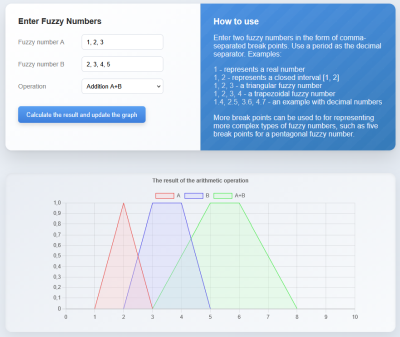
You can find a sample repository on GitHub that demonstrates how to use this library in practice. It is a simple Blazor WebAssembly project that performs arithmetic operations on two fuzzy numbers.
The goal is not to showcase complex calculations, but rather to demonstrate how to parse fuzzy numbers entered by users, validate them, and display the resulting fuzzy number as a graph. These tasks are essential when working with fuzzy numbers in real-world applications.
In addition to the source code, the sample repository also includes a more detailed description of how these tasks are implemented.
You also can try the sample application live at: fuzzymath.holecekp.eu
Usage
Create a fuzzy number
The classes related to fuzzy numbers are located in the Holecek.FuzzyMath.FuzzyNumbers namespace.
Using the FuzzyNumber class constructor, you can create various common types of fuzzy numbers. A triangular fuzzy number can be created by passing three values to the constructor:
var triangular = new FuzzyNumber(1, 2, 3);
A trapezoidal fuzzy number is created by passing four values:
var trapezoidal = new FuzzyNumber(1, 2, 3, 4);
Providing just two values creates a fuzzy representation of a closed interval, and passing a single numeric value creates a fuzzy representation of a crisp number:
var interval = new FuzzyNumber(5, 6);
var crisp = new FuzzyNumber(7);
Another way to create a fuzzy number is to provide a list of α-cuts in order from the support to the kernel. To define a valid fuzzy number, the list of α-cuts must contain at least two items, and each α-cut must be a subinterval of the previous one.
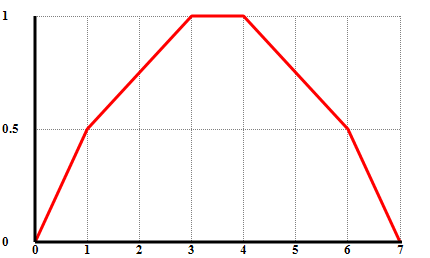
Example: A piecewise linear fuzzy number A defined by 3 α-cuts can be created with the following code:
var A = new FuzzyNumber(
[
    new Interval(0, 7), // the support
    new Interval(1, 6), // 0.5-cut
    new Interval(3, 4)  // the kernel (1-cut)
]);
Basic methods
Get an α-cut
An α-cut of a fuzzy number can be obtained using the GetAlphaCut method for any α in the range [0, 1]. For example:
var fuzzyNumber = new FuzzyNumber(1, 2, 3);
Interval alphaCut = fuzzyNumber.GetAlphaCut(0.75);
Mathematical note:
For convenience, GetAlphaCut(0) returns the support of the fuzzy number instead of the actual 0-cut,
which would be (-∞, ∞) if we followed the strict mathematical definition.
This makes the method much more practical to use.
Get membership degree
The membership degree of an element is calculated by GetMembership. For example:
var fuzzyNumber = new FuzzyNumber(1, 2, 3);
double alpha = fuzzyNumber.GetMembership(1.5);
Changing the number of α-cuts
The WithAlphaCutsCount method creates a copy of the fuzzy number with the specified number of α-cuts.
This is especially useful when performing operations with multiple fuzzy numbers that require all of them to have the same number of α-cuts.
In the following example, a triangular fuzzy number is recreated with 60 α-cuts:
var fuzzyNumber = new FuzzyNumber(1, 2, 3).WithAlphaCutsCount(60);
Equality of fuzzy numbers
The method IsEqualTo checks if one fuzzy number is equal to another. The comparison is made according to the definition: two fuzzy numbers
are considered equal if their respective α-cuts are equal. The compared fuzzy numbers do not need to have the same number of α-cuts.
The method takes two arguments: another fuzzy number for comparison and a tolerance value for the comparison.
const double Tolerance = 0.001;
var first = new FuzzyNumber(1, 2, 3);
var sameWithMoreAlphaCuts = new FuzzyNumber(1, 2, 3).WithAlphaCutsCount(4);

bool areEqual = first.IsEqualTo(sameWithMoreAlphaCuts, Tolerance); // true
Arithmetic Operations with Fuzzy Numbers
The basic arithmetic operators +, -, *, and / are overloaded, making arithmetic operations with fuzzy numbers very simple.
var a = new FuzzyNumber(1, 2, 3);
var b = new FuzzyNumber(3, 4, 5);
var c = new FuzzyNumber(6, 7, 8, 9);
FuzzyNumber result = 0.3  * a + 0.6 * b + 0.1 * c;
As seen in the example above, it is also possible to combine FuzzyNumber instances with double values for arithmetic operations.
Using the built-in mathematical operators is simple and convenient, but it has a limitation: the fuzzy numbers must have the same number of α-cuts. If they don't, an exception will be thrown.
If you need more control, or if you're working with fuzzy numbers that have a different number of α-cuts, you can use the static methods in the FuzzyNumberArithmetic class. The Add, Subtract, Multiply, and Divide methods each have an overload that accepts the desired number of α-cuts for the result as an additional argument. When this argument is provided, fuzzy numbers with different α-cuts will be automatically converted.
var a = new FuzzyNumber(1, 2, 3).WithAlphaCutsCount(15);
var b = new FuzzyNumber(3, 4, 5).WithAlphaCutsCount(40);;
FuzzyNumber sum = FuzzyNumberArithmetic.Add(a, b, alphaCutsCount: 30);
The FuzzyNumberArithmetic class also provides additional methods:
Negation: Returns the negation of a fuzzy number A, i.e.,-A.Reciprocal: Returns the reciprocal of a fuzzy number A, i.e.,1/A.
Advanced operations with α-cuts
Creating a fuzzy number using an α-cuts function
Instead of directly providing a list of α-cuts to the constructor, you can create a fuzzy number from a function that defines its α-cuts.
This is done using the static method FuzzyNumber.FromAlphaCutFunction.
It expects a function that takes the α (from 0 to 1) and returns the corresponding α-cut interval.
In the following example, a fuzzy number is created with 60 α-cuts defined as [2 + 3α, 10 - 2α], for any α in [0, 1]:
const int AlphaCutCount = 60;
FuzzyNumber fuzzyNumber = FuzzyNumber.FromAlphaCutFunction(
    alpha => new Interval(2 + 3 * alpha, 10 - 2 * alpha),
    AlphaCutCount);
An important difference from providing a list of α-cuts directly to the constructor is that the constructor requires the α-cuts to be valid. Any α-cut must be a subinterval of all α-cuts with a lower value of α to form a valid fuzzy number. If this condition is not met, the constructor throws an exception.
The FuzzyNumber.FromAlphaCutFunction method, however, behaves differently. If the function returns α-cuts that do not satisfy the condition, they are automatically
adjusted to ensure validity. This is especially important when creating fuzzy numbers as a result of mathematical operations, as rounding errors in the double values
used for the interval boundaries could otherwise lead to invalid α-cuts.
For example, due to rounding errors, the resulting α-cuts could be {[2, 3], [1.99999, 3], [2, 3.00001]}.
The constructor would throw an exception, whereas the FromAlphaCutFunction method would automatically adjust these α-cuts to {[2, 3], [2, 3], [2, 3]} to ensure validity.
Custom operations with fuzzy numbers
Unary and binary operations with fuzzy numbers can be performed using the FuzzyNumber.FromFuzzyNumberOperation static method. In the case of a unary operation,
the method takes the input fuzzy number and a function that transforms its α-cuts. By default, the result will have the same number of α-cuts as the input, but a different
number of α-cuts can be optionally provided as another argument.
For example, the negation of a fuzzy number can be created as follows:
var inputFuzzyNumber  = new FuzzyNumber(1, 2, 3);

FuzzyNumber result = FuzzyNumber.FromFuzzyNumberOperation(
    inputFuzzyNumber,
    alphaCut => -1 * alphaCut);
A binary operation with two fuzzy numbers can be done in a similar way. The following arguments are provided to the method: two input fuzzy numbers, a function that takes the α-cuts from the first and the second input fuzzy numbers and returns the corresponding α-cut for the result.
The following example shows the multiplication of two fuzzy numbers:
var fuzzyNumberA  = new FuzzyNumber(1, 2, 3);
var fuzzyNumberB  = new FuzzyNumber(4, 5, 6);

FuzzyNumber result = FuzzyNumber.FromFuzzyNumberOperation(
    fuzzyNumberA,
    fuzzyNumberB,
    (alphaCutA, alphaCutB) => alphaCutA * alphaCutB;
The input fuzzy numbers must have the same number of α-cut, because otherwhise it isn't possible to determine the number of α-cuts for the result. An exception is thrown in that case. However, the method has another overload, that takes the number of α-cuts for the resulting fuzzy number as an additional argument. This overload can operate also on input fuzzy numbers with different numbers of α-cuts.
Parsing, formatting and drawing fuzzy numbers
The library also includes dedicated APIs for parsing fuzzy numbers from text, formatting them back into text, and converting them into graph points for a graphical presentation to the user.
Parsing fuzzy numbers from text
The Holecek.FuzzyMath.FuzzyNumbers.Parsing namespace contains:
IFuzzyNumberParserFuzzyNumberParser
The FuzzyNumberParser class parses a fuzzy number from a list of break points. By default, break points are separated by commas, and a period is used as the decimal separator (for example, "1.5, 2, 2.5" for a triangular fuzzy number). The possible break point separators can be customized using the BreakPointsSeparators property. Moreover, Culture can be set to a specific culture instead of the neutral culture.
var parser = new FuzzyNumberParser();
if (parser.TryParse("1, 2, 3, 4", out FuzzyNumber? fuzzyNumber))
{
    // use fuzzyNumber
}
The IFuzzyNumberParser interface can be used to register the fuzzy number parser in DI. This ensures that the same format is used consistently throughout the application and can be easily replaced with a custom implementation if needed.
Formatting fuzzy numbers to text
The Holecek.FuzzyMath.FuzzyNumbers.Formatting namespace contains:
IFuzzyNumberFormatterFuzzyNumberFormatter
These can be used to convert a fuzzy number to a string, either for serialization, saving to a file, sending to an API, or presenting it to a user. The FuzzyNumberFormatter class produces a comma-separated list of break points. This string can be later used to convert the value back to a fuzzy number by FuzzyNumberParser. Similarly to parsing, the break point separator and culture can be customized.
var formatter = new FuzzyNumberFormatter();
string text = formatter.Format(fuzzyNumber);
Converting fuzzy numbers to graph points
The Holecek.FuzzyMath.FuzzyNumbers.Drawing namespace contains:
IFuzzyNumberToGraphPointsConverterFuzzyNumberToGraphPointsConverter
The converter exposes the Convert(FuzzyNumber fuzzyNumber) method, which returns a list of System.Drawing.PointF values suitable for plotting the fuzzy number. This makes it easy to present fuzzy numbers to users in graphical form using a graph plotting library of your choice. See
the sample Blazor app for a practical example.
var converter = new FuzzyNumberToGraphPointsConverter();
List<PointF> points = converter.Convert(fuzzyNumber);
Intervals
The classes related to intervals are found in the Holecek.FuzzyMath.Intervals namespace. The Interval class represents a closed interval and is primarily used in this library to represent the α-cut of a fuzzy number.
The Min and Max properties represent the lower and upper bounds of the interval. The arithmetic operators +, -, *, and / are overloaded, allowing for easy interval arithmetic in a similar way to the fuzzy numbers described earlier.
| Product | Versions Compatible and additional computed target framework versions. |
|---|---|
| .NET | net5.0 was computed. net5.0-windows was computed. net6.0 was computed. net6.0-android was computed. net6.0-ios was computed. net6.0-maccatalyst was computed. net6.0-macos was computed. net6.0-tvos was computed. net6.0-windows was computed. net7.0 was computed. net7.0-android was computed. net7.0-ios was computed. net7.0-maccatalyst was computed. net7.0-macos was computed. net7.0-tvos was computed. net7.0-windows was computed. net8.0 was computed. net8.0-android was computed. net8.0-browser was computed. net8.0-ios was computed. net8.0-maccatalyst was computed. net8.0-macos was computed. net8.0-tvos was computed. net8.0-windows was computed. net9.0 was computed. net9.0-android was computed. net9.0-browser was computed. net9.0-ios was computed. net9.0-maccatalyst was computed. net9.0-macos was computed. net9.0-tvos was computed. net9.0-windows was computed. net10.0 was computed. net10.0-android was computed. net10.0-browser was computed. net10.0-ios was computed. net10.0-maccatalyst was computed. net10.0-macos was computed. net10.0-tvos was computed. net10.0-windows was computed. |
| .NET Core | netcoreapp2.0 was computed. netcoreapp2.1 was computed. netcoreapp2.2 was computed. netcoreapp3.0 was computed. netcoreapp3.1 was computed. |
| .NET Standard | netstandard2.0 is compatible. netstandard2.1 was computed. |
| .NET Framework | net461 was computed. net462 was computed. net463 was computed. net47 was computed. net471 was computed. net472 was computed. net48 was computed. net481 was computed. |
| MonoAndroid | monoandroid was computed. |
| MonoMac | monomac was computed. |
| MonoTouch | monotouch was computed. |
| Tizen | tizen40 was computed. tizen60 was computed. |
| Xamarin.iOS | xamarinios was computed. |
| Xamarin.Mac | xamarinmac was computed. |
| Xamarin.TVOS | xamarintvos was computed. |
| Xamarin.WatchOS | xamarinwatchos was computed. |
-
.NETStandard 2.0
- No dependencies.
NuGet packages
This package is not used by any NuGet packages.
GitHub repositories
This package is not used by any popular GitHub repositories.
| Version | Downloads | Last Updated |
|---|---|---|
| 2.0.0 | 130 | 5/27/2026 |
| 1.0.0 | 273 | 12/3/2025 |
| 0.9.0-alpha | 370 | 11/30/2025 |