IcodeNet.FluentSpecification
1.1.1
dotnet add package IcodeNet.FluentSpecification --version 1.1.1
NuGet\Install-Package IcodeNet.FluentSpecification -Version 1.1.1
<PackageReference Include="IcodeNet.FluentSpecification" Version="1.1.1" />
<PackageVersion Include="IcodeNet.FluentSpecification" Version="1.1.1" />
<PackageReference Include="IcodeNet.FluentSpecification" />
paket add IcodeNet.FluentSpecification --version 1.1.1
#r "nuget: IcodeNet.FluentSpecification, 1.1.1"
#:package IcodeNet.FluentSpecification@1.1.1
#addin nuget:?package=IcodeNet.FluentSpecification&version=1.1.1
#tool nuget:?package=IcodeNet.FluentSpecification&version=1.1.1







A lightweight C# implementation of the Specification pattern. Express business rules as small, reusable, composable objects and combine them fluently with And, Or and Not.
Install
dotnet add package IcodeNet.FluentSpecification
The package ID is IcodeNet.FluentSpecification. In code, the namespace stays FluentSpecification:
using FluentSpecification;
Supported platforms: the package targets .NET Standard 2.0. It runs on .NET Framework 4.6.1+, .NET Core 2.0+ and .NET 5+, on Windows, Linux and macOS. It has no dependencies.
Why?
Instead of scattering if conditions and LINQ predicates across your codebase, you express each rule as a named class (or a one-line lambda). Rules stay decoupled from your domain objects and can be combined without touching either.
How it fits together
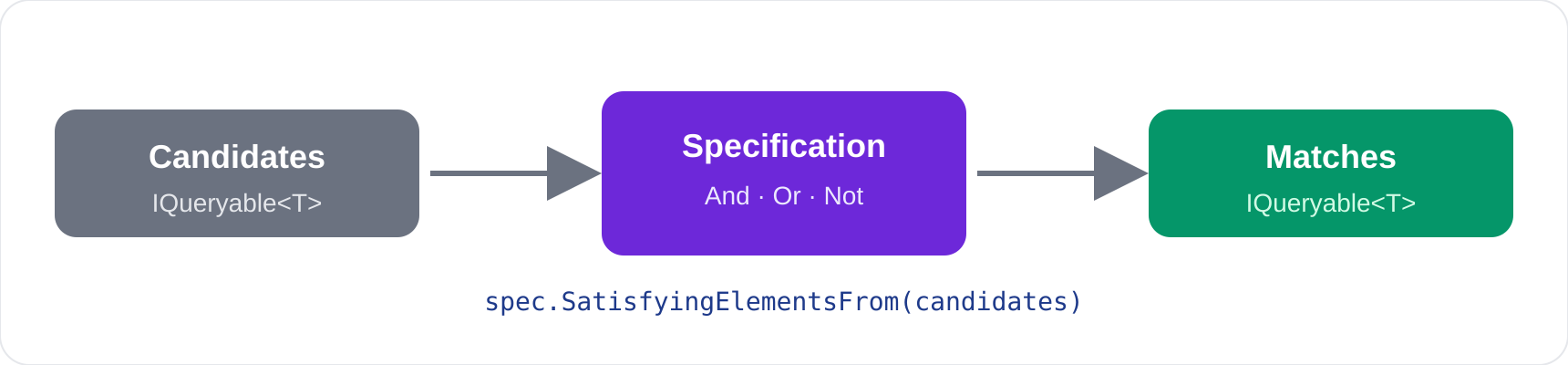
Core Classes
| Class | Purpose |
|---|---|
SpecificationBase<T> |
Abstract base – implement SatisfyingElementsFrom to define your rule |
CompositeSpecification<T> |
Extends SpecificationBase<T> with And, Or, and Not combinators |
FunctionalSpecification<T> |
Ready-made specification built from a lambda – no subclass needed. In-memory data only |
ExpressionSpecification<T> |
Same, but built from an expression, so databases such as Entity Framework can run it as SQL |
Quick Start
1 – Define a named specification
Subclass CompositeSpecification<T> and express the rule in LINQ:
public class OverDueLoanSpecification : CompositeSpecification<Loan>
{
    public override IQueryable<Loan> SatisfyingElementsFrom(IQueryable<Loan> candidates)
    {
        return from l in candidates
               where l.DateTaken < DateTime.Today
               where l.DateTaken.Add(l.LoanPeriod) < DateTime.Now
               select l;
    }
}
2 – Check a single object
var customer = new Customer { FirstName = "Alice", Balance = 500.00 };
var valuedCustomer = new ValuedCustomerSpecification(); // Balance > 1300

bool isValued = valuedCustomer.IsSatisfiedBy(customer); // false
3 – Filter a collection
The OverDueLoanSpecification above works on in-memory data. See the database section below for rules that run as SQL.
var overdueSpec = new OverDueLoanSpecification();
IQueryable<Loan> overdueLoans = overdueSpec.SatisfyingElementsFrom(loans.AsQueryable());
4 – Use a lambda instead of a class
When the rule is simple enough that a dedicated class would be overkill, use FunctionalSpecification<T> (in-memory data) or ExpressionSpecification<T> (databases):
var bigLoanSpec = new FunctionalSpecification<Loan>(l => l.Amount > 10_000.00);
IQueryable<Loan> bigLoans = bigLoanSpec.SatisfyingElementsFrom(loans.AsQueryable());
5 – Use a database
For Entity Framework or any other query provider, use ExpressionSpecification<T>. The provider translates it to SQL:
var bigLoans = new ExpressionSpecification<Loan>(l => l.Amount > 10_000);
var rows = bigLoans.SatisfyingElementsFrom(db.Loans).ToList(); // WHERE Amount > 10000
6 – Combine specifications
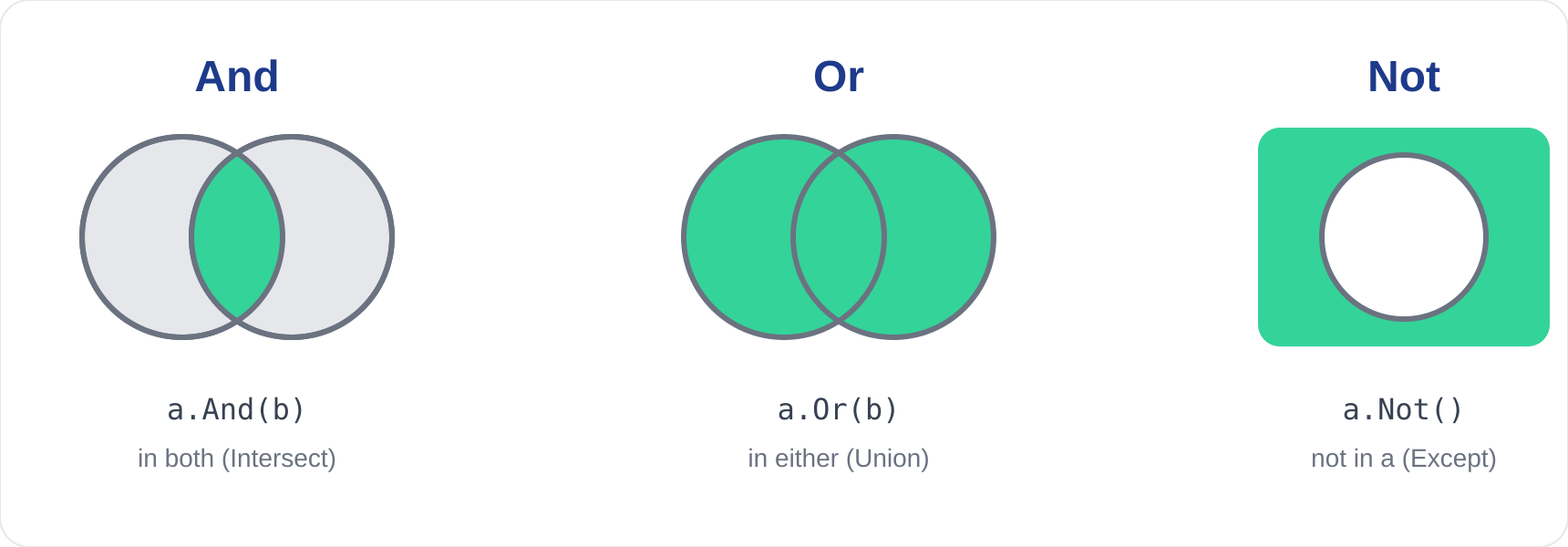
Specifications that extend CompositeSpecification<T> (including FunctionalSpecification<T>) expose And, Or, and Not:
var overdueSpec  = new OverDueLoanSpecification();
var bigLoanSpec  = new FunctionalSpecification<Loan>(l => l.Amount > 10_000.00);
var sixDaysSpec  = new FunctionalSpecification<Loan>(l => l.LoanPeriod == TimeSpan.FromDays(6));
var fortDaysSpec = new FunctionalSpecification<Loan>(l => l.LoanPeriod == TimeSpan.FromDays(14));

// AND – overdue AND large
var overdueAndBig = overdueSpec.And(bigLoanSpec);

// OR – 6-day or 14-day loans
var sixOrFourteen = sixDaysSpec.Or(fortDaysSpec);

// NOT – anything that is NOT a 6-day loan
var notSixDays = sixDaysSpec.Not();

// Use just like any other specification
IQueryable<Loan> results = repo.FindElementsBy(overdueAndBig);
Combinators can be chained arbitrarily:
var complex = overdueSpec.And(bigLoanSpec).And(sixDaysSpec.Not());
Repository Integration
Pass a specification into your repository to keep query logic out of your data layer:
public class LoanRepository
{
    public IQueryable<Loan> FindElementsBy(SpecificationBase<Loan> spec)
    {
        // fetch your data source, then delegate filtering to the spec
        return spec.SatisfyingElementsFrom(loans.AsQueryable());
    }
}

// Caller decides the rule – repository stays unchanged
var results = repo.FindElementsBy(overdueSpec.And(bigLoanSpec));
How it works, and what to watch for
Read this before you use the library with a database.
- Each rule filters a set.
SatisfyingElementsFromtakes anIQueryable<T>and returns the items that pass.IsSatisfiedBychecks one item by running the same rule over a one-item set. And,OrandNotuse LINQ set operations (Intersect,UnionandExcept). In memory, items are compared withEqualsandGetHashCode. A class without them is compared by reference, so two different objects with the same data count as different items. On a database, the provider compares whole rows (every selected column) and ignoresEquals. The same specification can therefore return different results in memory and on a database.- The combinators remove duplicates and do not keep order. A single rule keeps duplicates. A combined rule does not. On a database the order of a combined result is not guaranteed, so add
OrderBywhen order matters. IsSatisfiedByis fast for the built-in rules. It checks one item directly. A custom rule that only overridesSatisfyingElementsFromuses the slower default, which runs a query over a one-item set.- Databases: use
ExpressionSpecification<T>.FunctionalSpecification<T>takes aFunc<T, bool>(plain code), which Entity Framework and other query providers cannot translate to SQL. They throwInvalidOperationExceptionwhen you read the query.ExpressionSpecification<T>takes an expression, so the provider turns it into SQL. A named specification also works, as long as every construct in its LINQ expression is one your provider can translate. For example,DateTime.Add(TimeSpan)in theOverDueLoanSpecificationexample above works in memory but Entity Framework cannot translate it. If you must use aFunc, load the rows first withToList().AsQueryable(). Note thatAsEnumerable().AsQueryable()does not help. - Combinators and databases.
And,OrandNotuseIntersect,UnionandExcept. With Entity Framework on SQLite they run when every rule is an expression, and the tests cover this. Other providers may behave differently, so test yours. - Null arguments fail fast. Passing
nullto a constructor, a combinator orSatisfyingElementsFromthrowsArgumentNullExceptionstraight away. - Thread safety. Specifications hold no changing state. They are safe to share across threads if your own predicates are.
API reference
Full XML documentation ships with the package, so your editor shows it as you type.
| Member | Description |
|---|---|
SpecificationBase<T>.IsSatisfiedBy(T) |
Returns true when one item passes the rule |
SpecificationBase<T>.SatisfyingElementsFrom(IQueryable<T>) |
Abstract. Returns the items that pass the rule |
CompositeSpecification<T>.And(other) |
Both rules must pass |
CompositeSpecification<T>.Or(other) |
Either rule must pass |
CompositeSpecification<T>.Not() |
The rule must not pass |
FunctionalSpecification<T>(Func<T, bool>) |
A rule built from a lambda. In-memory data only |
ExpressionSpecification<T>(Expression<Func<T, bool>>) |
A rule built from an expression. Works with Entity Framework |
AndSpecification<T>, OrSpecification<T>, NotSpecification<T> |
What the combinators return. You rarely create them directly |
Troubleshooting
SpecificationBase<T>has noAndmethod. OnlyCompositeSpecification<T>has the combinators. Derive your rule fromCompositeSpecification<T>, not fromSpecificationBase<T>.- Two equal-looking objects are treated as different (in memory). Override
EqualsandGetHashCode, or use arecord. This has no effect on a database, which compares whole rows. InvalidOperationException: "The LINQ expression ... could not be translated". You usedFunctionalSpecification<T>on a database query. Switch toExpressionSpecification<T>.
Samples and tests
FluentSpecification.Samples is a runnable console example (loans and customers):
dotnet run --project FluentSpecification.Samples
FluentSpecification.Tests holds the unit tests:
dotnet test
Contributing, security and licence
See CONTRIBUTING.md, SECURITY.md and CHANGELOG.md. Released under the MIT licence.
Project structure
FluentSpecification/
├── FluentSpecification/          # The NuGet package (netstandard2.0)
├── FluentSpecification.Tests/    # xUnit tests
└── FluentSpecification.Samples/  # Runnable examples (Loan / Customer domain)
| Product | Versions Compatible and additional computed target framework versions. |
|---|---|
| .NET | net5.0 was computed. net5.0-windows was computed. net6.0 was computed. net6.0-android was computed. net6.0-ios was computed. net6.0-maccatalyst was computed. net6.0-macos was computed. net6.0-tvos was computed. net6.0-windows was computed. net7.0 was computed. net7.0-android was computed. net7.0-ios was computed. net7.0-maccatalyst was computed. net7.0-macos was computed. net7.0-tvos was computed. net7.0-windows was computed. net8.0 was computed. net8.0-android was computed. net8.0-browser was computed. net8.0-ios was computed. net8.0-maccatalyst was computed. net8.0-macos was computed. net8.0-tvos was computed. net8.0-windows was computed. net9.0 was computed. net9.0-android was computed. net9.0-browser was computed. net9.0-ios was computed. net9.0-maccatalyst was computed. net9.0-macos was computed. net9.0-tvos was computed. net9.0-windows was computed. net10.0 was computed. net10.0-android was computed. net10.0-browser was computed. net10.0-ios was computed. net10.0-maccatalyst was computed. net10.0-macos was computed. net10.0-tvos was computed. net10.0-windows was computed. |
| .NET Core | netcoreapp2.0 was computed. netcoreapp2.1 was computed. netcoreapp2.2 was computed. netcoreapp3.0 was computed. netcoreapp3.1 was computed. |
| .NET Standard | netstandard2.0 is compatible. netstandard2.1 was computed. |
| .NET Framework | net461 was computed. net462 was computed. net463 was computed. net47 was computed. net471 was computed. net472 was computed. net48 was computed. net481 was computed. |
| MonoAndroid | monoandroid was computed. |
| MonoMac | monomac was computed. |
| MonoTouch | monotouch was computed. |
| Tizen | tizen40 was computed. tizen60 was computed. |
| Xamarin.iOS | xamarinios was computed. |
| Xamarin.Mac | xamarinmac was computed. |
| Xamarin.TVOS | xamarintvos was computed. |
| Xamarin.WatchOS | xamarinwatchos was computed. |
-
.NETStandard 2.0
- No dependencies.
NuGet packages
This package is not used by any NuGet packages.
GitHub repositories
This package is not used by any popular GitHub repositories.