KumikoUI.Uno
0.2.0
See the version list below for details.
dotnet add package KumikoUI.Uno --version 0.2.0
NuGet\Install-Package KumikoUI.Uno -Version 0.2.0
<PackageReference Include="KumikoUI.Uno" Version="0.2.0" />
<PackageVersion Include="KumikoUI.Uno" Version="0.2.0" />
<PackageReference Include="KumikoUI.Uno" />
paket add KumikoUI.Uno --version 0.2.0
#r "nuget: KumikoUI.Uno, 0.2.0"
#:package KumikoUI.Uno@0.2.0
#addin nuget:?package=KumikoUI.Uno&version=0.2.0
#tool nuget:?package=KumikoUI.Uno&version=0.2.0

KumikoUI.Uno



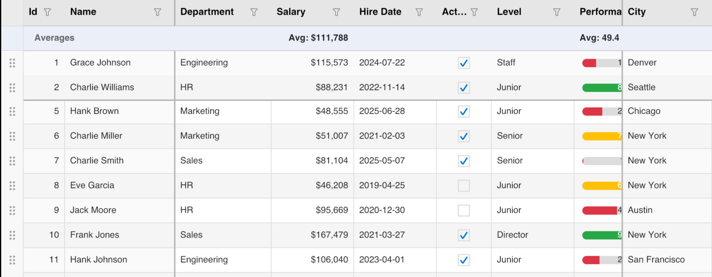
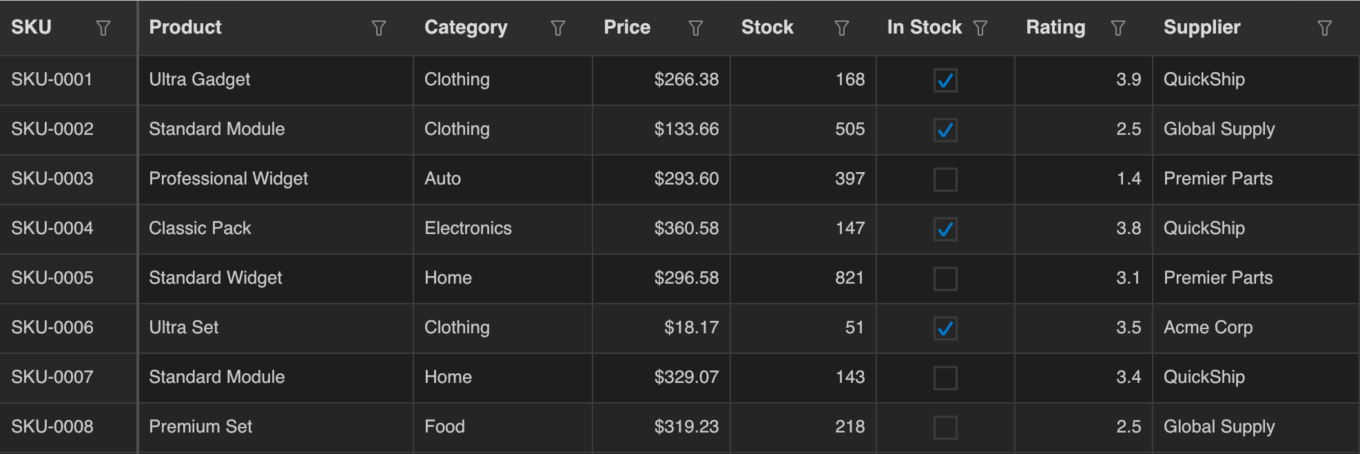
KumikoUI.Uno is a high-performance data grid control for the Uno Platform. The whole grid is drawn with SkiaSharp on one canvas, with no native cell controls, using the same engine and features as KumikoUI.Maui: virtual scrolling, sorting, filtering, grouping, summaries, cell editing, frozen columns and rows, row drag and drop, theming and localization.
It targets .NET 10 on Windows (WinUI), desktop (Windows, macOS, Linux), WebAssembly, Android and iOS.
Which package do I install?
| You are building | Install |
|---|---|
| An Uno Platform app | KumikoUI.Uno (this package) |
| A .NET MAUI app | KumikoUI.Maui |
| Your own host, or rendering to an image | KumikoUI.SkiaSharp |
| Only the data model, with your own renderer | KumikoUI.Core |
Installing KumikoUI.Uno brings in KumikoUI.Core and KumikoUI.SkiaSharp. All four packages share one version.
Quick start
Install the package in your Uno app project:
dotnet add package KumikoUI.Uno
The app uses the Skia renderer. In your app's .csproj, include SkiaRenderer in UnoFeatures:
<UnoFeatures>
  SkiaRenderer;
</UnoFeatures>
On the Windows (WinAppSDK) head, also reference SkiaSharp.Views.WinUI, which the SkiaRenderer feature does not add there. samples/SampleApp.Uno shows the full project setup.
Declare the grid and its columns in XAML:
<Page x:Class="MyApp.MainPage"
      xmlns="http://schemas.microsoft.com/winfx/2006/xaml/presentation"
      xmlns:x="http://schemas.microsoft.com/winfx/2006/xaml"
      xmlns:kumiko="using:KumikoUI.Uno"
      xmlns:core="using:KumikoUI.Core.Models">

    <kumiko:KumikoDataGrid ItemsSource="{Binding People}"
                           RowHeight="36"
                           HeaderHeight="40"
                           AllowSorting="True"
                           AllowFiltering="True">
        <core:KumikoColumn Header="Name" PropertyName="Name" Width="160" />
        <core:KumikoColumn Header="Age" PropertyName="Age" ColumnType="Numeric" Width="80" />
        <core:KumikoColumn Header="Active" PropertyName="IsActive" ColumnType="Boolean" Width="80" />
    </kumiko:KumikoDataGrid>
</Page>
Provide the data. Marking the row type with [KumikoGridItem] generates reflection-free property access, which Native AOT, WebAssembly and trimmed builds need.
using System.Collections.ObjectModel;
using KumikoUI.Core.Data;
using Microsoft.UI.Xaml.Controls;

public sealed partial class MainPage : Page
{
    public ObservableCollection<Person> People { get; } = new()
    {
        new Person { Name = "Ada", Age = 36, IsActive = true },
        new Person { Name = "Grace", Age = 45, IsActive = false },
    };

    public MainPage()
    {
        InitializeComponent();
        DataContext = this;
    }
}

[KumikoGridItem]
public class Person
{
    public string Name { get; set; } = "";
    public int Age { get; set; }
    public bool IsActive { get; set; }
}
Columns is the content property of KumikoDataGrid, so columns go directly inside the element. To use a custom font, register it before the first grid renders with KumikoFonts.RegisterFromAppPackageAsync("Family", "ms-appx:///Assets/Fonts/File.ttf").
Documentation
- Project README: column types, editing, validation, theming, fonts and more.
- Uno sample app.
- Uno host design notes.
- Changelog and versioning policy.
- Report an issue.
License
MIT. See LICENSE.
| Product | Versions Compatible and additional computed target framework versions. |
|---|---|
| .NET | net10.0 is compatible. net10.0-android was computed. net10.0-android36.0 is compatible. net10.0-browser was computed. net10.0-browserwasm1.0 is compatible. net10.0-desktop1.0 is compatible. net10.0-ios was computed. net10.0-ios26.0 is compatible. net10.0-maccatalyst was computed. net10.0-macos was computed. net10.0-tvos was computed. net10.0-windows was computed. net10.0-windows10.0.26100 is compatible. |
-
net10.0
- KumikoUI.Core (>= 0.2.0)
- KumikoUI.SkiaSharp (>= 0.2.0)
- SkiaSharp.Views.Uno.WinUI (>= 4.153.1)
- Uno.WinUI (>= 6.7.135)
-
net10.0-android36.0
- KumikoUI.Core (>= 0.2.0)
- KumikoUI.SkiaSharp (>= 0.2.0)
- SkiaSharp.Skottie (>= 4.153.1)
- SkiaSharp.Views (>= 4.153.1)
- SkiaSharp.Views.Uno.WinUI (>= 4.153.1)
- Uno.WinUI (>= 6.7.135)
-
net10.0-browserwasm1.0
- KumikoUI.Core (>= 0.2.0)
- KumikoUI.SkiaSharp (>= 0.2.0)
- SkiaSharp.Views.Uno.WinUI (>= 4.153.1)
- Uno.WinUI (>= 6.7.135)
-
net10.0-desktop1.0
- KumikoUI.Core (>= 0.2.0)
- KumikoUI.SkiaSharp (>= 0.2.0)
- SkiaSharp.NativeAssets.Linux (>= 4.153.1)
- SkiaSharp.Views.Uno.WinUI (>= 4.153.1)
- Uno.WinUI (>= 6.7.135)
-
net10.0-ios26.0
- KumikoUI.Core (>= 0.2.0)
- KumikoUI.SkiaSharp (>= 0.2.0)
- SkiaSharp.Skottie (>= 4.153.1)
- SkiaSharp.Views (>= 4.153.1)
- SkiaSharp.Views.Uno.WinUI (>= 4.153.1)
- Uno.WinUI (>= 6.7.135)
-
net10.0-windows10.0.26100
- KumikoUI.Core (>= 0.2.0)
- KumikoUI.SkiaSharp (>= 0.2.0)
- Microsoft.Windows.SDK.BuildTools (>= 10.0.28000.2705)
- Microsoft.WindowsAppSDK (>= 1.7.250909003)
- SkiaSharp.Views.WinUI (>= 4.153.1)
- Uno.WinUI (>= 6.7.135)
NuGet packages
This package is not used by any NuGet packages.
GitHub repositories
This package is not used by any popular GitHub repositories.
| Version | Downloads | Last Updated |
|---|---|---|
| 1.0.0-preview.1 | 52 | 11/14/2026 |
| 0.2.0 | 84 | 11/12/2026 |
### Added
- Custom editors can see the character that opened the edit (#34). New `CellEditorContext` (`Value`, `Bounds`, `InitialCharacter`, `Culture`), `KumikoColumn.EditorFactory` (takes precedence over `CustomEditorFactory`), `EditorDescriptor.CreateEditor(CellEditorContext)` (virtual; forwards to the existing method) and `ICellEditorProvider.CreateEditor(CellEditorContext)` (default interface method; forwards to the existing method). Existing factories, descriptors and providers keep working but receive no character; `TextEditorDescriptor` and the template-column text fallback show it.
- `IValueEditor` (`Value`, `HasValue`, `IsDirty`), implemented by every built-in editor; a custom editor implements it to have its value committed (#33). `DrawnScrollPicker` takes display/value pairs (`SetItems(displayTexts, values)`, `ItemValues`, `SelectedItemValue`, `SelectValue`, `ClearSelection`), and `DrawnDatePicker.TimeOfDay` keeps an edited cell's time of day.
- Validation surface (#32): `EditSession.ValidationFailed` (`CellValidationEventArgs`) reports every error, warning or informational message with its severity and whether the value was committed, and the editor shows the message under the cell with an icon and a red (error) or orange (warning) outline. `KumikoValueConverter.TryConvert` is public. See "Validation" in the README.
- Text-input contract and a rewritten `DrawnTextBox` (#39):
- `ITextInputSession` (`KumikoUI.Core.Input`) is what a host's native text-input adapter drives: committed text, input-method composition (`SetComposition`, `CommitComposition`, `CancelComposition`), grapheme-wise deletion and selection, with `KumikoTextRange` for ranges and `TextInputStateChanged` for changes made in Core. `EditSession.ActiveTextInput` exposes it for the open editor. The contract is described in [docs/TEXT-INPUT.md](docs/TEXT-INPUT.md); the host adapters follow in #40–#43.
- `DrawnTextBox` keeps the caret and selection on grapheme-cluster boundaries, so Backspace, Delete and the arrow keys treat an emoji sequence, a flag or a letter with combining marks as one character, and a surrogate pair is never split. It underlines composition text, and applies `NumericOnly`, `InputMask`, `InputValidator` and `MaxLength` (cut at a grapheme boundary) to typed, pasted and composed text alike. Pasted text is single-line.
- Undo and redo (Ctrl/Cmd+Z, Ctrl/Cmd+Shift+Z, Ctrl/Cmd+Y, `Undo()`, `Redo()`): typing is undone a word at a time, a run of deletes as one step.
- Double click selects a word, triple click selects all, and dragging selects text and scrolls past the edges; Ctrl/Cmd+Left/Right and Ctrl/Cmd+Backspace/Delete work by word; Left/Right collapse a selection to its edge.
- `EditSession.ClipboardCopyRequested` and `ClipboardPasteRequested` carry the editor's copy, cut and paste to the host.
- `KumikoKeyEventArgs.Text` carries text input as a string (a surrogate pair or dead-key sequence arrives whole), `KumikoKeyEventArgs.HasCommand` is Control or Command, and `KumikoKey.Y` is mapped on Uno for redo.
- Caret hit-testing is a binary search over cached text widths instead of measuring every prefix on every click.
- Safe, culture-aware comparison (#15): `KumikoComparer` orders any two cell values without throwing (nulls first; numbers by value across numeric types; `DateTime`, `DateTimeOffset` and `DateOnly` chronologically; same-type `IComparable`; otherwise by text, then type name). `KumikoSource.Comparer`, `KumikoSource.Culture` (default: current culture) and `KumikoSource.StringCompareOptions` (default: `IgnoreCase`) set one rule for sorting, grouping, the filter popup's value list and search, text and parsed filter conditions, Min/Max summaries and cell formatting.
- View change notifications (#20):
- `KumikoSource.ViewChanged` (`KumikoViewChangedEventArgs`) is raised exactly once per change, with its kind: `Redraw`, `Rebuild`, `Insert` or `Remove`, and `ViewIndex`/`Count` for incremental changes. `MapRow(oldRow)` follows a row from before the change to after it (data rows by item, group rows by group), and `GetViewRow(item)` finds an item's row.
- `KumikoSource.BeginUpdate`/`EndUpdate` batch changes (they nest) into one rebuild and one notification.
- `KumikoSource.SetSort(column, direction, order)` sets single or multi-column sort; with `ToggleSort`, `ToggleMultiSort` and `ClearSort` it is the only writer of sort state.
- `ScrollState.ScrollChanged` (`KumikoScrollChangedEventArgs`) is raised once per actual scroll offset change.
- `KumikoSource.GroupExpandedChanged` (`GroupExpandedChangedEventArgs.IsExpanded`) is raised when a group header is expanded or collapsed.
- The selection model and the edit session follow `ViewChanged` by themselves (#30, #31).
- Native AOT and trimming support (#17). Item properties are read and written, in order, through:
- `KumikoColumn.ValueAccessor` / `ValueSetter` delegates (and `EditorDisplaySelector` / `EditorValueSelector` for ComboBox items, `DrawnComboBox.DisplaySelector` / `ValueSelector`);
- accessors generated for types marked `[KumikoGridItem]` (`KumikoUI.Core.Data`), by a source generator now included in the KumikoUI.Core package;
- providers registered with `KumikoAccessorRegistry.Register` / `AddProvider` (`IKumikoAccessorProvider`, `KumikoPropertyAccessor`);
- reflection, as before.
Generated and delegate reads are 3–5× faster than the previous compiled expression trees, with 80% less allocation (`bench/KumikoUI.Benchmarks`). All four packages are marked `IsAotCompatible` and build with no trimming or AOT analyzer warnings; such warnings now fail the build.
- **KumikoUI.Uno**: a new package hosting the grid on the Uno Platform (Windows App SDK, desktop on Windows/macOS/Linux, WebAssembly, Android, iOS) with the same engine, rendering and features as KumikoUI.Maui, plus `KumikoFonts` for registering custom fonts from app assets, and the `SampleApp.Uno` sample.
- `KumikoStyle.PinBottomSummaryRows` (default `true`): `Position=Bottom` table summary rows are pinned to the bottom of the viewport as a fixed footer instead of scrolling after the last row. **Behavior change** for existing users of bottom summaries; set it to `false` to restore the previous layout.
- Localization (#47): `KumikoStrings` (a record, `KumikoStrings.Default` is English) holds every piece of text the grid draws or reports on its own: the group panel label, the blank group header, default summary labels, the filter popup and the validation messages. Set it with `KumikoSource.Strings`, which rebuilds the view. `KumikoValueConverter.TryConvert` has an overload that takes the strings, and `DrawnDatePicker.Culture` (set by the grid's date editor) selects the culture of the picker's month names, day names, AM/PM designators and displayed date. See "Localization" in the README.
- `KumikoSelectionModel.ClearSelectionOnEmptyAreaTap` (default `true`), also `ClearSelectionOnEmptyAreaTap` on the MAUI and Uno `KumikoDataGrid`: a tap on the empty part of the rows area (below the last row, right of the last column) commits an open edit and clears the selection and the current cell (#45).
- `KumikoInputController.WouldHandleTab(selection, source, backwards)` tells a host whether Tab would be handled before it processes the key, for hosts that must claim Tab up front (#45).
- Space toggles the current Boolean cell when its column is editable (not read-only, edit triggers not `None`); on other cells it still toggles the row's selection (#45).
- MVVM selection surface on both hosts (#55): `SelectedItem`, `SelectedItems` (an owned `ObservableCollection` kept in sync, or your own bound list), `SelectedIndex` and `CurrentCell` as two-way properties, plus `SelectionChanged` (added and removed items), `SelectionChangedCommand` and `SelectionChangedCommandParameter`. They follow items through sort and filter. Core gains `KumikoSelectionBinder` (the shared sync logic), `KumikoSelectionModel.SetSelectedItems` (replace the selection in one change) and `KumikoSelectionModel.CurrentCellChanged`.
- Bindable options and commands on both hosts (#58): `GroupDescriptions` and `GroupSummaryRows` (XAML-addable collections synced to the data source), `AllowRowDragDrop`, `ShowRowDragHandle`, `ShowHorizontalGridLines`, `ShowVerticalGridLines` and `AlternateRowBackground` (nullable: null leaves the value to the style or theme, a value overrides it and is re-applied after `Theme` or `GridStyle` changes), `CellValidator`, and `RowTappedCommand`, `CellValueChangedCommand` and `SortChangedCommand` (event arguments as the parameter). The control now re-surfaces `SortChanging`, `SortChanged`, `FilterChanging`, `FilterChanged`, `ViewChanged`, `GroupExpanding`, `GroupExpandedChanged`, `RowReordered`, `ColumnReordered`, `ColumnResized` and `ValidationFailed`, and has a public thread-safe `Invalidate()` that repaints without a refresh. The Uno control gains `Theme` to match MAUI. Core gains `KumikoStyleOptions`, `KumikoCommands.TryExecute` and `KumikoSource.SetGroupDescriptions` / `SetGroupSummaryRows` (one rebuild, one notification). The README has a host property, command and event reference.
- `IInteractiveCellRenderer` (`OnCellTap`, `OnCellActivate`, `RedrawRequested`): a cell renderer whose cell is acted on without an editor. `ActionButtonsCellRenderer` implements it, is `IDisposable`, and listens to its commands' `CanExecuteChanged` through weak listeners. `KumikoRenderer` is `IDisposable` and raises `RedrawRequested` for such renderers (the MAUI and Uno grids redraw on it) (#35).
- `KumikoStyle.ActionButtonDisabledBackgroundColor` and `ActionButtonDisabledTextColor`, with values for the Light, Dark and HighContrast themes: the look of an action button whose command cannot execute (#35).
- `SkiaResourceCache` (KumikoUI.SkiaSharp) keeps the `SKPaint`, `SKFont` and `SKTypeface` objects a grid draws with across frames (#62). Pass it to the new `SkiaDrawingContext(SKCanvas, SkiaResourceCache)` constructor each frame; disposing the context ends the frame and keeps the objects. The cache is bounded (least recently used eviction, `MaxPaints`/`MaxFonts`/`MaxTypefaces`, defaults 512/128/32), disposes only what it created (never `SKTypeface.Default` or registered typefaces), and `Clear()` empties it. `SkiaDrawingContext(SKCanvas)` still works and uses a private cache disposed with the context.
- `SkiaFontRegistrar.Unregister(family)` and `SkiaFontRegistrar.Version` (#62).
- Frame-time overlay (#70): `ShowFrameStats` (a MAUI `BindableProperty`, a Uno `DependencyProperty`, and `KumikoRenderer.ShowFrameStats`) draws the render time, frames per second and bytes allocated per frame in the grid's top-right corner. It is off by default, costs one boolean check per frame when off, and when on updates its text four times a second (`KumikoFrameStats`, readable through `KumikoRenderer.FrameStats`), so it allocates nothing per frame. The Large Data page of both sample apps has a toggle.
- Benchmarks and performance budgets (#70): `bench/KumikoUI.Benchmarks` gains sort (int, string, date, two columns), text and numeric filter, one- and two-level grouping with summaries, combined sort/filter/group, incremental `ObservableCollection` add and remove, `ComputeColumnWidths` and scrolling-frame benchmarks, all with `[MemoryDiagnoser]` on deterministic data; `PerformanceBudgetTests` guards allocation budgets for the data pipeline on 100 000 rows in CI; a manual and weekly `Benchmarks` workflow uploads the results as an artifact. Budgets and measured numbers are in `bench/README.md`.
- Per-column first sort direction (#173): `KumikoColumn.InitialSortDirection` (`KumikoSortDirection?`, null: the column type's default) sets the direction of the first header tap, and `KumikoColumn.FirstSortDirection` reports the direction in effect. `KumikoStrings.SortBooleanCheckedFirst` and `SortBooleanUncheckedFirst` ("Sort Checked First" / "Sort Unchecked First") label the filter popup's sort rows of Boolean columns.
- Sticky group headers (#174): `KumikoStyle.StickyGroupHeaders` (default `true`) pins the header of the group the top rows belong to at the top of the data area while its rows scroll; nested levels stack (the outermost on top) and the next group's header pushes a pinned header up. A pinned header can be tapped to expand or collapse its group (collapsing it keeps the header at the top), and keyboard navigation keeps the current row below the pinned headers. Rendering stays allocation-free. **Visible behavior change** for every grouped grid; set `GridStyle.StickyGroupHeaders = false` to let group headers scroll away as before.
- `IDrawingContext.FillPolygon(ReadOnlySpan<KumikoPoint>, KumikoPaint)` and `DrawPolyline(ReadOnlySpan<KumikoPoint>, KumikoPaint)` (round joins and caps) (#118). Both are default interface members, so existing `IDrawingContext` implementers keep compiling; the defaults fall back to `DrawLine` (outline only). `SkiaDrawingContext` overrides them with one reused `SKPath`, so drawing a glyph allocates nothing.
- Hover cursors (#181). `KumikoInputController.Cursor` (`KumikoCursor`: `Default`, `ResizeHorizontal`, `Hand`) is the cursor for what is under the mouse: a left-right resize cursor over a column resize grip and for the whole of a resize drag (re-evaluated on release), a hand over a filter icon, a group chevron, a grouping chip or its remove button, the row drag handle, an editable check box or an enabled action button, and the arrow elsewhere; `CursorChanged` is raised only when it changes. The Uno control shows it through `ProtectedCursor` (Windows, desktop and WebAssembly heads), the MAUI control on Mac Catalyst (`NSCursor`, with a `UIHoverGestureRecognizer` for hover moves) and Windows (`ProtectedCursor` on the canvas); touch platforms ignore it. `InputAction.Hover` (a move with no button pressed) and `InputAction.Exited` (the pointer left the grid, which resets the cursor unless a resize is in progress) are new; `IInteractiveCellRenderer.HasControlAt` (default `false`) tells the grid where a hand cursor belongs, and `ActionButtonLayout.IndexAt` finds the button under a point without allocating. Hover hit-testing does not allocate.
- Uno: `KumikoDataGrid` has a UI Automation peer (DataGrid control type, name from `GridDescription` or `KumikoStrings.AccessibleGridName`, computed or `GridHint` help text) and, like MAUI, `GridHint` and `AnnounceChanges` with announcements for the current cell, sort changes, edits and validation errors; `GridDescription` is nullable. The hidden keyboard proxy is marked `AccessibilityView.Raw` and no longer takes pointer input. (#78)
- MAUI: the hidden keyboard proxy is out of the accessibility tree. `KumikoDataGrid` gains `GridHint` and `AnnounceChanges` and announces the current cell, sort changes, edit start and end, and validation errors through `SemanticScreenReader`. `GridDescription` is nullable and defaults to the localizable `KumikoStrings.AccessibleGridName`. The texts are 13 new `KumikoStrings` properties, formatted by Core's `KumikoAnnouncements`. (#77)
- Programmatic scrolling on both hosts: `ScrollToRow`, `ScrollToItem` and `ScrollToColumn` (with `KumikoScrollPosition` Nearest/Start/Center/End), two-way `VerticalOffset`/`HorizontalOffset`, and a `Scrolled` event (`KumikoScrolledEventArgs`). Core adds `KumikoScroller`, `ScrollState.ScrollTo`, and `KumikoSource.IndexOfItem`/`ExpandToItem`. (#56)
- Text cells can wrap with `KumikoColumn.TextWrap` (`Word`/`Character`). Ellipsis truncation never splits emoji or combining sequences and no longer needs a 20 px minimum width, and line breaks in single-line cells draw as spaces. New `IDrawingContext` default members and `KumikoTextLayout`. (#23)
- `KumikoDataGrid.SetCellRenderer` on the MAUI and Uno controls. (#204)
- Clipboard: Ctrl/Cmd+C copies the selected rows as Excel-compatible TSV (`KumikoDataGrid.ClipboardCopyIncludesHeaders` adds a header row). Copy, cut, paste and select-all work in cell editors and the filter search box on MAUI (iOS, Mac Catalyst, Windows, and Android with a hardware keyboard) and Uno. Cut deletes only after the clipboard took the text. New `IKumikoClipboard` and `KumikoDataGrid.Clipboard`. (#44)
- Per-glyph font fallback in the SkiaSharp renderer: text the requested font can't draw (emoji, CJK, symbols) falls back to `SkiaFontRegistrar.FallbackFamilies`, then to the platform font manager. `SkiaFontRegistrar` registers bold and italic faces per `SKFontStyle`, and bold or italic text whose face lacks the style is emboldened or slanted synthetically. (#74)
- `KumikoColumnType.ProgressBar` draws a read-only progress bar (`ProgressMinimum`, `ProgressMaximum`, `ProgressShowText`, `ProgressFillColor`, `Format`), and Boolean columns can be three-state with `IsThreeState`: tap, Space or Enter cycles unchecked, checked and indeterminate (null), drawn as a dash. (#38)
- `Theme`, `GridStyle` and `ScrollSettings` are bindable on MAUI and Uno (including `Theme="{AppThemeBinding Light=Light, Dark=Dark}"`), and Uno gains `Theme`. The new `FollowSystemTheme`, on by default until a theme or style is set, follows OS light/dark changes at runtime, so a default grid is dark in a dark app. `RowHeight`/`HeaderHeight` and other style overrides now win over a theme or style regardless of XAML attribute order. (#57)
- Uno: `KumikoDataGrid.RenderMode` (`KumikoRenderMode`) selects the GPU-backed `SKCanvasElement` (Skia-rendered heads) or the `SKXamlCanvas` fallback. (#65)
- CI collects code coverage for KumikoUI.Core and KumikoUI.SkiaSharp, publishes a coverage summary and report artifact, and fails when coverage drops below the checked-in baseline (`eng/coverage/baseline.json`). Microsoft.NET.Test.Sdk is updated to 18.12.0. (#85)
- Host test coverage: a new KumikoUI.Maui.Tests project (bindable property to Core mapping, run on plain net10.0) and more Uno helper tests (double-tap detector, pointer timestamp and color conversion). The MAUI host tests are part of the CI and publish gates. (#84)
- Every C# and XAML block in the README is compiled against both hosts in CI (`eng/DocsSnippets`, `tests/KumikoUI.Docs.Snippets.*`), so a renamed or removed documented member fails the build. (#87)
- `KumikoColumn.EditorIsFilterable` makes a ComboBox dropdown searchable. (#46)
- Row drag and drop: the new `RowReorderRejected` event reports a refused drop, dragging to the top or bottom edge autoscrolls (`ScrollSettings.AutoScrollEdgeSize`/`AutoScrollMaxSpeed`), and `KumikoPointerEventArgs.DeviceType` identifies touch, mouse and pen. (#99)
- `KumikoPointerEventArgs.PointerId`/`ScrollUnit` and `KumikoInputController.IsEnabled`. (#60)
- `ScrollSettings.FlingHoldCutoffMs`. (#72)
- `KumikoSource.DisplayColumns`, `ColumnLayoutVersion`, `GetDisplayIndex`, `ToDisplayIndex` and `ToColumnIndex`. (#223)
- `KumikoSelectionBinder.Detach()`/`Attach()`. (#59)
- `KumikoColumn.ContentFitWidth`, `KumikoLayoutEngine.AutoFitSampleRows` and `KumikoRenderer.AutoFitColumn`. (#24)
- New Core members for grid-level read-only, sorting and filtering: `EditSession.IsReadOnly`, `KumikoInputController.AllowSorting`/`AllowFiltering`, `KumikoRenderer.AllowFiltering` and `KumikoHitTester.AllowFiltering`. (#53)
### Changed
- **Breaking:** the host controls keep their children private (#52). MAUI's `KumikoDataGrid` derives from `ContentView` instead of `Grid` and Uno's from `UserControl` instead of `Grid`, so the layout API (`Children`, `RowDefinitions`, `Add`) is gone and replacing `Content` throws. `SetItemsSource` and `SetColumns` are removed: use `ItemsSource` and `Columns`. `Columns` and `TableSummaryRows` are never null (assigning null sets an empty collection). MAUI's `HeaderHeight` and `RowHeight` are `double`, like Uno's, and `IsReadOnly` no longer hides a base member. Uno's control has `[ContentProperty(Columns)]`, so columns go directly inside it in XAML, as on MAUI.
- **Breaking:** `DrawnDatePicker.SelectedDate` is `DateTime?` (null: nothing selected). `DrawnScrollPicker.SelectedIndex` can be -1 (nothing selected), and its `ValueChanged` reports item texts instead of indices. `CellEditorFactory.GetEditorValue` reads `IValueEditor.Value`, so a picker returns the selected item's value. An edit whose editor wasn't changed ends without writing or validating (#33).
- **Breaking:** `CellValueChanged` is now raised after `CellEndEdit` (it was before), for an edit and for a boolean toggle, so a handler sees the session no longer editing and can start the next edit. A refused boolean toggle raises `CellEndEdit` with `Committed` false. Handlers that relied on the old order must change (#34).
- **Breaking:** `KumikoSource.SetCellValue` returns `bool` (whether the value was written) and raises a change only on success. `CellEditorFactory.GetEditorValue` returns the editor's own value (a text box's text) and no longer converts it: `EditSession.CommitEdit` converts. `CellEditorFactory.CreateEditor` takes an optional culture. A warning from validation now keeps the editor open on the first commit (#32).
- **Breaking:** `KumikoColumn.AllowSorting` now defaults to `false` for Template and Image columns and for columns with neither a `PropertyName` nor a `ValueAccessor`; set it to `true` to sort them. `KumikoSource.FormatCellValue` is now an instance method, so it formats in the source's `Culture` (#15).
- **Breaking:** item-based selection (#30). `KumikoSelectionModel` is created for a source (`new KumikoSelectionModel(source)`; the hosts do this) and tracks the selected **items** and the current cell's item and column, so the same items stay selected through sorts, filters, regrouping and collection changes, and items that are no longer visible leave the selection.
- `SelectedItems` and `SelectedRows` are read-only sets.
- New: `Select(item)`, `Deselect(item)`, `SelectRange(from, to)`, `SetCurrentCell(row, column)`, `IsSelected(item)` and `CurrentItem`.
- `SelectionChanged` reports `AddedItems` and `RemovedItems`, and is raised only when the selected items change, not when they merely move.
- `SelectAll()` and Shift ranges select only data rows (group header and summary rows are never selected); `SelectAll(int)` and `HandleRowSelection(row, shift, ctrl, totalRows)` lose their row-count parameter, and `ClearSelection()` is now `Clear()`.
- `SelectionUnit`, `KumikoSelectionModel.Unit`, `SelectedCells` and `IsCellSelected` are removed: cell selection was never implemented and is planned for 1.x (#108).
- **Breaking:** `KumikoSource.DataChanged` (an argument-less `Action`) is replaced by `ViewChanged`. `GroupCollapsed`/`GroupCollapsedEventArgs`, which fired on expand as well, are replaced by `GroupExpandedChanged`. `KumikoColumn.SortDirection`, `SortOrder` and `ActiveFilter` are read-only outside KumikoUI.Core: use `KumikoSource.SetSort`, `ClearSort`, `SetColumnFilter` and `ClearAllFilters`. `SetColumns` now rebuilds the view, `ReorderRow` raises one notification instead of two, and a `SetCellValue` whose item raises `PropertyChanged` raises one notification instead of two. `IsMultiSortActive` is cached.
- The reflection fallback for item properties is off for `PublishAot=true` and `TrimMode=full` publishes (KumikoUI.Core build targets set the `KumikoUI.Core.IsReflectionPropertyAccessSupported` switch). A property with no generated accessor, delegate or provider then reads as null and is traced once. Override with the `KumikoReflectionPropertyAccess` MSBuild property. Partial trimming, the .NET MAUI default, is unaffected.
- A nested property path with a `null` value part-way (`Address.City` when `Address` is null) now reads as an empty cell instead of throwing, and an edit to it is ignored.
- **Breaking:** naming pass: every grid type now uses the `Kumiko` prefix (drawn components keep `Drawn`), and no public name collides with types of MAUI, CommunityToolkit.Maui, WinUI/Uno, the Windows Community Toolkit DataGrid, WPF, Windows Forms or Avalonia (#16). Namespaces are unchanged (`KumikoUI.*`); member names are unchanged (for example `KumikoColumn.SortDirection`, `KumikoDataGrid.GridSelectionMode` and `KumikoDataGrid.GridStyle` keep their names, only their types change). Update XAML and code as follows:
- Host control: `DataGridView` → `KumikoDataGrid` in both `KumikoUI.Maui` and `KumikoUI.Uno`, including XAML (`<dg:DataGridView …>` → `<dg:KumikoDataGrid …>`, `<dg:DataGridView.Columns>` → `<dg:KumikoDataGrid.Columns>`, and the same for `TableSummaryRows` and `GroupSummaryRows`).
- Models: `DataGridSource` → `KumikoSource`, `DataGridColumn` → `KumikoColumn` (including `<core:DataGridColumn …>` in XAML), `DataGridColumnType` → `KumikoColumnType`, `DataGridStyle` → `KumikoStyle`, `DataGridTheme` → `KumikoTheme`, `DataGridThemeMode` → `KumikoThemeMode`, `CellStyle` → `KumikoCellStyle`, `RowStyle` → `KumikoRowStyle`, `DataGridRenderer` → `KumikoRenderer`
- Selection and sorting: `SelectionModel` → `KumikoSelectionModel`, `SelectionMode` → `KumikoSelectionMode`, `SelectionChangedEventArgs` → `KumikoSelectionChangedEventArgs`, `SortDirection` → `KumikoSortDirection`
- Primitives: `GridColor` → `KumikoColor` (and `GridColorTypeConverter` → `KumikoColorTypeConverter`), `GridFont` → `KumikoFont`, `GridFontMetrics` → `KumikoFontMetrics`, `GridPaint` → `KumikoPaint`, `GridRect` → `KumikoRect`, `GridSize` → `KumikoSize`, `GridPoint` → `KumikoPoint`, `GridTextAlignment` → `KumikoTextAlignment`, `GridVerticalAlignment` → `KumikoVerticalAlignment`
- Input: `GridKey` → `KumikoKey`, `GridKeyEventArgs` → `KumikoKeyEventArgs`, `GridPointerEventArgs` → `KumikoPointerEventArgs`, `GridInputController` → `KumikoInputController`, `GridHitTester` → `KumikoHitTester`, `HitTestResult` → `KumikoHitTestResult`, `GridLayoutEngine` → `KumikoLayoutEngine`
- Event arguments: `TextChangedEventArgs` → `KumikoTextChangedEventArgs`, `TimeChangedEventArgs` → `KumikoTimeChangedEventArgs`, `ColumnReorderedEventArgs` → `KumikoColumnReorderedEventArgs`, `FocusChangedEventArgs` → `KumikoFocusChangedEventArgs`, `RowTappedEventArgs2` → `RowTappedEventArgs` (the type of `RowTapped` and `RowDoubleTapped` on both hosts and on `KumikoInputController`)
- Drawn components: `ComboBoxItem` → `DrawnComboBoxItem`, `FocusManager` → `DrawnFocusManager`, `CheckState` → `DrawnCheckState`
Apps that aliased Core's types to avoid clashes with `Microsoft.UI.Xaml.Controls` or `Microsoft.Maui.Controls` (for example `using SelectionMode = KumikoUI.Core.Models.SelectionMode;`) can drop the aliases.
- KumikoUI.Uno no longer ships the `KumikoUI.Uno.WindowExtensions` app-icon helper that Uno.Resizetizer's source generator added to the library.
- CI fails when a public KumikoUI type shares its simple name with another public KumikoUI type or with a type of those frameworks. The check (`eng/TypeNameCheck`) reads the names from pinned packages, so it needs no workloads. See "Public type names" in CONTRIBUTING.md.
- Every public type now lives in its own source file named after it (for example `KumikoStyle` moved from `GridState.cs` to `KumikoStyle.cs`; the MAUI hosting extensions file is now `KumikoUIHostingExtensions.cs`). No API change.
- The product is named "KumikoUI DataGrid" in all package descriptions, assembly metadata and the README.
- **Breaking:** minimum OS versions raised and unified across KumikoUI.Maui and KumikoUI.Uno: iOS 17.0 (was 15.0 on MAUI, 14.2 on Uno), Mac Catalyst 17.0 (was 15.0, which current Xcode toolchains reject), Android API 24 (was 21), Windows 10.0.19041 (was 10.0.17763 on MAUI). Defined once in `Directory.Build.props` and re-baselined at each .NET major.
- **Breaking:** SkiaSharp 4.153.1 (was 3.119.2) for KumikoUI.SkiaSharp, KumikoUI.Maui and KumikoUI.Uno, which changes the native SkiaSharp library in every consuming app. **Uno apps must set `<SkiaSharpVersion>4.153.1</SkiaSharpVersion>`** in their csproj: Uno.Sdk's implicit SkiaSharp packages default to 3.x, and the app must resolve the same major as KumikoUI. KumikoUI.Uno also references the SkiaSharp packages Uno's runtime pulls at 3.x (`SkiaSharp.Views`, `SkiaSharp.NativeAssets.Linux`, `SkiaSharp.Skottie`), so the whole graph resolves one major.
- **Breaking:** KumikoUI.Core, KumikoUI.SkiaSharp and every KumikoUI.Uno head now target .NET 10 (`net10.0`, `net10.0-*`); `net9.0` is dropped because .NET 9 support ends 2026-11-10. KumikoUI.Maui already targeted .NET 10. Apps must target .NET 10.
- Supply-chain hardening: Dependabot (NuGet and GitHub Actions, grouped weekly), CodeQL analysis, OpenSSF Scorecard, read-only workflow tokens by default, and every GitHub Action pinned to a commit SHA at its current major (checkout v7, setup-dotnet v6, upload-artifact v7, download-artifact v8, action-gh-release v3).
...
The full release notes are longer than NuGet allows: https://github.com/TheEightBot/KumikoUI/releases/tag/v0.2.0