Labcoat.Aspire.Hosting
1.2.2
dotnet add package Labcoat.Aspire.Hosting --version 1.2.2
NuGet\Install-Package Labcoat.Aspire.Hosting -Version 1.2.2
<PackageReference Include="Labcoat.Aspire.Hosting" Version="1.2.2" />
<PackageVersion Include="Labcoat.Aspire.Hosting" Version="1.2.2" />
<PackageReference Include="Labcoat.Aspire.Hosting" />
paket add Labcoat.Aspire.Hosting --version 1.2.2
#r "nuget: Labcoat.Aspire.Hosting, 1.2.2"
#:package Labcoat.Aspire.Hosting@1.2.2
#addin nuget:?package=Labcoat.Aspire.Hosting&version=1.2.2
#tool nuget:?package=Labcoat.Aspire.Hosting&version=1.2.2
Labcoat.Aspire.Hosting
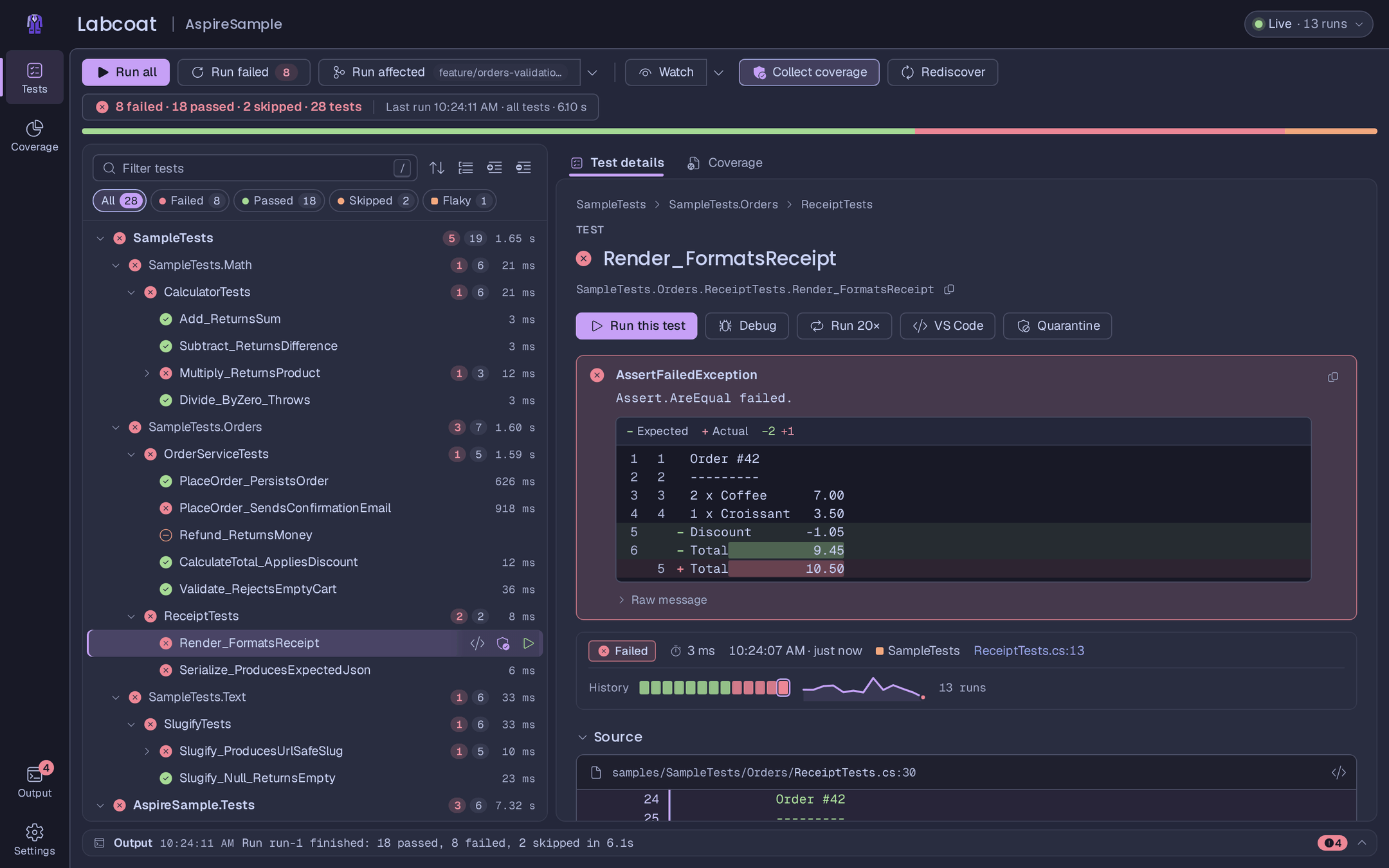
Aspire hosting integration for Labcoat, a web UI for Microsoft.Testing.Platform tests. Add it to your AppHost and Labcoat shows up as a resource in the Aspire dashboard, with a Labcoat UI link, commands to run your tests and the suite result in the resource state.
Install
dotnet add MyApp.AppHost package Labcoat.Aspire.Hosting
The package contains Labcoat itself. On build it is copied to your AppHost's output folder (bin/<config>/<tfm>/labcoat/)
and started from there with dotnet, so there is nothing else to install. It needs Aspire 13.4.5 or later.
Usage
var builder = DistributedApplication.CreateBuilder(args);

var api = builder.AddProject<Projects.MyApp_Api>("api");

builder.AddLabcoat("tests");     // scans the solution for test projects

builder.Build().Run();
Options:
builder.AddLabcoat("tests")
       .WithTestProject("../MyApp.Tests")   // repeatable: a .csproj, solution or directory, relative to the AppHost
       .WithWatch()                         // start with watch mode on
       .WithCoverage()                      // start with code coverage on
       .WithTestTracing()                   // start with per-test traces on
       .WithTestTimeout(TimeSpan.FromMinutes(5)) // optional per-test timeout (off by default)
       .WithHostPort(4300);                 // a fixed port instead of a random one
Vitest projects: add the Labcoat.Vitest package to the AppHost too. Each Labcoat resource then runs .NET and Vitest
tests; WithRunners picks per resource:
builder.AddLabcoat("tests-dotnet").WithRunners("dotnet");   // MSTest, NUnit, xUnit v3, TUnit
builder.AddLabcoat("tests-web").WithTestProject("../MyApp.Web").WithRunners("vitest");
See docs/runners.md.
Or all in one place, with defaults for the Labcoat UI's settings (theme, mode, motion, editor, coverage tint, confetti, …). A choice made in the browser wins over a default, unless the setting is locked:
builder.AddLabcoat("tests", labcoat =>
{
    labcoat.TestProjects.Add("../MyApp.Tests");
    labcoat.Watch = true;
    labcoat.Ui.Theme = LabcoatTheme.Aspire;
    labcoat.Ui.Mode = LabcoatThemeMode.Dark;
    labcoat.Ui.Editor = LabcoatEditor.Rider;
    labcoat.Ui.Lock(s => s.Editor);       // shown disabled: "Set by the AppHost (Program.cs)"
});

// or on the resource builder
builder.AddLabcoat("smoke").WithUiSettings(ui => ui.Confetti = true);
The same options can come from appsettings.json (section Labcoat, or Labcoat:Resources:<name> for one resource).
Tests run with the environment dotnet test gets in your terminal: the variables of the Aspire run (ASPIRE_* such as
ASPIRE_BACKCHANNEL_PATH, DCP_*, the Labcoat resource's OTEL_* and PORT, ...) are left out, so a nested AppHost in
a test doesn't talk to the outer aspire CLI or dashboard. Keep one your tests need with
.WithPassThroughEnvironment("NAME"), or set one for the tests with .WithTestEnvironment("NAME", "value").
In the dashboard
- A Labcoat UI link on the resource, and a link back to the dashboard in the UI.
- The suite result as the resource state:
✓ 12 passed,✕ 1 failed · 20 tests,▶ Running 3/20. - Commands: Run all tests, Run failed tests, Cancel run, Restart test host, Toggle watch mode, Toggle code coverage and Toggle test tracing.
Traces and logs per test (opt-in)
Turned on (.WithTestTracing(), the Toggle test tracing command or the toggle in the UI), every test links to the
traces and structured logs it caused in the dashboard, and a failed integration test shows the error spans and warning
logs of the services it called inline. Your tests need the
package for their test framework for that:
Labcoat.Testing.MSTest or
Labcoat.Testing.TUnit.
To trace only some tests, pass a filter in the UI's search syntax: .WithTestTracing(filter: "cat:Integration") (or
o.TestTracingFilter, "Labcoat": { "TestTracingFilter": "cat:Integration" } in appsettings.json). See
Trace only some tests.
More
The full guide, including how to keep an Aspire app warm between test runs: docs/aspire.md.
MIT license. Not affiliated with or endorsed by Microsoft or the .NET Foundation.
| Product | Versions Compatible and additional computed target framework versions. |
|---|---|
| .NET | net10.0 is compatible. net10.0-android was computed. net10.0-browser was computed. net10.0-ios was computed. net10.0-maccatalyst was computed. net10.0-macos was computed. net10.0-tvos was computed. net10.0-windows was computed. |
-
net10.0
- Aspire.Hosting (>= 13.4.5)
- MessagePack (>= 2.5.303)
NuGet packages
This package is not used by any NuGet packages.
GitHub repositories
This package is not used by any popular GitHub repositories.