Lightbringer.SimpleFileLogger.Components
0.1.5
See the version list below for details.
dotnet add package Lightbringer.SimpleFileLogger.Components --version 0.1.5
NuGet\Install-Package Lightbringer.SimpleFileLogger.Components -Version 0.1.5
<PackageReference Include="Lightbringer.SimpleFileLogger.Components" Version="0.1.5" />
<PackageVersion Include="Lightbringer.SimpleFileLogger.Components" Version="0.1.5" />
<PackageReference Include="Lightbringer.SimpleFileLogger.Components" />
paket add Lightbringer.SimpleFileLogger.Components --version 0.1.5
#r "nuget: Lightbringer.SimpleFileLogger.Components, 0.1.5"
#:package Lightbringer.SimpleFileLogger.Components@0.1.5
#addin nuget:?package=Lightbringer.SimpleFileLogger.Components&version=0.1.5
#tool nuget:?package=Lightbringer.SimpleFileLogger.Components&version=0.1.5
SimpleFileLogger.Components
This project contains view components for the SimpleFileLogger library, which provides functionality for displaying logging messages recorded by SimpleFileLogger.
The library uses Syncfusion Blazor components and requires an active Syncfusion license in the consuming project. You can obtain a free community license from Syncfusion if you qualify.
The library is referencing Syncfusion.Blazor version 28.1.33.
You should be fine having this version or a newer one in your project
as long as Syncfusion does not introduce breaking changes.
Getting Started
The library is available as a NuGet package named
Lightbringer.SimpleFileLogger.Components.
To install the package, run the following command in the Package Manager Console:
Install-Package Lightbringer.SimpleFileLogger.Components
Then add this to your Startup.cs or Program.cs file:
using SimpleFileLogger.Components;
//...
builder.Services.AddSimpleFileLoggingUi(builder.Configuration);
If you haven't used syncfusion components before, you also have to follow the getting started steps from their documentation. See Getting Started and Register a Syncfusion Blazor license
Log Viewer Component
The Log Viewer offers a file explorer (SfFileManager) to navigate through a log folder and a display component to view the contents of a selected log file.
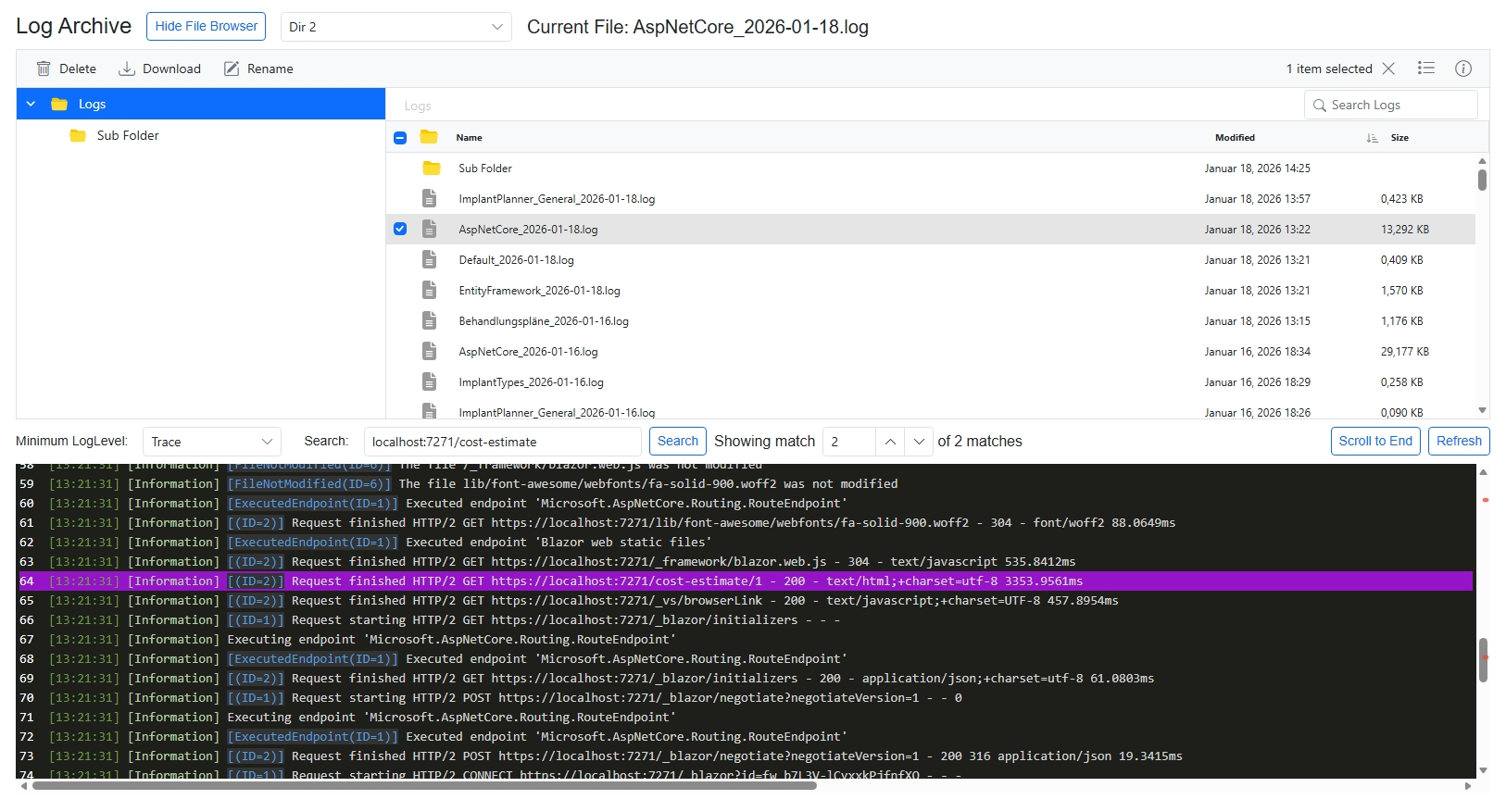
The display component offers highlighting, searching, log level filtering and more.
By default, the log files are consumed from the LogFolder specified in the SimpleFileLogger configuration.
If no such value exists, the relative path ./Logs will be used.
To display log files from a different folder than the one your application is logging to,
there is a singleton of type LogBrowserSettings registered that has a property Dictionary<string, string> LogFolders which you can change or extend.
For a static display log folder, you can overwrite the singleton registration like this:
var settings = new LogBrowserSettings();
settings.LogFolders["default"] = @"D:\Your\Log\Root";
builder.Services.AddSingleton(settings);
If you want to switch between different log folders at runtime, add multiple entries to the dictionary.
var settings = new LogBrowserSettings() {
    LogFolders = new Dictionary<string, string>()
    {
        { "Dir 1" , @"D:\Your\Log\Root" },
        { "Dir 2" , @"D:\Your\Other\Log\Root" },
        // ...
    }
};
builder.Services.AddSingleton(settings);
The <LogView> component will then show a drop-down from which you can select the current source and defaults to the first item in the dictionary.
Note that LogBrowserSettings is a singleton and works on the application level, not on a per-user level.
In your Razor components, you just have to add:
@using SimpleFileLogger.Components.LogDisplayUI

<div class="log-container">
    <LogView></LogView>
</div>
Make sure the CSS class .log-container limits the size of the <LogView> appropriately. Assuming you have a menu on the
left side and a title bar on the top, you may want something like this to avoid additional scroll bars:
    .log-container {
       display: flex;
       flex-direction: column;
       flex: 1 1 auto;
       min-height: 0;
       height: calc(100vh - 105px);
       width: calc(100vw - 320px);
       overflow: hidden;
   }
But in the end it depends on your specific needs and layout.
| Product | Versions Compatible and additional computed target framework versions. |
|---|---|
| .NET | net8.0 is compatible. net8.0-android was computed. net8.0-browser was computed. net8.0-ios was computed. net8.0-maccatalyst was computed. net8.0-macos was computed. net8.0-tvos was computed. net8.0-windows was computed. net9.0 was computed. net9.0-android was computed. net9.0-browser was computed. net9.0-ios was computed. net9.0-maccatalyst was computed. net9.0-macos was computed. net9.0-tvos was computed. net9.0-windows was computed. net10.0 was computed. net10.0-android was computed. net10.0-browser was computed. net10.0-ios was computed. net10.0-maccatalyst was computed. net10.0-macos was computed. net10.0-tvos was computed. net10.0-windows was computed. |
-
net8.0
- Syncfusion.Blazor (>= 28.1.33)
NuGet packages
This package is not used by any NuGet packages.
GitHub repositories
This package is not used by any popular GitHub repositories.