Linkernizer 1.3.0
dotnet add package Linkernizer --version 1.3.0
NuGet\Install-Package Linkernizer -Version 1.3.0
<PackageReference Include="Linkernizer" Version="1.3.0" />
<PackageVersion Include="Linkernizer" Version="1.3.0" />
<PackageReference Include="Linkernizer" />
paket add Linkernizer --version 1.3.0
#r "nuget: Linkernizer, 1.3.0"
#:package Linkernizer@1.3.0
#addin nuget:?package=Linkernizer&version=1.3.0
#tool nuget:?package=Linkernizer&version=1.3.0
Linkernizer
Welcome to Linkernizer, the (possibly best) .NET library for automatically linking URLs and email addresses.
It takes in plain text and wraps anything it considers a link with the HTML markup for a hyperlink / anchor.
You can use it like this:
var linkernizer = new Linkernizer();
var input = "Visit us at www.example.org or email us at mail@example.org!";
var output = linkernizer.Linkernize(input);
// Visit us at <a href="https://www.example.org">www.example.org</a> or email us at <a href="mailto:mail@example.org">mail@example.org</a>!
You can configure a few additional options like this:
var linkernizer = new Linkernizer(options => {
  options.OpenExternalLinksInNewTab = true; // inserts target="_blank" and rel="noopener"
  options.NoReferrerOnExternalLinks = true; // also adds noreferrer to the rel attribute
  options.InternalHost = "www.example.com"; // treat these as internal (no target or rel)
  options.DefaultScheme = "http://"; // use this scheme for links starting with www.
});
If you are using Microsoft.Extensions.DependencyInjection, the companion package
Linkernizer.DependencyInjection
adds some convenience methods to simplify usage even further:
services.AddLinkernizer();
Check the README of the package for more detailed usage instructions and other configuration options.
Why should I use or not use Linkernizer?
You should use it because:
- It is fast (see the benchmarks below for more details)
- It uses little memory (there are zero allocations after the setup when the input does not contain links)
- It is thread-safe (instances are immutable after construction, so a single instance can be shared across the whole application)
- It has only one dependency (to Microsoft.SourceLink.GitHub, which is only a build-time dependency)
- It provides an interface so that it can be used via dependency injection
However, there are also some limitations:
- Links are not validated against a full list of top-level domains (as this list will be outdated quickly)
- Links are not validated against a full list of URI schemes (as these could change quickly as well)
- Telephone numbers are not linked automatically (as this usually generates too many false positives for my taste)
- It assumes the input does not already contain HTML (and will likely lead to invalid markup if this is not the case)
Installation
The library can be used like any other NuGet package. For example:
> dotnet add package Linkernizer
You can find more information on https://www.nuget.org/packages/Linkernizer.
Benchmarks
The benchmarks compare the following libraries in their default configuration:
- Linkernizer (1.3.0)
- AutoLink (2.0.5)
- TextHelper (0.2.0)
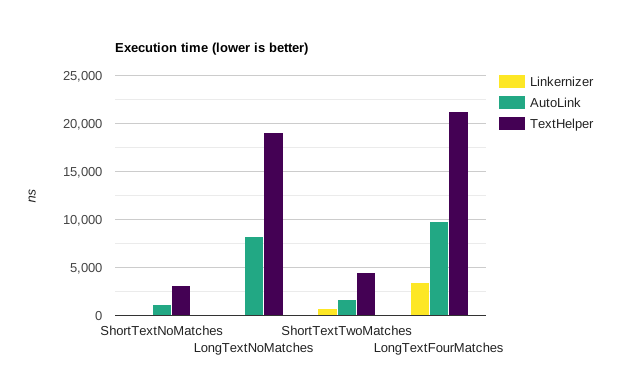
The execution time (excluding initial setup):
The memory allocated (excluding initial setup):
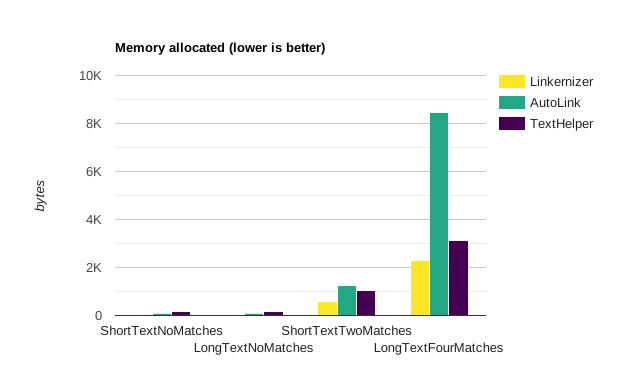
Keep in mind that the exact values will vary from run to run.
| Method                         | Mean          | Error       | StdDev     | Gen0   | Allocated |
|------------------------------- |--------------:|------------:|-----------:|-------:|----------:|
| LinkernizerShortTextNoMatches  |      7.657 ns |   0.0631 ns |  0.0527 ns |      - |         - |
| LinkernizerLongTextNoMatches   |     37.645 ns |   0.2509 ns |  0.2347 ns |      - |         - |
| LinkernizerShortTextTwoMatches |    689.404 ns |   3.8499 ns |  3.6012 ns | 0.1163 |     488 B |
| LinkernizerLongTextFourMatches |  3,139.607 ns |  11.1179 ns |  8.6801 ns | 0.5264 |    2208 B |
|------------------------------- |--------------:|------------:|-----------:|-------:|----------:|
| AutoLinkShortTextNoMatches     |    913.125 ns |   5.3398 ns |  4.7336 ns | 0.0210 |      88 B |
| AutoLinkLongTextNoMatches      |  6,377.185 ns |  25.5865 ns | 23.9336 ns | 0.0153 |      88 B |
| AutoLinkShortTextTwoMatches    |  1,433.639 ns |   5.8996 ns |  5.2298 ns | 0.2937 |    1232 B |
| AutoLinkLongTextFourMatches    |  8,136.476 ns |  96.0548 ns | 89.8497 ns | 2.0142 |    8448 B |
|------------------------------- |--------------:|------------:|-----------:|-------:|----------:|
| TextHelperShortTextNoMatches   |  3,109.229 ns |  21.4969 ns | 20.1082 ns | 0.0381 |     168 B |
| TextHelperLongTextNoMatches    | 21,863.800 ns | 124.6723 ns | 97.3359 ns | 0.0305 |     168 B |
| TextHelperShortTextTwoMatches  |  4,264.676 ns |  31.5707 ns | 27.9866 ns | 0.2441 |    1040 B |
| TextHelperLongTextFourMatches  | 24,071.769 ns |  82.9393 ns | 69.2580 ns | 0.7324 |    3136 B |
You can verify the results by running the same benchmarks on your machine.
| Product | Versions Compatible and additional computed target framework versions. |
|---|---|
| .NET | net9.0 is compatible. net9.0-android was computed. net9.0-browser was computed. net9.0-ios was computed. net9.0-maccatalyst was computed. net9.0-macos was computed. net9.0-tvos was computed. net9.0-windows was computed. net10.0 is compatible. net10.0-android was computed. net10.0-browser was computed. net10.0-ios was computed. net10.0-maccatalyst was computed. net10.0-macos was computed. net10.0-tvos was computed. net10.0-windows was computed. |
-
net10.0
- No dependencies.
-
net9.0
- No dependencies.
NuGet packages (1)
Showing the top 1 NuGet packages that depend on Linkernizer:
| Package | Downloads |
|---|---|
|
Linkernizer.DependencyInjection
Dependency injection extensions for Linkernizer. |
GitHub repositories
This package is not used by any popular GitHub repositories.