LinqContraband 5.0.4
dotnet add package LinqContraband --version 5.0.4
NuGet\Install-Package LinqContraband -Version 5.0.4
<PackageReference Include="LinqContraband" Version="5.0.4"> <PrivateAssets>all</PrivateAssets> <IncludeAssets>runtime; build; native; contentfiles; analyzers</IncludeAssets> </PackageReference>
<PackageVersion Include="LinqContraband" Version="5.0.4" />
<PackageReference Include="LinqContraband"> <PrivateAssets>all</PrivateAssets> <IncludeAssets>runtime; build; native; contentfiles; analyzers</IncludeAssets> </PackageReference>
paket add LinqContraband --version 5.0.4
#r "nuget: LinqContraband, 5.0.4"
#:package LinqContraband@5.0.4
#addin nuget:?package=LinqContraband&version=5.0.4
#tool nuget:?package=LinqContraband&version=5.0.4
LinqContraband
<div align="center">
Stop Smuggling Bad Queries into Production
</div>
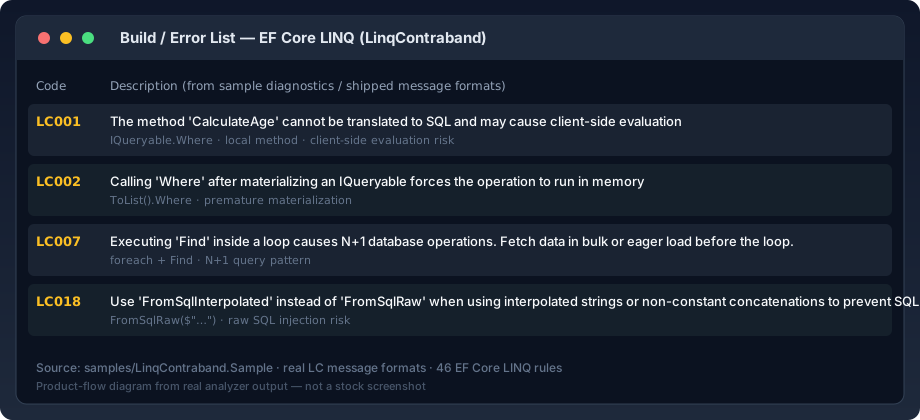
LinqContraband is the TSA for your Entity Framework Core queries. It scans your code as you type and confiscates performance killersโlike client-side evaluation, N+1 risks, and sync-over-asyncโbefore they ever reach production.
โก Why use LinqContraband?
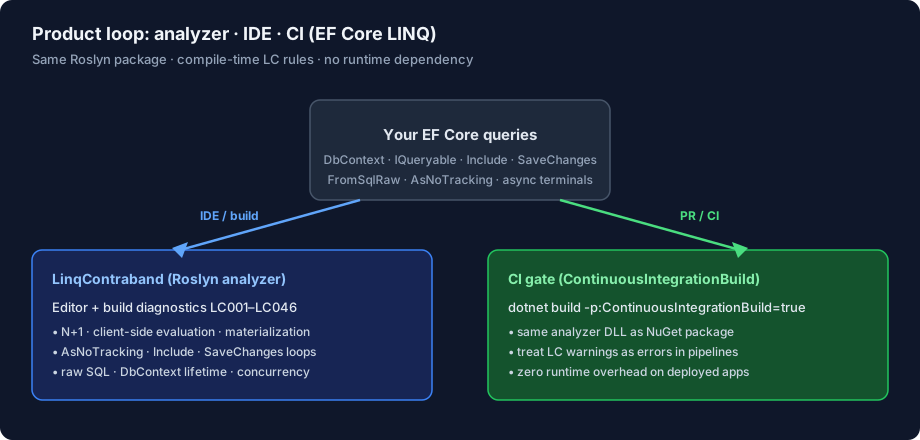
- Zero Runtime Overhead: It runs entirely at compile-time. No performance cost to your app.
- Catch Bugs Early: Fix N+1 queries and Cartesian explosions in the IDE, not during a 3 AM outage.
- Enforce Best Practices: Acts as an automated code reviewer for your team's data access patterns.
- Universal Support: Works with VS, Rider, VS Code, and CI/CD pipelines. Compatible with all modern EF Core versions.
๐ Installation
Install via NuGet. No configuration required.
dotnet add package LinqContraband
The analyzer will immediately start scanning your code for contraband.
๐ฎโโ๏ธ The Rules
43 rules covering performance, correctness, and design pitfalls in Entity Framework Core queries.
๐บ๏ธ Rule Neighborhoods
The repository keeps the familiar LC001-style rule numbering, but the rules now also live in explicit neighborhoods:
| Domain | Rules |
|---|---|
| Query Shape & Translation | LC001, LC004, LC005, LC014, LC015, LC016, LC020, LC024 |
| Materialization & Projection | LC002, LC003, LC017, LC022, LC023, LC029, LC031, LC033, LC041 |
| Loading & Includes | LC006, LC019, LC028, LC038, LC042 |
| Execution & Async | LC007, LC008, LC026, LC036, LC043 |
| Change Tracking & Context Lifetime | LC009, LC010, LC013, LC025, LC030, LC039, LC040 |
| Bulk Operations & Set-Based Writes | LC012, LC032, LC035 |
| Schema & Modeling | LC011, LC027 |
| Raw SQL & Security | LC018, LC021, LC034, LC037 |
For the full matrix of rule metadata, docs, and sample locations, see docs/rule-catalog.md.
LC001: The Local Method Smuggler
When EF Core encounters a method it can't translate, it might switch to client-side evaluation (fetching all rows) or throw a runtime exception. This turns a fast SQL query into a massive memory leak.
๐ถ Explain it like I'm a ten year old: Imagine hiring a translator to translate a book into Spanish, but you used made-up slang words they don't know. They can't finish the job, so they hand you the entire dictionary and say "You figure it out." You have to read the whole dictionary just to find one word.
โ The Crime:
// CalculateAge is a local C# method. EF Core doesn't know SQL for it.
var query = db.Users.Where(u => CalculateAge(u.Dob) > 18);
โ The Fix: Extract the logic outside the query.
var minDob = DateTime.Now.AddYears(-18);
var query = db.Users.Where(u => u.Dob <= minDob);
Methods explicitly mapped for translation are exempt. LC001 will not report methods marked with
[DbFunction] or EntityFrameworkCore.Projectables' [Projectable] attribute.
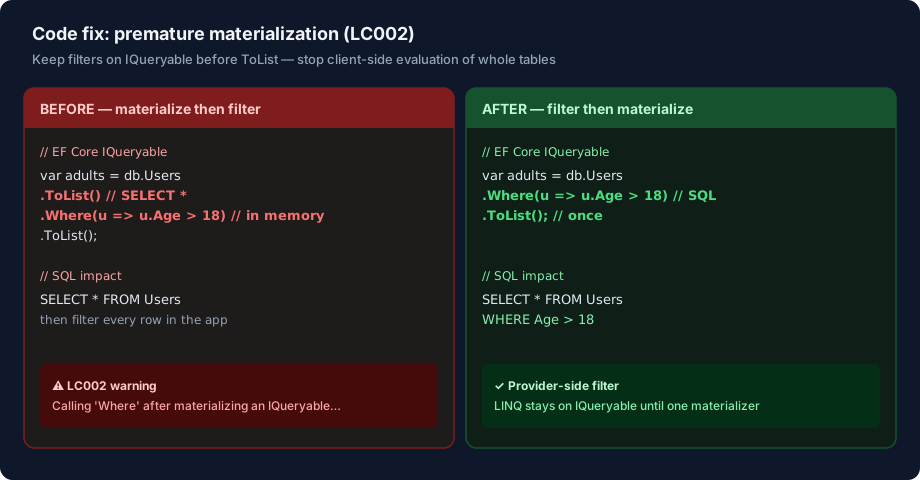
LC002: Premature Materialization
This is the "Select *" of EF Core. By materializing early, you transfer the entire table over the network, discard 99% of it in memory, and keep the Garbage Collector busy.
๐ถ Explain it like I'm a ten year old: Imagine you want a pepperoni pizza. Instead of ordering just pepperoni, you order a pizza with every single topping in the restaurant. When it arrives, you have to spend an hour picking off the anchovies, pineapple, and mushrooms before you can eat. Itโs a waste of food and time.
โ The Crime:
// ToList() executes the query (SELECT * FROM Users).
// Where() then filters millions of rows in memory.
var query = db.Users.ToList().Where(u => u.Age > 18);
// Same crime with other materializers: AsEnumerable, ToDictionary, etc.
var query2 = db.Users.AsEnumerable().Where(u => u.Age > 18);
var query3 = db.Users.ToDictionary(u => u.Id).Where(kvp => kvp.Value.Age > 18);
// Redundant second materializer
var query4 = db.Users.ToArray().ToList();
โ The Fix: Keep approved query work on the provider, then materialize once.
// SELECT * FROM Users WHERE Age > 18
var query = db.Users.Where(u => u.Age > 18).ToList();
var query2 = db.Users.Where(u => u.Age > 18).ToDictionary(u => u.Id);
var query3 = db.Users.ToList();
๐ก๏ธ Reliability Notes:
- LC002 follows direct chains, single-assignment local hops, and collection constructors only when the
IQueryableorigin is provable. - It stays silent on ambiguous multi-assignment, field/property provenance, and overloads without a clear
IQueryable-safe equivalent. - The fixer is intentionally conservative and skips risky cases such as local-hop rewrites or shape-changing materializers like
ToDictionary(...).Where(...).
LC003: Prefer Any() over Count() > 0
Count() > 0 forces the database to scan all matching rows to return a total number (e.g., 5000). Any() generates IF EXISTS (...), allowing the database to stop scanning after finding just one match.
๐ถ Explain it like I'm a ten year old: Imagine you want to know if there are any cookies left in the jar. Count() > 0 is like dumping the entire jar onto the table and counting 500 cookies one by one just to say "Yes". Any() is like opening the lid, seeing one cookie, and saying "Yes" immediately.
โ The Crime:
// Counts 1,000,000 rows just to see if one exists.
if (db.Users.Count() > 0) { ... }
โ The Fix:
// Checks IF EXISTS (SELECT 1 ...)
if (db.Users.Any()) { ... }
LC004: Deferred Execution Leak
Passing IQueryable<T> to a method that takes IEnumerable<T> is only flagged when LinqContraband can prove that the
callee actually forces in-memory execution by iterating, counting, or materializing that parameter. This prevents
further provider-side composition and hides the real query cost.
๐ถ Explain it like I'm a ten year old: Imagine you have a coupon for "Build Your Own Burger". You give it to the chef, but instead of letting you choose toppings, he immediately hands you a plain burger and says "Too late, I already cooked it."
โ The Crime:
public void ProcessUsers(IEnumerable<User> users)
{
// Iterates and fetches ALL users from DB immediately.
foreach(var u in users) { ... }
}
// Passing IQueryable to IEnumerable parameter.
ProcessUsers(db.Users);
โ The Fix:
Change the parameter to IQueryable<T> to allow composition, or explicitly call .ToList() at the call site if you
intend to fetch everything.
public void ProcessUsers(IQueryable<User> users)
{
// Now we can filter! SELECT ... WHERE Age > 10
foreach(var u in users.Where(x => x.Age > 10)) { ... }
}
LC005: Multiple OrderBy Calls
This is a logic bug that acts like a performance bug. The second OrderBy completely ignores the first. The database creates a sorting plan for the first column, then discards it to sort by the second.
๐ถ Explain it like I'm a ten year old: Imagine telling someone to sort a deck of cards by Suit (Hearts, Spades...). As soon as they finish, you say "Actually, sort them by Number (2, 3, 4...) instead." They did all that work for the first sort for nothing because you changed the rules.
โ The Crime:
// Sorts by Name, then immediately discards it to sort by Age.
var query = db.Users.OrderBy(u => u.Name).OrderBy(u => u.Age);
โ The Fix: Chain them properly.
var query = db.Users.OrderBy(u => u.Name).ThenBy(u => u.Age);
LC006: Cartesian Explosion Risk
If User has 10 Orders, and Order has 10 Items, fetching all creates 100 rows per User. With 1000 Users, that's 100,000
rows transferred. AsSplitQuery fetches Users, Orders, and Items in 3 separate, clean queries.
๐ถ Explain it like I'm a ten year old: Imagine a teacher asks 30 students what they ate. Instead of getting 30 answers, she asks every student to list every single fry they ate individually. You end up with thousands of answers ("I ate fry #1", "I ate fry #2") instead of just "I had fries".
โ The Crime:
// Fetches Users * Orders * Roles rows.
var query = db.Users.Include(u => u.Orders).Include(u => u.Roles).ToList();
โ
The Fix:
Use .AsSplitQuery() to fetch related data in separate SQL queries.
// Fetches Users, then Orders, then Roles (3 queries).
var query = db.Users.Include(u => u.Orders).AsSplitQuery().Include(u => u.Roles).ToList();
LC007: N+1 Looper
Database queries have high fixed overhead (latency, connection pooling). Executing 100 queries takes ~100x longer than
executing 1 query that fetches 100 items. LC007 covers more than Find(...): it catches explicit loading, query
materialization, aggregates, and EF set-based executors when they run once per iteration on a provably EF-backed
source.
๐ถ Explain it like I'm a ten year old: Imagine you need 10 eggs. You drive to the store, buy one egg, drive home. Drive back, buy one egg, drive home. You do this 10 times. You spend all day driving instead of just buying the carton at once.
โ The Crime:
foreach (var id in ids)
{
// Executes 1 query per ID. Latency kills you here.
var user = db.Users.Find(id);
}
// Explicit loading is the same trap in a different disguise.
foreach (var user in db.Users.ToList())
{
db.Entry(user).Collection(u => u.Orders).Load();
}
โ The Fix: Fetch data in bulk outside the loop. When the problem is explicit loading, eager load it.
// Executes 1 query for all IDs.
var users = db.Users.Where(u => ids.Contains(u.Id)).ToList();
// LC007 can auto-fix this shape to eager loading.
var usersWithOrders = db.Users.Include(u => u.Orders).ToList();
LC008: Sync-over-Async
In web apps, threads are a limited resource. Blocking a thread to wait for SQL (I/O) means that thread can't serve other users. Under load, this causes "Thread Starvation", leading to 503 errors even if CPU is low.
๐ถ Explain it like I'm a ten year old: Imagine a waiter taking your order, then walking into the kitchen and staring at the chef for 20 minutes until the food is ready. No one else gets served. That's Sync-over-Async. Async means the waiter takes the order and goes to serve other tables while the food cooks.
โ The Crime:
public async Task<List<User>> GetUsersAsync()
{
// Blocks the thread while waiting for DB.
return db.Users.ToList();
}
โ The Fix: Use the Async counterpart and await it.
public async Task<List<User>> GetUsersAsync()
{
// Frees up the thread while waiting.
return await db.Users.ToListAsync();
}
LC009: The Tracking Tax
EF Core takes a "snapshot" of every entity it fetches to detect changes. For a read-only dashboard, this snapshot process consumes CPU and doubles the memory usage for every row.
๐ถ Explain it like I'm a ten year old: Imagine you go to a museum. You promise not to touch anything. But security guards still follow you and take high-resolution photos of every painting you look at, just in case you decide to draw a mustache on one. It wastes their time and memory.
โ The Crime:
public List<User> GetUsers()
{
// EF Core tracks these entities, but we never modify them.
return db.Users.ToList();
}
โ
The Fix:
Add .AsNoTracking() to the query.
public List<User> GetUsers()
{
// Pure read. No tracking overhead.
return db.Users.AsNoTracking().ToList();
// Or, if you need identity resolution without full tracking:
return db.Users.AsNoTrackingWithIdentityResolution().ToList();
}
LC010: SaveChanges Loop Tax
Opening and committing a database transaction is an expensive operation. Doing this inside a loop (e.g., for 100 items) means 100 separate transactions, which can be 1000x slower than a single batched commit.
๐ถ Explain it like I'm a ten year old: Imagine mailing 100 letters. Instead of putting them all in the mailbox at once, you put one in, wait for the mailman to pick it up, then put the next one in. It takes 100 days to mail your invites!
โ The Crime:
foreach (var user in users)
{
user.LastLogin = DateTime.Now;
// Opens a transaction and commits for EVERY user.
db.SaveChanges();
}
โ The Fix:
Batch the changes and save once.
foreach (var user in users)
{
user.LastLogin = DateTime.Now;
}
// One transaction, one roundtrip.
db.SaveChanges();
LC011: Entity Missing Primary Key
Entities in EF Core require a Primary Key to track identity. If you don't define one, EF Core might throw a runtime exception or prevent you from updating the record later.
๐ถ Explain it like I'm a ten year old: Imagine a library where books have no titles or ISBN numbers. You ask for a book, but because there's no unique way to identify it, the librarian can't find it, or worse, gives you the wrong one.
โ The Crime:
public class Product
{
// No 'Id', 'ProductId', or [Key] attribute defined.
public string Name { get; set; }
}
โ The Fix:
Define a primary key using the Id convention, [Key] attribute, or Fluent API.
// 1. Convention: Id or {ClassName}Id
public class Product
{
public int Id { get; set; }
public string Name { get; set; }
}
// 2. Attribute: [Key]
public class Product
{
[Key]
public int ProductCode { get; set; }
public string Name { get; set; }
}
// 3. Fluent API (in OnModelCreating)
modelBuilder.Entity<Product>().HasKey(p => p.ProductCode);
// 4. Separate Configuration (IEntityTypeConfiguration<T>)
public class ProductConfiguration : IEntityTypeConfiguration<Product>
{
public void Configure(EntityTypeBuilder<Product> builder)
{
builder.HasKey(p => p.ProductCode);
}
}
LC012: Optimize Bulk Delete
RemoveRange() fetches entities into memory before deleting them one by one (or in batches). ExecuteDelete() (EF Core
7+) performs a direct SQL DELETE, which is orders of magnitude faster.
๐ถ Explain it like I'm a ten year old: Imagine you want to throw away a pile of old magazines. RemoveRange is like
picking up each magazine, reading the cover, and then throwing it in the bin. ExecuteDelete is like dumping the whole
box in the bin at once.
โ The Crime:
var oldUsers = db.Users.Where(u => u.LastLogin < DateTime.Now.AddYears(-1));
// Fetches all old users into memory, then deletes them.
db.Users.RemoveRange(oldUsers);
โ The Fix:
Use ExecuteDelete() for direct SQL execution.
// Executes: DELETE FROM Users WHERE LastLogin < ...
db.Users.Where(u => u.LastLogin < DateTime.Now.AddYears(-1)).ExecuteDelete();
โ ๏ธ Warning: ExecuteDelete bypasses EF Core Change Tracking, so Deleted events and client-side cascades won't
fire. This analyzer does not offer an automatic code fix because switching to ExecuteDelete changes the semantic
behavior of your application (by skipping interceptors and events). You must manually verify it is safe to use.
LC013: Disposed Context Query
EF Core IQueryable and IAsyncEnumerable queries are deferred, meaning they don't execute until you iterate them.
If you build a query using a local DbContext that is disposed (via using) and return that query, it will explode
when the caller tries to use it.
๐ถ Explain it like I'm a ten year old: Imagine buying a ticket to a movie. But the ticket is only valid inside the ticket booth. As soon as you walk out to the theater (return the query), the ticket dissolves in your hand.
โ The Crime:
public IQueryable<User> GetUsers(bool adultsOnly)
{
using var db = new AppDbContext();
var query = db.Users;
// The analyzer catches alias-based returns and conditional branches:
return adultsOnly
? query.Where(u => u.Age >= 18)
: query;
}
โ The Fix:
Materialize the results (e.g., .ToList()) while the context is still alive.
public List<User> GetUsers(bool adultsOnly)
{
using var db = new AppDbContext();
var query = adultsOnly
? db.Users.Where(u => u.Age >= 18)
: db.Users;
// Executes the query immediately. Safe to return.
return query.ToList();
}
LC013 is analyzer-only. It does not offer an automatic code fix because the safe remediation depends on whether you should materialize, change the return contract, or change the context lifetime.
LC014: Avoid String Case Conversion in Queries
Using ToLower() or ToUpper() inside a LINQ query (e.g., Where clause) prevents the database from using an index on
that column. This forces a full table scan, which is significantly slower for large datasets.
๐ถ Explain it like I'm a ten year old: Imagine looking for "John" in a phone book. If you look for "John", you can jump straight to 'J'. But if you decide to convert every single name in the book to lowercase first, you have to read every single name from A to Z to check if it matches "john".
โ The Crime:
// Forces a full table scan because the index on 'Name' cannot be used.
var user = db.Users.Where(u => u.Name.ToLower() == "john").FirstOrDefault();
โ The Fix:
Use string.Equals with a case-insensitive comparison, or configure the database collation to be case-insensitive.
// 1. Use string.Equals (translated to efficient SQL if supported)
var user = db.Users.Where(u => string.Equals(u.Name, "john", StringComparison.OrdinalIgnoreCase)).FirstOrDefault();
// 2. Or, rely on DB collation (if case-insensitive by default)
var user = db.Users.Where(u => u.Name == "john").FirstOrDefault();
LC015: Deterministic Pagination Requires OrderBy
Pagination (Skip/Take) and fetching the Last item rely on a specific sort order. If the query is unordered, the
database can return results in any random order, making pagination unpredictable and Last() results non-deterministic.
When a single query chain contains both Skip(...) and Take(...), LinqContraband reports one primary warning for the
unordered chain instead of duplicating the same root-cause message on both calls.
๐ถ Explain it like I'm a ten year old: Imagine a teacher asks you to "Skip the first 5 students and pick the next one." If the students are standing in a line, you know who to pick. But if they are running around the playground randomly, you have no idea who "the first 5" are, and you might pick a different person every time.
โ The Crime:
// Randomly skips 10 rows. The result is unpredictable.
var page2 = db.Users.Skip(10).Take(10).ToList();
// Which user is "Last"? Random.
var last = db.Users.Last();
// Chunks of 10 users. But who is in the first chunk? Random.
var chunks = db.Users.Chunk(10).ToList();
โ The Fix: Explicitly sort the data first.
// Defined order: Sort by ID, then skip.
var page2 = db.Users.OrderBy(u => u.Id).Skip(10).Take(10).ToList();
// Defined order: Sort by Date, then get last.
var last = db.Users.OrderBy(u => u.CreatedAt).Last();
// Defined order: Sort by Name, then chunk.
var chunks = db.Users.OrderBy(u => u.Name).Chunk(10).ToList();
LC016: Avoid DateTime.Now in Queries
Using DateTime.Now (or UtcNow) inside a LINQ query prevents the database execution plan from being cached
efficiently because the constant value changes every millisecond. It also makes unit testing impossible without mocking
the system clock.
๐ถ Explain it like I'm a ten year old: Imagine baking a cake. If the recipe says "Bake for 30 minutes," you can use it every day. But if the recipe says "Bake until the clock shows exactly 4:03 PM on Tuesday," you can only use it once, and then you have to write a new recipe.
โ The Crime:
// The value of DateTime.Now is baked into the SQL as a constant.
// This constant changes every time, forcing a new query plan.
var query = db.Users.Where(u => u.Dob < DateTime.Now);
โ The Fix: Store the date in a variable before the query.
// The variable is passed as a parameter (@p0). The plan is cached.
var now = DateTime.Now;
var query = db.Users.Where(u => u.Dob < now);
LC017: Whole Entity Projection
Loading entire entities when you only need a few properties wastes bandwidth, memory, and CPU. For large entities with 10+ properties, this can result in 10-40x more data transfer than necessary.
๐ถ Explain it like I'm a ten year old: Imagine you want to know your friend's phone number. Instead of asking for just the number, you ask them to recite their entire autobiographyโname, address, favorite foods, every vacation they've ever taken. You only needed one fact, but you got a whole book.
โ The Crime:
// Loads all 12 columns for every product, but only uses Name
var products = db.Products.Where(p => p.Price > 100).ToList();
foreach (var p in products)
{
Console.WriteLine(p.Name); // Only Name is ever accessed!
}
โ
The Fix:
Use .Select() to project only what you need. The built-in fixer takes the safe route and inserts an anonymous-type
projection so existing downstream property access still compiles.
// Safe fixer output: projects only the needed property but preserves p.Name usage
var products = db.Products
.Where(p => p.Price > 100)
.Select(p => new { p.Name })
.ToList();
foreach (var p in products)
{
Console.WriteLine(p.Name);
}
LC018: Avoid FromSqlRaw with Interpolation
Using interpolated strings ($"{var}") with FromSqlRaw is a major security risk. It embeds variables directly into
the SQL string, bypassing parameterization and opening your database to SQL injection attacks.
๐ถ Explain it like I'm a ten year old: Imagine a bank where you write your name on a slip to get money. If you use
a special pen that lets you erase "Name: John" and write "Give John everything in the vault," you've just robbed the
bank. FromSqlRaw with interpolated strings is like using that eraseable pen.
โ The Crime:
// Potential SQL Injection!
var users = db.Users.FromSqlRaw($"SELECT * FROM Users WHERE Name = '{name}'").ToList();
โ
The Fix:
Use FromSqlInterpolated or FromSql (EF Core 7+), which automatically parameterize the string.
// Safe: EF Core handles parameterization
var users = db.Users.FromSqlInterpolated($"SELECT * FROM Users WHERE Name = {name}").ToList();
๐ก๏ธ Reliability Notes:
- LC018 owns direct interpolated-string and direct non-constant
+concatenation passed straight intoFromSqlRaw(...). - Broader constructed-SQL flows such as local aliases,
string.Format(...),string.Concat(...), andStringBuilderare covered byLC037.
LC019: Conditional Include Expression
Using a conditional (ternary or null-coalescing) expression inside Include() or ThenInclude() always throws
InvalidOperationException at runtime. EF Core does not support conditional navigation loading.
๐ถ Explain it like I'm a ten year old: Imagine you're at a restaurant and you tell the waiter "If it's Tuesday, bring me pizza; otherwise bring me pasta" โ but this waiter only understands one order at a time. He gets confused and drops your plate on the floor every single time.
โ The Crime:
// ALWAYS throws InvalidOperationException at runtime
var orders = db.Orders.Include(o => useCustomer ? o.Customer : o.Supplier).ToList();
โ The Fix: Split into separate conditional Include calls.
var query = db.Orders.AsQueryable();
if (useCustomer)
query = query.Include(o => o.Customer);
else
query = query.Include(o => o.Supplier);
var orders = query.ToList();
LC020: StringComparison Smuggler
Using string.Contains, StartsWith, or EndsWith with a StringComparison argument in a LINQ query often cannot be
translated to SQL. This forces EF Core to pull all records from the database and filter them in your app's memory.
๐ถ Explain it like I'm a ten year old: Imagine asking a robot to find all red blocks in a giant bin. But you give the robot a very complicated rule: "Find blocks that are red, but only if they are the exact shade of 'Sunset Crimson' from a specific 1990s crayon box." The robot gets confused and just hands you the entire bin to sort yourself.
โ The Crime:
// Likely to cause client-side evaluation
var users = db.Users.Where(u => u.Name.Contains("admin", StringComparison.OrdinalIgnoreCase)).ToList();
โ The Fix: Use the simple overload. Databases are usually configured with a specific case-sensitivity (collation) anyway.
// Translates to SQL LIKE
var users = db.Users.Where(u => u.Name.Contains("admin")).ToList();
LC021: Avoid IgnoreQueryFilters
Global query filters are often used for critical security and logic, like multi-tenancy or soft-deletes. Using
IgnoreQueryFilters() bypasses these protections and can lead to data leaks.
๐ถ Explain it like I'm a ten year old: Imagine a high-security building where every door has a lock. IgnoreQueryFilters
is like a skeleton key that opens every single door at once. It's powerful, but if you use it by accident, you might
end up somewhere you're not supposed to be.
โ The Crime:
// Might accidentally see data from other tenants or deleted items
var allUsers = db.Users.IgnoreQueryFilters().ToList();
โ The Fix: Ensure that bypassing global filters is intentional and necessary for the specific task (e.g., admin tools).
LC022: ToList Inside Select Projection
Calling ToList(), ToArray(), or similar collection materializers inside a Select() projection on an IQueryable
forces client-side evaluation or throws in EF Core 3+. EF Core handles collection projections natively.
๐ถ Explain it like I'm a ten year old: Imagine you ask a baker to put frosting on 100 cupcakes. But for each cupcake, you tell them "First, put all the frosting in a separate bowl, then frost the cupcake from the bowl." The baker gets frustrated because they could just frost the cupcake directly โ the extra bowl step is pointless and slows everything down.
โ The Crime:
// Forces client-side evaluation of the sub-collection
var result = db.Users.Select(u => u.Orders.ToList()).ToList();
โ The Fix: Remove the materializer from the projection. EF Core handles it.
// EF Core projects the collection natively
var result = db.Users.Select(u => u.Orders).ToList();
๐ก๏ธ Reliability Notes:
- LC022 applies to normal
IQueryable.Select(...)projections where the collection materializer is redundant or forces client evaluation. - Grouped projections like
GroupBy(...).Select(g => g.ToList())are owned byLC024, which gives the more specific non-translatableGroupByguidance.
LC023: Suggest Find/FindAsync
FirstOrDefault(x => x.Id == id) always goes to the database. Find(id) first checks if the entity is already loaded
in your app's memory (the Change Tracker), which is much faster.
๐ถ Explain it like I'm a ten year old: Imagine you want to know if you have a blue shirt. FirstOrDefault is like
driving to the store to buy a new one just to check. Find is like looking in your closet first. If it's in the closet,
you save a trip!
โ The Crime:
// Always hits the database
var user = db.Users.FirstOrDefault(u => u.Id == userId);
โ
The Fix:
Use Find or FindAsync for primary key lookups.
// Checks local memory first, then DB if not found
var user = db.Users.Find(userId);
LC024: GroupBy with Non-Translatable Projection
EF Core can only translate g.Key and aggregate functions (Count, Sum, Average, Min, Max) inside a
GroupBy().Select() projection. Accessing group elements directly (e.g., g.ToList(), g.Where(), g.First())
forces client-side evaluation or throws.
๐ถ Explain it like I'm a ten year old: Imagine a teacher asks "How many students are in each class?" That's easy โ just count the names on the list. But if the teacher says "For each class, tell me every single thing every student had for lunch," the teacher has to go ask every student individually. The counting is quick; the lunch survey is not.
โ The Crime:
// g.ToList() can't be translated to SQL
var result = db.Orders.GroupBy(o => o.CustomerId)
.Select(g => new { Key = g.Key, Items = g.ToList() }).ToList();
โ The Fix: Use only Key and aggregate functions in GroupBy projections.
var result = db.Orders.GroupBy(o => o.CustomerId)
.Select(g => new { Key = g.Key, Count = g.Count(), Total = g.Sum(o => o.Amount) }).ToList();
๐ก๏ธ Reliability Notes:
- LC024 owns grouped element access such as
g.ToList(),g.Where(...), andg.First()insideGroupBy(...).Select(...). - That grouped-projection case is intentionally excluded from
LC022so one rule owns the diagnostic.
LC025: AsNoTracking with Update/Remove
AsNoTracking() is great for speed, but it tells EF Core "I'm only reading this." If you then try to Update() or
Remove() that entity, EF Core has to "guess" what changed, which leads to inefficient SQL that updates every single
column.
๐ถ Explain it like I'm a ten year old: Imagine you check out a library book but tell the librarian, "I'm just going to look at the pictures." Then you go home and rewrite three chapters. When you return it, the librarian has to re-read the entire book to figure out what you changed.
โ The Crime:
// Fetches as read-only
var user = db.Users.AsNoTracking().First(u => u.Id == id);
user.Name = "New Name";
// EF Core has to update ALL columns because it wasn't tracking changes
db.Users.Update(user);
โ
The Fix:
Remove AsNoTracking() if you plan to modify the entity.
// Tracked by default
var user = db.Users.First(u => u.Id == id);
user.Name = "New Name";
// EF Core knows exactly which column changed
db.SaveChanges();
LC026: Missing CancellationToken
Async database operations can take time. If a user cancels their request, the server should stop the query. If you don't
pass a CancellationToken, the database keeps working for a user who is no longer there!
๐ถ Explain it like I'm a ten year old: Imagine you ask a robot to go get you a ball from a very far away field. Halfway there, you change your mind and shout "Stop!" If the robot isn't listening for your shout (no CancellationToken), it will walk all the way to the field, get the ball, and walk all the way back, even though you don't want it anymore. Itโs a waste of the robot's battery!
โ The Crime:
public async Task<List<User>> GetUsers(CancellationToken ct)
{
// Violation: CancellationToken is ignored
return await db.Users.ToListAsync();
}
โ The Fix: Pass the token to the async method.
public async Task<List<User>> GetUsers(CancellationToken ct)
{
// Correct: Robot is listening!
return await db.Users.ToListAsync(ct);
}
LC027: Missing Explicit Foreign Key Property
A navigation property (e.g., public Customer Customer { get; set; }) without a corresponding FK property causes EF
Core to create a "shadow property" behind the scenes. Shadow FKs make it harder to set relationships without loading the
navigation entity, produce less efficient API serialization, and can cause subtle performance issues.
๐ถ Explain it like I'm a ten year old: Imagine you have a friend's phone number written on a secret sticky note hidden under your desk. When someone asks "What's your friend's number?", you have to crawl under the desk to find it. If you just wrote the number in your address book (an explicit FK), anyone could look it up instantly.
โ The Crime:
public class Order
{
public int Id { get; set; }
// No CustomerId โ EF creates a shadow FK
public Customer Customer { get; set; }
}
โ The Fix: Add an explicit FK property.
public class Order
{
public int Id { get; set; }
public int CustomerId { get; set; }
public Customer Customer { get; set; }
}
LC028: Deep ThenInclude Chain
ThenInclude chains deeper than 3 levels generate complex SQL with many LEFT JOINs. This is usually a sign of
over-fetching โ loading deeply nested data that should be projected with Select instead.
๐ถ Explain it like I'm a ten year old: Imagine asking your friend to bring their mom, who brings their grandma, who brings their great-grandma, who brings their great-great-grandma. At some point, the car is full and everyone is uncomfortable. It's better to just ask for the specific people you actually need.
โ The Crime:
// 4 levels deep โ complex JOIN query
var orders = db.Orders
.Include(o => o.Customer)
.ThenInclude(c => c.Address)
.ThenInclude(a => a.Country)
.ThenInclude(c => c.Region)
.ThenInclude(r => r.Continent)
.ToList();
โ
The Fix:
Use Select projection to load only the needed nested data.
var orders = db.Orders.Select(o => new {
o.Id,
CustomerName = o.Customer.Name,
Country = o.Customer.Address.Country.Name
}).ToList();
LC029: Redundant Identity Select
Select(x => x) tells the database "For every item, return that item." It's the default behavior, so writing it out
just makes your code harder to read.
๐ถ Explain it like I'm a ten year old: Imagine you ask a friend to go to the store and buy apples. But then you say, "And for every apple you find, make sure the apple you bring back is an apple." Your friend will look at you funny because they were already going to do that!
โ The Crime:
// Violation: Does nothing
var users = db.Users.Select(u => u).ToList();
โ The Fix: Remove the redundant Select.
// Correct
var users = db.Users.ToList();
LC030: DbContext Lifetime Review
Holding a DbContext as a field or property is a lifetime smell. It may be fine for scoped types, but it is risky in
long-lived services because DbContext is not thread-safe and is designed to be short-lived. Review the lifetime
before keeping it around, and prefer IDbContextFactory<T> for long-lived services. The rule is intentionally
advisory: it looks for likely long-lived shapes such as hosted services or conventional middleware and stays quiet on
obviously scoped request types.
๐ถ Explain it like I'm a ten year old: Imagine you have one paintbrush (DbContext) that everyone in the class has to share at the same time. Paint gets mixed up, bristles break, and everyone makes a mess! Instead, give each person their own paintbrush from a box (IDbContextFactory) when they need one, and put it back when they're done.
โ The Crime:
public sealed class Worker : BackgroundService
{
private readonly AppDbContext _db; // Review: long-lived hosted services should not hold DbContext directly
public Worker(AppDbContext db) => _db = db;
}
โ
The Fix:
Use IDbContextFactory to create short-lived instances.
public class MySingletonService
{
private readonly IDbContextFactory<AppDbContext> _factory;
public MySingletonService(IDbContextFactory<AppDbContext> factory) => _factory = factory;
public void DoWork()
{
using var db = _factory.CreateDbContext();
// ...
}
}
LC031: Unbounded Query Materialization
Calling .ToList() or .ToArray() on an IQueryable chain from a DbSet without any Take(), First(), Single(),
or similar bounding method risks loading an entire table into memory โ the most common cause of out-of-memory errors in
production EF Core apps.
๐ถ Explain it like I'm a ten year old: Imagine you go to a library and say "Give me every book." The librarian starts piling books onto a cart โ thousands and thousands of them. Your arms break. You only needed the first 10! You should have said "Give me the first 10 books" instead.
โ The Crime:
// Could load millions of rows into memory
var users = db.Users.Where(u => u.IsActive).ToList();
โ The Fix: Add a bound to the query.
// Loads at most 1000 rows
var users = db.Users.Where(u => u.IsActive).Take(1000).ToList();
LC032: ExecuteUpdate for Bulk Scalar Updates
When a foreach loop loads tracked EF entities only to assign scalar properties and then immediately calls
SaveChanges(), EF Core has to materialize and track every row first. ExecuteUpdate() turns the same bulk change into
one set-based SQL update.
๐ถ Explain it like I'm a ten year old: Imagine you need to put the same sticker on 10,000 boxes. The slow way is opening every box, touching it, and closing it again. The fast way is using a big stamp machine that marks all matching boxes at once.
โ The Crime:
using var db = new AppDbContext();
foreach (var user in db.Users.Where(u => u.IsActive))
{
user.Name = "Archived";
}
db.SaveChanges();
โ
The Fix:
Use ExecuteUpdate() when you are making a uniform scalar change and do not need change tracking callbacks.
db.Users
.Where(u => u.IsActive)
.ExecuteUpdate(setters => setters.SetProperty(u => u.Name, "Archived"));
โ ๏ธ Warning: ExecuteUpdate() bypasses change tracking and entity callbacks, so this rule stays advisory and does
not offer an automatic fixer.
LC033: FrozenSet Membership Cache
If a private static readonly HashSet<T> is initialized once and then used only for Contains(...), you are paying
for mutability you never use. On .NET 8+, FrozenSet<T> is a better fit for these membership caches.
๐ถ Explain it like I'm a ten year old: Imagine you made a VIP guest list and then laminated it forever. You do not need an editable whiteboard anymore. A laminated list is faster to check and nobody can accidentally scribble on it.
โ The Crime:
private static readonly HashSet<string> ElevatedRoles = new(StringComparer.OrdinalIgnoreCase)
{
"admin",
"ops"
};
var elevated = roles.Where(role => ElevatedRoles.Contains(role)).ToList();
โ
The Fix:
Convert the cache to FrozenSet<T> when the set is built once and only used for membership checks.
private static readonly FrozenSet<string> ElevatedRoles = new string[] { "admin", "ops" }
.ToFrozenSet(StringComparer.OrdinalIgnoreCase);
๐ก๏ธ Reliability Notes:
- LC033 only reports
private static readonly HashSet<T>fields with inline initializers that can be rewritten safely. - It requires every source reference in the compilation to be a direct
Contains(...)use and skips aliases, enumeration, mutation, and expression-tree usage. - The fixer is intentionally narrow and bails out if the field declaration no longer matches the analyzer-proven shape.
LC034: Avoid ExecuteSqlRaw with Interpolation
Passing interpolated input into ExecuteSqlRaw(...) or ExecuteSqlRawAsync(...) builds raw SQL text and can open the
door to SQL injection. EF Core already provides a safe interpolated path for this.
๐ถ Explain it like I'm a ten year old: Imagine writing a note to the cafeteria that says "Throw away lunch for ${name}". If somebody scribbles extra instructions into the blank, the cafeteria might throw away everybody's lunch. You want a form with a locked box for the name instead.
โ The Crime:
await db.Database.ExecuteSqlRawAsync($"DELETE FROM Users WHERE Name = '{name}'");
โ The Fix: Use EF Core's safe interpolated API.
await db.Database.ExecuteSqlAsync($"DELETE FROM Users WHERE Name = {name}");
๐ก๏ธ Reliability Notes:
- LC034 only offers a fixer when the replacement is analyzer-proven and keeps the same semantics.
- LC034 owns direct interpolated-string and direct non-constant
+concatenation passed straight intoExecuteSqlRaw(...)andExecuteSqlRawAsync(...). - More complex string-building cases are covered separately by LC037.
LC035: Missing Where before ExecuteDelete / ExecuteUpdate
ExecuteDelete() and ExecuteUpdate() are powerful because they affect rows in bulk. That also means a missing
filter can delete or update an entire table in one statement.
๐ถ Explain it like I'm a ten year old: Imagine you meant to erase one line on the whiteboard, but instead you pressed the giant "erase whole board" button.
โ The Crime:
await db.Users.ExecuteDeleteAsync();
โ The Fix: Add a real filter before the bulk operation.
await db.Users
.Where(u => !u.IsActive)
.ExecuteDeleteAsync();
โ ๏ธ Warning: This rule is advisory only. There is no safe automatic fixer because LinqContraband cannot guess the missing predicate for you.
LC036: DbContext Captured Across Threads
DbContext is not thread-safe. Capturing it into Task.Run(...), Parallel.ForEach(...), or thread-pool callbacks
can produce race conditions, disposal bugs, and very confusing data-access failures.
๐ถ Explain it like I'm a ten year old: Imagine two people trying to write in the same notebook at the exact same time. They bump elbows, write over each other, and ruin the page.
โ The Crime:
await Task.Run(() => db.Users.Count());
โ
The Fix:
Create a fresh context inside the delegate, typically via IDbContextFactory<TContext>.
await Task.Run(async () =>
{
await using var innerDb = await factory.CreateDbContextAsync();
return await innerDb.Users.CountAsync();
});
๐ก๏ธ Reliability Notes:
- LC036 stays quiet when the delegate creates and uses its own fresh context.
- This rule defaults to
Warningbecause cross-threadDbContextuse is both common and high-risk.
LC037: Raw SQL String Construction
Even if the final call site is FromSqlRaw(...) or ExecuteSqlRaw(...), the real bug often starts earlier: string
concatenation, string.Format(...), or StringBuilder assembling SQL from user input.
๐ถ Explain it like I'm a ten year old: Imagine building a train track out of random spare pieces and hoping the train still goes where you wanted. One bad piece and it flies off the rails.
โ The Crime:
var sql = "SELECT * FROM Users WHERE Name = '" + name + "'";
var users = db.Users.FromSqlRaw(sql).ToList();
โ The Fix: Use EF Core's parameterized or safe interpolated APIs instead of hand-built SQL strings.
var users = db.Users
.FromSql($"SELECT * FROM Users WHERE Name = {name}")
.ToList();
๐ก๏ธ Reliability Notes:
- LC037 catches
string.Concat(...),string.Format(...),StringBuilder, and local alias hops when the raw SQL flow is provable. - Direct interpolated-string and direct non-constant
+call-site patterns are intentionally owned byLC018(FromSqlRaw) andLC034(ExecuteSqlRaw*).
LC038: Excessive Eager Loading
Long Include(...) / ThenInclude(...) chains can explode query size, duplicate data, and create very expensive SQL.
Past a certain point, a projection or split strategy is usually clearer and cheaper.
๐ถ Explain it like I'm a ten year old: Imagine ordering a backpack, then asking the shop to also stuff in your books, your desk, your chair, and your whole bedroom. Technically they can try, but it becomes a terrible delivery.
โ The Crime:
var users = db.Users
.Include(u => u.Orders)
.Include(u => u.Roles)
.Include(u => u.Addresses)
.Include(u => u.Payments)
.ToList();
โ The Fix: Project only what you need, split the query, or load related data in more focused steps.
var users = db.Users
.AsSplitQuery()
.Include(u => u.Orders)
.Include(u => u.Roles)
.ToList();
โ๏ธ Configuration: Tune the threshold with dotnet_code_quality.LC038.include_threshold in your
.editorconfig. The default is 4.
LC039: Nested SaveChanges
Calling SaveChanges() or SaveChangesAsync() repeatedly on the same context in one method often means extra
round-trips, fragmented units of work, and a higher chance of partial persistence.
๐ถ Explain it like I'm a ten year old: Imagine mailing each page of your homework in a separate envelope instead of sending one finished packet.
โ The Crime:
db.Users.Add(user);
await db.SaveChangesAsync();
db.AuditEntries.Add(audit);
await db.SaveChangesAsync();
โ The Fix: Batch related work and save once when the unit of work is complete.
db.Users.Add(user);
db.AuditEntries.Add(audit);
await db.SaveChangesAsync();
๐ก๏ธ Reliability Notes:
- LC039 is advisory and suppresses obvious transaction-boundary patterns.
- If the split save is intentional, keep it explicit with a transaction or a clear comment boundary.
LC040: Mixed Tracking and No-Tracking
Mixing tracked queries with AsNoTracking() queries on the same proven DbContext in one method often signals muddled
intent. It makes it harder to reason about updates, identity resolution, and why some entities are tracked while others
are not.
๐ถ Explain it like I'm a ten year old: Imagine half your soccer team is wearing jerseys with numbers and the other half is invisible. The coach cannot tell who is on the field anymore.
โ The Crime:
var user = await db.Users.FirstAsync(u => u.Id == id);
var related = await db.Users.AsNoTracking().Where(u => u.ManagerId == id).ToListAsync();
โ The Fix: Pick one tracking mode for the method, or split the work so each scope has a single clear purpose.
var user = await db.Users.AsNoTracking().FirstAsync(u => u.Id == id);
var related = await db.Users.AsNoTracking().Where(u => u.ManagerId == id).ToListAsync();
LC041: Single-Entity Scalar Projection
If you fetch a whole entity with First* or Single* and then immediately read just one scalar property, you are
over-fetching. Push that projection into SQL instead.
๐ถ Explain it like I'm a ten year old: Imagine asking the library to deliver an entire encyclopedia just because you wanted to read one sentence.
โ The Crime:
var user = await db.Users.FirstAsync(u => u.Id == id);
return user.Name;
โ The Fix: Project the one value you need before materializing.
return await db.Users
.Where(u => u.Id == id)
.Select(u => u.Name)
.FirstAsync();
๐ก๏ธ Reliability Notes:
- LC041 only fixes analyzer-proven single-property usages.
- The fixer currently targets guarded
varlocal patterns and stays silent on escape-heavy or shape-changing cases.
LC042: Missing Query Tags
Complex EF queries are much easier to find and diagnose in logs when they carry a TagWith(...) label. Without tags,
slow-query analysis turns into guesswork.
๐ถ Explain it like I'm a ten year old: Imagine a giant pile of lunch boxes with no names on them. When something goes wrong, nobody knows which lunch belongs to whom.
โ The Crime:
var users = await db.Users
.Where(u => u.IsActive)
.OrderBy(u => u.Name)
.Take(50)
.ToListAsync();
โ The Fix: Add a meaningful query tag near the root of the chain.
var users = await db.Users
.TagWith("Active users list")
.Where(u => u.IsActive)
.OrderBy(u => u.Name)
.Take(50)
.ToListAsync();
โ๏ธ Configuration: Tune the complexity threshold with dotnet_code_quality.LC042.query_operator_threshold. The
default is 3.
LC043: Async Enumerable Buffering
If an IAsyncEnumerable<T> is buffered into a list or array and then immediately looped once, you lose the streaming
benefit and hold everything in memory for no reason.
๐ถ Explain it like I'm a ten year old: Imagine waiting for every toy to arrive in one giant pile before you start playing, even though you could play with each toy as soon as it shows up.
โ The Crime:
var users = await stream.ToListAsync();
foreach (var user in users)
{
Console.WriteLine(user.Name);
}
โ
The Fix:
Stream the sequence directly with await foreach.
await foreach (var user in stream)
{
Console.WriteLine(user.Name);
}
๐ก๏ธ Reliability Notes:
- LC043 intentionally targets a narrow, analyzer-proven v1 pattern: immediate buffering followed by one linear loop in the same method.
- The fixer rewrites only those safe cases and does not try to transform broader async-stream usage.
โ๏ธ Configuration
You can configure the severity of these rules in your .editorconfig file:
[*.cs]
dotnet_diagnostic.LC001.severity = error
dotnet_diagnostic.LC002.severity = error
dotnet_diagnostic.LC003.severity = warning
# Optional rule-specific thresholds
dotnet_code_quality.LC038.include_threshold = 4
dotnet_code_quality.LC042.query_operator_threshold = 3
Advisory rules such as LC009, LC017, LC023, LC026, LC027, LC029, LC030, LC031, LC032, LC033,
LC035, LC038, LC039, LC040, LC041, LC042, and LC043 default to Info so they surface as
hints without drowning out higher-confidence warnings.
๐ค Contributing
Found a new way to smuggle bad queries? Open an issue or submit a PR!
License: MIT
Learn more about Target Frameworks and .NET Standard.
This package has no dependencies.
NuGet packages
This package is not used by any NuGet packages.
GitHub repositories
This package is not used by any popular GitHub repositories.
| Version | Downloads | Last Updated |
|---|---|---|
| 5.0.4 | 41 | 4/1/2026 |
| 5.0.3 | 34 | 4/1/2026 |
| 5.0.2 | 94 | 3/29/2026 |
| 5.0.1 | 78 | 3/29/2026 |
| 5.0.0 | 84 | 3/29/2026 |
| 4.7.1 | 828 | 3/18/2026 |
| 4.7.0 | 84 | 3/18/2026 |
| 4.6.0 | 83 | 3/18/2026 |
| 4.5.1 | 85 | 3/18/2026 |
| 4.5.0 | 82 | 3/18/2026 |
| 4.4.0 | 94 | 3/14/2026 |
| 4.3.1 | 81 | 3/13/2026 |
| 4.3.0 | 84 | 3/13/2026 |
| 4.2.0 | 83 | 3/13/2026 |
| 4.1.0 | 83 | 3/13/2026 |
| 4.0.0 | 1,300 | 2/5/2026 |
| 3.1.0 | 95 | 2/5/2026 |
| 3.0.0 | 96 | 2/5/2026 |
| 2.19.0 | 3,406 | 12/20/2025 |
| 2.18.0 | 167 | 12/20/2025 |