LiteExcel 2.4.76
See the version list below for details.
dotnet add package LiteExcel --version 2.4.76
NuGet\Install-Package LiteExcel -Version 2.4.76
<PackageReference Include="LiteExcel" Version="2.4.76" />
<PackageVersion Include="LiteExcel" Version="2.4.76" />
<PackageReference Include="LiteExcel" />
paket add LiteExcel --version 2.4.76
#r "nuget: LiteExcel, 2.4.76"
#:package LiteExcel@2.4.76
#addin nuget:?package=LiteExcel&version=2.4.76
#tool nuget:?package=LiteExcel&version=2.4.76
LiteExcel




A lightweight, zero-dependency .NET library for reading and writing xlsx / xlsm / xlsb / xls / csv without installing Excel. 无需安装 Excel 即可读写 xlsx / xlsm / xlsb / xls / csv 的轻量级 .NET 库,零第三方依赖,AOT 友好。
Language / 语言
Preview / 效果预览
Files written by LiteExcel, opened in Excel / 以下均为 LiteExcel 写出的文件在 Excel 中打开的效果:
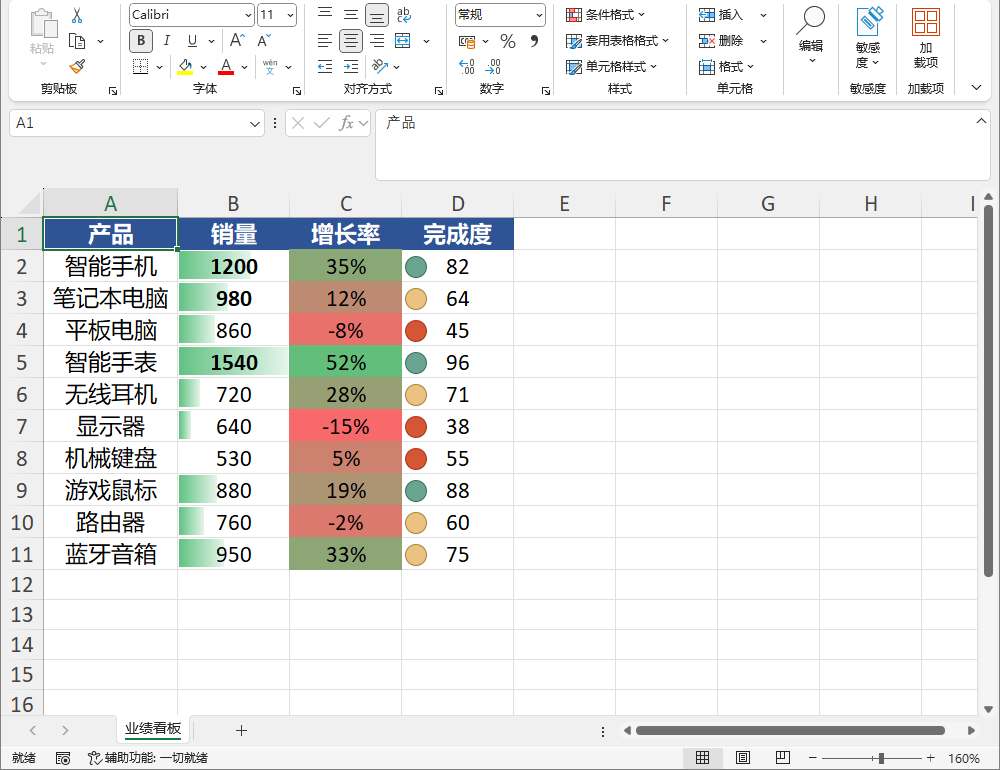
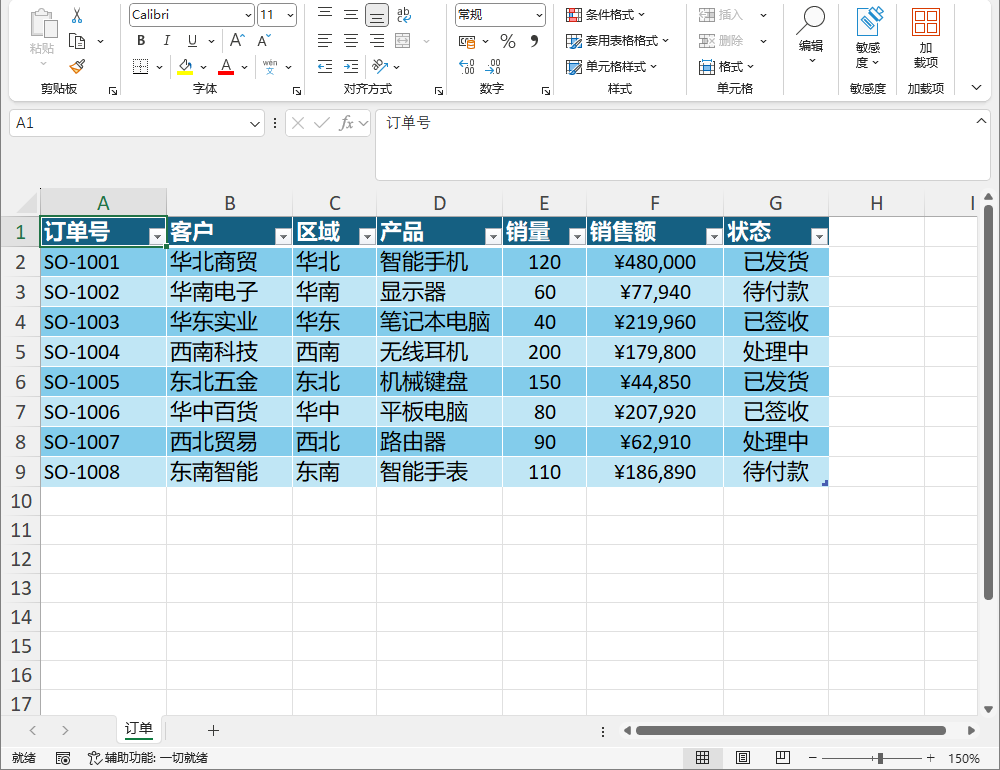
More screenshots are in the 中文 README and the usage guide §15 / §16. / 更多截图见中文 README 与使用手册 §15 / §16。
Docs / 文档
Install / 安装
dotnet add package LiteExcel
Quick Start / 快速上手
using LiteExcel;

// Object-model API / 对象模型 API
var wb = Excel.Create();
wb.Worksheets["Sheet1"].SetValue("A1", "Name");
wb.Worksheets["Sheet1"].SetValue("A2", "Zhang San");
wb.SaveAs("output.xlsx");

var opened = Excel.Open("output.xlsx");
var name = opened.Worksheets[0].Cell("A2").GetString();

// Classic API / 经典 API(XlsxWriter / XlsxReader)
var sheet = new SheetData
{
    SheetName = "Sheet1",
    Headers = new() { "Name", "Age" },
    Rows = new()
    {
        new Cell[] { Cell.FromText("Zhang San"), Cell.FromNumber(25) },
    },
};
XlsxWriter.Write("output2.xlsx", sheet);
var read = XlsxReader.Read("output2.xlsx", 0);
Features / 特性
- Zero dependencies, built only on the .NET base class library / 零依赖,仅用 .NET 基础类库
- net48 + net8.0, all public APIs Native AOT / trim compatible / 双目标,公开 API 兼容 Native AOT 与裁剪
- One object model across five formats / 一套对象模型覆盖五种格式
- Styles, merge, filter, row/column sizing, comments, validation, hyperlinks, freeze, images, conditional formatting, tables, formulas, passwords / 样式、合并、筛选、行高列宽、批注、数据验证、超链接、冻结、图片、条件格式、超级表、公式、文件密码
- Open-then-save preserves macros, charts, pivot tables for xlsx / xlsm / xlsb / 打开再保存透传保留宏、图表、透视表
- Large-file streaming read/write / 大文件流式读写
- Capabilities the target format lacks are reported, never silently dropped / 目标格式不支持的能力显式上报,不静默丢弃
Capability Matrix / 能力矩阵
Legend / 图例:☑️ supported / 支持 · ❌ not supported / 不支持 · text = partial / 文字表示部分支持
| Capability / 能力 | xlsx | xlsm | xlsb | xls | csv |
|---|---|---|---|---|---|
| Cell read/write / 数据读写 | ☑️ | ☑️ | ☑️ | ☑️ | text only / 纯文本 |
| Styles & number formats / 样式与数字格式 | ☑️ | ☑️ | number format only / 仅数字格式 | number format only / 仅数字格式 | ❌ |
| Layout / 表格布局 | ☑️ | ☑️ | ☑️ | ☑️ | ❌ |
| Auto filter / 自动筛选 | ☑️ | ☑️ | ❌ | ❌ | ❌ |
| Comments / 批注 | ☑️ | ☑️ | ❌ | ❌ | ❌ |
| Data validation / 数据验证 | ☑️ | ☑️ | ❌ | ❌ | ❌ |
| Hyperlinks / 超链接 | ☑️ | ☑️ | ☑️ | ☑️ | ❌ |
| Freeze panes / 冻结窗格 | ☑️ | ☑️ | ☑️ | ☑️ | ❌ |
| Images / 图片 | ☑️ | ☑️ | ❌ | ❌ | ❌ |
| Conditional formatting / 条件格式 | ☑️ | ☑️ | ❌ | ❌ | ❌ |
| Tables / 超级表 | ☑️ | ☑️ | ❌ | ❌ | ❌ |
| Formulas / 公式 | ☑️ | ☑️ | read only / 仅读取 | read only / 仅读取 | ❌ |
| File passwords / 文件密码 | ☑️ | ☑️ | ☑️ | ❌ | ❌ |
| Charts / pivot tables / 图表 / 透视表 | passthrough / 原样保留 | passthrough / 原样保留 | passthrough / 原样保留 | ❌ | ❌ |
| Large-file streaming / 大文件流式 | ☑️ | ☑️ | ❌ | ❌ | ❌ |
Full details in the usage guide / 完整能力明细见使用手册 §20.1:中文 · English
License
| Product | Versions Compatible and additional computed target framework versions. |
|---|---|
| .NET | net8.0 is compatible. net8.0-android was computed. net8.0-browser was computed. net8.0-ios was computed. net8.0-maccatalyst was computed. net8.0-macos was computed. net8.0-tvos was computed. net8.0-windows was computed. net9.0 was computed. net9.0-android was computed. net9.0-browser was computed. net9.0-ios was computed. net9.0-maccatalyst was computed. net9.0-macos was computed. net9.0-tvos was computed. net9.0-windows was computed. net10.0 was computed. net10.0-android was computed. net10.0-browser was computed. net10.0-ios was computed. net10.0-maccatalyst was computed. net10.0-macos was computed. net10.0-tvos was computed. net10.0-windows was computed. |
| .NET Framework | net48 is compatible. net481 was computed. |
-
.NETFramework 4.8
- No dependencies.
-
net8.0
- No dependencies.
NuGet packages
This package is not used by any NuGet packages.
GitHub repositories
This package is not used by any popular GitHub repositories.
| Version | Downloads | Last Updated |
|---|---|---|
| 2.4.80 | 72 | 10/7/2026 |
| 2.4.79 | 102 | 9/28/2026 |
| 2.4.78 | 96 | 9/26/2026 |
| 2.4.77 | 109 | 9/18/2026 |
| 2.4.76 | 105 | 9/15/2026 |
| 2.4.75 | 119 | 9/10/2026 |
| 2.4.74 | 110 | 9/9/2026 |
| 2.4.71 | 117 | 9/3/2026 |
| 2.4.7 | 118 | 8/27/2026 |
| 2.4.6 | 109 | 8/25/2026 |
| 2.4.5 | 117 | 8/24/2026 |
| 2.4.4 | 120 | 8/22/2026 |
| 2.4.3 | 101 | 8/22/2026 |
| 2.4.2 | 120 | 8/21/2026 |
| 2.4.1 | 118 | 8/19/2026 |
| 2.4.0 | 114 | 8/19/2026 |
| 2.3.0 | 134 | 8/18/2026 |
| 2.2.6 | 135 | 8/17/2026 |
| 2.2.5 | 119 | 8/15/2026 |
| 2.2.4 | 113 | 8/15/2026 |